Samsung Gear VR Virtual Reality Console Headset (USA Version) with Samsung Gear VR Controller All In One Bundle For Galaxy S7, Galaxy S7 edge, Galaxy Note5, S6 edge+, S6 and S6 edge



Key features
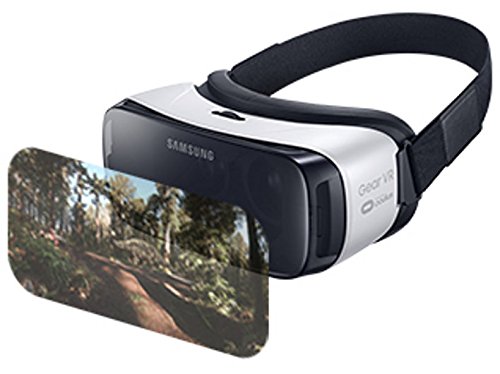
- •WHAT CAN IT DO? 360 visibility angles, head-tracking and low latency brings virtual reality to a whole new level Its premium virtual reality experience with a wide 101 field of view. Stream over 1 million short films and videos on Vimeo. Keep up with the best gamers in Twitch and enjoy amazing new videos daily on Samsung Milk VR. Games and applications available from the Oculus VR app store.
- •EASY TO USE WITH GLASSES. Stabilizes temperature within minutes to take away any possible fog or reduced sight!
- •IS IT COMFORTABLE? New cushioned fit allows room for most eyeglasses for comfort and durability and ergonomic design makes the controller perfect for long time use. Lightweight for the most comfortable play and watch experience
- •DOES IT WORK WITH ANY PHONE? The Samsung Gear VR Headset is compatible with the Galaxy S7, Galaxy S7 edge, Galaxy Note5, S6 edge+, S6 and S6 edge. The Galaxy S7 has increased battery life for a longer experience
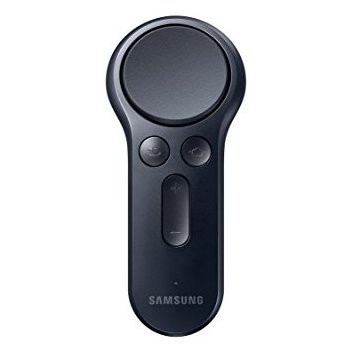
- •With VR CONTROLLER! Improved lightweight touch-pad easy to use buttons let you dive straight into the action of your favorite game and start throwing, steering and aiming with the new incredibly responsive handheld controller. A backtrigger makes menu selection easy and FPS more realistic.
Samsung Gear VR Virtual Reality Console Headset (USA Version) with Samsung Gear VR Controller All In One Bundle For Galaxy S7, Galaxy S7 edge, Galaxy Note5, S6 edge+, S6 and S6 edge
List Price: $122.22$110.00DEALYou Save: $12.22 (10%)
Free shippingFree Returns – 30 daysFree Order CancellationSecure Payment2–3 Days DeliveryGet It October 26, 2026In Stock (2)No marketing spamNo account requiredFulfilment by FedEx / Amazon / UPS / ShipwirePayPal / Card Buyer Protection
Customer Reviews
Reviews sourced from verified Amazon purchasers4.4
out of 5
Based on 10 reviews
5★
70%
4★
20%
3★
10%
2★
0%
1★
0%
It's an hour long project to connect it to the S7... unless you read this tutorial!
Rick✓ Verified Purchase•February 24, 2018
I'm giving the controller 3 stars because Samsung makes it excruciatingly difficult to connect your controller.
I have an S7 Edge and it took me over an hour to make it connect. For those of you facing issues where the software says it needs to update before it can connect and then the window closes, or those of you who finally get past that mess and then have it say it failed to connect your Gear VR controller, here's how to navigate this annoying mess so you can use the controller your just paid for.
TUTORIAL (Shorter version at the end of this review - no commentary)
1. Try to connect it normally as the manual says. It'll most likely fair. If not, kudos to you for having an easy process. Most of us are not so fortunate that all we need to do is RTFM.
2. Most likely in that last step you got a message in the Oculus app saying you need to update your your software, then when you try it gives you a message saying everything is up to date. (In other words, the app is just blowing smoke up your a** and spitting in your face.)
3. Now to get around that issue, you'll need to reinstall your Oculus app. Remember that Facebook and Samsung aren't bright enough to add it to Google Play, so long press the Oculus icon and click "uninstall." After that, just connect the Gear VR headset to your phone and it'll automatically install the Oculus app for you. (Don't worry. It's a shorter install than the first time and you won't lose all of your Oculus apps either.)
4. Now relaunch the Oculus app and you'll see a message asking you to watch a video to get rid of the annoying health warning every time the app launches. (HOORAY! They finally did something to fix that.) It's well worth it and the video is pretty funny.
OK, now back to business. Go to the More -> Controllers page again and you should see it says "Pair" instead of giving you useless error popups.
5. Use the steps from the manual again involving the home button on the controller and click "Pair" in the app. See if it works, but most likely it won't. If you get a message saying "Failed to connect the Gear VR Controller" or some similar load of bollocks, go to the next step.
6. I know, I know. It should work especially if you restart the app or reset the bluetooth controller, etc. Surprise, surprise it doesn't, so restart, restart your phone! lol (Just restart it once.)
7. You're now nearing the end of our journey through Samsung's mayhem. (At least it isn't packed with explosives like those poor people who bought a brand new Note 8 last year, but I digress.) Now, you'll need to repeat the steps in the manual once more. This time it'll connect without issue. If not, perhaps you'd like to post a comment on this review showing people what you did to fix it.
SHORT VERSION (No commentary)
1. Try installing it as per the manual.
2. Uninstall the Oculus app by long-pressing on the icon.
3. Connect your phone to the Gear VR headset to reinstall the Oculus app.
4. Watch the video to get rid of the annoying health warning every time to wear the headset.
5. Take your phone off of the Gear VR and restart your phone.
6. Retry the steps in the manual and it should connect without issue.
I have an S7 Edge and it took me over an hour to make it connect. For those of you facing issues where the software says it needs to update before it can connect and then the window closes, or those of you who finally get past that mess and then have it say it failed to connect your Gear VR controller, here's how to navigate this annoying mess so you can use the controller your just paid for.
TUTORIAL (Shorter version at the end of this review - no commentary)
1. Try to connect it normally as the manual says. It'll most likely fair. If not, kudos to you for having an easy process. Most of us are not so fortunate that all we need to do is RTFM.
2. Most likely in that last step you got a message in the Oculus app saying you need to update your your software, then when you try it gives you a message saying everything is up to date. (In other words, the app is just blowing smoke up your a** and spitting in your face.)
3. Now to get around that issue, you'll need to reinstall your Oculus app. Remember that Facebook and Samsung aren't bright enough to add it to Google Play, so long press the Oculus icon and click "uninstall." After that, just connect the Gear VR headset to your phone and it'll automatically install the Oculus app for you. (Don't worry. It's a shorter install than the first time and you won't lose all of your Oculus apps either.)
4. Now relaunch the Oculus app and you'll see a message asking you to watch a video to get rid of the annoying health warning every time the app launches. (HOORAY! They finally did something to fix that.) It's well worth it and the video is pretty funny.
OK, now back to business. Go to the More -> Controllers page again and you should see it says "Pair" instead of giving you useless error popups.
5. Use the steps from the manual again involving the home button on the controller and click "Pair" in the app. See if it works, but most likely it won't. If you get a message saying "Failed to connect the Gear VR Controller" or some similar load of bollocks, go to the next step.
6. I know, I know. It should work especially if you restart the app or reset the bluetooth controller, etc. Surprise, surprise it doesn't, so restart, restart your phone! lol (Just restart it once.)
7. You're now nearing the end of our journey through Samsung's mayhem. (At least it isn't packed with explosives like those poor people who bought a brand new Note 8 last year, but I digress.) Now, you'll need to repeat the steps in the manual once more. This time it'll connect without issue. If not, perhaps you'd like to post a comment on this review showing people what you did to fix it.
SHORT VERSION (No commentary)
1. Try installing it as per the manual.
2. Uninstall the Oculus app by long-pressing on the icon.
3. Connect your phone to the Gear VR headset to reinstall the Oculus app.
4. Watch the video to get rid of the annoying health warning every time to wear the headset.
5. Take your phone off of the Gear VR and restart your phone.
6. Retry the steps in the manual and it should connect without issue.
Meh...not worth 30 bones...but it works
ShameUs✓ Verified Purchase•July 26, 2017
So after using this first a few months, I have to say I'm not entirely impressed, you have limited movement as is with just the headset, so not being able to actually move the controller around for secondary movement is a bit...meh. Sure you can move up, down, left, right. But there is no z to the x and y, so it feels as though it should be on a joystick that's stuck to the chair. It has no internal battery, but slap some rechargeable AAA batts in there and ur good.
You have to calibrate every other couple of minutes because it can't just stay callibrated.
BUT
For a controller it's not bad, shooting games are good, point and click games are good. The design is solid, and don't entirely hate it as it keeps me from having to smack my head to do stuff. But it definitely isn't worth the 30 bucks.
You have to calibrate every other couple of minutes because it can't just stay callibrated.
BUT
For a controller it's not bad, shooting games are good, point and click games are good. The design is solid, and don't entirely hate it as it keeps me from having to smack my head to do stuff. But it definitely isn't worth the 30 bucks.
Learn how to read
Luke✓ Verified Purchase•June 8, 2017
This connects to your phone, NOT your GearVR headset. Supported phones listed in the description and on Google. Not fair to give 1 or 2 stars because somebody is being illiterate. This controller is much better than holding your hand up to your head to swipe. For those who don't mind reading, there's a gear vr community with more than 25,000 members on a website called reddit.
Whole new world.
CHARLES KIM✓ Verified Purchase•June 3, 2017
I tried this from Samsung experience I had too much fun with this controller. I have old gear vr (2015 white) and told that it will be compatible so I got it with Samsung Gear VR Cooling Fan. Now I am having so much fun and all the interaction got so much easier as I don't have to use touch pad for all the actions. I hope more apps/ games will be supported with controller
Feels good in the hand
cody✓ Verified Purchase•May 27, 2017
Feels good in the hand. I like that it comes with the strap to attach the controller to your headset, so you don't misplace it. Also it comes with batteries in the package. Not too much available to utilize it, but I'm sure things are coming. Because it's Bluetooth it will connect to any galaxy device that is able to be used with the Gear VR.
Page 1 of 2


![Pansonite Vr Headset with Remote Controller[New Version], 3D Glasses Virtual Reality Headset for VR Games & 3D Movies, Eye Care System for iPhone and Android Smartphones (01)](https://images-na.ssl-images-amazon.com/images/I/51cGmGwqCXL.jpg)