QNINE Dual M.2 PCIe Adapter, M.2 NVME SSD M Key or M.2 SATA SSD B Key 22110 2280 2260 2242 2230 to PCIe 3.0 x4 Host Controller Expansion Card with Low Profile Bracket for PC Desktop


Key features
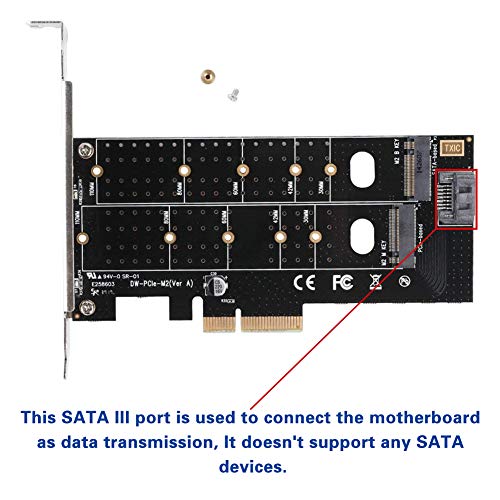
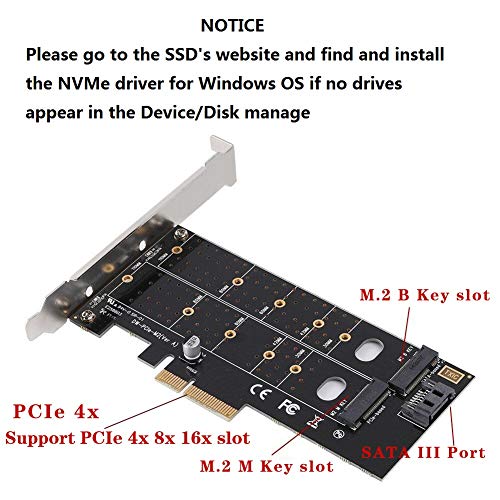
- •NGFF M.2 to PCIE Adapter Card, Support B Key & M Key Dual interfaces.
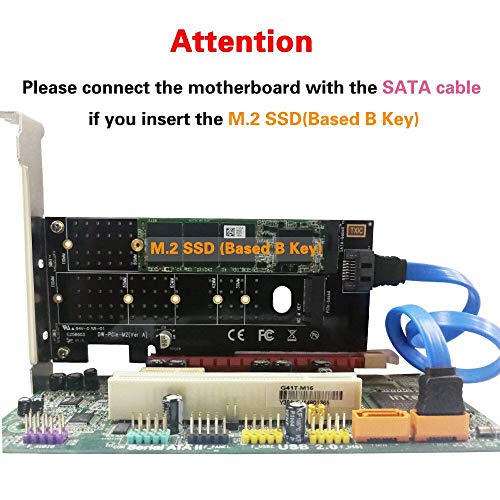
- •KEY-B can be inserted into the M.2 NGFF SATA protocol solid state hard disk, and then plug into the SATA line to connect the motherboard, PCIE power supply, no external power supply.
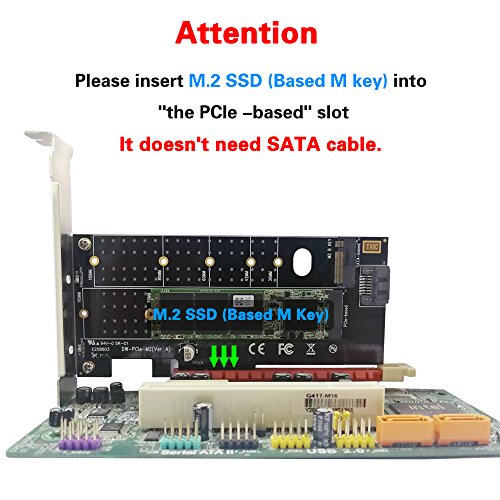
- •KEY-M can be inserted into the M.2 NVME PCIE protocol solid state hard disk, PCIE channel data transmission, without external SATA line can be used.
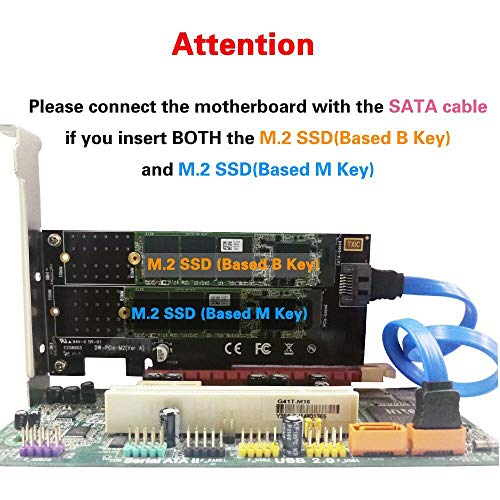
- •Supports one M.2 PCIe (NVMe or AHCI) SSD and a second M.2 SATA 6Gbps SSD simultaneously. Supports M.2 form factors 2230, 2242, 2260 and 2280 22110.
QNINE Dual M.2 PCIe Adapter, M.2 NVME SSD M Key or M.2 SATA SSD B Key 22110 2280 2260 2242 2230 to PCIe 3.0 x4 Host Controller Expansion Card with Low Profile Bracket for PC Desktop
List Price: $32.96$29.66DEALYou Save: $3.30 (10%)
Free shippingFree Returns – 30 daysFree Order CancellationSecure Payment2–3 Days DeliveryGet It October 28, 2026In Stock (1)No marketing spamNo account requiredFulfilment by FedEx / Amazon / UPS / ShipwirePayPal / Card Buyer Protection
Customer Reviews
Reviews sourced from verified Amazon purchasers4.0
out of 5
Based on 10 reviews
5★
70%
4★
30%
3★
0%
2★
0%
1★
0%
Excellent Adapter
Matt Parker✓ Verified Purchase•October 11, 2023
I bought this to move my 500gb m.2 to a secondary drive and add a 1tb m.2. I specifically bought this because I can add a SATA or NVME to it. This also allowed me to easily backup my laptop m.2 to 1tb and do the data transfer on my desktop.
Great addition to my system
Adam L✓ Verified Purchase•August 20, 2023
Bought to support 2 more M.2 drives for my motherboard, 1 SATA and 1 NVMe (both samsungs, 870 and 970 respectively). Works great and very minimal.
To install the drives, the drives pop in at an angle, and you have to hold them down with the mounting piece at the end (the drive goes between the indent of the mounting piece). Then screw the mounting piece from the back of the board. Remember to connect the SATA cable. Upon bootup in windows, open Disk Management to format new drives for use.
To install the drives, the drives pop in at an angle, and you have to hold them down with the mounting piece at the end (the drive goes between the indent of the mounting piece). Then screw the mounting piece from the back of the board. Remember to connect the SATA cable. Upon bootup in windows, open Disk Management to format new drives for use.
Works as expected. Didn't include pictured SATA cable
Josh Axtell✓ Verified Purchase•August 16, 2023
It seems to be working fine. Mine didn't include the SATA cable, but I had a spare so it wasn't too much of a problem.
Works as described. Took a little work.
GanskiRules✓ Verified Purchase•August 9, 2023
Works as described. Took a little work.
Tried it in an older Dell Vostro - either a 400 series or a 220 in the PCIex16 slot and it detected the card but not the drive and showed it under other devices in device manager. Tried it in an XPS 8700 with a PCIex4 slot that I've read is wired x1 but whatever, gave it a shot - both running win 7 pro x64 SP1 btw. Same thing PCI device showed in device manager but no drive detected in OS and nothing showing in disk management.
Found the following MS Kbase article:
Update to add native driver support in NVM Express in Windows 7 and Windows Server 2008 R2 2990941
Obtained the hotfix, ran it and rebooted and the drive showed up instantly. I'm not saying it'll work for you and I'm not responsible for any issues arising from the installation of this fix but it worked for me and I was on the verge or returning the card.
The drive I have on the board is a LiteOn CX2-8B256-Q11. NVMe.
Hope this helps anyone who got the card and has problems getting it to detect the card or the drive - and I know I'm not going to see the best speeds with this setup, it was just a temporary solution to recover some data off of a failing drive - since there seems to be no affordable external drive enclosure for these NVMe SSDs yet.
Tried it in an older Dell Vostro - either a 400 series or a 220 in the PCIex16 slot and it detected the card but not the drive and showed it under other devices in device manager. Tried it in an XPS 8700 with a PCIex4 slot that I've read is wired x1 but whatever, gave it a shot - both running win 7 pro x64 SP1 btw. Same thing PCI device showed in device manager but no drive detected in OS and nothing showing in disk management.
Found the following MS Kbase article:
Update to add native driver support in NVM Express in Windows 7 and Windows Server 2008 R2 2990941
Obtained the hotfix, ran it and rebooted and the drive showed up instantly. I'm not saying it'll work for you and I'm not responsible for any issues arising from the installation of this fix but it worked for me and I was on the verge or returning the card.
The drive I have on the board is a LiteOn CX2-8B256-Q11. NVMe.
Hope this helps anyone who got the card and has problems getting it to detect the card or the drive - and I know I'm not going to see the best speeds with this setup, it was just a temporary solution to recover some data off of a failing drive - since there seems to be no affordable external drive enclosure for these NVMe SSDs yet.
Perfect fix if you're Mobo keeps losing your m.2 drive
Aaron A. Tyler✓ Verified Purchase•July 21, 2023
I thought this might work for a new PC build I was working on. My Mobo supported the new Ryzen 3 2200G so I bought one but the new BIOS kept losing the m.2 boot drive. This was a perfect fix! After loading Samsung magician, my 960 Evo clocked transfer rates near it's max. Boot up was fine after the first manual time. Perfectly stable so far. There are slots on the board for all of the types of m.2 drives so it should work with anything. It's a shame to lose the only PCIe tray on my mini ITX board but the on chip GPU seems to have that covered.
Page 1 of 2