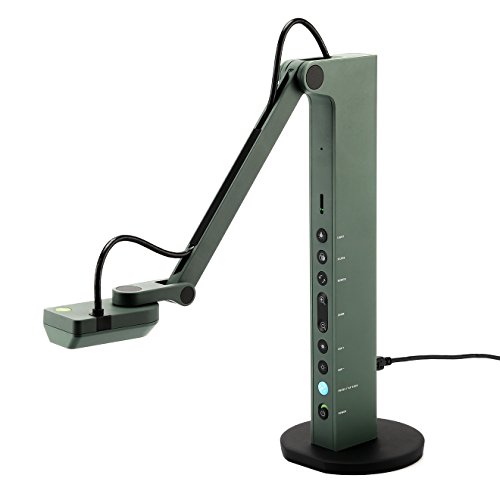
Ipevo VZ-R HDMI/USB Dual Mode 8MP Document Camera — Mac OS, Windows, Chromebook Compatible for Live Demo, Web Conferencing, Remote Teaching, Distance Learning, 8 Megapixel (5-883-4-01-00)


Key features
- •Hdmi and USB dual mode. 8 Megapixel camera that captures up to 3264 x 2448 (10Fps) in USB mode, and up to 1920 x 1080 (30Fps) in HDMI mode. Works on Mac, Windows PC and Chromebook.
- •Max shooting area: 10. 6" x 18. 9" (270 x 480mm) [16: 9]/13. 5" x 18. 1" (344 x 460mm) [4: 3]
- •Performance boost with Sony CMOS Image Sensor and Ambarella integrated system-on-a-chip (SoC) - faster focusing speed, better noise reduction under low-light conditions and excellent reproduction of colors for lesser disruptions, distortion and latency.
- •Stronger yet lighter with glass fiber reinforced stand (GVX-5H) - increased durability for daily usage yet light-weighted (2. 2 lbs. /1 kg) for swapping between classrooms or conference rooms
- •Designed and made in Taiwan. Swivelling head, Multi-Jointed stand, and small footprint allow you to capture freely from different height, angle, and orientation. Buttons conveniently located on vz-r's body enable you to adjust real-time images instantly.
BrandIPEVO
CategorySports & Action Video Cameras
Size8 Megapixel
ColorGreen
WarrantyAll IPEVO products come with a one-year warranty from the date of purchase.
Ipevo VZ-R HDMI/USB Dual Mode 8MP Document Camera — Mac OS, Windows, Chromebook Compatible for Live Demo, Web Conferencing, Remote Teaching, Distance Learning, 8 Megapixel (5-883-4-01-00)
List Price: $218.24$196.42DEALYou Save: $21.82 (10%)
Free shippingFree Returns – 30 daysFree Order CancellationSecure Payment2–3 Days DeliveryGet It October 25, 2026In Stock (2)No marketing spamNo account requiredFulfilment by FedEx / Amazon / UPS / ShipwirePayPal / Card Buyer Protection
Customer Reviews
Reviews sourced from verified Amazon purchasers4.2
out of 5
Based on 10 reviews
5★
70%
4★
30%
3★
0%
2★
0%
1★
0%
Great for a traveling lecture.
Kevin McCloskey✓ Verified Purchase•January 9, 2018
Impressed me with it's ease of use. I an an illustrator and I visit schools, some schools have documents cameras, some don't. They really make a difference for sharing art on screen via a projector. I got this one, expecting something adequate, but it is beyond that, it is great. I hokked it up to my Macbook air and it worked immediately. My one wish would be that it could copy up a slightly larger area, like 2 pages of a typical picture book. It handles one page at a time extraordinarily well.
Fantastic and Affordable
Spottedfire✓ Verified Purchase•October 19, 2016
I love this camera. I've been looking for something simpler than a cellphone + tripod for recording speedpaints and this one is near perfect. The software for it is online so you don't have to worry about losing a disk, and it's super easy to install compared to most other software. My only quarrel with this camera is that it can occasionally lag, though it's very infrequent. It could be my system but I haven't run into any other issues and it's only the recording part that freezes up. I included a sample sketch as an example of recording quality; though it was sped up with Windows Movie Maker the video quality overall was impressive and the flexibility of the camera for recording is awesome. Its joint function for changing height and angle are very smooth and don't stick. I've only used it a few times so far, and will update as time goes on.
A must-have for teachers, incredible display, amazing zoom, so many features!!!
Busy Mommy✓ Verified Purchase•August 22, 2016
I have used an older model of this document camera for the past few years in my kindergarten classroom for everything from showing illustrations in books larger so that the kids can see the details to dissecting owl pellets (again, so the kids can see the details) to demonstrating hands-on math activities. I recently moved to a new school where they didn't have these document cameras, or any for that matter. I thought I could do without one but within the first week I realized that I've become completely dependent on using a document camera in my everyday instruction...so I bought my own. I didn't really want to spend $100 on one (at my previous school the corporation had purchased them for teachers to use...it was fabulous) but it came down to the quality of my instruction and of course it's worth the money. The only thing I would change about this item is that the cord can be somewhat cumbersome (I plug it into the USB port on my desktop computer and then use it on top of my kidney shaped table where I work with the kids) when it's stretched across a few feet to get where I need it to be but I wasn't under the impression that it would be wireless or anything so that's not a defect with the product, just a wish if I could have the perfect document camera that would fit into my budget lol.
I am able to zoom in on size 12 font on a page and enlarge it on my SMART board (similar to a Promethean board...basically an interactive whiteboard) to letters that are over a foot tall. I usually keep it at a distance that allows me to display the entire page on which we are working so that the kids can follow along with me. The flexible arm allows it to move into unlimited positions. I also love the auto focus feature for when the display is blurry. Finally, just today I used the screen capture feature when I needed to keep something displayed on the screen for the kids but also needed that space for something else. I was basically able to screen shot the page that was being displayed and then proceed to move the document camera to clear the space (but the kids could still see the image which I had screen captured).
Obviously I would recommend this document camera to anyone who is in the market for one. I have now owned two and loved them both. I tried to get by without one but as a teacher this is one of my MUST HAVES!!!
I am able to zoom in on size 12 font on a page and enlarge it on my SMART board (similar to a Promethean board...basically an interactive whiteboard) to letters that are over a foot tall. I usually keep it at a distance that allows me to display the entire page on which we are working so that the kids can follow along with me. The flexible arm allows it to move into unlimited positions. I also love the auto focus feature for when the display is blurry. Finally, just today I used the screen capture feature when I needed to keep something displayed on the screen for the kids but also needed that space for something else. I was basically able to screen shot the page that was being displayed and then proceed to move the document camera to clear the space (but the kids could still see the image which I had screen captured).
Obviously I would recommend this document camera to anyone who is in the market for one. I have now owned two and loved them both. I tried to get by without one but as a teacher this is one of my MUST HAVES!!!
Good for book scanning.
Ruti✓ Verified Purchase•August 7, 2016
I love this little document camera so far. It works really well for scanning books. (Use the timer feature, hue all the way down, increased constrast. It also helps to use a piece of glass to hold the pages flat.) Now I can read any book I want. Libraries and used bookstores are interesting again.
That said, this generates enormous files. You will need an app that can compress them. (I use AABBYY FineReader for both OCR and compression.)
If you're blind, you may be better off with a portable flatbed scanner. I've found that scanning with a document camera, I need to look through and check visually whether things are aligned and photographing correctly. (That said, sighted people are terrible at being blind, and it wouldn't surprise me if I'm missing something.)
That said, this generates enormous files. You will need an app that can compress them. (I use AABBYY FineReader for both OCR and compression.)
If you're blind, you may be better off with a portable flatbed scanner. I've found that scanning with a document camera, I need to look through and check visually whether things are aligned and photographing correctly. (That said, sighted people are terrible at being blind, and it wouldn't surprise me if I'm missing something.)
Low cost magnifier for the vision impaired!
Byron✓ Verified Purchase•March 28, 2015
Fantastic device for the money. Will auto-focus to about 3-4" from target; making it very useful as a vision-impaired magnifier. I paired this device with a large monitor as a low-cost vision-aid for a friend suffering from macular degeneration and it is used daily. On a 42" display, newsprint is 3-4" block letters. It also should be noted that this device contains a built in illuminator that is incredibly useful for this purpose. I only wish the manufacturer would provide an optic that would allow the camera head to be 10" off the surface, and an arm large enough that you could navigate a newspaper under it, or a carriage with wheels/bearings so the camera could glide over the surface of a newspaper. That would be very enabling. I plan on constructing my own. Fantastic product.
Page 1 of 2