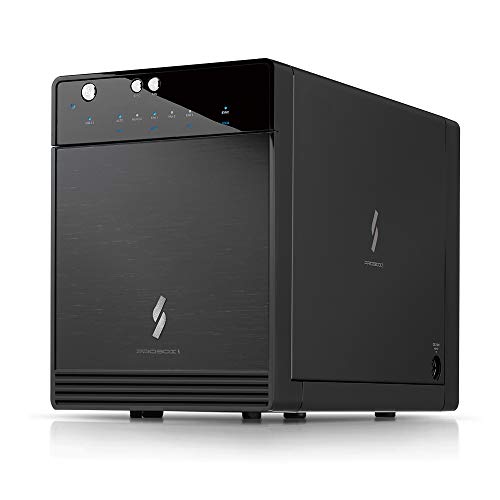
Mediasonic USB 3.2 4 Bay 3.5” SATA Hard Drive Enclosure DAS – USB 3.2 Gen 2 10Gbps Type C | USB-C (HF7-SU31C) Support 30TB HDD



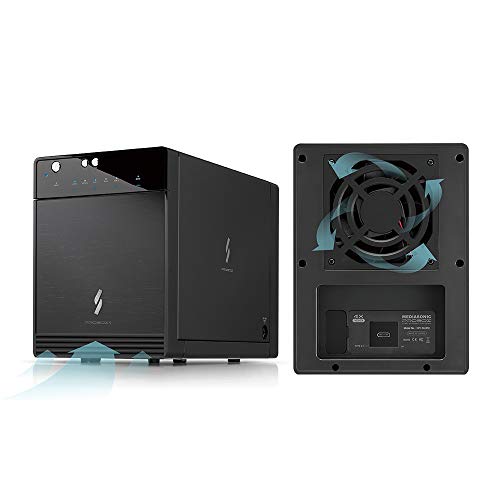

Key features
- •Support all brand of 3.5" SATA I / II / III hard disk drive up to 12TB per drive, and up to 4 x 12TB
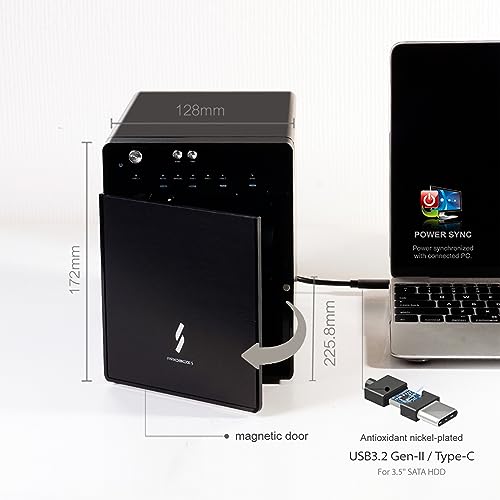
- •Transfer rate up to 10Gbps via USB 3.1 Gen 2 Type C (USB-C Cable included)
- •Support SATA 3 6.0Gbps hard drive transfer rate
- •Support S.M.A.R.T / Power Sync Features
- •Support UASP, and Smart Fan with built-in thermal sensor. 3 Level of fan speed
BrandMediasonic
CategoryEnclosures
Size4 Bay USB 3.2
ColorBlack
Warranty1 Year Warranty from Mediasonic Store
Mediasonic USB 3.2 4 Bay 3.5” SATA Hard Drive Enclosure DAS – USB 3.2 Gen 2 10Gbps Type C | USB-C (HF7-SU31C) Support 30TB HDD
List Price: $203.69$183.32DEALYou Save: $20.37 (10%)
Free shippingFree Returns – 30 daysFree Order CancellationSecure Payment2–3 Days DeliveryGet It October 25, 2026In Stock (1)No marketing spamNo account requiredFulfilment by FedEx / Amazon / UPS / ShipwirePayPal / Card Buyer Protection
Customer Reviews
Reviews sourced from verified Amazon purchasers4.1
out of 5
Based on 10 reviews
5★
70%
4★
30%
3★
0%
2★
0%
1★
0%
Bright Lights, Good Value,
Ambrose McNibble✓ Verified Purchase•October 14, 2023
I add my voice to the small group who think that a drive activity indicator does not need to be bright enough to read the fine print in a EULA. There is a six-inch piece of black electrical tape in the future of my ProBox.
The unit came with a map-fold sheet labeled 'Quick Installation Guide' on the front, and a 'Thank You' note. Both had different web links that offered a manual. I could not make either of these links work. When I came to write this review I discovered a bullet in the 'About This Item' section that offered a link to a manual. After scrolling up and down the page for a while I found the link rendered in the smallest type, just where the bullet said it would be. This link worked for me and led to a PDF version of the same map-fold sheet that came with the unit. In spite of what it says on the front, that sheet apparently is the manual. As such it offers pretty good graphics with mediocre and obviously translated accompanying text. The most glaring fault is the total absence of technical specifications. It does have enough information to get the unit set up and running.
One of the things you may need the manual for is how to get the unit open. It features a unique set of molded plastic latches, one for the hinged front panel (which comes off when you open it) and a different style set-of-two to remove the plate that holds the drives in their bays. These appear fairly sturdy but I wonder about their longevity in the warm environment. Fortunately they don't appear to be necessary for the operation of the unit.
As a person with experience using external drive enclosures I found the setup reasonably easy. The unit and all drives were immediately recognized by my eSATA I/O card and have run seamlessly for about a week.
I am not a fan of power bricks and this one looks particularly vexing because it uses a right-angle connector to plug into the side of the unit at the back. This means you can't put that side up against anything or have two units side-by-side without a gap.
I read some comments about overheating. I have not experienced this. I loaded the ProBox with four 7200RPM terabyte-sized drives and set it to a multi-hour backup task. I never saw temperatures in excess of 41°C. It didn't even ramp up the automatic fans. In any case there is a manual fan control that can turn them up to a dull roar.
I used eSATA to hook the ProBox to my MacPro and discovered I had to disable the automatic shut-off feature because it would not wake when the computer came out of sleep mode. This might work better with a newer computer or over USB. This isn't a big power-waster because the computer system spins down the drives in sleep mode.
I found the operation of some of the front panel push buttons less than intuitive.
To change the interface mode you must hold the button for several seconds.
To power the unit on you push and release the power button. To power it off you must push and hold the power button.
Bottom Line:
In spite of some quirky design choices, overall this appears to be a reasonably well constructed unit at an attractive price. I liked the first one well enough I ordered another.
The unit came with a map-fold sheet labeled 'Quick Installation Guide' on the front, and a 'Thank You' note. Both had different web links that offered a manual. I could not make either of these links work. When I came to write this review I discovered a bullet in the 'About This Item' section that offered a link to a manual. After scrolling up and down the page for a while I found the link rendered in the smallest type, just where the bullet said it would be. This link worked for me and led to a PDF version of the same map-fold sheet that came with the unit. In spite of what it says on the front, that sheet apparently is the manual. As such it offers pretty good graphics with mediocre and obviously translated accompanying text. The most glaring fault is the total absence of technical specifications. It does have enough information to get the unit set up and running.
One of the things you may need the manual for is how to get the unit open. It features a unique set of molded plastic latches, one for the hinged front panel (which comes off when you open it) and a different style set-of-two to remove the plate that holds the drives in their bays. These appear fairly sturdy but I wonder about their longevity in the warm environment. Fortunately they don't appear to be necessary for the operation of the unit.
As a person with experience using external drive enclosures I found the setup reasonably easy. The unit and all drives were immediately recognized by my eSATA I/O card and have run seamlessly for about a week.
I am not a fan of power bricks and this one looks particularly vexing because it uses a right-angle connector to plug into the side of the unit at the back. This means you can't put that side up against anything or have two units side-by-side without a gap.
I read some comments about overheating. I have not experienced this. I loaded the ProBox with four 7200RPM terabyte-sized drives and set it to a multi-hour backup task. I never saw temperatures in excess of 41°C. It didn't even ramp up the automatic fans. In any case there is a manual fan control that can turn them up to a dull roar.
I used eSATA to hook the ProBox to my MacPro and discovered I had to disable the automatic shut-off feature because it would not wake when the computer came out of sleep mode. This might work better with a newer computer or over USB. This isn't a big power-waster because the computer system spins down the drives in sleep mode.
I found the operation of some of the front panel push buttons less than intuitive.
To change the interface mode you must hold the button for several seconds.
To power the unit on you push and release the power button. To power it off you must push and hold the power button.
Bottom Line:
In spite of some quirky design choices, overall this appears to be a reasonably well constructed unit at an attractive price. I liked the first one well enough I ordered another.
Good things come in small packages
Smilin Sam✓ Verified Purchase•September 24, 2023
Where to begin? Well...first of all, this non-RAID ProBox is a lot smaller in person that it appears in the photos. That's neither a good thing, nor a bad thing -- it just is. Second, and my only real criticism so far, is that the provided cords are short -- the USB cable, the power cord, and the eSata cable. Consequently, I can't even put this unit on the floor directly beneath my desk, I have to have it ON my desk. I was able to accommodate it, but it wasn't my first choice. Now...on to the good stuff:
I received this ProBox Friday afternoon. It's now not quite Sunday afternoon, and I'm about 1 hour away from having copied over/transferred 4TB of media data from my desktop and various external hard drives. (And the truth is it would have gone even faster if I'd used a different defragger, which I didn't do until later on Saturday night. But that's a horse of another color.) I installed 4 WD Black 4TB drives and aside from a minor glitch at the beginning I had the Probox set up properly in around 30 minutes or less.
As others have helpfully pointed out I selected the ORANGE!!! sync option (and the USB option since I don't have eSata on my laptop). I started adding drives from the top down, one at a time, and would re-hook up the ProBox to my laptop after each additional drive. (NOTE: Inserting the drives is sort of a "feel" thing. You have to feel the slight difference between the drive fitting in and not fitting in. It's hard to explain because it's subtle. But all I can say is that you know it when you feel it engage the back port properly.) Then I'd go to Windows Disk Management and initialize each subsequent drive using GPT, not MBR to assure that Windows could read the entire 4TB drive, and everything went well until I had all 4 drives installed. (I'm running Win 7 Pro 64 bit.)
I'm not sure exactly what happened after all 4 drives were installed, but after having read 1, 2, and 3 drives perfectly, Disk Management suddenly wouldn't read/recognize any of them. So I turned it off, unhooked the USB cable, and then took each drive out and re-inserted it, then hooked up the fully loaded box again, and Disk Management was then able to see all 4. I then initialized the 4th drive and was ready to start transferring my 4TBs of media files. (It's possible that Windows got hung up waiting for USB drivers to download and install, because afterwards I saw this huge popup showing that 8 USB drivers had been successfully installed. I'm not sure if this was the problem, or maybe one of the drives wasn't fully engaged, but whatever the problem was, it was resolved very quickly.)
Since this is a non-RAID box, it has advantages and disadvantages. To me, the advantages far outweigh the disadvantages. The main advantage is that I can use whatever brand and whatever size hard drive I choose. I can mix and match them without any problems. And I can have as many or as few drives in the ProBox as I want. There's also the reduced cost factor.
Obviously, OTOH, you don't get the built-in hardware RAID options. So you have to decide what's best for you. For me, after having read about a lot of problems with RAID configurations and losing data not necessarily because of a hardware failure but because of some RAID glitch, I decided to get this box and make backups to external drives instead of relying on RAID. I'm not interested in the speed boost that striping offers, since this is only going to be used for storage and file sharing. (And the truth is, even using RAID mirroring, you're STILL supposed to back up to an external source in the event of some catastrophic hardware and/or RAID failure.)
And in RAID setups, depending on the particular setup and/or the drive or drives that fail, when ONE drive goes it often can and does take other drives and data down with it. So to my way of thinking, and for my purposes (i.e. using this as one big mass storage device, albeit with 4 distinct drives rather than one huge drive) this non-RAID ProBox is the way to go.) The one thing I did have to do was plan more precisely where I wanted the data to go and how I wanted to divide it up between the 4 drives. Since I already know what I have and what I'll be adding, I could select particular drives for particular types of media (i.e. songs, movies, etc.)
And since the bulk of the data was coming from my desktop that already had the data spread over several drives, it was relatively painless to do the transfers. I did have to re-divide the pie somewhat differently, but having 16 TB to work with made it easier. And down the road I always have the option to redistribute some of the files from one drive to another to keep everything balanced. (That's the downside to a non-RAID setup; it's not as flexible. And it's a bit of a hassle. But so is trying to rebuild a destroyed RAID setup from scratch. So again...it's a personal choice each person has to make. And Mediasonic makes both versions so all the bases are covered.) As it now stands I have around 70% free space on all 4 drives. (It ranges from 66% to 84% free space, which matches the type of data files on each drive. I'll be filling in a lot more on the 84% drives down the road and it should balance out very closely.)
NOTE: There IS an option built into Windows that allows users to convert basic drives to Dynamic drives, which can then be "spanned", mirrored, or set up in a RAID 05 array. I considered the spanning option, and might actually use that at some point down the road if my current configuration doesn't work the way I hope it does. But the same issues pertaining to hardware controlled RAID arrays apply to the Windows options, which are basically software RAID implementations. So I passed, at least for the time being.
If I were to do anything differently, and I might down the road, it would be to get this same non-RAID box in the 8 hard drive version. That way I could REALLY load up on hard drives and have my backup needs covered internally instead of externally. However, I did find that the transfer rates between the internal drives was slower than from an external source or from my small networked desktop computer. The desktop network transfer rates were in the 60MB/sec range for hours on end. (They'd start out around 100MB/sec then quickly wind down to around 60MB/sec.) The internal transfer rates were around half of that. And the transfer rates from an externally plugged in USB HDD were in the 39MB/second range -- not nearly as fast as the networked speed but a little faster than the internal transfer rate speed. (NOTE: I made sure to select the faster Write Cache option for all the drives inside the ProBox.)
Some observations:
1. I experimented with the different fan speeds. Having 4 WD Black HDDs is bound to generate some heat, especially initially with all the file writing going on. At the highest setting, obviously, I got the best cooling results. I'm not sure what criteria is used to regulate the fan on automatic, but the drives were running too hot for my taste (around 123 F) so I switched to the HIGH setting and that brought the temps down to a more acceptable 110 F max. Once all the data transferring is complete, I'll probably cut it back to either the next highest setting, or automatic. I'll have to check and see. The noise level is comparable to the noise level generated by the fans in my desktop. But since the ProBox sits directly behind my laptop I might be more aware of the fan noise because of the closer proximity.
2. Depending on which way you have the ProBox facing, the blue light can be a distraction at night.
3. The door/cover, as others have pointed out, is kind of a joke. It's more like a dust cover, but almost as soon as you open it up it falls off. Since I don't plan to ever open it up (since I hope I never have to replace any drives) I don't see that as a problem for me. It's not a functional part that gets used very often and as such it seems to serve its purpose to cover the drives and protect them from dust.
4. This is maybe one of the best investments I've ever made. I REALLY like this. The only reason I gave it 4 stars instead of 5 is because of the short cords. As far as the unit itself is concerned, this thing ROCKS. It's been running 24/7 all weekend and to be able to have this much storage capacity and only use up 1 USB 3.0 port -- is amazing (Especially on a laptop where you just don't have any real workable options in terms of adding additional ports.) I've experienced NO problems transferring a TON of data at a very quick and sustained rate. Kudos to Mediasonic for this one! I've rebooted several times and never lost the connection. This is a keeper for sure!!
UPDATE (3/17/15): One of the main reasons I gave this product 4 stars instead of 5 had to do with the short length of the provided USB cable, AND a review that I'd read that stated that the ProBox ONLY worked with the provided cable. Since the product did work with the provided cable I was reluctant to try to use any other cable. That notwithstanding I did order a longer 6 ft cable and am here to report that it works perfectly. So I've upgraded the ProBox to 5 stars.
I received this ProBox Friday afternoon. It's now not quite Sunday afternoon, and I'm about 1 hour away from having copied over/transferred 4TB of media data from my desktop and various external hard drives. (And the truth is it would have gone even faster if I'd used a different defragger, which I didn't do until later on Saturday night. But that's a horse of another color.) I installed 4 WD Black 4TB drives and aside from a minor glitch at the beginning I had the Probox set up properly in around 30 minutes or less.
As others have helpfully pointed out I selected the ORANGE!!! sync option (and the USB option since I don't have eSata on my laptop). I started adding drives from the top down, one at a time, and would re-hook up the ProBox to my laptop after each additional drive. (NOTE: Inserting the drives is sort of a "feel" thing. You have to feel the slight difference between the drive fitting in and not fitting in. It's hard to explain because it's subtle. But all I can say is that you know it when you feel it engage the back port properly.) Then I'd go to Windows Disk Management and initialize each subsequent drive using GPT, not MBR to assure that Windows could read the entire 4TB drive, and everything went well until I had all 4 drives installed. (I'm running Win 7 Pro 64 bit.)
I'm not sure exactly what happened after all 4 drives were installed, but after having read 1, 2, and 3 drives perfectly, Disk Management suddenly wouldn't read/recognize any of them. So I turned it off, unhooked the USB cable, and then took each drive out and re-inserted it, then hooked up the fully loaded box again, and Disk Management was then able to see all 4. I then initialized the 4th drive and was ready to start transferring my 4TBs of media files. (It's possible that Windows got hung up waiting for USB drivers to download and install, because afterwards I saw this huge popup showing that 8 USB drivers had been successfully installed. I'm not sure if this was the problem, or maybe one of the drives wasn't fully engaged, but whatever the problem was, it was resolved very quickly.)
Since this is a non-RAID box, it has advantages and disadvantages. To me, the advantages far outweigh the disadvantages. The main advantage is that I can use whatever brand and whatever size hard drive I choose. I can mix and match them without any problems. And I can have as many or as few drives in the ProBox as I want. There's also the reduced cost factor.
Obviously, OTOH, you don't get the built-in hardware RAID options. So you have to decide what's best for you. For me, after having read about a lot of problems with RAID configurations and losing data not necessarily because of a hardware failure but because of some RAID glitch, I decided to get this box and make backups to external drives instead of relying on RAID. I'm not interested in the speed boost that striping offers, since this is only going to be used for storage and file sharing. (And the truth is, even using RAID mirroring, you're STILL supposed to back up to an external source in the event of some catastrophic hardware and/or RAID failure.)
And in RAID setups, depending on the particular setup and/or the drive or drives that fail, when ONE drive goes it often can and does take other drives and data down with it. So to my way of thinking, and for my purposes (i.e. using this as one big mass storage device, albeit with 4 distinct drives rather than one huge drive) this non-RAID ProBox is the way to go.) The one thing I did have to do was plan more precisely where I wanted the data to go and how I wanted to divide it up between the 4 drives. Since I already know what I have and what I'll be adding, I could select particular drives for particular types of media (i.e. songs, movies, etc.)
And since the bulk of the data was coming from my desktop that already had the data spread over several drives, it was relatively painless to do the transfers. I did have to re-divide the pie somewhat differently, but having 16 TB to work with made it easier. And down the road I always have the option to redistribute some of the files from one drive to another to keep everything balanced. (That's the downside to a non-RAID setup; it's not as flexible. And it's a bit of a hassle. But so is trying to rebuild a destroyed RAID setup from scratch. So again...it's a personal choice each person has to make. And Mediasonic makes both versions so all the bases are covered.) As it now stands I have around 70% free space on all 4 drives. (It ranges from 66% to 84% free space, which matches the type of data files on each drive. I'll be filling in a lot more on the 84% drives down the road and it should balance out very closely.)
NOTE: There IS an option built into Windows that allows users to convert basic drives to Dynamic drives, which can then be "spanned", mirrored, or set up in a RAID 05 array. I considered the spanning option, and might actually use that at some point down the road if my current configuration doesn't work the way I hope it does. But the same issues pertaining to hardware controlled RAID arrays apply to the Windows options, which are basically software RAID implementations. So I passed, at least for the time being.
If I were to do anything differently, and I might down the road, it would be to get this same non-RAID box in the 8 hard drive version. That way I could REALLY load up on hard drives and have my backup needs covered internally instead of externally. However, I did find that the transfer rates between the internal drives was slower than from an external source or from my small networked desktop computer. The desktop network transfer rates were in the 60MB/sec range for hours on end. (They'd start out around 100MB/sec then quickly wind down to around 60MB/sec.) The internal transfer rates were around half of that. And the transfer rates from an externally plugged in USB HDD were in the 39MB/second range -- not nearly as fast as the networked speed but a little faster than the internal transfer rate speed. (NOTE: I made sure to select the faster Write Cache option for all the drives inside the ProBox.)
Some observations:
1. I experimented with the different fan speeds. Having 4 WD Black HDDs is bound to generate some heat, especially initially with all the file writing going on. At the highest setting, obviously, I got the best cooling results. I'm not sure what criteria is used to regulate the fan on automatic, but the drives were running too hot for my taste (around 123 F) so I switched to the HIGH setting and that brought the temps down to a more acceptable 110 F max. Once all the data transferring is complete, I'll probably cut it back to either the next highest setting, or automatic. I'll have to check and see. The noise level is comparable to the noise level generated by the fans in my desktop. But since the ProBox sits directly behind my laptop I might be more aware of the fan noise because of the closer proximity.
2. Depending on which way you have the ProBox facing, the blue light can be a distraction at night.
3. The door/cover, as others have pointed out, is kind of a joke. It's more like a dust cover, but almost as soon as you open it up it falls off. Since I don't plan to ever open it up (since I hope I never have to replace any drives) I don't see that as a problem for me. It's not a functional part that gets used very often and as such it seems to serve its purpose to cover the drives and protect them from dust.
4. This is maybe one of the best investments I've ever made. I REALLY like this. The only reason I gave it 4 stars instead of 5 is because of the short cords. As far as the unit itself is concerned, this thing ROCKS. It's been running 24/7 all weekend and to be able to have this much storage capacity and only use up 1 USB 3.0 port -- is amazing (Especially on a laptop where you just don't have any real workable options in terms of adding additional ports.) I've experienced NO problems transferring a TON of data at a very quick and sustained rate. Kudos to Mediasonic for this one! I've rebooted several times and never lost the connection. This is a keeper for sure!!
UPDATE (3/17/15): One of the main reasons I gave this product 4 stars instead of 5 had to do with the short length of the provided USB cable, AND a review that I'd read that stated that the ProBox ONLY worked with the provided cable. Since the product did work with the provided cable I was reluctant to try to use any other cable. That notwithstanding I did order a longer 6 ft cable and am here to report that it works perfectly. So I've upgraded the ProBox to 5 stars.
Nice enclosure for the price, but not really recommended for hotswap with Linux+ZFS in USB3 mode - YMMV with eSATA mode
Dave Bechtel✓ Verified Purchase•September 17, 2023
( Note: this review is for the ProBox HF2-SU3S2 4-bay JBOD USB3/eSATA Mediasonic model // Non-RAID )
--I purchased this 4-bay enclosure to test Linux + ZFS drive hotswap and see if it would make a decent DAS (direct attached storage) for an old PC. In conjunction with the "StarTech.com 2 Port PCI Express SuperSpeed USB 3.0 Card Adapter with UASP - SATA PEXUSB3S24" (also available here on Amazon) this enclosure has some limitations for ZFS.
Environment: Ubuntu 14.04-64-LTS on an underclocked Dual-core (2.1GHz) PC with 4GB of RAM; CPU is not capable of hardware virtualization, but makes a decent ZFS+Samba fileserver/testbox.
Enclosure: starting with 1 drive, adding 2 more on the fly, attached with USB3 cable to USB3 PCIe card
o 1st try, 1 WD500 Blue drive, not all the way in - ' fdisk -l ' Kernel panic (drive will not slot)
Reboot
o 2nd try, tried a different drive of the same model and it slotted OK into the enclosure. Drive was detected in both cases when the USB3 cable was hot-inserted into the USB3 PCIe card (enclosure on), AND when the USB3 cable was already in and the enclosure was powered up separately.
*NOTE* - there are a couple drives that I have that would not slot into the SATA backplane of this enclosure. YMMV. I was unable to determine why.
--The good news is, you CAN insert multiple drives one at a time and they will be detected as separate drives by Linux.
--The bad news is, the enclosure DETACHES from the USB bus when you do this, so if you have any Probox-mounted drives you may be risking file/system corruption. (CAVEAT)
Test hotswap: semi-FAIL - added 3rd drive, Green, enclosure disconnected existing drives and re-added:
Jun 30 06:24:01 p2700dual1404 kernel: [ 636.100286] usb 2-1: USB disconnect, device number 2
Jun 30 06:24:20 p2700dual1404 kernel: [ 654.344522] usb 2-1: new SuperSpeed USB device number 3 using xhci_hcd
Jun 30 06:24:20 p2700dual1404 kernel: [ 654.363691] usb 2-1: New USB device found, idVendor=152d, idProduct=0567
Jun 30 06:24:20 p2700dual1404 kernel: [ 654.363697] usb 2-1: New USB device strings: Mfr=10, Product=11, SerialNumber=5
Jun 30 06:24:20 p2700dual1404 kernel: [ 654.363702] usb 2-1: Product: USB to ATA/ATAPI Bridge
Jun 30 06:24:20 p2700dual1404 kernel: [ 654.363706] usb 2-1: Manufacturer: JMicron
Jun 30 06:24:20 p2700dual1404 kernel: [ 654.363710] usb 2-1: SerialNumber: 152D00539000
Jun 30 06:24:20 p2700dual1404 kernel: [ 654.365802] usb-storage 2-1:1.0: USB Mass Storage device detected
Jun 30 06:24:20 p2700dual1404 kernel: [ 654.366189] usb-storage 2-1:1.0: Quirks match for vid 152d pid 0567: 5000000
Jun 30 06:24:20 p2700dual1404 kernel: [ 654.366227] scsi host12: usb-storage 2-1:1.0
Jun 30 06:24:21 p2700dual1404 kernel: [ 655.364678] scsi 12:0:0:0: Direct-Access WDC WD50 00AAKX-221CA1 0125 PQ: 0 ANSI: 6
Jun 30 06:24:21 p2700dual1404 kernel: [ 655.364907] scsi 12:0:0:1: Direct-Access WDC WD50 01AALS-00E3A0 0125 PQ: 0 ANSI: 6
Jun 30 06:24:21 p2700dual1404 kernel: [ 655.365122] scsi 12:0:0:2: Direct-Access WDC WD50 00AADS-00L4B1 0125 PQ: 0 ANSI: 6
Jun 30 06:24:21 p2700dual1404 kernel: [ 655.365614] sd 12:0:0:0: Attached scsi generic sg4 type 0
Jun 30 06:24:21 p2700dual1404 kernel: [ 655.365961] sd 12:0:0:1: Attached scsi generic sg5 type 0
Jun 30 06:24:21 p2700dual1404 kernel: [ 655.366296] sd 12:0:0:2: Attached scsi generic sg6 type 0
Jun 30 06:24:21 p2700dual1404 kernel: [ 655.369464] sd 12:0:0:0: [sdd] 976773168 512-byte logical blocks: (500 GB/465 GiB)
Jun 30 06:24:21 p2700dual1404 kernel: [ 655.369559] sd 12:0:0:1: [sde] 976773168 512-byte logical blocks: (500 GB/465 GiB)
Jun 30 06:24:21 p2700dual1404 kernel: [ 655.369687] sd 12:0:0:2: [sdf] 976773168 512-byte logical blocks: (500 GB/465 GiB)
Jun 30 06:24:21 p2700dual1404 kernel: [ 655.369857] sd 12:0:0:0: [sdd] Write Protect is off
Jun 30 06:24:21 p2700dual1404 kernel: [ 655.369865] sd 12:0:0:0: [sdd] Mode Sense: 67 00 10 08
Jun 30 06:24:21 p2700dual1404 kernel: [ 655.370006] sd 12:0:0:1: [sde] Write Protect is off
Jun 30 06:24:21 p2700dual1404 kernel: [ 655.370012] sd 12:0:0:1: [sde] Mode Sense: 67 00 10 08
Jun 30 06:24:21 p2700dual1404 kernel: [ 655.370155] sd 12:0:0:2: [sdf] Write Protect is off
Jun 30 06:24:21 p2700dual1404 kernel: [ 655.370162] sd 12:0:0:2: [sdf] Mode Sense: 67 00 10 08
Jun 30 06:24:21 p2700dual1404 kernel: [ 655.370330] sd 12:0:0:0: [sdd] No Caching mode page found
Jun 30 06:24:21 p2700dual1404 kernel: [ 655.370338] sd 12:0:0:0: [sdd] Assuming drive cache: write through
Jun 30 06:24:21 p2700dual1404 kernel: [ 655.370603] sd 12:0:0:1: [sde] No Caching mode page found
Jun 30 06:24:21 p2700dual1404 kernel: [ 655.370608] sd 12:0:0:1: [sde] Assuming drive cache: write through
Jun 30 06:24:21 p2700dual1404 kernel: [ 655.370624] sd 12:0:0:2: [sdf] No Caching mode page found
Jun 30 06:24:21 p2700dual1404 kernel: [ 655.370630] sd 12:0:0:2: [sdf] Assuming drive cache: write through
Jun 30 06:24:21 p2700dual1404 kernel: [ 655.469253] sdf: sdf1 sdf2 sdf3 sdf4
Jun 30 06:24:21 p2700dual1404 kernel: [ 655.487575] sde: sde1 sde2 sde3 sde4
Jun 30 06:24:21 p2700dual1404 kernel: [ 655.520648] sd 12:0:0:2: [sdf] Attached SCSI disk
Jun 30 06:24:21 p2700dual1404 kernel: [ 655.541244] sd 12:0:0:1: [sde] Attached SCSI disk
Jun 30 06:24:21 p2700dual1404 kernel: [ 655.562694] sdd: sdd1 sdd9
Jun 30 06:24:21 p2700dual1404 kernel: [ 655.580201] sd 12:0:0:0: [sdd] Attached SCSI disk
# fdisk -l /dev/sdd;fdisk -l /dev/sde;fdisk -l /dev/sdf
Disk /dev/sdd: 500.1 GB, 500107862016 bytes
256 heads, 63 sectors/track, 60563 cylinders, total 976773168 sectors
Units = sectors of 1 * 512 = 512 bytes
Sector size (logical/physical): 512 bytes / 512 bytes
I/O size (minimum/optimal): 512 bytes / 512 bytes
Disk identifier: 0x00000000
Device Boot Start End Blocks Id System
/dev/sdd1 1 976773167 488386583+ ee GPT
Disk /dev/sde: 500.1 GB, 500107862016 bytes
255 heads, 63 sectors/track, 60801 cylinders, total 976773168 sectors
Units = sectors of 1 * 512 = 512 bytes
Sector size (logical/physical): 512 bytes / 512 bytes
I/O size (minimum/optimal): 512 bytes / 512 bytes
Disk identifier: 0x000afbb5
Device Boot Start End Blocks Id System
/dev/sde1 2048 41945087 20971520 83 Linux
/dev/sde2 41945088 83888127 20971520 83 Linux
/dev/sde3 83888128 125831167 20971520 83 Linux
/dev/sde4 125831168 976773119 425470976 5 Extended
/dev/sde5 125833216 130027519 2097152 82 Linux swap / Solaris
/dev/sde6 130029568 197138431 33554432 83 Linux
/dev/sde7 197140480 406855679 104857600 7 HPFS/NTFS/exFAT
/dev/sde8 406857728 976773119 284957696 83 Linux
Disk /dev/sdf: 500.1 GB, 500107862016 bytes
255 heads, 63 sectors/track, 60801 cylinders, total 976773168 sectors
Units = sectors of 1 * 512 = 512 bytes
Sector size (logical/physical): 512 bytes / 512 bytes
I/O size (minimum/optimal): 512 bytes / 512 bytes
Disk identifier: 0x0005094a
Device Boot Start End Blocks Id System
/dev/sdf1 * 2048 52430847 26214400 83 Linux
/dev/sdf2 52430848 104859647 26214400 83 Linux
/dev/sdf3 104859648 157288447 26214400 83 Linux
/dev/sdf4 157288448 976773119 409742336 5 Extended
/dev/sdf5 157290496 161484799 2097152 82 Linux swap / Solaris
/dev/sdf6 161486848 228595711 33554432 83 Linux
/dev/sdf7 228597760 976773119 374087680 83 Linux
# ls -al /dev/disk/by-id |grep -v part
lrwxrwxrwx 1 root root 9 Jun 30 06:14 ata-SAMSUNG_HD322HJ_S17AJB0SA23730 -> ../../sda
lrwxrwxrwx 1 root root 9 Jun 30 06:14 ata-ST3320620AS_9QF4BMH8 -> ../../sdc
lrwxrwxrwx 1 root root 9 Jun 30 06:14 ata-TSSTcorp_CDDVDW_SH-S222A -> ../../sr0
lrwxrwxrwx 1 root root 9 Jun 30 06:54 ata-WDC_WD5000AAKX-221CA1_WD-WMAYUL461873 -> ../../sdg
lrwxrwxrwx 1 root root 9 Jun 30 06:14 usb-Samsung_Flash_Drive_FIT_0355715090021777-0:0 -> ../../sdb
(The following sde,sdd,sdf are the enclosure drives):
lrwxrwxrwx 1 root root 9 Jun 30 06:42 usb-WDC_WD50_00AADS-00L4B1_152D00539000-0:1 -> ../../sde
lrwxrwxrwx 1 root root 9 Jun 30 06:42 usb-WDC_WD50_00AAKX-221CA1_152D00539000-0:0 -> ../../sdd
lrwxrwxrwx 1 root root 9 Jun 30 06:42 usb-WDC_WD50_01AALS-00E3A0_152D00539000-0:2 -> ../../sdf
lrwxrwxrwx 1 root root 9 Jun 30 06:54 wwn-0x50014ee6acf2d9c8 -> ../../sdg
lrwxrwxrwx 1 root root 9 Jun 30 06:14 wwn-0x50024e920140f1b7 -> ../../sda
--Drive read speed on the WD500 Black in the enclosure is VERY good (copying to a motherboard-attached SATA drive):
# blockdev --setra 16384 /dev/sdf # read more sectors at once / I/O optimization
# time (dd if=/dev/sdf1 of=/dev/sdg1 bs=1M;sync)
20480+0 records in
20480+0 records out
21474836480 bytes (21 GB) copied, 187.885 s, 114 MB/s
real 3m12.755s
--With straight read speed, I/O is still really good; on average (monitored with iostat) I was getting ~110MB+/sec sustained from partition 1 on the WD 500 Black drive:
# time dd if=/dev/sdf1 of=/dev/null bs=1M
20480+0 records in
20480+0 records out
21474836480 bytes (21 GB) copied, 186.264 s, 115 MB/s
real 3m6.268s
--Good news: The enclosure drives also respond to " hdparm -y /dev/sdX " (instant spindown) and should also respond to " hdparm -S (sleep time) "
--The other bad news is that you will not be able to see or do SMART testing on the enclosure drives (from Linux, anyhow):
# smartctl -a /dev/sdf
smartctl 6.2 2013-07-26 r3841 [x86_64-linux-4.2.0-36-generic] (local build)
Copyright (C) 2002-13, Bruce Allen, Christian Franke, [...]
/dev/sdf: Unknown USB bridge [0x152d:0x0567 (0x205)]
Please specify device type with the -d option.
--I need to do some further testing (zfs RAID10 with some disposable 500GB drives) and will update this review as necessary, but so far pretty impressed with this device. It's working with a mix of WD Blue, Green and Black 500GB drives.
UPDATE: Further testing with ZFS on USB3
--OK, so I created a ZFS RAIDZ1 pool out of the mixed (3)xWD500 drives:
# zpool create -f -o ashift=12 -o autoexpand=on -O atime=off -O compression=lz4 zproboxRZCOMPR raidz \
usb-WDC_WD50_00AAKX-221CA1_152D00539000-0:0 usb-WDC_WD50_00AADS-00L4B1_152D00539000-0:1 usb-WDC_WD50_01AALS-00E3A0_152D00539000-0:2
# zpool status
pool: zproboxRZCOMPR
state: ONLINE
scan: none requested
config:
NAME STATE READ WRITE CKSUM
zproboxRZCOMPR ONLINE 0 0 0
raidz1-0 ONLINE 0 0 0
usb-WDC_WD50_00AAKX-221CA1_152D00539000-0:0 ONLINE 0 0 0
usb-WDC_WD50_00AADS-00L4B1_152D00539000-0:1 ONLINE 0 0 0
usb-WDC_WD50_01AALS-00E3A0_152D00539000-0:2 ONLINE 0 0 0
errors: No known data errors
--I then copied ~16GB of data to the pool and ran a test scrub to verify no data issues; I/O was really pretty good, getting ~33MB/sec sustained from each drive and the scrub finished quickly:
scrub:
Pool: zproboxRZCOMPR - scrub started: Thu Jun 30 09:36:54 CDT 2016
scan: scrub in progress since Thu Jun 30 09:36:55 2016
11.9G scanned out of 23.5G at 102M/s, 0h1m to go
0 repaired, 50.51% done
Thu Jun 30 09:38:54 CDT 2016
scan: scrub repaired 0 in 0h3m with 0 errors on Thu Jun 30 09:40:48 2016
o Scrub zproboxRZCOMPR start: Thu Jun 30 09:36:54 CDT 2016 // Completed: Thu Jun 30 09:40:51 CDT 2016
--With everything still powered on, I then removed the middle Green drive(!)
--This Failed the whole pool - after the enclosure "bounced", drives were re-added to the system as sdg,sdh:
# la /dev/disk/by-id |grep -v part
lrwxrwxrwx 1 root root 9 Jun 30 08:45 ata-SAMSUNG_HD322HJ_S17AJB0SA23730 -> ../../sde
lrwxrwxrwx 1 root root 9 Jun 30 08:45 ata-ST3320620AS_9QF4BMH8 -> ../../sdf
lrwxrwxrwx 1 root root 9 Jun 30 08:45 ata-TSSTcorp_CDDVDW_SH-S222A -> ../../sr0
lrwxrwxrwx 1 root root 9 Jun 30 08:45 usb-Samsung_Flash_Drive_FIT_0355715090021777-0:0 -> ../../sda
lrwxrwxrwx 1 root root 9 Jun 30 09:45 usb-WDC_WD50_00AAKX-221CA1_152D00539000-0:0 -> ../../sdg
lrwxrwxrwx 1 root root 9 Jun 30 09:45 usb-WDC_WD50_01AALS-00E3A0_152D00539000-0:1 -> ../../sdh
lrwxrwxrwx 1 root root 9 Jun 30 08:45 wwn-0x50024e920140f1b7 -> ../../sde
--I tried copying more data to the pool and it hung hard:
# zpool status
pool: zproboxRZCOMPR
state: ONLINE
status: One or more devices are faulted in response to IO failures.
action: Make sure the affected devices are connected, then run 'zpool clear'.
see: http://zfsonlinux.org/msg/ZFS-8000-HC
scan: scrub repaired 0 in 0h3m with 0 errors on Thu Jun 30 09:40:48 2016
config:
NAME STATE READ WRITE CKSUM
zproboxRZCOMPR ONLINE 0 439 0
raidz1-0 ONLINE 0 4 0
usb-WDC_WD50_00AAKX-221CA1_152D00539000-0:0 ONLINE 3 4 0
usb-WDC_WD50_00AADS-00L4B1_152D00539000-0:1 ONLINE 3 2 0
usb-WDC_WD50_01AALS-00E3A0_152D00539000-0:2 ONLINE 3 2 0
errors: 439 data errors, use '-v' for a list
( had to reboot here; left the green drive out to simulate failure )
pool: zproboxRZCOMPR
state: DEGRADED
status: One or more devices could not be used because the label is missing or
invalid. Sufficient replicas exist for the pool to continue
functioning in a degraded state.
action: Replace the device using 'zpool replace'.
see: http://zfsonlinux.org/msg/ZFS-8000-4J
scan: scrub repaired 0 in 0h3m with 0 errors on Thu Jun 30 09:40:48 2016
config:
NAME STATE READ WRITE CKSUM
zproboxRZCOMPR DEGRADED 0 0 0
raidz1-0 DEGRADED 0 0 0
usb-WDC_WD50_00AAKX-221CA1_152D00539000-0:0 ONLINE 0 0 0
10918954850413458013 UNAVAIL 0 0 0 was /dev/disk/by-id/usb-WDC_WD50_00AADS-00L4B1_152D00539000-0:1-part1
usb-WDC_WD50_01AALS-00E3A0_152D00539000-0:1 ONLINE 0 0 0
errors: No known data errors
( re-inserted green drive in the enclosure here - Hotswap )
( tried ZFS scrub -- hung hard )
[ 221.415966] WARNING: Pool 'zproboxRZCOMPR' has encountered an uncorrectable I/O failure and has been suspended.
# zpool scrub -s zproboxRZCOMPR
cannot cancel scrubbing zproboxRZCOMPR: pool I/O is currently suspended
( reboot again, leaving green drive in )
pool: zproboxRZCOMPR
state: ONLINE
status: One or more devices has experienced an unrecoverable error. An
attempt was made to correct the error. Applications are unaffected.
action: Determine if the device needs to be replaced, and clear the errors
using 'zpool clear' or replace the device with 'zpool replace'.
see: http://zfsonlinux.org/msg/ZFS-8000-9P
scan: resilvered 24K in 0h0m with 0 errors on Thu Jun 30 10:02:17 2016
config:
NAME STATE READ WRITE CKSUM
zproboxRZCOMPR ONLINE 0 0 0
raidz1-0 ONLINE 0 0 0
usb-WDC_WD50_00AAKX-221CA1_152D00539000-0:0 ONLINE 0 0 0
usb-WDC_WD50_00AADS-00L4B1_152D00539000-0:1 ONLINE 0 0 1
usb-WDC_WD50_01AALS-00E3A0_152D00539000-0:2 ONLINE 0 0 0
errors: No known data errors
--After rebooting with the missing drive in again, ZFS now sees the whole pool and responds OK to scrub:
Pool: zproboxRZCOMPR - scrub started: Thu Jun 30 10:05:40 CDT 2016
pool: zproboxRZCOMPR
state: ONLINE
status: One or more devices has experienced an unrecoverable error. An
attempt was made to correct the error. Applications are unaffected.
action: Determine if the device needs to be replaced, and clear the errors
using 'zpool clear' or replace the device with 'zpool replace'.
see: http://zfsonlinux.org/msg/ZFS-8000-9P
scan: scrub repaired 0 in 0h3m with 0 errors on Thu Jun 30 10:09:35 2016
config:
NAME STATE READ WRITE CKSUM
zproboxRZCOMPR ONLINE 0 0 0
raidz1-0 ONLINE 0 0 0
usb-WDC_WD50_00AAKX-221CA1_152D00539000-0:0 ONLINE 0 0 0
usb-WDC_WD50_00AADS-00L4B1_152D00539000-0:1 ONLINE 0 0 1
usb-WDC_WD50_01AALS-00E3A0_152D00539000-0:2 ONLINE 0 0 0
errors: No known data errors
o Scrub zproboxRZCOMPR start: Thu Jun 30 10:05:40 CDT 2016 // Completed: Thu Jun 30 10:09:37 CDT 2016
Conclusion: At least in USB3 mode, I would not recommend this particular enclosure for Linux+ZFS unless you are willing to put up with reboots in case of drive failure. It's probably fine to use with new drives that have been burned-in/tested as long as you have everything backed up; for all I know it may be more reliable with swapping drives under Windows.
I wish the manufacturer had some kind of update that would not cause the whole enclosure to essentially "reboot" in case a drive is removed or inserted, the whole point of having a SATA backplane is for hotswap.
If you're serious about your data, I would also recommend plugging this into a UPS instead of just a power/surge strip. Just MHO.
UPDATE: The enclosure DOES work as you would expect in eSATA mode - hotswap on a 3-drive RAIDZ1 works without unmounting/faulting the whole ZFS pool. AND you can access the SMARTCTL data on individual drives. :-) Might be a slight performance loss, but certainly merits further testing. And of course, you need to attach it to a SATA port that supports port multiplication (which my old Gigabyte motherboard does.) Very happy now.
UPDATE 2017.April: I'm very happy with this enclosure - it's still going strong and I've been using it for laptop ZFS demos in eSATA mode :)
--I purchased this 4-bay enclosure to test Linux + ZFS drive hotswap and see if it would make a decent DAS (direct attached storage) for an old PC. In conjunction with the "StarTech.com 2 Port PCI Express SuperSpeed USB 3.0 Card Adapter with UASP - SATA PEXUSB3S24" (also available here on Amazon) this enclosure has some limitations for ZFS.
Environment: Ubuntu 14.04-64-LTS on an underclocked Dual-core (2.1GHz) PC with 4GB of RAM; CPU is not capable of hardware virtualization, but makes a decent ZFS+Samba fileserver/testbox.
Enclosure: starting with 1 drive, adding 2 more on the fly, attached with USB3 cable to USB3 PCIe card
o 1st try, 1 WD500 Blue drive, not all the way in - ' fdisk -l ' Kernel panic (drive will not slot)
Reboot
o 2nd try, tried a different drive of the same model and it slotted OK into the enclosure. Drive was detected in both cases when the USB3 cable was hot-inserted into the USB3 PCIe card (enclosure on), AND when the USB3 cable was already in and the enclosure was powered up separately.
*NOTE* - there are a couple drives that I have that would not slot into the SATA backplane of this enclosure. YMMV. I was unable to determine why.
--The good news is, you CAN insert multiple drives one at a time and they will be detected as separate drives by Linux.
--The bad news is, the enclosure DETACHES from the USB bus when you do this, so if you have any Probox-mounted drives you may be risking file/system corruption. (CAVEAT)
Test hotswap: semi-FAIL - added 3rd drive, Green, enclosure disconnected existing drives and re-added:
Jun 30 06:24:01 p2700dual1404 kernel: [ 636.100286] usb 2-1: USB disconnect, device number 2
Jun 30 06:24:20 p2700dual1404 kernel: [ 654.344522] usb 2-1: new SuperSpeed USB device number 3 using xhci_hcd
Jun 30 06:24:20 p2700dual1404 kernel: [ 654.363691] usb 2-1: New USB device found, idVendor=152d, idProduct=0567
Jun 30 06:24:20 p2700dual1404 kernel: [ 654.363697] usb 2-1: New USB device strings: Mfr=10, Product=11, SerialNumber=5
Jun 30 06:24:20 p2700dual1404 kernel: [ 654.363702] usb 2-1: Product: USB to ATA/ATAPI Bridge
Jun 30 06:24:20 p2700dual1404 kernel: [ 654.363706] usb 2-1: Manufacturer: JMicron
Jun 30 06:24:20 p2700dual1404 kernel: [ 654.363710] usb 2-1: SerialNumber: 152D00539000
Jun 30 06:24:20 p2700dual1404 kernel: [ 654.365802] usb-storage 2-1:1.0: USB Mass Storage device detected
Jun 30 06:24:20 p2700dual1404 kernel: [ 654.366189] usb-storage 2-1:1.0: Quirks match for vid 152d pid 0567: 5000000
Jun 30 06:24:20 p2700dual1404 kernel: [ 654.366227] scsi host12: usb-storage 2-1:1.0
Jun 30 06:24:21 p2700dual1404 kernel: [ 655.364678] scsi 12:0:0:0: Direct-Access WDC WD50 00AAKX-221CA1 0125 PQ: 0 ANSI: 6
Jun 30 06:24:21 p2700dual1404 kernel: [ 655.364907] scsi 12:0:0:1: Direct-Access WDC WD50 01AALS-00E3A0 0125 PQ: 0 ANSI: 6
Jun 30 06:24:21 p2700dual1404 kernel: [ 655.365122] scsi 12:0:0:2: Direct-Access WDC WD50 00AADS-00L4B1 0125 PQ: 0 ANSI: 6
Jun 30 06:24:21 p2700dual1404 kernel: [ 655.365614] sd 12:0:0:0: Attached scsi generic sg4 type 0
Jun 30 06:24:21 p2700dual1404 kernel: [ 655.365961] sd 12:0:0:1: Attached scsi generic sg5 type 0
Jun 30 06:24:21 p2700dual1404 kernel: [ 655.366296] sd 12:0:0:2: Attached scsi generic sg6 type 0
Jun 30 06:24:21 p2700dual1404 kernel: [ 655.369464] sd 12:0:0:0: [sdd] 976773168 512-byte logical blocks: (500 GB/465 GiB)
Jun 30 06:24:21 p2700dual1404 kernel: [ 655.369559] sd 12:0:0:1: [sde] 976773168 512-byte logical blocks: (500 GB/465 GiB)
Jun 30 06:24:21 p2700dual1404 kernel: [ 655.369687] sd 12:0:0:2: [sdf] 976773168 512-byte logical blocks: (500 GB/465 GiB)
Jun 30 06:24:21 p2700dual1404 kernel: [ 655.369857] sd 12:0:0:0: [sdd] Write Protect is off
Jun 30 06:24:21 p2700dual1404 kernel: [ 655.369865] sd 12:0:0:0: [sdd] Mode Sense: 67 00 10 08
Jun 30 06:24:21 p2700dual1404 kernel: [ 655.370006] sd 12:0:0:1: [sde] Write Protect is off
Jun 30 06:24:21 p2700dual1404 kernel: [ 655.370012] sd 12:0:0:1: [sde] Mode Sense: 67 00 10 08
Jun 30 06:24:21 p2700dual1404 kernel: [ 655.370155] sd 12:0:0:2: [sdf] Write Protect is off
Jun 30 06:24:21 p2700dual1404 kernel: [ 655.370162] sd 12:0:0:2: [sdf] Mode Sense: 67 00 10 08
Jun 30 06:24:21 p2700dual1404 kernel: [ 655.370330] sd 12:0:0:0: [sdd] No Caching mode page found
Jun 30 06:24:21 p2700dual1404 kernel: [ 655.370338] sd 12:0:0:0: [sdd] Assuming drive cache: write through
Jun 30 06:24:21 p2700dual1404 kernel: [ 655.370603] sd 12:0:0:1: [sde] No Caching mode page found
Jun 30 06:24:21 p2700dual1404 kernel: [ 655.370608] sd 12:0:0:1: [sde] Assuming drive cache: write through
Jun 30 06:24:21 p2700dual1404 kernel: [ 655.370624] sd 12:0:0:2: [sdf] No Caching mode page found
Jun 30 06:24:21 p2700dual1404 kernel: [ 655.370630] sd 12:0:0:2: [sdf] Assuming drive cache: write through
Jun 30 06:24:21 p2700dual1404 kernel: [ 655.469253] sdf: sdf1 sdf2 sdf3 sdf4
Jun 30 06:24:21 p2700dual1404 kernel: [ 655.487575] sde: sde1 sde2 sde3 sde4
Jun 30 06:24:21 p2700dual1404 kernel: [ 655.520648] sd 12:0:0:2: [sdf] Attached SCSI disk
Jun 30 06:24:21 p2700dual1404 kernel: [ 655.541244] sd 12:0:0:1: [sde] Attached SCSI disk
Jun 30 06:24:21 p2700dual1404 kernel: [ 655.562694] sdd: sdd1 sdd9
Jun 30 06:24:21 p2700dual1404 kernel: [ 655.580201] sd 12:0:0:0: [sdd] Attached SCSI disk
# fdisk -l /dev/sdd;fdisk -l /dev/sde;fdisk -l /dev/sdf
Disk /dev/sdd: 500.1 GB, 500107862016 bytes
256 heads, 63 sectors/track, 60563 cylinders, total 976773168 sectors
Units = sectors of 1 * 512 = 512 bytes
Sector size (logical/physical): 512 bytes / 512 bytes
I/O size (minimum/optimal): 512 bytes / 512 bytes
Disk identifier: 0x00000000
Device Boot Start End Blocks Id System
/dev/sdd1 1 976773167 488386583+ ee GPT
Disk /dev/sde: 500.1 GB, 500107862016 bytes
255 heads, 63 sectors/track, 60801 cylinders, total 976773168 sectors
Units = sectors of 1 * 512 = 512 bytes
Sector size (logical/physical): 512 bytes / 512 bytes
I/O size (minimum/optimal): 512 bytes / 512 bytes
Disk identifier: 0x000afbb5
Device Boot Start End Blocks Id System
/dev/sde1 2048 41945087 20971520 83 Linux
/dev/sde2 41945088 83888127 20971520 83 Linux
/dev/sde3 83888128 125831167 20971520 83 Linux
/dev/sde4 125831168 976773119 425470976 5 Extended
/dev/sde5 125833216 130027519 2097152 82 Linux swap / Solaris
/dev/sde6 130029568 197138431 33554432 83 Linux
/dev/sde7 197140480 406855679 104857600 7 HPFS/NTFS/exFAT
/dev/sde8 406857728 976773119 284957696 83 Linux
Disk /dev/sdf: 500.1 GB, 500107862016 bytes
255 heads, 63 sectors/track, 60801 cylinders, total 976773168 sectors
Units = sectors of 1 * 512 = 512 bytes
Sector size (logical/physical): 512 bytes / 512 bytes
I/O size (minimum/optimal): 512 bytes / 512 bytes
Disk identifier: 0x0005094a
Device Boot Start End Blocks Id System
/dev/sdf1 * 2048 52430847 26214400 83 Linux
/dev/sdf2 52430848 104859647 26214400 83 Linux
/dev/sdf3 104859648 157288447 26214400 83 Linux
/dev/sdf4 157288448 976773119 409742336 5 Extended
/dev/sdf5 157290496 161484799 2097152 82 Linux swap / Solaris
/dev/sdf6 161486848 228595711 33554432 83 Linux
/dev/sdf7 228597760 976773119 374087680 83 Linux
# ls -al /dev/disk/by-id |grep -v part
lrwxrwxrwx 1 root root 9 Jun 30 06:14 ata-SAMSUNG_HD322HJ_S17AJB0SA23730 -> ../../sda
lrwxrwxrwx 1 root root 9 Jun 30 06:14 ata-ST3320620AS_9QF4BMH8 -> ../../sdc
lrwxrwxrwx 1 root root 9 Jun 30 06:14 ata-TSSTcorp_CDDVDW_SH-S222A -> ../../sr0
lrwxrwxrwx 1 root root 9 Jun 30 06:54 ata-WDC_WD5000AAKX-221CA1_WD-WMAYUL461873 -> ../../sdg
lrwxrwxrwx 1 root root 9 Jun 30 06:14 usb-Samsung_Flash_Drive_FIT_0355715090021777-0:0 -> ../../sdb
(The following sde,sdd,sdf are the enclosure drives):
lrwxrwxrwx 1 root root 9 Jun 30 06:42 usb-WDC_WD50_00AADS-00L4B1_152D00539000-0:1 -> ../../sde
lrwxrwxrwx 1 root root 9 Jun 30 06:42 usb-WDC_WD50_00AAKX-221CA1_152D00539000-0:0 -> ../../sdd
lrwxrwxrwx 1 root root 9 Jun 30 06:42 usb-WDC_WD50_01AALS-00E3A0_152D00539000-0:2 -> ../../sdf
lrwxrwxrwx 1 root root 9 Jun 30 06:54 wwn-0x50014ee6acf2d9c8 -> ../../sdg
lrwxrwxrwx 1 root root 9 Jun 30 06:14 wwn-0x50024e920140f1b7 -> ../../sda
--Drive read speed on the WD500 Black in the enclosure is VERY good (copying to a motherboard-attached SATA drive):
# blockdev --setra 16384 /dev/sdf # read more sectors at once / I/O optimization
# time (dd if=/dev/sdf1 of=/dev/sdg1 bs=1M;sync)
20480+0 records in
20480+0 records out
21474836480 bytes (21 GB) copied, 187.885 s, 114 MB/s
real 3m12.755s
--With straight read speed, I/O is still really good; on average (monitored with iostat) I was getting ~110MB+/sec sustained from partition 1 on the WD 500 Black drive:
# time dd if=/dev/sdf1 of=/dev/null bs=1M
20480+0 records in
20480+0 records out
21474836480 bytes (21 GB) copied, 186.264 s, 115 MB/s
real 3m6.268s
--Good news: The enclosure drives also respond to " hdparm -y /dev/sdX " (instant spindown) and should also respond to " hdparm -S (sleep time) "
--The other bad news is that you will not be able to see or do SMART testing on the enclosure drives (from Linux, anyhow):
# smartctl -a /dev/sdf
smartctl 6.2 2013-07-26 r3841 [x86_64-linux-4.2.0-36-generic] (local build)
Copyright (C) 2002-13, Bruce Allen, Christian Franke, [...]
/dev/sdf: Unknown USB bridge [0x152d:0x0567 (0x205)]
Please specify device type with the -d option.
--I need to do some further testing (zfs RAID10 with some disposable 500GB drives) and will update this review as necessary, but so far pretty impressed with this device. It's working with a mix of WD Blue, Green and Black 500GB drives.
UPDATE: Further testing with ZFS on USB3
--OK, so I created a ZFS RAIDZ1 pool out of the mixed (3)xWD500 drives:
# zpool create -f -o ashift=12 -o autoexpand=on -O atime=off -O compression=lz4 zproboxRZCOMPR raidz \
usb-WDC_WD50_00AAKX-221CA1_152D00539000-0:0 usb-WDC_WD50_00AADS-00L4B1_152D00539000-0:1 usb-WDC_WD50_01AALS-00E3A0_152D00539000-0:2
# zpool status
pool: zproboxRZCOMPR
state: ONLINE
scan: none requested
config:
NAME STATE READ WRITE CKSUM
zproboxRZCOMPR ONLINE 0 0 0
raidz1-0 ONLINE 0 0 0
usb-WDC_WD50_00AAKX-221CA1_152D00539000-0:0 ONLINE 0 0 0
usb-WDC_WD50_00AADS-00L4B1_152D00539000-0:1 ONLINE 0 0 0
usb-WDC_WD50_01AALS-00E3A0_152D00539000-0:2 ONLINE 0 0 0
errors: No known data errors
--I then copied ~16GB of data to the pool and ran a test scrub to verify no data issues; I/O was really pretty good, getting ~33MB/sec sustained from each drive and the scrub finished quickly:
scrub:
Pool: zproboxRZCOMPR - scrub started: Thu Jun 30 09:36:54 CDT 2016
scan: scrub in progress since Thu Jun 30 09:36:55 2016
11.9G scanned out of 23.5G at 102M/s, 0h1m to go
0 repaired, 50.51% done
Thu Jun 30 09:38:54 CDT 2016
scan: scrub repaired 0 in 0h3m with 0 errors on Thu Jun 30 09:40:48 2016
o Scrub zproboxRZCOMPR start: Thu Jun 30 09:36:54 CDT 2016 // Completed: Thu Jun 30 09:40:51 CDT 2016
--With everything still powered on, I then removed the middle Green drive(!)
--This Failed the whole pool - after the enclosure "bounced", drives were re-added to the system as sdg,sdh:
# la /dev/disk/by-id |grep -v part
lrwxrwxrwx 1 root root 9 Jun 30 08:45 ata-SAMSUNG_HD322HJ_S17AJB0SA23730 -> ../../sde
lrwxrwxrwx 1 root root 9 Jun 30 08:45 ata-ST3320620AS_9QF4BMH8 -> ../../sdf
lrwxrwxrwx 1 root root 9 Jun 30 08:45 ata-TSSTcorp_CDDVDW_SH-S222A -> ../../sr0
lrwxrwxrwx 1 root root 9 Jun 30 08:45 usb-Samsung_Flash_Drive_FIT_0355715090021777-0:0 -> ../../sda
lrwxrwxrwx 1 root root 9 Jun 30 09:45 usb-WDC_WD50_00AAKX-221CA1_152D00539000-0:0 -> ../../sdg
lrwxrwxrwx 1 root root 9 Jun 30 09:45 usb-WDC_WD50_01AALS-00E3A0_152D00539000-0:1 -> ../../sdh
lrwxrwxrwx 1 root root 9 Jun 30 08:45 wwn-0x50024e920140f1b7 -> ../../sde
--I tried copying more data to the pool and it hung hard:
# zpool status
pool: zproboxRZCOMPR
state: ONLINE
status: One or more devices are faulted in response to IO failures.
action: Make sure the affected devices are connected, then run 'zpool clear'.
see: http://zfsonlinux.org/msg/ZFS-8000-HC
scan: scrub repaired 0 in 0h3m with 0 errors on Thu Jun 30 09:40:48 2016
config:
NAME STATE READ WRITE CKSUM
zproboxRZCOMPR ONLINE 0 439 0
raidz1-0 ONLINE 0 4 0
usb-WDC_WD50_00AAKX-221CA1_152D00539000-0:0 ONLINE 3 4 0
usb-WDC_WD50_00AADS-00L4B1_152D00539000-0:1 ONLINE 3 2 0
usb-WDC_WD50_01AALS-00E3A0_152D00539000-0:2 ONLINE 3 2 0
errors: 439 data errors, use '-v' for a list
( had to reboot here; left the green drive out to simulate failure )
pool: zproboxRZCOMPR
state: DEGRADED
status: One or more devices could not be used because the label is missing or
invalid. Sufficient replicas exist for the pool to continue
functioning in a degraded state.
action: Replace the device using 'zpool replace'.
see: http://zfsonlinux.org/msg/ZFS-8000-4J
scan: scrub repaired 0 in 0h3m with 0 errors on Thu Jun 30 09:40:48 2016
config:
NAME STATE READ WRITE CKSUM
zproboxRZCOMPR DEGRADED 0 0 0
raidz1-0 DEGRADED 0 0 0
usb-WDC_WD50_00AAKX-221CA1_152D00539000-0:0 ONLINE 0 0 0
10918954850413458013 UNAVAIL 0 0 0 was /dev/disk/by-id/usb-WDC_WD50_00AADS-00L4B1_152D00539000-0:1-part1
usb-WDC_WD50_01AALS-00E3A0_152D00539000-0:1 ONLINE 0 0 0
errors: No known data errors
( re-inserted green drive in the enclosure here - Hotswap )
( tried ZFS scrub -- hung hard )
[ 221.415966] WARNING: Pool 'zproboxRZCOMPR' has encountered an uncorrectable I/O failure and has been suspended.
# zpool scrub -s zproboxRZCOMPR
cannot cancel scrubbing zproboxRZCOMPR: pool I/O is currently suspended
( reboot again, leaving green drive in )
pool: zproboxRZCOMPR
state: ONLINE
status: One or more devices has experienced an unrecoverable error. An
attempt was made to correct the error. Applications are unaffected.
action: Determine if the device needs to be replaced, and clear the errors
using 'zpool clear' or replace the device with 'zpool replace'.
see: http://zfsonlinux.org/msg/ZFS-8000-9P
scan: resilvered 24K in 0h0m with 0 errors on Thu Jun 30 10:02:17 2016
config:
NAME STATE READ WRITE CKSUM
zproboxRZCOMPR ONLINE 0 0 0
raidz1-0 ONLINE 0 0 0
usb-WDC_WD50_00AAKX-221CA1_152D00539000-0:0 ONLINE 0 0 0
usb-WDC_WD50_00AADS-00L4B1_152D00539000-0:1 ONLINE 0 0 1
usb-WDC_WD50_01AALS-00E3A0_152D00539000-0:2 ONLINE 0 0 0
errors: No known data errors
--After rebooting with the missing drive in again, ZFS now sees the whole pool and responds OK to scrub:
Pool: zproboxRZCOMPR - scrub started: Thu Jun 30 10:05:40 CDT 2016
pool: zproboxRZCOMPR
state: ONLINE
status: One or more devices has experienced an unrecoverable error. An
attempt was made to correct the error. Applications are unaffected.
action: Determine if the device needs to be replaced, and clear the errors
using 'zpool clear' or replace the device with 'zpool replace'.
see: http://zfsonlinux.org/msg/ZFS-8000-9P
scan: scrub repaired 0 in 0h3m with 0 errors on Thu Jun 30 10:09:35 2016
config:
NAME STATE READ WRITE CKSUM
zproboxRZCOMPR ONLINE 0 0 0
raidz1-0 ONLINE 0 0 0
usb-WDC_WD50_00AAKX-221CA1_152D00539000-0:0 ONLINE 0 0 0
usb-WDC_WD50_00AADS-00L4B1_152D00539000-0:1 ONLINE 0 0 1
usb-WDC_WD50_01AALS-00E3A0_152D00539000-0:2 ONLINE 0 0 0
errors: No known data errors
o Scrub zproboxRZCOMPR start: Thu Jun 30 10:05:40 CDT 2016 // Completed: Thu Jun 30 10:09:37 CDT 2016
Conclusion: At least in USB3 mode, I would not recommend this particular enclosure for Linux+ZFS unless you are willing to put up with reboots in case of drive failure. It's probably fine to use with new drives that have been burned-in/tested as long as you have everything backed up; for all I know it may be more reliable with swapping drives under Windows.
I wish the manufacturer had some kind of update that would not cause the whole enclosure to essentially "reboot" in case a drive is removed or inserted, the whole point of having a SATA backplane is for hotswap.
If you're serious about your data, I would also recommend plugging this into a UPS instead of just a power/surge strip. Just MHO.
UPDATE: The enclosure DOES work as you would expect in eSATA mode - hotswap on a 3-drive RAIDZ1 works without unmounting/faulting the whole ZFS pool. AND you can access the SMARTCTL data on individual drives. :-) Might be a slight performance loss, but certainly merits further testing. And of course, you need to attach it to a SATA port that supports port multiplication (which my old Gigabyte motherboard does.) Very happy now.
UPDATE 2017.April: I'm very happy with this enclosure - it's still going strong and I've been using it for laptop ZFS demos in eSATA mode :)
I'm impressed
Matt O✓ Verified Purchase•September 16, 2023
I'm running a NAS with one 16TB drive and three 12TB drives in a hybrid RAID 5. I needed a better backup system and didn't see adding another NAS as being cost effective. I've attached this via USB 3.0 to a Windows PC. Without a raid, Windows will see the each drive in the closure as a separate drive. You cannot expand a volume in Windows across multiple USB attached drives. You can purchase software to run in Windows that will do this, but none of the free applications do this function. I've got two 6TB drives and one 12TB drive installed in the 4 bay RAID version of these Mediasonic enclosures. RAID 0 (spanning) is setup in the enclosure so Windows sees a single 24TB volume. Worth noting, RAID 0 in any device will not have drive fault tolerance (plenty of other RAID options in this enclosure). Since it's a backup to a fault tolerant NAS, I didn't need redundant redundancy ;). I've completed the backups to this enclosure which moved a bit over 14TB and it took about 30 hours (normal). When the PC is powered off, the enclosure goes into standby. As far as sleep, maybe this is what they're talking about, maybe it's not. While I'm using it as a backup in RAID 0, I could easily see using this as budget server storage in RAID 5 attached to a decently powerful PC.
As the headline states, I'm impressed. I've attached an image of my home system as a resume of sorts, so you know this isn't my first rodeo. This Mediasonic 4 bay RAID enclosure performs the functions I needed and does it very well. Most notably is how quiet the fan runs. I actually bought the Cenmate 4 Bay RAID Hard Drive Enclosure first. Hours after I finished the backup, I was hoping the fan would slow and quiet down since the drives weren't spinning. They didn't and I repacked the enclosure to return it. The fan on that box is unnerving. I'm not a fussy guy, but the fan in the Cenmate was just too much for me.
As the headline states, I'm impressed. I've attached an image of my home system as a resume of sorts, so you know this isn't my first rodeo. This Mediasonic 4 bay RAID enclosure performs the functions I needed and does it very well. Most notably is how quiet the fan runs. I actually bought the Cenmate 4 Bay RAID Hard Drive Enclosure first. Hours after I finished the backup, I was hoping the fan would slow and quiet down since the drives weren't spinning. They didn't and I repacked the enclosure to return it. The fan on that box is unnerving. I'm not a fussy guy, but the fan in the Cenmate was just too much for me.
Mediasonic 4 Bay USB 3.1 Gen-II/Type-C Review
RTPV✓ Verified Purchase•September 10, 2023
Conclusions: Discussions of details and expansion of the conclusions follow, but it does get long.
1. The drives do spin down as expected.
2. The automatic functions (Power Sync and Auto Fan) do work, just not as well as they could.
3. The Auto Fan function did not shift into level 2 or level 3 soon enough to keep my drives from reaching undesirable temperatures (it didn't shift to level 3 at all while in auto during my tests). The temps were kept within the drive manufacturer's specs, but they were too hot for maximum drive life, IMO.
4. Leaving the fan on Level 3 rather than Auto did keep the drives within reasonable temperatures during my simple test.
5. Fan Levels 1 and 2 are quite quiet (Level 1 nearly silent) and Level 3, while louder than 2, is not intrusively loud (my unit is sitting next to me below my desk.)
All of the above is based on my setup and my simple-to-do testing. I did NOT attempt a max load test, so do not overinterpret these results.
Final Summary: I rated this device 4 out of 5, but with the caveat that the Auto Fan mode is NOT used, but rather keeping the fan set to manual at Level 3. Fan Auto might be useful for drives only accessed occasionally, such as backups or archives, but it is not useful for drives being actively used.
My device is loaded as shown in photo #1.
A total of 33TB and all bays occupied with 4 Western Digital drives of varying ages.
My test technique was simple: I used the Auto Refresh function of CrystalDiskInfo 9.1.1 (CDI) to create activity on the drives and to report the individual drive temperatures. I recorded the temperature(s) every 10 minutes.
All tests were run with the Power Sync On for the Mediasonic, which causes the device to shut down after inactivity as determined by the manufacturer.
Test 1: Fan set to High. CDI set to auto refresh every 5 minutes while targeting a single drive (the one in Bay #2). I ran this test for one hour. More than adequate cooling for accessing one drive occasionally. See photo #2.
Test 2: Fan set to Auto, otherwise the same as Test 1. In Auto mode, the fan remained at Level 1 for the entire test. Note that under the identical drive use scenario, this resulted in the drive temperature increasing by 2°C, but still more than adequate for accessing one drive occasionally. See photo #3.
For Tests 3 and 4, I increased the drive activity by setting the CDI Auto Refresh to every 1 minute and to access all four drives at each refresh. This resulted in a significant increase in drive temperatures. Since temperatures were still rising after 1 hour, I ran these tests for 2 hours to determine where they would plateau.
Test 3: Fan set to Auto, all drives refreshed every minute. The WD Red drives are spec'ed to have an operating temperature of up to 65°C, and the drives did stay well below that, but OTOH, I consider anything above 45° to be undesirable and at 50° or higher to be VERY undesirable. Therefore, I do not consider the cooling capability of this device with the fan set to auto to be adequate. Note that it never did shift to Level 3 fan speed. See photo #4.
My final test was identical to Test 3, except the fan was taken off of auto and placed at Level 3.
Test 4: Fan set to Level 3, all drives refreshed every minute. This test resulted in acceptable drive temperature control.
Caveat: CDI Refresh every minute is hardly a drive stress test. See photo #5.
I rated this device 4 out of 5, but with the caveat that the Auto Fan mode is NOT used, but rather kept set to manual at Level 3. Fan Auto might be useful for drives only accessed occasionally, such as backups or archives, but it is not useful for drives being actively used.
1. The drives do spin down as expected.
2. The automatic functions (Power Sync and Auto Fan) do work, just not as well as they could.
3. The Auto Fan function did not shift into level 2 or level 3 soon enough to keep my drives from reaching undesirable temperatures (it didn't shift to level 3 at all while in auto during my tests). The temps were kept within the drive manufacturer's specs, but they were too hot for maximum drive life, IMO.
4. Leaving the fan on Level 3 rather than Auto did keep the drives within reasonable temperatures during my simple test.
5. Fan Levels 1 and 2 are quite quiet (Level 1 nearly silent) and Level 3, while louder than 2, is not intrusively loud (my unit is sitting next to me below my desk.)
All of the above is based on my setup and my simple-to-do testing. I did NOT attempt a max load test, so do not overinterpret these results.
Final Summary: I rated this device 4 out of 5, but with the caveat that the Auto Fan mode is NOT used, but rather keeping the fan set to manual at Level 3. Fan Auto might be useful for drives only accessed occasionally, such as backups or archives, but it is not useful for drives being actively used.
My device is loaded as shown in photo #1.
A total of 33TB and all bays occupied with 4 Western Digital drives of varying ages.
My test technique was simple: I used the Auto Refresh function of CrystalDiskInfo 9.1.1 (CDI) to create activity on the drives and to report the individual drive temperatures. I recorded the temperature(s) every 10 minutes.
All tests were run with the Power Sync On for the Mediasonic, which causes the device to shut down after inactivity as determined by the manufacturer.
Test 1: Fan set to High. CDI set to auto refresh every 5 minutes while targeting a single drive (the one in Bay #2). I ran this test for one hour. More than adequate cooling for accessing one drive occasionally. See photo #2.
Test 2: Fan set to Auto, otherwise the same as Test 1. In Auto mode, the fan remained at Level 1 for the entire test. Note that under the identical drive use scenario, this resulted in the drive temperature increasing by 2°C, but still more than adequate for accessing one drive occasionally. See photo #3.
For Tests 3 and 4, I increased the drive activity by setting the CDI Auto Refresh to every 1 minute and to access all four drives at each refresh. This resulted in a significant increase in drive temperatures. Since temperatures were still rising after 1 hour, I ran these tests for 2 hours to determine where they would plateau.
Test 3: Fan set to Auto, all drives refreshed every minute. The WD Red drives are spec'ed to have an operating temperature of up to 65°C, and the drives did stay well below that, but OTOH, I consider anything above 45° to be undesirable and at 50° or higher to be VERY undesirable. Therefore, I do not consider the cooling capability of this device with the fan set to auto to be adequate. Note that it never did shift to Level 3 fan speed. See photo #4.
My final test was identical to Test 3, except the fan was taken off of auto and placed at Level 3.
Test 4: Fan set to Level 3, all drives refreshed every minute. This test resulted in acceptable drive temperature control.
Caveat: CDI Refresh every minute is hardly a drive stress test. See photo #5.
I rated this device 4 out of 5, but with the caveat that the Auto Fan mode is NOT used, but rather kept set to manual at Level 3. Fan Auto might be useful for drives only accessed occasionally, such as backups or archives, but it is not useful for drives being actively used.
Page 1 of 2