Ooma Telo Air VoIP Free Internet Home Phone Service with Wireless Connectivity. Affordable landline replacement. Unlimited nationwide calling. Call on the go with free mobile app. Can block robocalls




Key features
- •Built-in wireless and Bluetooth connectivity to place your Ooma Telo anywhere in your home.
- •Crystal-clear nationwide calling for free and low international rates. Pay only monthly applicable taxes and fees.
- •# 1 rated home phone service for overall satisfaction and value by a leading consumer research publication.
- •Pure Voice HD delivers superior voice quality for a consistently great calling experience.
- •Includes unlimited calling in the U. S. , voicemail, caller-ID, call-waiting, 911 calling and text alerts.
- •More features including the ability to block robocallers available when you upgrade to Ooma Premier phone service.
Ooma Telo Air VoIP Free Internet Home Phone Service with Wireless Connectivity. Affordable landline replacement. Unlimited nationwide calling. Call on the go with free mobile app. Can block robocalls
List Price: $145.49$130.94DEALYou Save: $14.55 (10%)
Free shippingFree Returns – 30 daysFree Order CancellationSecure Payment2–3 Days DeliveryGet It October 29, 2026In Stock (1)No marketing spamNo account requiredFulfilment by FedEx / Amazon / UPS / ShipwirePayPal / Card Buyer Protection
Customer Reviews
Reviews sourced from verified Amazon purchasers4.1
out of 5
Based on 10 reviews
5★
50%
4★
50%
3★
0%
2★
0%
1★
0%
Works Like a Champ
Darwin E. Ammala✓ Verified Purchase•September 26, 2023
I ordered the Telo Air 2 in order to migrate my Mom's landline from Frontier Communications. I was finally able to get time to do the migration. Frontier is not on the Ooma default carrier list. I chose Other and specified them. The migration of the line took 7 days. They state 3-4 weeks. Right now, they move much faster. A worthwhile purchase.
Easy setup but need to be patient
Jeff✓ Verified Purchase•August 30, 2023
I initially set up to connect with wifi. It worked but took a very long time to connect. I then used my computer (attached to rhe "home" port) to set up ethernet connection for calls. Still took a long time to connect because I couldn't find a way to disable the wifi connection. So I did a factory reset from my computer and did not configure wifi. Now it connects within a minute AFTER BOOTUP (Bootup takes about 2.5 minutes.) Porting number was very easy and was included in price of first year premium service. ) Sound quality is good and so far no clicking which I had with previous VOIP carrier. Works OK for incoming and outgoing faxes.
Would give five stars if not for one thing: SLOW, INCONVENIENT UPDATES.
Darth Continent ✓ Verified Purchase•August 7, 2023
Got the Ooma Telo Air 2 as finally a new broadband option arrived in my area prompting me to switch from AT&T landline and "legacy" DSL to T-Mobile 5G home internet. While the new internet service was spectacular in comparison, I wanted to keep my landline cordless phone, and for this the Ooma works flawlessly.
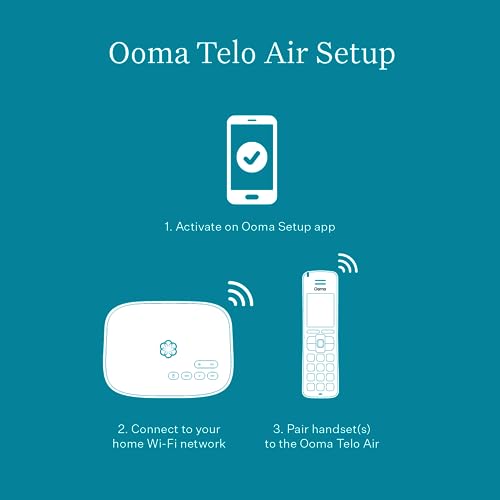
Setup was simple, just had to do some initial configuration to hook it up to my wifi, then find a place to mount the box. It ended up below the cordless phone's base on a kitchen wall and, bonus, connected to my existing CPR call blocker device, which works with the Ooma seamlessly.
After setup, things have generally worked nicely, and at minimal cost with their "free" plan where you pay only taxes and regulatory fees. They offer an inexpensive bundle of other services for around $10 a month including caller ID and other things, though they don't let you pick and choose which individual services, it's all or nothing. No biggie, the free service works out nicely.
The only reason I give the Ooma four stars is for UPDATES. I've had a handful of instances where I wanted to make a call only to find no dialtone, and in those cases either the Ooma's flowery status LED was flashing red (indicating an update was in progress) or solid blue (should be usable but no, an update is queued when there's no dialtone, apparently). Given the otherwise free service, it's understandable that Ooma might go on the cheap in terms of delivering updates, but it would be nice if they could do them in the early morning hours, rather than first thing in the morning around 9-11am ET as has been the case every time thus far.
Setup was simple, just had to do some initial configuration to hook it up to my wifi, then find a place to mount the box. It ended up below the cordless phone's base on a kitchen wall and, bonus, connected to my existing CPR call blocker device, which works with the Ooma seamlessly.
After setup, things have generally worked nicely, and at minimal cost with their "free" plan where you pay only taxes and regulatory fees. They offer an inexpensive bundle of other services for around $10 a month including caller ID and other things, though they don't let you pick and choose which individual services, it's all or nothing. No biggie, the free service works out nicely.
The only reason I give the Ooma four stars is for UPDATES. I've had a handful of instances where I wanted to make a call only to find no dialtone, and in those cases either the Ooma's flowery status LED was flashing red (indicating an update was in progress) or solid blue (should be usable but no, an update is queued when there's no dialtone, apparently). Given the otherwise free service, it's understandable that Ooma might go on the cheap in terms of delivering updates, but it would be nice if they could do them in the early morning hours, rather than first thing in the morning around 9-11am ET as has been the case every time thus far.
Ooma is GREAT. Telo Air is a great upgrade. But WiFi configuration process needs to be better.
Eliot Prescott✓ Verified Purchase•July 15, 2023
I'm a huge fan of Ooma. I've been using them for many years, for both home and office. The service is dramatically cheaper than an old-fashioned landline, and consistently higher quality than relying on a cell phone when at home or in the office. This Telo Air solves one of the constraints of the older Telo models, which needed a wired (CAT5) connection to the router. With this new Telo Air, you can put the unit in a more convenient location. I have it connected wirelessly to an Eero Pro 6 router, and the quality and reliability are great.
The one shortcoming has to do with wireless configuration. If you initially activate via a web browser, rather than via the app, switching from wired to wireless connection is a challenge. I had to call for tech support (which was fast and efficient). They helped me find the IP address of the Telo box, and with that I could access it and configure it for a wireless connection. Switching from wired to wireless isn't possible from the Ooma app after activation, which seems to me like a major bit of missing functionality. This will also be a problem if and when I upgrade my router, since I'll have to hunt for the Telo IP in order to access the device and reconfigure it (fortunately that's easier with an Eero router, but in this day and age, reconfiguring a devices WiFi connection should be easy enough for grandparents).
Bottom line: Ooma is a five-star product, and the Telo Air 2 is a five-star device, but I'm taking off a star for the poor execution of WiFi configuration, since that's the whole point of paying an extra twenty bucks for the Telo Air vs. the wired-only Telo.
P.S. As I mentioned, when I reached out to Ooma Tech Support via chat, I went from queue to active within one minute, and the support person diagnosed the issue and offered a working solution very quickly. So kudos to Tech Support for dealing efficiently with a current shortcoming of the product software.
The one shortcoming has to do with wireless configuration. If you initially activate via a web browser, rather than via the app, switching from wired to wireless connection is a challenge. I had to call for tech support (which was fast and efficient). They helped me find the IP address of the Telo box, and with that I could access it and configure it for a wireless connection. Switching from wired to wireless isn't possible from the Ooma app after activation, which seems to me like a major bit of missing functionality. This will also be a problem if and when I upgrade my router, since I'll have to hunt for the Telo IP in order to access the device and reconfigure it (fortunately that's easier with an Eero router, but in this day and age, reconfiguring a devices WiFi connection should be easy enough for grandparents).
Bottom line: Ooma is a five-star product, and the Telo Air 2 is a five-star device, but I'm taking off a star for the poor execution of WiFi configuration, since that's the whole point of paying an extra twenty bucks for the Telo Air vs. the wired-only Telo.
P.S. As I mentioned, when I reached out to Ooma Tech Support via chat, I went from queue to active within one minute, and the support person diagnosed the issue and offered a working solution very quickly. So kudos to Tech Support for dealing efficiently with a current shortcoming of the product software.
Was a life saver for a Sr. Living situation that had WiFi but no landline
A. Jones✓ Verified Purchase•June 29, 2023
Had some difficulty using setup instructions, but tech support spent the better part of an hour helping us get the system working. It works great now, providing land-line service using WiFi.
Page 1 of 2


