Future Call FC-0613 Big Button Phone for Seniors, Landline Phone for Seniors, Senior Phone for Elderly, Home Phones for Seniors, Telephones for Hearing Impaired, Phones for Elderly, 10 Picture Keys




Key features
- •NEW FEATURE: Phone Number Store ON-OFF Switch(located on the back of the phone), Prevents memories accidentally being erased or changed; the only picture care phone of it's kind.
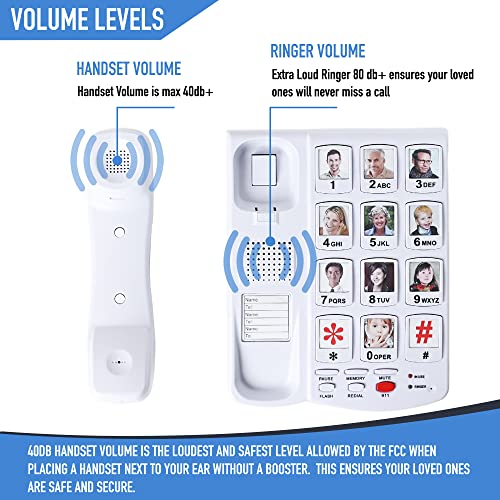
- •Pictures 1" x 1" can be placed on each button for programmable memory dialing and are not lost during power outage or when accidentally unplugged.
- •Big Dial Key Pad with "Photo Frame", Includes 10 Two-touch or 10 one-touch memory keys; Red 911 Button is also re-programmable if needed and will not be erased if unplugged
- •Bright LED Lights for incoming calls, Redial / Pause Key, Flash Key for Call Waiting, FCC Approved
- •Ringer Volume Hi / Low / Off; Handset Volume Control VHI - Hi / Low, Handset Volume max 40dB, Hearing Aid Compatible, Switch is relocated to the back of the phone for safety, preventing accidental volume change
Future Call FC-0613 Big Button Phone for Seniors, Landline Phone for Seniors, Senior Phone for Elderly, Home Phones for Seniors, Telephones for Hearing Impaired, Phones for Elderly, 10 Picture Keys
List Price: $69.82$62.84DEALYou Save: $6.98 (10%)
Free shippingFree Returns – 30 daysFree Order CancellationSecure Payment2–3 Days DeliveryGet It June 25, 2026In Stock (1)No marketing spamNo account requiredFulfilment by FedEx / Amazon / UPS / ShipwirePayPal / Card Buyer Protection
Customer Reviews
Reviews sourced from verified Amazon purchasers4.0
out of 5
Based on 10 reviews
5★
40%
4★
60%
3★
0%
2★
0%
1★
0%
For dad after a stroke
Susan✓ Verified Purchase•July 14, 2023
After contracting COVID, our 94 year old dad suffered a stroke that severely affected his right side (his dominant side). In particular, he lost the effective use of his right hand and even had manual dexterity problems with his left hand. His dexterity declined to the point that he could no longer easily dial a regular phone. After a search on Amazon, and as a result of the good ratings here, we purchased this "picture buttons" phone. In short, this is an excellent product that does exactly what it says. We first added pictures of all the kids and their spouses to each picture button (there are 10 available picture buttons). You'll need an X-ACTO type knife for this, first so that you can pry the plastic protector covers and sample pictures from their buttons and then to cut your own pictures to fit (we just used one of the sample pictures as a template around which to cut).
Programming the phone could not be simpler. Simply press the "Store" button, enter the number, press "Store" again, and then press the picture button to which you wish to assign the number. Made a mistake? Just do it again. Beautifully simple. In our case, the facility where our dad is staying requires that you first enter "81" to get an outside line. That was no problem, we just programmed the phone numbers all starting with 81 and it worked fine.
Just a point of clarification regarding VOIP. The description here goes to pains to point out that this phone won't work on SIP. That's a special protocol for business use. This phone works absolutely fine with the regular VOIP service provided by your cable company or telephone company. We just plugged the phone into the modem phone jack and that is all that is required to provide a phone signal AND power (just like the old POTS line phones - this phone does not need to be plugged into a power outlet; it gets its power through the phone line). We programmed this phone at home via our cable VOIP and then took it to the care facility where our dad is, plugged it into the wall jack, and we were up and running with no problems. He is now easily able to call each of us by just pressing a picture button.
The only thing we wanted to be careful of was the 911 call button. This isn't something he needs in the facility where he is staying and we did not want him (or anyone else) to accidentally press that button so we taped some plastic over that button and the other five special use buttons (store, memory, mute, flash, redial). If I could suggest one thing for this phone, it'd be a switch to disable those special feature buttons which really aren't going to be of use to the target audience who may be living in a care facility.
Overall, this product does exactly what it says. Volume is loud and voices are clear. Absolutely perfect for any person who may be suffering from physical or memory impediments.
Programming the phone could not be simpler. Simply press the "Store" button, enter the number, press "Store" again, and then press the picture button to which you wish to assign the number. Made a mistake? Just do it again. Beautifully simple. In our case, the facility where our dad is staying requires that you first enter "81" to get an outside line. That was no problem, we just programmed the phone numbers all starting with 81 and it worked fine.
Just a point of clarification regarding VOIP. The description here goes to pains to point out that this phone won't work on SIP. That's a special protocol for business use. This phone works absolutely fine with the regular VOIP service provided by your cable company or telephone company. We just plugged the phone into the modem phone jack and that is all that is required to provide a phone signal AND power (just like the old POTS line phones - this phone does not need to be plugged into a power outlet; it gets its power through the phone line). We programmed this phone at home via our cable VOIP and then took it to the care facility where our dad is, plugged it into the wall jack, and we were up and running with no problems. He is now easily able to call each of us by just pressing a picture button.
The only thing we wanted to be careful of was the 911 call button. This isn't something he needs in the facility where he is staying and we did not want him (or anyone else) to accidentally press that button so we taped some plastic over that button and the other five special use buttons (store, memory, mute, flash, redial). If I could suggest one thing for this phone, it'd be a switch to disable those special feature buttons which really aren't going to be of use to the target audience who may be living in a care facility.
Overall, this product does exactly what it says. Volume is loud and voices are clear. Absolutely perfect for any person who may be suffering from physical or memory impediments.
ðŸ‘ðŸ‘ðŸ‘ðŸ‘ðŸ‘
L Ashcraft✓ Verified Purchase•July 12, 2023
Finally, a dementia phone that works! We went through 2 "senior" phones then an Easytrac phone designed for dementia patients (please do not waste your money on that piece of junk). My mom has moderate heading to advanced dementia and this works perfectly. We had an additional problem in that they do not allow landlines at her memory care unit because the residents kept calling 911. We used a cell2jack device and linked it through Bluetooth to her old flip phone then hid all that under her bed. Phone works perfectly. 911 button can be programmed to call another number or no number at all. It was easy to set up, easy to program numbers into and the calls are clear as a bell. Another review said you have to push a separate button before pushing the photo button. I think they set it up wrong. All mom has to do is push the large photo button and it dials. This phone is a winner!
Perfect for the elderly
MamaD923✓ Verified Purchase•July 6, 2023
Purchased for elderly parents. Easy to program except to try to override #1, which is programmed for 911, is impossible. Instructions are confusing at best.
Just what we needed
Jean in De Pere, WI✓ Verified Purchase•May 26, 2023
Works great for my 92 year old mother without being complicated. She was having trouble with her other phones. For many reasons. Needed the simplest phone out there. No answering machine. No other extensions but those are available. Handset is very lightweight. Slight hollow sounding, We will try adjusting the volume. We put on longer cords. She is so happy. It was a great purchase. Getting another for bedroom.
Good for elderly
Ellie✓ Verified Purchase•May 15, 2023
Good idea for the elderly. A little hard to push the buttons for someone older but she does manage it.
Page 1 of 2