WALI Mount Bracket Adapter Monitor Arm Mounting Kit for Screen 13 to 27 inch, Mounting Holes 75mm and 100mm (UVVEP)


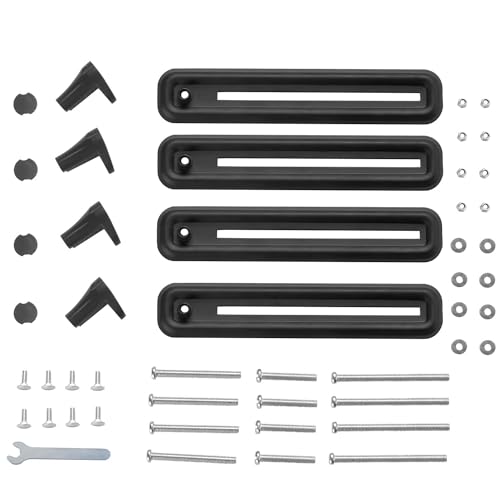

Key features
- •Smart design: to convert non-vesa compatible monitors into 75mm or 100mm VESA to mount onto monitor stand or wall mount. Please check power and video ports are not blocked by bracket
- •Compatibility: most 13" to 27" monitors weighing 17.6 lbs or less, screen thickness of 1" to 2.75", bezel height from 10.5" to 16.25"
- •Built: of high-quality steel to securely hold your screen, soft padding in the durable plastic grips prevent scratching of the monitor edges
- •Elegance: sleek low profile matte black finish to compliment modern LCD, LED, oled/qled displays
- •Package includes: 1 x WALI VESA mount adapter bracket set, 1 x mounting hardware kit, 1 x user manual, 10 Year protection
WALI Mount Bracket Adapter Monitor Arm Mounting Kit for Screen 13 to 27 inch, Mounting Holes 75mm and 100mm (UVVEP)
List Price: $36.84$33.16DEALYou Save: $3.68 (10%)
Free shippingFree Returns – 30 daysFree Order CancellationSecure Payment2–3 Days DeliveryGet It October 28, 2026In Stock (2)No marketing spamNo account requiredFulfilment by FedEx / Amazon / UPS / ShipwirePayPal / Card Buyer Protection
Customer Reviews
Reviews sourced from verified Amazon purchasers4.2
out of 5
Based on 10 reviews
5★
30%
4★
70%
3★
0%
2★
0%
1★
0%
Can Mount a Curved 32" Monitor! (with a little help)
This Guy✓ Verified Purchase•September 9, 2023
I recently bought three 32" curved Samsung monitors. I'll spare you the details but Samsung basically advertised them online as being VESA compatible while it turns out, they are not. Oh the outrage! So I investigate possible solutions, that all seem to max out at 27" monitors. Enter more annoyance over the situation. Then I find this other amazon listed product described as such:
Mount Plus 1056 VESA 200x200 Universal Adapter Plate for TV Mounts | Convert VESA 75x75, 100x100 Mount to Fit 200X100, 200x200 mm VESA Patterns
I bought this and that and combined their outputs to assemble a biggened mount (see pictures). If you go this route then here are some pointers:
1) I'm a little OCD so I drilled 4 holes into the plates to enable the 8 bolts to line up "perfectly". There is some amount of squish in the final step so don't obsess about the arms being at perfect 90 degree angles with your desk. I probably could of gotten away with just using 4 bolts in the pre-drilled holes. There were another 2 holes I didn't use so if you don't want to go drilling, then I would attach the bottom arms to the 4 bolts and then use the other 2 up top.
2) Nuts and bolts are fabricated to line up perfectly flush at 90 degrees. So you're better off maintaining a straight line with in your plate and arms and using the longer screws at the monitor's edges (see picture #2). This was counter-intuitive for me at first b/c I wanted the arms to hug the monitor as closely as possible.
Mount Plus 1056 VESA 200x200 Universal Adapter Plate for TV Mounts | Convert VESA 75x75, 100x100 Mount to Fit 200X100, 200x200 mm VESA Patterns
I bought this and that and combined their outputs to assemble a biggened mount (see pictures). If you go this route then here are some pointers:
1) I'm a little OCD so I drilled 4 holes into the plates to enable the 8 bolts to line up "perfectly". There is some amount of squish in the final step so don't obsess about the arms being at perfect 90 degree angles with your desk. I probably could of gotten away with just using 4 bolts in the pre-drilled holes. There were another 2 holes I didn't use so if you don't want to go drilling, then I would attach the bottom arms to the 4 bolts and then use the other 2 up top.
2) Nuts and bolts are fabricated to line up perfectly flush at 90 degrees. So you're better off maintaining a straight line with in your plate and arms and using the longer screws at the monitor's edges (see picture #2). This was counter-intuitive for me at first b/c I wanted the arms to hug the monitor as closely as possible.
It works, but arms might press buttons or get in the way of cables on cheaper monitors
Anthony H.✓ Verified Purchase•August 28, 2023
It took a little while to assemble, but it wasn't too difficult and it makes sense for cheaper manufacturing and shipping. It feels reasonably sturdy holding my monitor.
In the most sturdy configuration, with the arms forming an "X" shape, it can barely hold a 12 inch tall monitor; it's a very snug fit. Additionally, since it's a cheaper monitor (which I'm assuming most of these are bought for rather cheap monitors because anything decent will have a VESA mount built in), the arms get in the way of buttons on the bottom of the monitor and of the power cable on the opposite side. If I were to use it with the lower arms facing straight down, it wouldn't get in the way, but it would definitely be less stable.
In the most sturdy configuration, with the arms forming an "X" shape, it can barely hold a 12 inch tall monitor; it's a very snug fit. Additionally, since it's a cheaper monitor (which I'm assuming most of these are bought for rather cheap monitors because anything decent will have a VESA mount built in), the arms get in the way of buttons on the bottom of the monitor and of the power cable on the opposite side. If I were to use it with the lower arms facing straight down, it wouldn't get in the way, but it would definitely be less stable.
Works pretty well
Alex A.✓ Verified Purchase•August 19, 2023
I have a dell consumer monitor in the 24" variety from probably 5-7 years back. It doesn't have a standard VESA mount point in the back due to that stupid "beer gut" back design where the lower part of the monitor sticks out and the upper part is thin. What the heck were they thinking anyways? Just make the whole thing thick then.
I got this so that I could mount to my dual mount setup. Overall it wasn't a bad installation, though the instructions really could've used a few words. The pictures didn't really illustrate a few important details like:
-One of the first pictures refers to screws A/B/C, which are the same screws with different lengths. They didn't really illustrate that depending on the thickness of the monitor you'll have to use different ones, but it's a bit tricky to know in actuality which ones you'll need because it's not about thickness at the top and bottom, it's about overall thickness. The entire assembly shouldn't be bending inwards to clip to the monitor so that's where the length really comes into play. It seems like it would be obvious, but at least for me I had to swap out for a larger kind when I was almost done. Not a huge deal because it's pretty easy to do, but the instructions could have been a bit clearer.
-The instructions also give the usual 3-design (check mark, check mark, x mark) for what works and what doesn't, but I honestly have no clue from the instructions what they're referring to. It's a side-view of a monitor and it could really use clarification, or again, some actual language.
All in all I would recommend this setup. I felt that I had extra room if my monitor had been a bit bigger. If you have the beer gut style monitor in the back, this will fit it, but you can't do the X pattern; you have to make the top or the bottom straight in order to get it set. This design is detailed in the instructions. Remember not to overtighten to the monitor!
Cheers!
I got this so that I could mount to my dual mount setup. Overall it wasn't a bad installation, though the instructions really could've used a few words. The pictures didn't really illustrate a few important details like:
-One of the first pictures refers to screws A/B/C, which are the same screws with different lengths. They didn't really illustrate that depending on the thickness of the monitor you'll have to use different ones, but it's a bit tricky to know in actuality which ones you'll need because it's not about thickness at the top and bottom, it's about overall thickness. The entire assembly shouldn't be bending inwards to clip to the monitor so that's where the length really comes into play. It seems like it would be obvious, but at least for me I had to swap out for a larger kind when I was almost done. Not a huge deal because it's pretty easy to do, but the instructions could have been a bit clearer.
-The instructions also give the usual 3-design (check mark, check mark, x mark) for what works and what doesn't, but I honestly have no clue from the instructions what they're referring to. It's a side-view of a monitor and it could really use clarification, or again, some actual language.
All in all I would recommend this setup. I felt that I had extra room if my monitor had been a bit bigger. If you have the beer gut style monitor in the back, this will fit it, but you can't do the X pattern; you have to make the top or the bottom straight in order to get it set. This design is detailed in the instructions. Remember not to overtighten to the monitor!
Cheers!
Works, no BS
Murph✓ Verified Purchase•July 28, 2023
The info you are looking for can be found in this review. Does exactly what it says it does. I rolled the dice on this because everyone on here writes reviews like they expect a hug and a kiss to arrive with the package. You are going to have to use your brain a little here to assemble. If you are not used to that, just squint really hard. Should help reactivate some neurons.
I provided pictures of a dual set up. One monitor mounted vertically one mounted horizontally. Works as expected. THE KNOBS WILL OVER HANG ONTO THE EDGE OF THE MONITOR FRAME! I put that in caps because people seem surprised by that. If the monitor is fully on the hook (flush and as deep as possible) your total overhang is 11/16th of an inch deep.
You can reduce the overhang by twisting the knobs slightly side ways or not placing them so deep to begin with. This is fully adjustable, you are going to have to work with it a bit. Keep things loose, mount, observe, adjust, repeat. Then you tighten when you are happy with it. It's a bit of a process but remember, you wanted to save money and not get a vesa monitor, here is your prize.
Offcentering. You can see in my photos that I don't have the X pattern of the knobs perfectly centered on the frames of my monitors. My HDMI ports and power-in would have been blocked if I left it on center. So yes you can mount the x pattern off center to work with the placement of your ports on the back of the monitor.
Sturdiness. It's sturdy. I've made a habit of smacking my knee into my desk as hard as possible everytime I get up to quickly and these things have not budged a bit. These work through pressure. It is squeezing and pulling your monitor backwards. Don't over tighten it, I did this and my monitor buttons weren't presseable. You are going to have to fiddle with it a bit.
How well do they move on a vesa mount? You are going to have to loosen your hinge points on whatever you are using. Again, this system is using pressure to keep your monitor in place. Pushing on the monitor too much can harm it or loosen it from the hold. I don't move my monitors at all once I set them up the way I like them because I have nothing to prove by looking cool and don't use my desk as a bench press so there is no need to move them. If you are going to move them, again, loosen the hinges on the mounter a bit and try and pull and adjust from the back center of the vesa mount adapter. You want to pull on the least flexible part. Doing this you shouldn't have much of a problem.
Final review. Ideally you would have three hands for setting this up, but most people don't have three hands. Use your noggin, take your time, breathe, and it's going to all come out fine. If you think it looks tacky, I am not sure who you are trying to impress or who is judging you but if that does concern you, buy a vesa mountable monitor.
I provided pictures of a dual set up. One monitor mounted vertically one mounted horizontally. Works as expected. THE KNOBS WILL OVER HANG ONTO THE EDGE OF THE MONITOR FRAME! I put that in caps because people seem surprised by that. If the monitor is fully on the hook (flush and as deep as possible) your total overhang is 11/16th of an inch deep.
You can reduce the overhang by twisting the knobs slightly side ways or not placing them so deep to begin with. This is fully adjustable, you are going to have to work with it a bit. Keep things loose, mount, observe, adjust, repeat. Then you tighten when you are happy with it. It's a bit of a process but remember, you wanted to save money and not get a vesa monitor, here is your prize.
Offcentering. You can see in my photos that I don't have the X pattern of the knobs perfectly centered on the frames of my monitors. My HDMI ports and power-in would have been blocked if I left it on center. So yes you can mount the x pattern off center to work with the placement of your ports on the back of the monitor.
Sturdiness. It's sturdy. I've made a habit of smacking my knee into my desk as hard as possible everytime I get up to quickly and these things have not budged a bit. These work through pressure. It is squeezing and pulling your monitor backwards. Don't over tighten it, I did this and my monitor buttons weren't presseable. You are going to have to fiddle with it a bit.
How well do they move on a vesa mount? You are going to have to loosen your hinge points on whatever you are using. Again, this system is using pressure to keep your monitor in place. Pushing on the monitor too much can harm it or loosen it from the hold. I don't move my monitors at all once I set them up the way I like them because I have nothing to prove by looking cool and don't use my desk as a bench press so there is no need to move them. If you are going to move them, again, loosen the hinges on the mounter a bit and try and pull and adjust from the back center of the vesa mount adapter. You want to pull on the least flexible part. Doing this you shouldn't have much of a problem.
Final review. Ideally you would have three hands for setting this up, but most people don't have three hands. Use your noggin, take your time, breathe, and it's going to all come out fine. If you think it looks tacky, I am not sure who you are trying to impress or who is judging you but if that does concern you, buy a vesa mountable monitor.
Does not place the VESA mount in the center of 27 inch displays
Nicolas Chasteler✓ Verified Purchase•July 17, 2023
Although it say it supports up to 27 inches, it will not support 27 inches AND keep the VESA mount in the middle of the monitor. I have a dual monitor stand which allows up to around 1/2 inch up and down movement between the two monitors and I was not able to line up the two monitor without making some massive adjustments to the mounting hardware. I would not recommend if you are trying to line up two 27 inch screens, otherwise the mount is fine.
Page 1 of 2