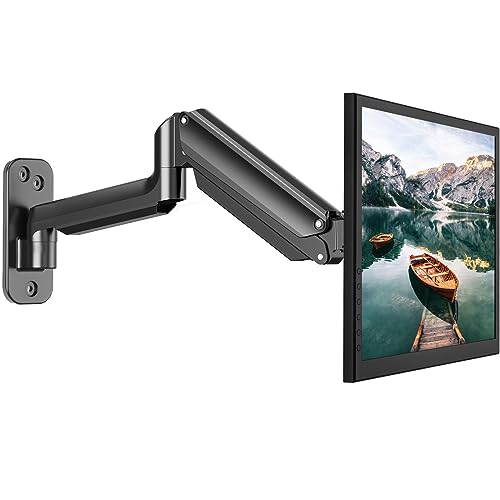
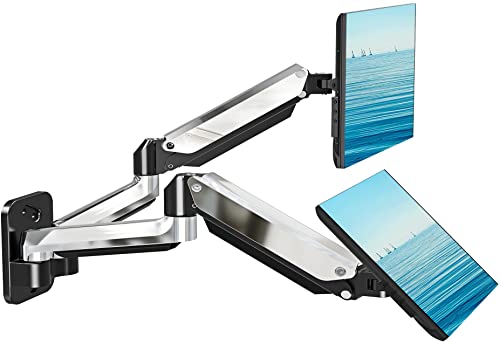
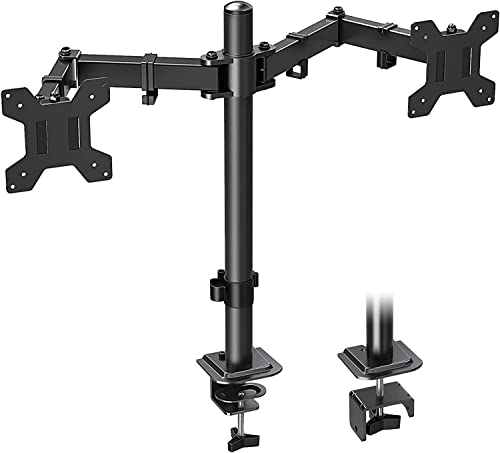
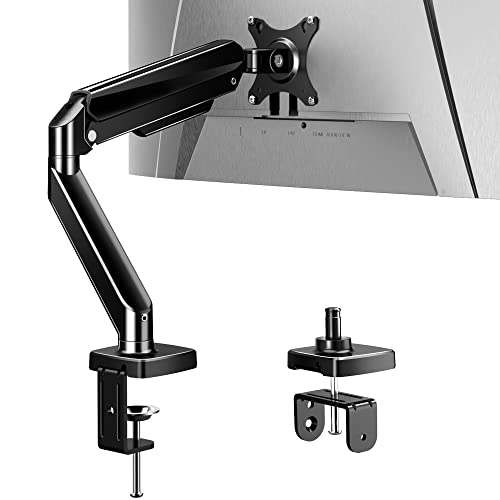
Viozon Monitor and Laptop Mount, 2-in-1 Adjustable Dual Arm Desk Mounts Single Desk Arm Stand/Holder for 17 to 32 Inch LCD Computer Screens, Extra Tray Fits 12 to 17 inch Laptops (Black)


Key features
- •Universal-- This monitor and laptop mount is applicable to 17-32 inches monitor up to 19.8lbs with VESA Standard interfaces (100x100mm / 75x75mm) such as Dell, Samsung, HP, BenQ, AOC, Acer, LG, ASUS and 10-17 inches laptop/notebook.
- •Steady Arm-- Made of heavy duty and premium aluminum to guarantee the sturdy and stable, The maximum display weight is below 9kg/19.8lbs, if you find your monitor is a little heavy, the tension adjustment is at the edge, no down problems
- •Adjustable-- The screen can freely swivel 360 degree, and easily adjust the monitor and laptop to the most comfortable position,monitor mounting arm offers 145 degree tilt, the maximum extension length up to 52cm/20.5", reach the height of 43cm/16.9", Laptop mounting arm offers 45 degree tilt, the maximum height up to 42cm/16.5".
- •Fashion & Simple-- Advanced design in appearance and function , and nature aluminum light silver make it looks like very fashion and clean . The arm have cable management feature to organize wires and cables fit neatly behind.
- •Healthy office--Adjust the monitor and laptop to the most comfortable position, helping reduce strain on your neck and shoulder, organize your workspace and improve your work efficiency.
Viozon Monitor and Laptop Mount, 2-in-1 Adjustable Dual Arm Desk Mounts Single Desk Arm Stand/Holder for 17 to 32 Inch LCD Computer Screens, Extra Tray Fits 12 to 17 inch Laptops (Black)
List Price: $128.03$115.23DEALYou Save: $12.80 (10%)
Free shippingFree Returns – 30 daysFree Order CancellationSecure Payment2–3 Days DeliveryGet It August 7, 2026In Stock (1)No marketing spamNo account requiredFulfilment by FedEx / Amazon / UPS / ShipwirePayPal / Card Buyer Protection
Customer Reviews
Reviews sourced from verified Amazon purchasers4.4
out of 5
Based on 10 reviews
5★
60%
4★
40%
3★
0%
2★
0%
1★
0%
Sturdy, but definitely some compromises
John W. ✓ Verified Purchase•October 20, 2023
I've had this arm system for about half a year now give or take.
First the PROS:
- Stable. I have an ultrawide monitor on one of these arms straight out and it doesn't wiggle. It's a well-built system.
- Plenty of cable management options. I should probably make better use of them, but there are a bunch of loops and hollowed out sections to run cables to your devices.
- Solid base. There are 2 clamps on this which do a great job of distributing weight. My desk has a cross beam that was a little too close to the back to be able to comfortably accomodate the base. I fixed this with a small wood block which ended up doing the trick and its solid steady now.
- Laptop arm has great padding and a decent amount of access to side ports through the grips. I have 14" and 15.6" machines, both of which comfortably sit on the arm. Max weight I've tested has been around 5 pounds.
CONS:
- Not extremely flexible. As opposed to a pneumatic arm or something along those lines, there are essentially 2 arms on this, each about 12" long, with a rigid ~30° angle in the middle. You CANNOT adjust the angle between the arms, so you need to get creative with the height of your arm placement, especially if your extra monitor is an abnormal aspect ratio.
- height system is a little less "locked in" than I'd expected - each arm has a collar that sits below it, as opposed to an internal locking system.
- rotating your laptop on the laptop arm can cause some awkward angles. Not great, as it's one of only 2 or 3 axes you can level it out with a main monitor.
All in all its a good system if you're not looking to spend several hundred dollars. I frequently trust it to hold a few thousand dollars' worth of equipment and have no doubt in its capabilities.
First the PROS:
- Stable. I have an ultrawide monitor on one of these arms straight out and it doesn't wiggle. It's a well-built system.
- Plenty of cable management options. I should probably make better use of them, but there are a bunch of loops and hollowed out sections to run cables to your devices.
- Solid base. There are 2 clamps on this which do a great job of distributing weight. My desk has a cross beam that was a little too close to the back to be able to comfortably accomodate the base. I fixed this with a small wood block which ended up doing the trick and its solid steady now.
- Laptop arm has great padding and a decent amount of access to side ports through the grips. I have 14" and 15.6" machines, both of which comfortably sit on the arm. Max weight I've tested has been around 5 pounds.
CONS:
- Not extremely flexible. As opposed to a pneumatic arm or something along those lines, there are essentially 2 arms on this, each about 12" long, with a rigid ~30° angle in the middle. You CANNOT adjust the angle between the arms, so you need to get creative with the height of your arm placement, especially if your extra monitor is an abnormal aspect ratio.
- height system is a little less "locked in" than I'd expected - each arm has a collar that sits below it, as opposed to an internal locking system.
- rotating your laptop on the laptop arm can cause some awkward angles. Not great, as it's one of only 2 or 3 axes you can level it out with a main monitor.
All in all its a good system if you're not looking to spend several hundred dollars. I frequently trust it to hold a few thousand dollars' worth of equipment and have no doubt in its capabilities.
Perfect for my monitor and Surface Pro!
NW✓ Verified Purchase•October 15, 2023
I am so happy that I got this mount. I got my new desk and was afraid that if I just put the monitor on it like normal, it would take up way too much space. When I'm sitting at my desk, I connect my Surface Pro to my monitor to have two screens, and the laptop mount arm is perfect for my Surface Pro! I do use a pen drive for a good portion of my storage, so for a little while I was using a pen to give it a little more height so that the pen drive would clear that side clasp, but I realized that I'd I leave the keyboard attached and fold it behind it, it takes care of that issue. Another small issue is that clasp holds on to it right at the end of where my charger plugs into it, but I'm actually able to plug the charger in and allow the clasp to hold on to the end of the charger as well, so that was good. The clasps are tight enough to hold it but not so tight it squeezes it.
It was fairly easy to assemble. The directions were confusing and it took me longer than it should have to put it together because of that confusion. But I figured it out and got it working. It seems very sturdy and I like that I can adjust the tensions of the moving parts as I see fit.
I am very glad I got this mount and I highly recommend it!
It was fairly easy to assemble. The directions were confusing and it took me longer than it should have to put it together because of that confusion. But I figured it out and got it working. It seems very sturdy and I like that I can adjust the tensions of the moving parts as I see fit.
I am very glad I got this mount and I highly recommend it!
Don’t Hesitate - Buy It!
HW✓ Verified Purchase•October 4, 2023
I did a ton of research and read countless reviews before deciding on the Viozon OL-3L. I'm extremely pleased with my decision! The quality of the product is fantastic, instructions were easy to follow and understand, and the finished result is exactly as I had hoped it would be. You can tell that a lot of thought went into this design, making it sturdy, easy to assemble and added features such as the cable covers and clips. Overall, I would highly recommend this product to anyone, and will be purchasing a second one for my office!
A few tips that I would recommend are:
1 - Make sure that you have enough of a lip/edge on your desk. The wing nuts that are used to clamp the mount on the desk are pretty wide and the bolts are long. I was unable to mount it completely flush against my desk because of this. Fortunately it wasn't a deal breaker and is still very secure.
2 - Read the instructions thoroughly BEFORE you begin and lay out the hardware, ensuring the correct position of installation. I even went as far as labeling the hardware with the corresponding letter ahead of time to ensure accuracy, as this was not done in the instructions. Also, you will not need any additional tools, everything you need is provide.
3 - Go ahead and mount the monitor bracket to the monitor before starting the desk installation. I found that doing this first was easier. Also, as I read in other people's comments, don't be surprised if the monitor mount looks crooked after installation. I was concerned of this when I read the reviews - and I did in fact have the same issue. The good news is that the arms have 3 points of adjustment, so you will easily be able to straighten and customize the angle of both, the monitor & laptop. The tension adjustment points, especially "The Adapter (E)", intentionally have quite a bit of tension, making you think they can't be moved, but they can - check out Step 6 of the instructions.
4 - The positions will feel a bit off at first when you initially get everything set up. You will need to play around with it until you get the desired positioning.
A few tips that I would recommend are:
1 - Make sure that you have enough of a lip/edge on your desk. The wing nuts that are used to clamp the mount on the desk are pretty wide and the bolts are long. I was unable to mount it completely flush against my desk because of this. Fortunately it wasn't a deal breaker and is still very secure.
2 - Read the instructions thoroughly BEFORE you begin and lay out the hardware, ensuring the correct position of installation. I even went as far as labeling the hardware with the corresponding letter ahead of time to ensure accuracy, as this was not done in the instructions. Also, you will not need any additional tools, everything you need is provide.
3 - Go ahead and mount the monitor bracket to the monitor before starting the desk installation. I found that doing this first was easier. Also, as I read in other people's comments, don't be surprised if the monitor mount looks crooked after installation. I was concerned of this when I read the reviews - and I did in fact have the same issue. The good news is that the arms have 3 points of adjustment, so you will easily be able to straighten and customize the angle of both, the monitor & laptop. The tension adjustment points, especially "The Adapter (E)", intentionally have quite a bit of tension, making you think they can't be moved, but they can - check out Step 6 of the instructions.
4 - The positions will feel a bit off at first when you initially get everything set up. You will need to play around with it until you get the desired positioning.
great mobile office addition
KURT MORAUER✓ Verified Purchase•September 29, 2023
Although I am only using the laptop arm, this really cleared my RV kitchen table and gave me a working office. I need small bungy cords to keep the laptop secure while on the road. Very sturdy construction .
Great but a bit dissapointed the second time around.
Hermann Steidel✓ Verified Purchase•September 24, 2023
The media could not be loaded. I have bought two of the Monitor and Laptop Mount, 2-in-1 Adjustable Dual Arm Desk Mounts (non-gas versions) in a span of about a year. The first one I received was great, I love it; 5 stars if I would have written a review back then.
These mounts work well for what they are and I like their adjustability and how well they keep their locking power once you get the screws tightened up. The cable management feature is nice but I don't use it. I tried to use it but didn't work out for me; not something I would knock stars off for.
Now, since I loved my first mount, I decided to get a second pair. My disclaimer up front, I did buy this as what looks like a returned item so it could be that I am drew a bad card. But to be clear, I'm not knocking points for the scratches that I already expected and am ok with. My issue is the change in the "quick vesa" mount mechanism that I got with my second stand. The mechanism is completely different.
I've uploaded a video to show everyone what I mean, but the short of it is that my new laptop tray is wobbly. I'm not sure if it something in the design tolerance or of they did this on purpose but it has some slop. My original stand "quick vesa" mounting mechanism is WAY tighter. Admittedly, the original quick adapter is slightly harder to pull out but I find that ok. It's not like I'm swapping out often. Perhaps this is why they decided to make the change to a "looser" mechanism? This wobbly-ness isn't that big a deal but it did bother me enough to write the review and post the video. It's not bad on the monitor since the monitor is on the vertical plane and its weight keeps it sturdier; my slight grief is with the laptop side.
So yeah, I recommend this product with that caveat but I would have been more enthusiastic about recommending it if I would have received the same original hardware from the first time. I get it, manufacturers change for x or y reason but if the wobble factor is something that bothers you, then you can either try your luck or look elsewhere. Again, I did buy one that was not new. However, I doubt that this has anything to do with it because both new vesa quick mounts have this wobble factor.
As a workaround, I cut and folded some paper and put it in the receiving end to close the gap.
These mounts work well for what they are and I like their adjustability and how well they keep their locking power once you get the screws tightened up. The cable management feature is nice but I don't use it. I tried to use it but didn't work out for me; not something I would knock stars off for.
Now, since I loved my first mount, I decided to get a second pair. My disclaimer up front, I did buy this as what looks like a returned item so it could be that I am drew a bad card. But to be clear, I'm not knocking points for the scratches that I already expected and am ok with. My issue is the change in the "quick vesa" mount mechanism that I got with my second stand. The mechanism is completely different.
I've uploaded a video to show everyone what I mean, but the short of it is that my new laptop tray is wobbly. I'm not sure if it something in the design tolerance or of they did this on purpose but it has some slop. My original stand "quick vesa" mounting mechanism is WAY tighter. Admittedly, the original quick adapter is slightly harder to pull out but I find that ok. It's not like I'm swapping out often. Perhaps this is why they decided to make the change to a "looser" mechanism? This wobbly-ness isn't that big a deal but it did bother me enough to write the review and post the video. It's not bad on the monitor since the monitor is on the vertical plane and its weight keeps it sturdier; my slight grief is with the laptop side.
So yeah, I recommend this product with that caveat but I would have been more enthusiastic about recommending it if I would have received the same original hardware from the first time. I get it, manufacturers change for x or y reason but if the wobble factor is something that bothers you, then you can either try your luck or look elsewhere. Again, I did buy one that was not new. However, I doubt that this has anything to do with it because both new vesa quick mounts have this wobble factor.
As a workaround, I cut and folded some paper and put it in the receiving end to close the gap.
Page 1 of 2