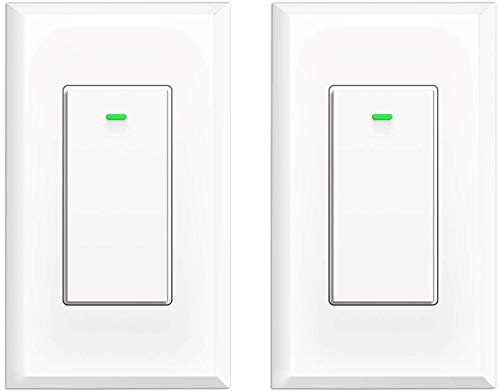
Smart Switch WiFi Light Switch No Hub Required, Light Switch Alexa Compatible with Google Assistant Requireds Neutral Wire,Timer Schedule, KULED K36 2Pack




Key features
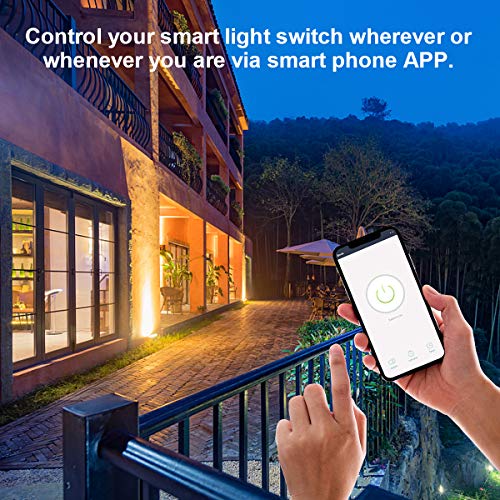
- •REMOTE CONTROL: Control your device wherever or whenever you are via smart phone APP(Compatible w/ Android 4.1or iOS8 above), connected your home wifi without hub required.
- •VOICE CONTROL: Compatible with Amazon Alexa( Echo/Dot/Tap), Google assistant for voice control. Save the effort to press button, and it would be simply turned on/off by your voice.
- •SMART SCHEDULE TIMER: Schedule the smart light switch to automatically power electronics on and off based on syour daily schedule and preferences. Power saving eliminate wasteful standby power and prevent overcharging and overheating; set a time limit to turn off the light or secure your home when you are not home.
- •Kuled Smart Light Switch simply replaces your old wall light switch to control permanently installed lighting ,also works with any one-way connection lights. Neutral wire required.
- •100% money back guaranty: CE and FCC approved for safety and quality assurance. We offer you 1 year warranty to let you buy with confidence In case any problem happens to the Switch, contact the seller of us without hesitation to solve the problem until satisfaction.
Smart Switch WiFi Light Switch No Hub Required, Light Switch Alexa Compatible with Google Assistant Requireds Neutral Wire,Timer Schedule, KULED K36 2Pack
List Price: $41.89$37.70DEALYou Save: $4.19 (10%)
Free shippingFree Returns – 30 daysFree Order CancellationSecure Payment2–3 Days DeliveryGet It October 24, 2026In Stock (1)No marketing spamNo account requiredFulfilment by FedEx / Amazon / UPS / ShipwirePayPal / Card Buyer Protection
Customer Reviews
Reviews sourced from verified Amazon purchasers4.4
out of 5
Based on 10 reviews
5★
50%
4★
50%
3★
0%
2★
0%
1★
0%
Great Switch Overall
Steven Alexander✓ Verified Purchase•September 6, 2023
Installation was pretty easy, assuming you have some basic working knowledge. The instructions did a far better job than most at visualizing what goes where. The app what the only issue. The instructions showed a picture of what the app looks like, but the app has been updated since. When adding a new switch, the option you want is "Switch (Wi-Fi)" under the Electrician tab. It won't always add the switch in the first try, and even then it might not actually save the switch. Too me a few tries to actually get it saved.
Then there's the integration. It'll work with Google Home by adding a new device, then searching by "Have something already set up?" Under "Works with Google". It's WAY down the list as Smart Life. That also too a few tries to work.
I know a lot of people hate on the app, but it isn't bad, honestly. I heard you can get it to work with Samsung Smart Things, but so far that's a mystery to me, and I specialize in smart home solutions!
Overall, great switch! I haven't a clue at it's longevity though, so we'll see. Great switch for the money, and cheaper that smart bulbs, especially if you have multiple lights on one circuit.
Then there's the integration. It'll work with Google Home by adding a new device, then searching by "Have something already set up?" Under "Works with Google". It's WAY down the list as Smart Life. That also too a few tries to work.
I know a lot of people hate on the app, but it isn't bad, honestly. I heard you can get it to work with Samsung Smart Things, but so far that's a mystery to me, and I specialize in smart home solutions!
Overall, great switch! I haven't a clue at it's longevity though, so we'll see. Great switch for the money, and cheaper that smart bulbs, especially if you have multiple lights on one circuit.
Atrocious to connect, but you get what you pay for one way or the other
Kyle Good✓ Verified Purchase•August 27, 2023
Well, it works. Connecting the actual electrical connections was pretty easy. I'm accustomed to having the little screws that press in against your copper connection after you slot it in, but these have 4 lines coming out of the back with a fair amount of wire for each. It was fine to get connected electrically.
I'm not sure how easy or difficult these would be to mount to a normal new construction switch box, but mine is a bit atypical. I should have bought some longer bolts going into the installation. I just got it all hooked up and connected and was so frustrated with the stupid network process and their app... I wanted to leave a review.
In the heat of the moment, I was a bit hot. Ultimately, everything seems sound enough from a build perspective.
Anyways, connecting the smart bits. The app tells you that you are going to have to connect to a 2.5 GHz wifi network and that you are on a 5ghz network. I went through some extraordinary efforts to connect around that before finally just trying to use the "carry on" option. My Nest router broadcasts 2.5 and 5ghz wifi on the same SSID, so it ultimately connected.
So, if you've got an SSID broadcast with both frequencies... Just try and carry on from the word go.
I will maybe adjust my rating in the future after I use it a bit more... See if it has any other issues.
I'm not sure how easy or difficult these would be to mount to a normal new construction switch box, but mine is a bit atypical. I should have bought some longer bolts going into the installation. I just got it all hooked up and connected and was so frustrated with the stupid network process and their app... I wanted to leave a review.
In the heat of the moment, I was a bit hot. Ultimately, everything seems sound enough from a build perspective.
Anyways, connecting the smart bits. The app tells you that you are going to have to connect to a 2.5 GHz wifi network and that you are on a 5ghz network. I went through some extraordinary efforts to connect around that before finally just trying to use the "carry on" option. My Nest router broadcasts 2.5 and 5ghz wifi on the same SSID, so it ultimately connected.
So, if you've got an SSID broadcast with both frequencies... Just try and carry on from the word go.
I will maybe adjust my rating in the future after I use it a bit more... See if it has any other issues.
Solid connection, seamless smart home integration. Look okay, but cheap feel to the plastic.
Vic Foster✓ Verified Purchase•August 16, 2023
They've been staying continuously connected for almost 6 months now. Never had problems installing or getting them integrated into my Google Home. Timer is working great though them. Only thing is they feel pretty cheap when pressing them.
Works well. Easy to install. Easy to use.
R.C.✓ Verified Purchase•August 7, 2023
The instructions that it came with were easy to follow. Once it was all hooked up and connected, we were able to use it hands-free by telling our Alexa devices to turn on/off the lights/fan.
Only quirk I have, I couldn't find a way to set it on an auto turn off, after a few minutes. It's fine. I found a work around. I just a scheduled it to make sure the power is off at a time we are all sleeping. This is great since now I don't have to worry if the lights/fans are still on at night.
Only quirk I have, I couldn't find a way to set it on an auto turn off, after a few minutes. It's fine. I found a work around. I just a scheduled it to make sure the power is off at a time we are all sleeping. This is great since now I don't have to worry if the lights/fans are still on at night.
Easily Flash with Open Source Tasmota Firmware
Cecilia Rose✓ Verified Purchase•August 2, 2023
You can use this with Alexa and Google voice with the software that is built in. However I preferred to flash with the great Tasmota open source firmware (google it). Don't like the proprietary software or communicating with servers outside your home ? Search youtube on Kuled wifi switch for a tutorial on how to flash this with Tasmota using a $10 tool, by removing 4 screws and plugging in a 4 wire riser board. Have flashed 10 with no issues. Tasmota allows you to add up to 15 timers for each switch, keep track of sunset/sunrise, emulate a Philips hue light, control the light by Alexa, all without having to setup an account with a server outside your home or even without having to setup a server like Home Assistant inside your network (though you can if you want to).
To use with Alexa, flash with Tasmota, navigate your browser to the switch's ipaddress (check your router for a "sonoff" device, go to Configuration->Configure Other->Emulation_>Hue Bridge. On same screen fill in the friendly name to what you want e.g., "Kitchen Lights". Open your Alexa app, search for a device, and add "Kitchen Lights". Done. "Alexa, turn on my kitchen lights". "OK". No need to use Home Assistant or any other server or software. Have Home Assistant ? Great - now you can do more things like setup google voice, setup sophisticated chained event routines, etc. Also works with Google Voice but requres IFTTT and to be used securely outside of your network, you need to setup a dynamic dns ssl connection and control it thought Home Assistant. Alexa is easiest and works best.
To use with Alexa, flash with Tasmota, navigate your browser to the switch's ipaddress (check your router for a "sonoff" device, go to Configuration->Configure Other->Emulation_>Hue Bridge. On same screen fill in the friendly name to what you want e.g., "Kitchen Lights". Open your Alexa app, search for a device, and add "Kitchen Lights". Done. "Alexa, turn on my kitchen lights". "OK". No need to use Home Assistant or any other server or software. Have Home Assistant ? Great - now you can do more things like setup google voice, setup sophisticated chained event routines, etc. Also works with Google Voice but requres IFTTT and to be used securely outside of your network, you need to setup a dynamic dns ssl connection and control it thought Home Assistant. Alexa is easiest and works best.
Page 1 of 2


![[5 Pack] BESTTEN Double Light Switch, Single Pole, Combination Decorator On/Off Interrupters, 15A 120V, Dual Paddle Rockers, Wallplate Included, White](https://m.media-amazon.com/images/I/31rx3Oj6J-L._SL500_.jpg)