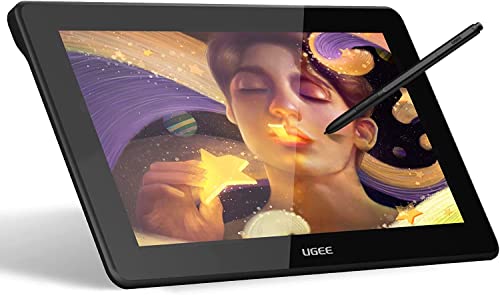
Huion KAMVAS Pro 12 Drawing Tablet with Screen Graphics Drawing Monitor Full-Laminated Pen Display with Battery-Free Pen and Adjustable Stand 8192 Pen Pressure(GT-116)


Key features
- •Tilt Function Battery-free Stylus - Comes with 8192 levels of pen pressure with ±60 pen tilt support, allowing you to have advanced pen performance; Battery-free pen PW507, no longer need to worry about charging.
- •11.6 Inches IPS screen - 120% sRGB Color Gamut presents 16.7 million colors vividly, which can greatly reduce the color difference; The dimension of the KAMVAS Pro 12 is 350 x 198.6 x 11mm, which is close to an A4 Sheet; Ultra thin and portable, take it to anywhere you want.
- •4 Press Keys and 1 Touch Bar - Setting the express keys in the light of your preference, you can easily access your favorite settings and enhance your productivity; The 266 PPS report rate provides a quick and agile feedback of the pen strokes, which is conducive to the smoothness of the lines.
- •Full-laminated Anti-glare Glass - With Anti-glare Technology, it effectively reduces the glare damage to human eyes and shorten the distance between the pen nib and the cursor; Making you feel like drawing on paper and offer better drawing experience.
- •Compatibility - KAMVAS Pro 12 is compatible with Windows 7 or later and Mac OS 10.12 or later; The new generation of portable adjustable stand coming with the package, which is light and convenient to carry, and also with a sleek look; Huion provides one year warranty.
Huion KAMVAS Pro 12 Drawing Tablet with Screen Graphics Drawing Monitor Full-Laminated Pen Display with Battery-Free Pen and Adjustable Stand 8192 Pen Pressure(GT-116)
List Price: $363.74$327.37DEALYou Save: $36.37 (10%)
Free shippingFree Returns – 30 daysFree Order CancellationSecure Payment2–3 Days DeliveryGet It October 27, 2026In Stock (2)No marketing spamNo account requiredFulfilment by FedEx / Amazon / UPS / ShipwirePayPal / Card Buyer Protection
Customer Reviews
Reviews sourced from verified Amazon purchasers4.4
out of 5
Based on 10 reviews
5★
60%
4★
40%
3★
0%
2★
0%
1★
0%
Great product.
Jeremy Catches✓ Verified Purchase•September 19, 2023
All the marketing says get the biggest that you can afford, but the smallest has its use cases as well and it will serve you well.
I really find myself getting lost in my drawing sessions and I find that to be easier to do when I can draw directly on the screen.
I really find myself getting lost in my drawing sessions and I find that to be easier to do when I can draw directly on the screen.
Portable, durable, easy set up, and cheap. Huion gets better and better.
Celeste Thoms✓ Verified Purchase•September 3, 2023
I'm a long time Wacom user until earlier this year when I sold my Cintiq Companion for a GT-221, and more recently sold a Cintiq Pro 13 for this Kamvas Pro 12. I wanted something portable that worked with my laptop. Surprisingly the Wacom 13in was too bulky and too heavy and honestly didn't work very well. I bought this Kamvas Pro 12 and once again Huion has proved to be worthy competition. Their products get better and better (FYI: for the price of a Cintiq Pro 13, you can get this Kamvas Pro 12 and the 22).
1920 x 1080 display looks great. The set up was much easier than previous models from Huion. They've been listening and the drivers are better. Other than the fact that I had to run out and buy a USB-C hub to use this, I was up and running once it was plugged in. That was my biggest issue. No USB-C connection. I hope that will be an option in the future.
The tablet itself is lighter than the stand that comes with it. It's about as heavy as my iPad Pro with a case on it. Fits comfortably in my lap and even though it's wired, those did not get in the way or feel like I was working with a bunch of cables tangled around me. It was clean and I could draw on the couch or the bed.
The stand, which is actually included, is very sturdy and portable. It doesn't add too much extra bulk to my backpack.
The only thing not included was a smudge guard, which is their trademark. I liked getting one.
The cables are not bulky either. I can fit all of this in one of those laptop cases.
1920 x 1080 display looks great. The set up was much easier than previous models from Huion. They've been listening and the drivers are better. Other than the fact that I had to run out and buy a USB-C hub to use this, I was up and running once it was plugged in. That was my biggest issue. No USB-C connection. I hope that will be an option in the future.
The tablet itself is lighter than the stand that comes with it. It's about as heavy as my iPad Pro with a case on it. Fits comfortably in my lap and even though it's wired, those did not get in the way or feel like I was working with a bunch of cables tangled around me. It was clean and I could draw on the couch or the bed.
The stand, which is actually included, is very sturdy and portable. It doesn't add too much extra bulk to my backpack.
The only thing not included was a smudge guard, which is their trademark. I liked getting one.
The cables are not bulky either. I can fit all of this in one of those laptop cases.
Worth The Purchase!! .. My Honest Review
Queening_V✓ Verified Purchase•August 8, 2023
So I want to start by saying that this is my very first drawing tablet and I bought this as a gift to myself for my birthday. As a child, I loved to draw but growing up I dropped drawing and never picked it back up. It has been yearsssss since I've picked up a pencil and with me not drawing daily like I used to, my talents were sure to fade. The thought of even investing in this baby would be a huge mistake and a waste of time but I made a promise to myself that I would practice drawing on the tablet every day for 2 weeks to see if my drawing would improve and if it doesn't I would return it.
This purchase was packaged nicely and came with the tablet, tablet stand, pen, pen stand, 3-in-1 cable, cloth to wipe the screen, pen nibs w/remover and an adapter cord but you must know that you NEED TO HAVE a laptop/PC and download the driver from the HUION website in order to use it. The tablet itself is lightweight, has a nice size screen for your drawing needs but it isn't a touch screen (for those who skip through reading the product info) so a drawing glove isn't really needed unless you don't like smudges on your screen (I bought a glove thinking I needed it), the default buttons are for adjusting brush sizes/scrolling or zooming in/tablet screen options, the pen is comfortable to hold, and you can adjust your button bindings with the Huion Tablet program that you download.
There are two issues that I have or have noticed so far with this tablet:
1. The tablet doesn't divide the screen between pc and the tablet meaning what I see on my PC screen I will see it on the tablet. I am not able to split my screen to having a program like, let's say, Photoshop open on the tablet and YouTube open on the PC.
2. The only program I am really familiar with is Photoshop but, with this tablet, the pen nor tablet buttons perform their tasks. If I drew something and made a mistake, I am able to press a button on the pen to quickly bring up the eraser but it doesn't work in Photoshop. I have found that the bindings work perfectly for Clip Studio Paint but this is a new program that I have to learn, which isn't an issue because I've grown to love it.
All in all, if you are a beginner or someone who is working with a budget then you should definitely give this tablet a try. I'm big on reading customers reviews and experiences before purchasing something and I've also read some of the negative reviews. I honestly feel that some people are very picky and are looking to have more options than what they need so they would give this tablet a bad review. I say you should buy this and try it out and see how it works for you and if it isn't for you then you can always return it within 30 days. I haven't tried all the big name tablets because I myself had a budget. I haven't met my 2 week mark yet but I honestly think I'm going to keep it and continue practicing with it!
This purchase was packaged nicely and came with the tablet, tablet stand, pen, pen stand, 3-in-1 cable, cloth to wipe the screen, pen nibs w/remover and an adapter cord but you must know that you NEED TO HAVE a laptop/PC and download the driver from the HUION website in order to use it. The tablet itself is lightweight, has a nice size screen for your drawing needs but it isn't a touch screen (for those who skip through reading the product info) so a drawing glove isn't really needed unless you don't like smudges on your screen (I bought a glove thinking I needed it), the default buttons are for adjusting brush sizes/scrolling or zooming in/tablet screen options, the pen is comfortable to hold, and you can adjust your button bindings with the Huion Tablet program that you download.
There are two issues that I have or have noticed so far with this tablet:
1. The tablet doesn't divide the screen between pc and the tablet meaning what I see on my PC screen I will see it on the tablet. I am not able to split my screen to having a program like, let's say, Photoshop open on the tablet and YouTube open on the PC.
2. The only program I am really familiar with is Photoshop but, with this tablet, the pen nor tablet buttons perform their tasks. If I drew something and made a mistake, I am able to press a button on the pen to quickly bring up the eraser but it doesn't work in Photoshop. I have found that the bindings work perfectly for Clip Studio Paint but this is a new program that I have to learn, which isn't an issue because I've grown to love it.
All in all, if you are a beginner or someone who is working with a budget then you should definitely give this tablet a try. I'm big on reading customers reviews and experiences before purchasing something and I've also read some of the negative reviews. I honestly feel that some people are very picky and are looking to have more options than what they need so they would give this tablet a bad review. I say you should buy this and try it out and see how it works for you and if it isn't for you then you can always return it within 30 days. I haven't tried all the big name tablets because I myself had a budget. I haven't met my 2 week mark yet but I honestly think I'm going to keep it and continue practicing with it!
Super strange to set up
ACP✓ Verified Purchase•July 29, 2023
Got this for a MacBook Pro. Had to get an adapter to allow the HDMI, and USB to plug in, then go into the side of the MacBook pro as ours does not have HDMI or USB port. After finally ordered and got all the connections was able to find the driver and get it to mirror the screen. Worked OK, was a lot of back and forth between the computer and the pad but that may have been the animation I was using. Drew pretty good, just have to be careful of how you put the stylus to the pad. The software is weird, and seems to need to be installed over and over. Have to make sure pad is getting adequate power or will not work, and the first time I didn't need to, but the second time had to give the paid access to control the computer for the pen to work. An OK sketcher, not like a real pencil, but better than a pad with no screen mirror. Really confusing to get set up, but works now so OK.
A good value for the money. A worthwhile entry level..
Heather Murray✓ Verified Purchase•July 25, 2023
In short, this is a yes buy. We've had it for a couple of weeks. I used it once, my son has used it nearly every day. Cons, Nuetrals, then pros. Bought this for my teenage son. He is using it frequently and taking good care of it. Note that this is meant to be hooked up to something with processing power, It is not a self-contained screen those cost inordinately more. Your experience may vary depending on the laptop or computer that you hook it up to. Note that huion has several models, this is a lower cost model than comes recommended in many of the reviews online. The Kamvas 12 is billed as the portable model, There is even a dedicated bag sold separately Which we have not bought. For us it burns through laptop battery power too fast for an extended unplugged experience, but we bought it for an at home entry model. This screen is a little rough and not iPad smooth, possibly making it easier to scratch and wear down on nibs more quickly, but the texture is a plus. This is billed as a paper experience, and we concur. We appreciate having that texture that lets us know where we are. It comes with plenty of replacement nibs that store themselves in the pen stand - which my son and I think is just wonderful. My son calibrates the pen fairly easily whatever he switches between his Android and my Mac laptop. I had no problems adjusting to using this pen because it shows you a little square and you learn to pay attention to the square instead of the tip of your pen. I felt as if the lines actually went where I put them and wanted them. He is using the free Krita program if that's helpful. We do have to slow down after awhile but that's all right. You can also download other free or paid programs. I appreciate that our package came with its stand, pen and pen holder with extra nibs, and cable. There are a lot of cables with this kind of set up, but it's easy to figure out. Huion has made a sort of three in one setup. We didn't need anything extra with our package. There are rubber strips on The back of the tablet to keep it from slipping if you lay it directly onto your desk. It is lighyweight enough for your lap. Personally I love to use the stand that comes with it that has six different height adjustments and is very stable despite being lightweight. Huion.com has manuals, drivers, and help in easy chart format. Just click. Can't read the manual on my Kindle, though. So...just winging it.
Page 1 of 2


![Drawing Glove for Tablet,[Pink 2Pack] Palm Rejection Artist Right Hand Glove Digital Art Accessories](https://m.media-amazon.com/images/I/41Jvp6-d4oL._SL500_.jpg)