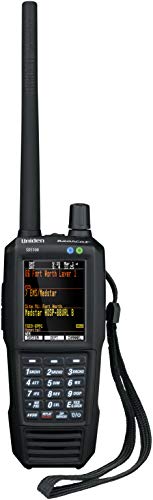
Uniden SDS100 True I/Q Digital Handheld Scanner, Designed for Improved Digital Performance in Weak-Signal and Simulcast Areas, Rugged / Weather Resistant JIS 4 Construction


Key features
- •True I/Q receiver design for improved digital performance in weak-signal and simulcast areas
- •Rugged/ weather resistant jis 4 construction
- •Li-Ion battery
- •Improved UI with 3 contextual soft keys that Change function based on the current operation
- •Customizable color LCD: user can modify color and what is displayed
Uniden SDS100 True I/Q Digital Handheld Scanner, Designed for Improved Digital Performance in Weak-Signal and Simulcast Areas, Rugged / Weather Resistant JIS 4 Construction
List Price: $1018.49$916.64DEALYou Save: $101.85 (10%)
Free shippingFree Returns – 30 daysFree Order CancellationSecure Payment2–3 Days DeliveryGet It October 25, 2026In Stock (30)No marketing spamNo account requiredFulfilment by FedEx / Amazon / UPS / ShipwirePayPal / Card Buyer Protection
Customer Reviews
Reviews sourced from verified Amazon purchasers4.5
out of 5
Based on 10 reviews
5★
80%
4★
20%
3★
0%
2★
0%
1★
0%
It's the best scanner available today
Ezra✓ Verified Purchase•November 23, 2023
I'm a Ham radio operator and over the years I have had dozens of scanners. I also own the SDS200 (base/mobile version of this radio) Most scanners don't die but the changing radion standards make them obsolete. This is the premium scanner that will handle the most radio systems that operate today. Analog, digital, trunked, it does them all. However you have to pay extra for and unlock key for NXDN ($50), DMR ($50) and ProVoice ($50) and if you do want these go directly to the Uniden site otherwise everyone else will charge $75. If you are just doing public service monitoring you won't need these options but I do a bit of commercial and business monitoring as well and many of them are NXDN or DMR. I don't think anyone except San Antonio Police use Provoice anymore.
Actual performance is great across all bands and intermod is well filtered. There are some idiosycrancies to it but go to radioreference.com forums to figure that out as I could go on for days. But overall it is the best most versatile and feature rich handheld scanner you can buy today. I live in an area with some radio systems that are problematic for many scanners (simulcast issues) and this one handles them all like a champ.
A couple things to know. There is no keyboard lock function which I REALLY dislike but I figured out a hack how to lock the keyboard via the free programming software but it's a total hassle and not practical. So it can be done and perhaps that will be a part of a future firmware upgrade. Also the unit gets pretty warm when operating, that's normal. The battery is pretty big and sticks out from the back of the unit which is a little dopey looking but overall not an issue with usability. It's just wen they first released them the original battery was way to weak so they now ship with the extended battery (about 8 hours) and it works fine. Actually the previous model would fall over all the time when you set it on a table and this bigger battery prevents that, so that's a plus. I bought a second battery and I've actually never used in about six months. It's a shame they didn't put bluetooth in it, but they did make it so you can charge the batteries while listening which you couldn't do on the previous model so that's a big plus.
The build is very sturdy and I'm sure I will replace this radio when technology changes not because the radio itself stopped working perfectly (like my last six scanners). It's is waterproof and much sturdier than the previous model. Sound quality is great and loud enough in very noisy environments.
Actual performance is great across all bands and intermod is well filtered. There are some idiosycrancies to it but go to radioreference.com forums to figure that out as I could go on for days. But overall it is the best most versatile and feature rich handheld scanner you can buy today. I live in an area with some radio systems that are problematic for many scanners (simulcast issues) and this one handles them all like a champ.
A couple things to know. There is no keyboard lock function which I REALLY dislike but I figured out a hack how to lock the keyboard via the free programming software but it's a total hassle and not practical. So it can be done and perhaps that will be a part of a future firmware upgrade. Also the unit gets pretty warm when operating, that's normal. The battery is pretty big and sticks out from the back of the unit which is a little dopey looking but overall not an issue with usability. It's just wen they first released them the original battery was way to weak so they now ship with the extended battery (about 8 hours) and it works fine. Actually the previous model would fall over all the time when you set it on a table and this bigger battery prevents that, so that's a plus. I bought a second battery and I've actually never used in about six months. It's a shame they didn't put bluetooth in it, but they did make it so you can charge the batteries while listening which you couldn't do on the previous model so that's a big plus.
The build is very sturdy and I'm sure I will replace this radio when technology changes not because the radio itself stopped working perfectly (like my last six scanners). It's is waterproof and much sturdier than the previous model. Sound quality is great and loud enough in very noisy environments.
AWESOME SCANNER!!! (Got a Mac?)
M. Wright✓ Verified Purchase•November 19, 2023
This is an AWESOME scanner and a worthy upgrade. Is it perfect? Nope. Uniden should have included some features that would have added significant value to the user. A few of those things are 1) Bluetooth 2) Ability to lockout keypad (seriously?) and 3) Ability to use AA batteries as a backup if needed. Are those all of them? Nope. But they are a few of them that irk me at the moment. The scanner overall is wonderful and amazing. The speaker is loud and clear, the reception is really great, and I pick up neighboring counties that I have never been able to pick up previously, and that's just using the stock antenna that came with it. The programming of this scanner is extremely easy. I had considered purchasing from another retailer as they had me scared to death about the complexities of setting up the programming. It's no sweat. Everything is pretty much already set up in the scanner. Just set up your favorites list, then enter your zip code location (in that order as one reviewer pointed out) and your set! There are a lot of customizable settings, pretty much everything by system, and it's fun to play around with all the different settings and screen colors. The reason I ended up purchasing on Amazon was for the extended warranty. I have enough experience to know, that you never know with Uniden what you will get long-term, and it was an inexpensive peace of mind to add that warranty through Amazon. I trust that if they ever need to make good on it, they will.
I did not really need to utilize the Sentinnel software... well because everything is pretty much already databased in the scanner, and it's easy to get it set up the way you want it. My concern with Sentinnel is that we have all Mac's, which it won't run on. I downloaded the parallel stuff and spent hours getting it all set up, but just couldn't get it to work. I ended up finding a super easy solution that worked easily and perfectly on my Mac, which I'll paste below if it would be helpful to someone else. It's important to note once again, that I really didn't need to do anything with the Sentinnel software, but I guess it's nice to know I have a backup of all my settings now. The instructions below may look intimidating at first, but trust me it's really quite easy and pain-free.
Here it is:
1. Go to WineBottler |*Run Windows-based Programs on a Mac and download WineBottler. I used the 1.6.1 Stable on Mavericks. It will pop up an ADFly Page. Just give it 5 seconds then click the "SKIP AD" button in the top right. (If you get any more ad pop ups just give it a few seconds and it will start downloading.)
Once finished: Move "Wine.app" and "Winebotter.app" to you applications folder.
2. Download the latest Sentinel Version. BCD536HP 3. Launch "Winebottler" from you applications folder. Follow prompts for install. This will install any needed files to run the apps later.
a. Click "Advanced" in the top bar.
b. Select "new prefix" default
c. Program to install: "select File"¦" and select the "Setup_BCDx36HP.msi" in the Sentinel folder on your desktop.
d. check "This is an installer, execute it.
e. in the "Winetricks" section, click in the search field and search for "dotnet20". Check the MS .NET 2.0. (this will install the .net for the Sentinel to install)
f. Click "Install" button. Save to your desk top as Sentinel.
This is now creating a windows app that will run on your mac using "wine". It will install the Dot Net files and you will have to agree to terms and tell it where to install. Defaults will be fine. That will finish and then Sentinel will star the install. Again, agree and save to defaults. This part does take some time so bear with it. (HINT: sometimes the installers will pop up in the background. You may have to click the doc to bring it forward to agree to the DOT NET terms etc"¦) Once the files are installed, the last step is to "Select Startfile" leave it on Program Files/Uniden/BCDX"¦"¦ and when you click the "Sentinel" app it will launch the app. Hit OK and your done. Now double click the newly created app and your ready to run Sentinel on your mac.
I did not really need to utilize the Sentinnel software... well because everything is pretty much already databased in the scanner, and it's easy to get it set up the way you want it. My concern with Sentinnel is that we have all Mac's, which it won't run on. I downloaded the parallel stuff and spent hours getting it all set up, but just couldn't get it to work. I ended up finding a super easy solution that worked easily and perfectly on my Mac, which I'll paste below if it would be helpful to someone else. It's important to note once again, that I really didn't need to do anything with the Sentinnel software, but I guess it's nice to know I have a backup of all my settings now. The instructions below may look intimidating at first, but trust me it's really quite easy and pain-free.
Here it is:
1. Go to WineBottler |*Run Windows-based Programs on a Mac and download WineBottler. I used the 1.6.1 Stable on Mavericks. It will pop up an ADFly Page. Just give it 5 seconds then click the "SKIP AD" button in the top right. (If you get any more ad pop ups just give it a few seconds and it will start downloading.)
Once finished: Move "Wine.app" and "Winebotter.app" to you applications folder.
2. Download the latest Sentinel Version. BCD536HP 3. Launch "Winebottler" from you applications folder. Follow prompts for install. This will install any needed files to run the apps later.
a. Click "Advanced" in the top bar.
b. Select "new prefix" default
c. Program to install: "select File"¦" and select the "Setup_BCDx36HP.msi" in the Sentinel folder on your desktop.
d. check "This is an installer, execute it.
e. in the "Winetricks" section, click in the search field and search for "dotnet20". Check the MS .NET 2.0. (this will install the .net for the Sentinel to install)
f. Click "Install" button. Save to your desk top as Sentinel.
This is now creating a windows app that will run on your mac using "wine". It will install the Dot Net files and you will have to agree to terms and tell it where to install. Defaults will be fine. That will finish and then Sentinel will star the install. Again, agree and save to defaults. This part does take some time so bear with it. (HINT: sometimes the installers will pop up in the background. You may have to click the doc to bring it forward to agree to the DOT NET terms etc"¦) Once the files are installed, the last step is to "Select Startfile" leave it on Program Files/Uniden/BCDX"¦"¦ and when you click the "Sentinel" app it will launch the app. Hit OK and your done. Now double click the newly created app and your ready to run Sentinel on your mac.
Uniden SDS100 handheld trunking scanner
David Young✓ Verified Purchase•November 7, 2023
Works well in congested high density areas, much better than the cheaper BCD436HP model.
Includes downloadable Windows PC programming software which can also be used for the BCD436HP model interchangeably. I installed and used the software using Windows 10 without problems.
Uses a rather expensive Lithium Ion battery pack if purchasing a backup battery pack. Would much prefer it to be designed around AA size rechargeable or alkaline batteries like are used with the BCD436HP model.
Battery run time for my monitoring application is approximately 7.5 continuous hours.
The color display is a nice touch but probably contributes to the reduced battery operation between charge cycles.
Can be somewhat difficult to program for the novice, but there are many U-Tube videos which can be viewed for step-by-step programming relatively quickly.
Very expensive trunking scanner, so probably not for the casual user.
Includes downloadable Windows PC programming software which can also be used for the BCD436HP model interchangeably. I installed and used the software using Windows 10 without problems.
Uses a rather expensive Lithium Ion battery pack if purchasing a backup battery pack. Would much prefer it to be designed around AA size rechargeable or alkaline batteries like are used with the BCD436HP model.
Battery run time for my monitoring application is approximately 7.5 continuous hours.
The color display is a nice touch but probably contributes to the reduced battery operation between charge cycles.
Can be somewhat difficult to program for the novice, but there are many U-Tube videos which can be viewed for step-by-step programming relatively quickly.
Very expensive trunking scanner, so probably not for the casual user.
Excellent High Quailty Scanner
BEAR LOCO✓ Verified Purchase•November 4, 2023
First of all I would like to say this scanner is made for anyone who enjoys listening to Police broadcasts, Highway Patrol, Fire Departments, Disasters, CB Radio and more. This is ready to go out of the box, all you need to do is input your location by zip code and the scanner automatically will program the frequencies in your area. If you live in an area that has encrypted digital frequencies, you will not be able to listen to these broadcasts. Make sure you read and understand the manual to operate this scanner correctly. There are also many YouTube tutorial videos to help guide you if you need to learn that way. I use my scanner on my road trips and at home everyday and so far I'm very happy with the results. I know the price tag is expensive, but this scanner is top of the line! Highly Recommend!
Wow, a great scanner is a small package!
Metrologist✓ Verified Purchase•November 1, 2023
I've been scanning for over 25 years. This scanner replaces my old venerable Icom IC-R1 that recently died. Some of the negative reviews here are from 2018 when the scanner was first introduced. This is a software scanner and is updated regularly with firmware patches. I just purchased mine and performed the firmware update. I haven't had any issues. The manual is a bit lacking and that is one of the reasons for the 4 star rating. The manual tells you what each setting does but doesn't explain how in many cases. I see some negative reviews about heat. I've had mine on continuously and it is slightly warm but nowhere near hot. The battery lasts a long time. 8 hours or so. This is a feature rich scanner and is fully customizable right down to the display colors. Once you get the hang of the interface it's really quite easy to navigate. It's great to have multiple favorites lists that you can turn off and on easily. The sound quality of the speaker is perfectly fine. I replaced the scanner antenna an increased reception by 6 dB overall. The stock antenna is water resistant at the coupling which probably attributes to slightly less signal strength received. Overall though this is a great little scanner that is feature rich and will last for many years into the future.
Page 1 of 2