ASRock B450M PRO4 AM4 AMD Promontory B450 SATA 6Gb/s USB 3.1 HDMI Micro ATX AMD Motherboard
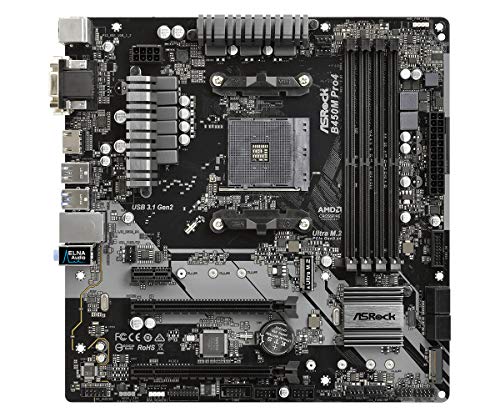


Key features
- •Socket AM4, Digi Power design, 9 Power Phase design, Supports 105W Water Cooling (Pinnacle Ridge); Supports 95W Water Cooling (Summit Ridge); Supports 65W Water Cooling (Raven Ridge)
- •Chipset: AMD Promontory B450
- •Memory: 4x DDR4-3200+(OC)/2933/2667/2400/2133 DIMM Slots, Dual Channel, ECC, Non-ECC, Unbuffered, Max Capacity of 64GB (AMD Ryzen series CPUs (Pinnacle Ridge))
- •Slots: 2x PCI-Express 3.0 x16 Slots (one runs at x8), 2x PCI-Express 2.0 x16 Slots (two run at x4), 1x PCI-Express 2.0 x1 Slot
- •SATA: 4x SATA3 Ports, Support RAID 0, 1, 10, NCQ, AHCI and Hot Plug
ASRock B450M PRO4 AM4 AMD Promontory B450 SATA 6Gb/s USB 3.1 HDMI Micro ATX AMD Motherboard
List Price: $178.21$160.39DEALYou Save: $17.82 (10%)
Free shippingFree Returns – 30 daysFree Order CancellationSecure Payment2–3 Days DeliveryGet It October 24, 2026In Stock (1)No marketing spamNo account requiredFulfilment by FedEx / Amazon / UPS / ShipwirePayPal / Card Buyer Protection
Customer Reviews
Reviews sourced from verified Amazon purchasers4.6
out of 5
Based on 10 reviews
5★
50%
4★
50%
3★
0%
2★
0%
1★
0%
First asrock board. So far so good
Sideshow 535✓ Verified Purchase•October 12, 2023
No need to be super geeky here. Grab it and go for your budget build of choice with am4 zen, zen+, or zen 2 without worry. It shows zen 3 out of box ready in the ads and on the package, so choose simply and you'll be rewarded.
I honestly think this is a great looking mid range 450 pro board that does everything I need. Connections are spaced out enough to strategize cable connects and routing, and with the right case, theres plenty of opportunity to load up this board, if that's your thing, and have plenty of air still move across the surface.
I built this with a ryzen 5 2400, 24gb ram 2400, 1TB ssd os/boot, 4tb storage, a 600w psu. Add some accessory fans and slap it all in your favorite case and you're good to go.
I'm playing many aaa games at recommended on 1080 p with 60fps. Internet, word processing, multimedia, and multi app processing is quick and easy. My cpu averages 45 c under heavy load. This is my first asrock board and so far so good. We shall see how long it lasts
I honestly think this is a great looking mid range 450 pro board that does everything I need. Connections are spaced out enough to strategize cable connects and routing, and with the right case, theres plenty of opportunity to load up this board, if that's your thing, and have plenty of air still move across the surface.
I built this with a ryzen 5 2400, 24gb ram 2400, 1TB ssd os/boot, 4tb storage, a 600w psu. Add some accessory fans and slap it all in your favorite case and you're good to go.
I'm playing many aaa games at recommended on 1080 p with 60fps. Internet, word processing, multimedia, and multi app processing is quick and easy. My cpu averages 45 c under heavy load. This is my first asrock board and so far so good. We shall see how long it lasts
Can Handle Mild Overclocks, Dont Push Harder Overclocks On 2nd Gen Ryzen 5/7 X Variant CPUs
DJ Smith✓ Verified Purchase•October 4, 2023
Used for a three months now. Have paired with a 2600x and 16gb delta rgb 3000mhz cl16 ram. It's good for what you get on a budget.
Pros:
Enough SATA ports for up to 4 HDDs/SSDs for starters.
2 M.2 Slots (1 NVMe x 1 Sata 3)
Enough space for GPU and Pcie Wifi
Can do mild overclocking (have 2600x at 4ghz with 1.2375v and -100mv vcore offset, never BSOD'd once)
Cons:
3+3 phase VRMs
Don't hard overclock, especially with 2nd/3rd gen Ryzen 5/7 x variants (stated above)
If you have a SATA M.2 installed on the SATA III M.2 slot, you lose a SATA port.
If you have a 2600x on this board. Don't use PBO (Precision Boost Overdrive), stick with a mild overclock of something like 4ghz at 1.2375v with a vcore offset of -100mv. Or stock settings.
Mine runs stable and never exceeds 1.14v. Have touched the VRMs multiple times whilst in stress tests for an hour, they never got hot and you still get the respected performance whilst not cooking VRMs.
If you want a better motherboard for hard overclocks, try and find a used b450 Tomahawk for under $80 through Amazon Warehouse. You'll have a better time and will get the most performance out of the 2600x on a Tomahawk. If you don't plan on overclocking, then this motherboard is fine at stock, you can still undervolt the cpu if need be. My Gammaxx 400 (extra fan attached) keeps my 2600x at around 35c max in ambient of 14c with current OC settings.
Pros:
Enough SATA ports for up to 4 HDDs/SSDs for starters.
2 M.2 Slots (1 NVMe x 1 Sata 3)
Enough space for GPU and Pcie Wifi
Can do mild overclocking (have 2600x at 4ghz with 1.2375v and -100mv vcore offset, never BSOD'd once)
Cons:
3+3 phase VRMs
Don't hard overclock, especially with 2nd/3rd gen Ryzen 5/7 x variants (stated above)
If you have a SATA M.2 installed on the SATA III M.2 slot, you lose a SATA port.
If you have a 2600x on this board. Don't use PBO (Precision Boost Overdrive), stick with a mild overclock of something like 4ghz at 1.2375v with a vcore offset of -100mv. Or stock settings.
Mine runs stable and never exceeds 1.14v. Have touched the VRMs multiple times whilst in stress tests for an hour, they never got hot and you still get the respected performance whilst not cooking VRMs.
If you want a better motherboard for hard overclocks, try and find a used b450 Tomahawk for under $80 through Amazon Warehouse. You'll have a better time and will get the most performance out of the 2600x on a Tomahawk. If you don't plan on overclocking, then this motherboard is fine at stock, you can still undervolt the cpu if need be. My Gammaxx 400 (extra fan attached) keeps my 2600x at around 35c max in ambient of 14c with current OC settings.
Very good quality board, but I almost think it's defect
Jayden T✓ Verified Purchase•September 8, 2023
This is a nice solid build board with lots of features, so far I think it's the best for the bucks spent.
Pros:
-- Easy to setup
-- Lots of features, including easy to do OC
-- Works flawlessly with Ryzen 5 3600 out of box
-- 4 memory module slots available
-- Supports M.2 SSD
-- ASRock support responded my question quickly than I expected, nice service
Cons:
-- Not supporting high frequency memory out of box, like 3200mHz, you have to adjust bios to make it work, and according to ASRock support, you need to put it into specific memory slot and no guaranty to work(even though manual states it does support 3200mhz). I couldn't make the Team 16GB 3200mhz working for the system and had to give up(no problem for 2666mHz memory module)
-- Major problem: no where to state you either need a graphics supported CPU(Ryzen 5 3600 does NOT have it) or you need a standalone video card, otherwise you will not be able to get any output. This makes me think the board is not booting, or it's defect, although it has a onboard video output which not working at all
-- Front panel connection(power switch, hdd LED, reset switch) is a little confused, not labeled clearly
-- Somehow, CPU fan 1 does not work well for cooling fan, but CPU fan 2 works fine
Overall, it's nice mainboard and worth the money. My system(2x8gb 2666Mhz, Ryzen 5 3600, 512 SSD, ATI WX9100 card etc.) runs smoothly like a charm.
Pros:
-- Easy to setup
-- Lots of features, including easy to do OC
-- Works flawlessly with Ryzen 5 3600 out of box
-- 4 memory module slots available
-- Supports M.2 SSD
-- ASRock support responded my question quickly than I expected, nice service
Cons:
-- Not supporting high frequency memory out of box, like 3200mHz, you have to adjust bios to make it work, and according to ASRock support, you need to put it into specific memory slot and no guaranty to work(even though manual states it does support 3200mhz). I couldn't make the Team 16GB 3200mhz working for the system and had to give up(no problem for 2666mHz memory module)
-- Major problem: no where to state you either need a graphics supported CPU(Ryzen 5 3600 does NOT have it) or you need a standalone video card, otherwise you will not be able to get any output. This makes me think the board is not booting, or it's defect, although it has a onboard video output which not working at all
-- Front panel connection(power switch, hdd LED, reset switch) is a little confused, not labeled clearly
-- Somehow, CPU fan 1 does not work well for cooling fan, but CPU fan 2 works fine
Overall, it's nice mainboard and worth the money. My system(2x8gb 2666Mhz, Ryzen 5 3600, 512 SSD, ATI WX9100 card etc.) runs smoothly like a charm.
This is a dope board
Amazon Customer✓ Verified Purchase•September 3, 2023
I love this board, perfect for what I need. I'm running a 3700x with 32gigs of ram, 1660 ti, with a WD Black 500GB NVME and a Samsung QVO 860 500GB (I know i could have just got a 1TB but its a long story). I love the USB-C port in the back, I use it to plug in my external NVME as a backup.
I mean yeah, some have complained about the second NVME slot and I ran into an issue with it. I had a drive in the slot while my Samsung just so happened to be plugged into the #3 SATA port and I received a "blue screen of death". I had to plug my sata cable into a different port because, like the board specs say, the SATA port #3 and the second nvme slot share a lane. And further more, the port didn't support the second nvme I installed, so like I said earlier, I bought an enclosure for it and I'm actually happy to have it as an external :)
Other than that, this board is awesome. It runs cool, bios menu is great, didn't need any bios update, dropped in my 3700x and was good to go. Would seriously recommend to anyone wanting a simple board for gaming.
I mean yeah, some have complained about the second NVME slot and I ran into an issue with it. I had a drive in the slot while my Samsung just so happened to be plugged into the #3 SATA port and I received a "blue screen of death". I had to plug my sata cable into a different port because, like the board specs say, the SATA port #3 and the second nvme slot share a lane. And further more, the port didn't support the second nvme I installed, so like I said earlier, I bought an enclosure for it and I'm actually happy to have it as an external :)
Other than that, this board is awesome. It runs cool, bios menu is great, didn't need any bios update, dropped in my 3700x and was good to go. Would seriously recommend to anyone wanting a simple board for gaming.
Asrock B450M motherboard
Gary Stutts✓ Verified Purchase•August 28, 2023
This motherboard was paired with an AMD R5 2600 for a budget build. The installation went well, but I had an issue with getting the system to boot into a prior install of Windows 10. Sometimes a BIOS update is needed for older motherboards to work properly. But given I was using an older CPU (although it too was brand new) I didn't think a BIOS update would be needed. Looking at the Asrock website I saw confusing statements about BIOS versions later than the one on the board from the factory would not support 2nd gen Ryzen CPUs. This did not make sense, so I did not flash the BIOS. The system would boot into the BIOS every time without my intervention. After reviewing the RAM that was used for compatibility and finding no issues, I replace the hard drive with the Windows 10 install with a blank SSD and it booted up to the prompt for a system disk (i.e. did not go straight to the BIOS this time). I had a Windows 10 ISO image on a USB stick, and completed the install with no issues. I activated Windows and it has been running fine since (about 5 weeks ago now). Strange build for sure, but I still recommend Asrock motherboards. I have used several and this one was the outlier. The other builds went just fine.
Page 1 of 2