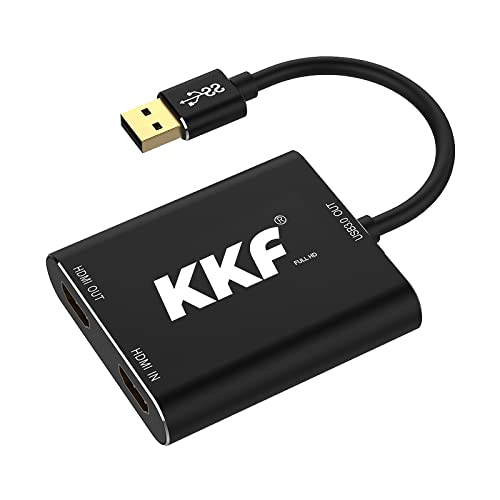
KKF Capture Card,60hz 4K HDMI Capture Card for Switch, 1080P 60FPS Video Capture Card for Streaming and Recording PS5 PS4 Xbox Series X/S Nintendo Switch in DSLR OBS with HD Ultra-Low Laten(USB A 3.0)


Key features
- •This HDMI to USB 3.0 Capture Devices can easily record high-definition pictures of game consoles (PS3/PS4, XBOX, Nintendo SWITCH, etc.) or other high-definition sources to your computer via third-party capture software,Or live broadcast over the Internet.Support most mainstream acquisition software, such as: AMCap, VLC, etc.
- •Plug and play, no need install driver. Design of low-power, no additional power supply required,Comply with UVC and UAC standards.
- •Adopting USB 3.0 channel recording of high-speed full HD screen. Compatible with many systems, such as Windows 7, 8, 10, Mac OS X 10.9 or above, Linux.
- •HDMI INPUT port, use a HDMI cable to connect to the HD video source; USB 3.0 Type A port OUTPUT, connect to USB 3.0 port on the computer(Compat With USB2.0 Theoretically); Power indicator, lights up after connecting to the USB port on the computer.
- •1 HDMI input, USB 3.0 out,design for your Home Theatre,Exhibition,Presentation,Reference.For OBS Studio operation instructions on Windows/MAC OS X/Linux: Go to the obsproject.com/download link and download the corresponding OBS Studio installer according to your computer's operating system and follow the installation prompts. If you have any questions about installing OBS Studio under Windows/MAC OS X/Linux,please do not hesitate to contact us.We will provide you with detailed operation guides!
KKF Capture Card,60hz 4K HDMI Capture Card for Switch, 1080P 60FPS Video Capture Card for Streaming and Recording PS5 PS4 Xbox Series X/S Nintendo Switch in DSLR OBS with HD Ultra-Low Laten(USB A 3.0)
List Price: $105.91$95.32DEALYou Save: $10.59 (10%)
Free shippingFree Returns – 30 daysFree Order CancellationSecure Payment2–3 Days DeliveryGet It August 10, 2026In Stock (1)No marketing spamNo account requiredFulfilment by FedEx / Amazon / UPS / ShipwirePayPal / Card Buyer Protection
Customer Reviews
Reviews sourced from verified Amazon purchasers4.0
out of 5
Based on 10 reviews
5★
50%
4★
50%
3★
0%
2★
0%
1★
0%
Excellent device for price
Paul Kersey✓ Verified Purchase•October 1, 2023
I don't write a lot of Amazon reviews, but felt compelled to review this capture box because so many of the negative comments include misinformation. I don't do any live streaming, so I can't comment on that functionality, but if you're looking for an extremely reliable device that can record 1080p video in outstanding quality, look no further. Here are a few important pieces of info if you're looking to capture 1080p video:
1) It requires a powerful CPU if you don't have a graphics card capable of utilizing the Nvidia NVENC hardware codec. This device off-loads the capture processing to your video card instead of your cpu (the standard x264 codec is software-driven). The difference on my antiquated AMD FX processor was 80+% CPU usage with x264, under 15% with NVENC.
2) Audio is tricky to configure as you need to ensure that the output device, sound card and all accompanying software, and the individual recording device installed in sound mixer ALL match. After 2 days of suffering with crackling, skipping sound, I found a message board post suggesting the issue was due to sample rate mismatch. Sure enough, once I matched ALL of the sample rates to the 48.0 KHZ of the output device, sound quality was excellent. If you aren't familiar with all of the sound settings in control panel, configuration might take some time-consuming poking around.
3) Claims that you can't achieve bitrates above 5 MB per second are totally erroneous. The NVENC codec allows you to set by CQP--a variable bitrate setting configured to achieve specific levels of quality. At CQP 20 and the BEST QUALITY setting, bitrates exceed 30 MB per second--in line with commercial blu-ray releases.
4) Needless to say, capturing at that level of quality will quickly fill a hard drive. At CQP 20 best quality, a 2-hour chunk of 1080p video will require approximately 12 gigabytes of disc space.
5) I capture to an SSD, but it seems likely that a traditional hard drive would be insufficient for keeping up that type of pace. SSD is probably a must.
6) You can capture using the Windows 10 CAMERA app, but you can get MUCH better quality and infinitely more configuration options by downloading the free OBS (Open Broadcaster Software). The initial learning curve is substantial, but once you figure out where the critical settings lie, you can get outstanding results. Plenty of help is available online.
If you're not an expert PC user, configuration challenges could prevent you from seeing the best of this device. But if you're technically capable and patient, you'll likely be enjoying outstanding performance after a few hours of tinkering.
Highly recommended.
1) It requires a powerful CPU if you don't have a graphics card capable of utilizing the Nvidia NVENC hardware codec. This device off-loads the capture processing to your video card instead of your cpu (the standard x264 codec is software-driven). The difference on my antiquated AMD FX processor was 80+% CPU usage with x264, under 15% with NVENC.
2) Audio is tricky to configure as you need to ensure that the output device, sound card and all accompanying software, and the individual recording device installed in sound mixer ALL match. After 2 days of suffering with crackling, skipping sound, I found a message board post suggesting the issue was due to sample rate mismatch. Sure enough, once I matched ALL of the sample rates to the 48.0 KHZ of the output device, sound quality was excellent. If you aren't familiar with all of the sound settings in control panel, configuration might take some time-consuming poking around.
3) Claims that you can't achieve bitrates above 5 MB per second are totally erroneous. The NVENC codec allows you to set by CQP--a variable bitrate setting configured to achieve specific levels of quality. At CQP 20 and the BEST QUALITY setting, bitrates exceed 30 MB per second--in line with commercial blu-ray releases.
4) Needless to say, capturing at that level of quality will quickly fill a hard drive. At CQP 20 best quality, a 2-hour chunk of 1080p video will require approximately 12 gigabytes of disc space.
5) I capture to an SSD, but it seems likely that a traditional hard drive would be insufficient for keeping up that type of pace. SSD is probably a must.
6) You can capture using the Windows 10 CAMERA app, but you can get MUCH better quality and infinitely more configuration options by downloading the free OBS (Open Broadcaster Software). The initial learning curve is substantial, but once you figure out where the critical settings lie, you can get outstanding results. Plenty of help is available online.
If you're not an expert PC user, configuration challenges could prevent you from seeing the best of this device. But if you're technically capable and patient, you'll likely be enjoying outstanding performance after a few hours of tinkering.
Highly recommended.
Great product! Works well! Best value!
susan s.✓ Verified Purchase•September 24, 2023
This product works exactly as intended. It is great quality and comes at half the price of the name brand ones. My only caveat is that it was not as easy to set up (plug and play) as I thought. I am using this to record gameplay on 1 PC (while using recording software on another PC), in order to prevent lag (and consume fewer resources) on the first PC. When I plugged the device in, the video passed through, but the audio didn't. I had to go to the sound setting in the control panel on the 1st PC and set this device as the default sound output. Then I had to go to the 2nd PC's sound setting and set the microphone input to this device. After that, it worked great.
Perfect video capture device
Amazon Customer✓ Verified Purchase•September 13, 2023
I used this one for my ambient lights project and it worked perfectly. Very satisfied with quality and low latency.
Minor issues to note
1. If you're not capturing, you still need to power it through USB. I had an HDMI splitter before, it could power itself from HDMI directly, which was nice because you were not required to power computer if you're not capturing.
2. I have an HDMI switch in front of this device and if I'm not capturing and switch inputs, colors are messed up (I think it's some kind of RGB vs BGR difference). If capturing (as it normally does) it does not have this problem.
Overall, easy to use high performance (I observed 100+ FPS on my Raspberry Pi) capturing device. Before I used a combination of HDMI splitter + HDMI-to-AV + USB-AV-capture device and although the whole setup costed less. it was a nightmare: lots of space taken, lots of wires, lots of power supplies needed, bad picture quality, high latency.
Minor issues to note
1. If you're not capturing, you still need to power it through USB. I had an HDMI splitter before, it could power itself from HDMI directly, which was nice because you were not required to power computer if you're not capturing.
2. I have an HDMI switch in front of this device and if I'm not capturing and switch inputs, colors are messed up (I think it's some kind of RGB vs BGR difference). If capturing (as it normally does) it does not have this problem.
Overall, easy to use high performance (I observed 100+ FPS on my Raspberry Pi) capturing device. Before I used a combination of HDMI splitter + HDMI-to-AV + USB-AV-capture device and although the whole setup costed less. it was a nightmare: lots of space taken, lots of wires, lots of power supplies needed, bad picture quality, high latency.
Value for money
Kyle Banner✓ Verified Purchase•August 22, 2023
First off I need to mention the price point. At the time of writing this review you won't find any other card with these specifications for this price. I did notice that the output video which is shown on the monitor/ tv is downgraded by quite a bit. The actual captured content which is shown on the laptop such as in obs is slightly better which strangely makes the stream clearer than video being transferred through the hdmi cable. Overall it gets the job done and isn't that bad for the price.
Great for New Streamers
HelloDanMo✓ Verified Purchase•July 26, 2023
In January, I wanted to start streaming on Twitch, but didn't want to make huge financial investments, since I was just beginning. I found this MCY capture card as a more inexpensive alternative to the Elgato, and it has been really good.
For about 1/3 of the price, this card does exactly what I need it to do. The picture quality is good, the sound quality is good, and it works well.
It is not perfect, however, for the following reasons:
- Sometimes when it's plugged into my computer, I cannot hear the sound from my console (PS4), and have to reinsert the usb a few times to get it to work.
- The capture card also runs hot at some points, and I believe affects the quality of the video.
- It does not come with software (like the Elgato), where you can adjust the different aspects of the device like picture, sound, etc.
That being said, this capture card was very easy to setup, and has lasted me 11 months with only a few minor headaches. I would recommend to the beginning streamer, who wants to try streaming out without spending too much money. If you have more questions, feel free to ask me on Twitch at HelloDanMo_ttv.
For about 1/3 of the price, this card does exactly what I need it to do. The picture quality is good, the sound quality is good, and it works well.
It is not perfect, however, for the following reasons:
- Sometimes when it's plugged into my computer, I cannot hear the sound from my console (PS4), and have to reinsert the usb a few times to get it to work.
- The capture card also runs hot at some points, and I believe affects the quality of the video.
- It does not come with software (like the Elgato), where you can adjust the different aspects of the device like picture, sound, etc.
That being said, this capture card was very easy to setup, and has lasted me 11 months with only a few minor headaches. I would recommend to the beginning streamer, who wants to try streaming out without spending too much money. If you have more questions, feel free to ask me on Twitch at HelloDanMo_ttv.
Page 1 of 2