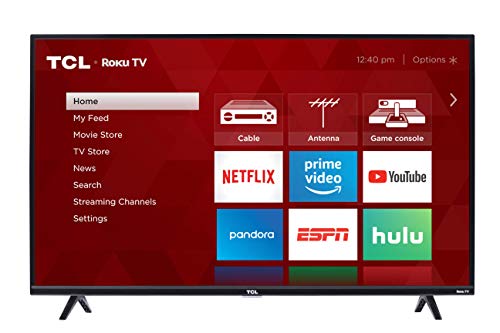
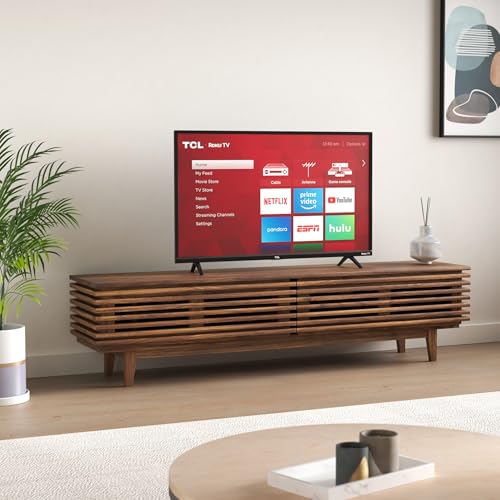
TCL 43S325 43 Inch 1080p Smart LED Roku TV (2019)


Key features
- •Easy Voice Control: Works with Amazon Alexa or Google Assistant to help you find movie titles, launch or change channels, even switch inputs, using just your voice. Also available through the Roku mobile app
- •Smart Functionality offers access to over 5,000 streaming channels featuring more than 500,000 movies and TV episodes via Roku TV
- •1080p Full HD Resolution excellent detail, color, and contrast
- •Direct lit LED produces great picture quality with 60Hz refresh rate for fast moving action scenes with virtually no motion blur
- •Inputs: 3 HDMI, 1 USB, RF, Composite, Headphone Jack, Optical audio Out
TCL 43S325 43 Inch 1080p Smart LED Roku TV (2019)
List Price: $478.74$430.87DEALYou Save: $47.87 (10%)
Free shippingFree Returns – 30 daysFree Order CancellationSecure Payment2–3 Days DeliveryGet It October 25, 2026In Stock (30)No marketing spamNo account requiredFulfilment by FedEx / Amazon / UPS / ShipwirePayPal / Card Buyer Protection
Customer Reviews
Reviews sourced from verified Amazon purchasers4.6
out of 5
Based on 10 reviews
5★
50%
4★
50%
3★
0%
2★
0%
1★
0%
It's amazing the quality you get for the price of TVs these days.
Eric W✓ Verified Purchase•October 1, 2023
So the past several years I just do everything on my PC, games and shows and movies I'd just watch there I used to have a nice home entertainment setup but not anymore I now have an awesome "gaming room" :) But I decided especially with the pandemic right now and stuck working from home I spend 8-9 working hours sitting in front of that computer desk and in that chair, it would be nice to retreat to something more relaxing. So I decided to upgrade my TV situation so I can lounge on the couch and watch movies and shows. I started looking online and I came across this brand TCL. I researched them and they have made their way up the ranks and are like the 3rd largest TV manufacturer now. Now for the same price (within 10 bucks) I could have gotten the 4K version of this TV but I'm not picky and all my media I have stored is a@ 1080p so at this time I didn't think 4K was needed so I went with this version 49in @ 1080 but it has all the same Smart TV features as the 4K model. It has a built in Roku which I hear is like 50 bucks on its own. This is my first smart TV. First off its a small thing really but I have to say this little remote it comes with is great, its oddly satisfying with the way it clicks. Responsive. I've watched a few movies on it and the picture is wonderful sound is ok, definitely nothing special probably just there to get the job done, and would have been satisfactory on their own, but I hooked up some nice logitech stereo speakers that I used to use on my PC. I would say the only negative about the TV itself would be the very shiny screen which causes lots of light glare. I have blackout curtains so its not an issue for me. The Smart TV allowed me to setup a few channels (youtube, wwe network, and roku media player) The media player is awesome the TV allowed me to attach an external harddrive via usb and I'm able to directly access all my shows and movies I have on them and it plays them flawlessly. I think this TV is absolutely wonderful for the price ($250). Get this one or the equivalent 4K version. You'll love it.
Note: If you purchase it online and have it shipped before getting it all setup, get the power cord out and test the TV. The first one was damaged in shipping and the screen was busted (not to mention the delivery driver put it on the neighbors porch...) But amazon was right on it, they got a new one shipped out with 48 hours to me and they had UPS come and pick the broken one up in 24 hours. But this had nothing to do with the TVs quality and I won't punish the score for the TV itself for that issue, not to mention Amazon was super on it.
Note: If you purchase it online and have it shipped before getting it all setup, get the power cord out and test the TV. The first one was damaged in shipping and the screen was busted (not to mention the delivery driver put it on the neighbors porch...) But amazon was right on it, they got a new one shipped out with 48 hours to me and they had UPS come and pick the broken one up in 24 hours. But this had nothing to do with the TVs quality and I won't punish the score for the TV itself for that issue, not to mention Amazon was super on it.
Went from Loving it to hating it to loving it again after fixing the slowness problem
P. Arnold✓ Verified Purchase•September 28, 2023
Aug 2022 UPDATE: TV became very slow again, even after doing the remote thing [shown below]. What I ended up doing FINALLY, TOTALLY fixed the problem. Should not NEED to do this, but for this TV anyway, I think you DO need to do it.... I purchased a ROKU device for about $30 bucks [from Amazon], plugged it into an HDMI Port on my Roku smart [?] TV, and now I don't even use it as a 'smart' TV. I simply use the Roku device I plugged in and now this TV is just as fast as my other two [dumb] TV's that I have. THIS finally and totally fixed the s-l-o-w problem!! And it only took me about a year and a half to figure it out. LOL
UPDATE: OK. I was hating this TV so much I wanted to just GIVE IT AWAY. Such a slow TV, it drove me crazy. THEN, I googled 'slow TCL Roku Smart TV'. There was a UTube on there that said it is the remote; not the TV. Here is what you do and it totally fixes the slow problem:
1. Remove batteries
2. Hold down red on/off button for about 20 - 30 seconds
3. Continuously press all the other buttons over and over again....Slap the remote against your hand, press buttons more, slap against your hand again.... [beat the crud out of your remote]
4. Put the batteries back in and VOILA!!!.... Your TV is now very fast!!
I was amazed. This little trick worked for me...I now love my TV once again! LOL
UPDATE: OK...I am going to give this TV away and just buy another of a different brand [Toshiba], I guess. I have 3 TV's in my house and this is the only one that just BUFFERS, and BUFFERS, and BUFFERS!! I thought it was my Wifi but I did all kinds of tests and it is NOT the Wifi. I don't know why or how, but this TV is soooo SLOW is the only way I can describe it. Sometimes it tells me I have to delete some of the APPS because it is full?? I am going to give this to one of my kids and just buy another NOT-smart TV and use a Roku stick to make it smart. Maybe the slowness and buffering is normal for a smart TV but in my opinion, that does not make it very Smart. LOL
UPDATE: Had this TV for 6 months now and I am ready to set it on the street with a 'FREE' sign on it and feel sorry for whomever takes it. The mouths do not sync with the audio now. You can unplug the TV and then plug it back in again and it fixes the problem for awhile, but only for a day or so. The TV is slow to respond when you press a button....I just hate it. I have been a Toshiba TV owner for the past 30 years and I WISH I would have just gotten another Toshiba rather than this junk. So my review has gone from Awesome TV, to not so awesome, to WORST TV ever.... LOL Seriously though, don't buy it!! You can HAVE mine.
UPDATE: OK. I was hating this TV so much I wanted to just GIVE IT AWAY. Such a slow TV, it drove me crazy. THEN, I googled 'slow TCL Roku Smart TV'. There was a UTube on there that said it is the remote; not the TV. Here is what you do and it totally fixes the slow problem:
1. Remove batteries
2. Hold down red on/off button for about 20 - 30 seconds
3. Continuously press all the other buttons over and over again....Slap the remote against your hand, press buttons more, slap against your hand again.... [beat the crud out of your remote]
4. Put the batteries back in and VOILA!!!.... Your TV is now very fast!!
I was amazed. This little trick worked for me...I now love my TV once again! LOL
UPDATE: OK...I am going to give this TV away and just buy another of a different brand [Toshiba], I guess. I have 3 TV's in my house and this is the only one that just BUFFERS, and BUFFERS, and BUFFERS!! I thought it was my Wifi but I did all kinds of tests and it is NOT the Wifi. I don't know why or how, but this TV is soooo SLOW is the only way I can describe it. Sometimes it tells me I have to delete some of the APPS because it is full?? I am going to give this to one of my kids and just buy another NOT-smart TV and use a Roku stick to make it smart. Maybe the slowness and buffering is normal for a smart TV but in my opinion, that does not make it very Smart. LOL
UPDATE: Had this TV for 6 months now and I am ready to set it on the street with a 'FREE' sign on it and feel sorry for whomever takes it. The mouths do not sync with the audio now. You can unplug the TV and then plug it back in again and it fixes the problem for awhile, but only for a day or so. The TV is slow to respond when you press a button....I just hate it. I have been a Toshiba TV owner for the past 30 years and I WISH I would have just gotten another Toshiba rather than this junk. So my review has gone from Awesome TV, to not so awesome, to WORST TV ever.... LOL Seriously though, don't buy it!! You can HAVE mine.
Video/Audio no complaints
Walter Ostlie ✓ Verified Purchase•September 19, 2023
Nice little tv. Was easy to mount on the wall with a standard, 3rd party wall mount. The picture and audio work perfect for a bedroom. I'm not a crazy audiophile, but it sounds good to me and gets plenty loud without sounding tinny.
It's easy to setup on WiFi.
The smart features are good, doesn't feel like anything is missing. All the apps are there. The TV features are nice, there's a sleep timer which is great for falling asleep to Great British Baking. There are also audio settings to make voices louder, not sure how much it helps. There is also a setting for lowering the brightness which is also great for sleepy time watching.
The remote is okay, sometimes I have to click multiple times. I'm not sure if the remote is weak or if the tv is just thinking. Maybe the processor is under powered? Sometimes when I try to set the sleep timer, I have to wait a few seconds for the menu to pop up. Not a huge deal, but I wonder how much slower it will get as new updates are added.
It's easy to setup on WiFi.
The smart features are good, doesn't feel like anything is missing. All the apps are there. The TV features are nice, there's a sleep timer which is great for falling asleep to Great British Baking. There are also audio settings to make voices louder, not sure how much it helps. There is also a setting for lowering the brightness which is also great for sleepy time watching.
The remote is okay, sometimes I have to click multiple times. I'm not sure if the remote is weak or if the tv is just thinking. Maybe the processor is under powered? Sometimes when I try to set the sleep timer, I have to wait a few seconds for the menu to pop up. Not a huge deal, but I wonder how much slower it will get as new updates are added.
Picture Quality, USB, Remote
Terran✓ Verified Purchase•September 19, 2023
I haven't had this set up and working for longer than a few days.
When it comes to ROKU remote it's a relief to go down to one remote as the volume buttons are on the side.
Also, if you already have a ROKU account the sign-in is easy. Once it registers the WIFI it already has on you, it's a fast process. If you're a newcomer to ROKU, you should know though a credit card (for any ROKU purchased apps) are required, if you're not doing any purchases thru ROKU you can pass on this page. They may not want you to know that, but it's easy. I have no CC with them and never have. I did need the computer for my email to confirm my new device (this TV) but otherwise that was it. No code required for me.
When it comes to Blu-Ray/DVD players these types of devices are auto scanned thru HDMI setup.
However now I needed to contact customer service (the info wasn't in the sparse manual) and that person was helpful and polite and I reached a human being in about two minutes. You have options but I did fine with a phone call. If you have a hard drive you want to add thru USB port you have to go into the ROKU MAIN PAGE 'SEARCH' FUNCTION for ROKU MEDIA and then you can add the HDD or SSD that way. There is a quirk with this as it will automatically tune to your hard drive, and I didn't need that. Options are available for instant access. But I might have to replug the hard drive in if I want to access it. Also I can tell you it was a clean hard drive and no option to format it so if you're looking for recordability, this TV doesn't have it. As it was, I added the hard drive and it froze on that added device, there was no option to get me off that screen. So then I was pushing the HOME (main) button for ROKU and it was doing nothing. I couldn't get out of where I was. I finally was pushing the star button about a dozen times and then the ROKU froze up to a blank screen and restarted itself. That should not happen when you have merely added a new device.
Now, when it comes to the picture quality, first off you have five settings available for picture brightness-dark. IMO the picture quality isn't as good as any other TV I've had. The image seems soft, not sharp. That is the disappointment. But this isn't my main TV.
When it comes to ROKU remote it's a relief to go down to one remote as the volume buttons are on the side.
Also, if you already have a ROKU account the sign-in is easy. Once it registers the WIFI it already has on you, it's a fast process. If you're a newcomer to ROKU, you should know though a credit card (for any ROKU purchased apps) are required, if you're not doing any purchases thru ROKU you can pass on this page. They may not want you to know that, but it's easy. I have no CC with them and never have. I did need the computer for my email to confirm my new device (this TV) but otherwise that was it. No code required for me.
When it comes to Blu-Ray/DVD players these types of devices are auto scanned thru HDMI setup.
However now I needed to contact customer service (the info wasn't in the sparse manual) and that person was helpful and polite and I reached a human being in about two minutes. You have options but I did fine with a phone call. If you have a hard drive you want to add thru USB port you have to go into the ROKU MAIN PAGE 'SEARCH' FUNCTION for ROKU MEDIA and then you can add the HDD or SSD that way. There is a quirk with this as it will automatically tune to your hard drive, and I didn't need that. Options are available for instant access. But I might have to replug the hard drive in if I want to access it. Also I can tell you it was a clean hard drive and no option to format it so if you're looking for recordability, this TV doesn't have it. As it was, I added the hard drive and it froze on that added device, there was no option to get me off that screen. So then I was pushing the HOME (main) button for ROKU and it was doing nothing. I couldn't get out of where I was. I finally was pushing the star button about a dozen times and then the ROKU froze up to a blank screen and restarted itself. That should not happen when you have merely added a new device.
Now, when it comes to the picture quality, first off you have five settings available for picture brightness-dark. IMO the picture quality isn't as good as any other TV I've had. The image seems soft, not sharp. That is the disappointment. But this isn't my main TV.
CAN'T BEAT THIS T.V. FOR THE PRICE!!
Ron ✓ Verified Purchase•August 14, 2023
Received this product today. It was in EXCELLENT QUALITY when I received it. Easily un-boxed and able to set-up. All items were present. I have to say this was the quickest set-up I've ever had for any type of device (T.V, PC, Laptop, Phone, etc.). Although I did a bit of research before I purchased this device through Amazon. Then after I ordered it and while I was waiting for delivery I did a bit of reading on this site (reviews & Q&A's) just to have an "edge" when it came time to set it up. When all was said & done it probably was an hour to hour and a half from opening the box to setting back down on the couch after all was done.
Once you read through all the Q&A's, and about 75% of them are questions that have been asked two to three times, you'll have ALL of your questions answered so once your t.v. is delivered you have a plan of action and push right through that set-up.
Here are the biggest "complaints" that are non-sense when dealing with a ROKU t.v.:
A. It doesn't COST A PENNY TO SET UP A ROKU ACCOUNT and activate your T.V...if for some reason you come across a site or a phone call demanding payment in order to activate your t.v...hang up or whatnot, and reevaluate (i.e. make sure you have the correct website typed in or the correct phone number dialed in). You can activate your roku t.v. with a "free" roku account. You don't even have to put in a credit card.
B. You get what you pay for...Yes, while that is true in every aspect of life you can get a good deal without having to pay out the butt. I believe this is one of those times!!
C. This item DOES NOT COME WITH A WALL MOUNT. If you want to wall mount it you buy the mount yourself. If you want to specifications of what size wall-mount to buy they are all in the directions that come with the t.v. While I didn't wall mount it (I just used the stands that come with the set) If I wanted to all I had to do was either read through the Q&A's (as that question has been asked over 20 times) or just read through the "directions" booklet provided with the T.V.
D. If you want to use your phone as your "roku remote" all you have to do is d/l the app from your store (G-Play or apple) and you're good to go. No, the roku remote doesn't have numbers on it and yes it does have volume control on the side of it. Just remember, both your phone and your T.V. have to both be on the same wi-fi connection in order for your phone to work as the remote, if not, then it's a NO-GO!!
E. If you have satellite, cable, etc...YES, it works with this T.V., along with Wi-fi. The model I have doesn't work with Ethernet or bluetooth, but TCL does have models that do work with Bluetooth & ethernet.
Be a bit proactive, it'll save you a bunch of time in the end!
As I stated earlier, it didn't take any time at all for me to set this up from beginning to end. Take a bit of time and do some research!!
This set is great quality and you are easily able to adjust it to your liking in the settings menu. Every aspect of this set is adjustable. I couldn't be happier with the amount I paid for it!!!
Try it, YOU WON'T BE DISAPPOINTED!!!
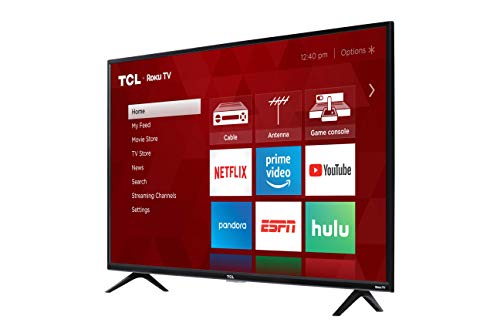
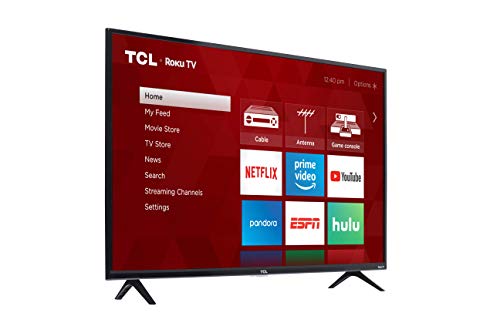
In the pictures below, one of the pics is the front of the set and the other is a side shot showing the thickness of the set along with the fact that there aren't a million plugs coming from the back area.
Once you read through all the Q&A's, and about 75% of them are questions that have been asked two to three times, you'll have ALL of your questions answered so once your t.v. is delivered you have a plan of action and push right through that set-up.
Here are the biggest "complaints" that are non-sense when dealing with a ROKU t.v.:
A. It doesn't COST A PENNY TO SET UP A ROKU ACCOUNT and activate your T.V...if for some reason you come across a site or a phone call demanding payment in order to activate your t.v...hang up or whatnot, and reevaluate (i.e. make sure you have the correct website typed in or the correct phone number dialed in). You can activate your roku t.v. with a "free" roku account. You don't even have to put in a credit card.
B. You get what you pay for...Yes, while that is true in every aspect of life you can get a good deal without having to pay out the butt. I believe this is one of those times!!
C. This item DOES NOT COME WITH A WALL MOUNT. If you want to wall mount it you buy the mount yourself. If you want to specifications of what size wall-mount to buy they are all in the directions that come with the t.v. While I didn't wall mount it (I just used the stands that come with the set) If I wanted to all I had to do was either read through the Q&A's (as that question has been asked over 20 times) or just read through the "directions" booklet provided with the T.V.
D. If you want to use your phone as your "roku remote" all you have to do is d/l the app from your store (G-Play or apple) and you're good to go. No, the roku remote doesn't have numbers on it and yes it does have volume control on the side of it. Just remember, both your phone and your T.V. have to both be on the same wi-fi connection in order for your phone to work as the remote, if not, then it's a NO-GO!!
E. If you have satellite, cable, etc...YES, it works with this T.V., along with Wi-fi. The model I have doesn't work with Ethernet or bluetooth, but TCL does have models that do work with Bluetooth & ethernet.
Be a bit proactive, it'll save you a bunch of time in the end!
As I stated earlier, it didn't take any time at all for me to set this up from beginning to end. Take a bit of time and do some research!!
This set is great quality and you are easily able to adjust it to your liking in the settings menu. Every aspect of this set is adjustable. I couldn't be happier with the amount I paid for it!!!
Try it, YOU WON'T BE DISAPPOINTED!!!
In the pictures below, one of the pics is the front of the set and the other is a side shot showing the thickness of the set along with the fact that there aren't a million plugs coming from the back area.
Page 1 of 2