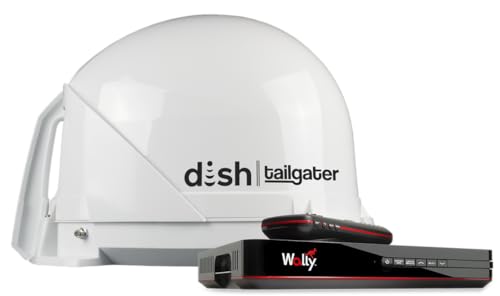
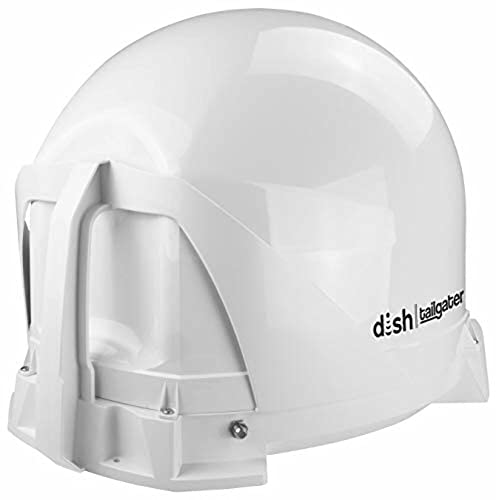
KING DT4450 DISH Tailgater Bundle - Portable/Roof Mountable Satellite TV Antenna and DISH Wally HD Receiver , White , Western & Eastern Arc Satellites





Key features
- •Portable satellite TV antenna with included dish Wally HD receiver provides 100% nationwide coverage using western and Eastern satellites (110/119/129 or 110/119/61.5)
- •Lightweight and compact (8 lbs), The dish Tailgater is portable or roof-mountable - Mounting feet included
- •The Wally HD receiver allows you to connect to a wireless network to enjoy streaming videos and other web apps (requires separate Wi-Fi adapter)
- •Included coax cable provides simple setup with automatic satellite acquisition and switching; supports single TV viewing
- •Weather-resistant materials withstand extreme heat/cold
BrandKING
CategoryTV Antennas
SizeWestern & Eastern Arc Satellites
ColorWhite
Warranty2 Years Parts and Labor
KING DT4450 DISH Tailgater Bundle - Portable/Roof Mountable Satellite TV Antenna and DISH Wally HD Receiver , White , Western & Eastern Arc Satellites
List Price: $640.19$576.17DEALYou Save: $64.02 (10%)
Free shippingFree Returns – 30 daysFree Order CancellationSecure Payment2–3 Days DeliveryGet It October 27, 2026In Stock (23)No marketing spamNo account requiredFulfilment by FedEx / Amazon / UPS / ShipwirePayPal / Card Buyer Protection
Customer Reviews
Reviews sourced from verified Amazon purchasers4.6
out of 5
Based on 10 reviews
5★
80%
4★
20%
3★
0%
2★
0%
1★
0%
Works as it should
elm673✓ Verified Purchase•August 10, 2023
Worked perfectly.
I had the Dish Playmaker and returned it. What a joke!
The King is the way to go.
The Playmaker was useless because the bundled Wally was defective. I returned the first one and the second one was defective also. Bought the Tailgater Pro and what a difference. Had it up and running in10 minutes.
I had the Dish Playmaker and returned it. What a joke!
The King is the way to go.
The Playmaker was useless because the bundled Wally was defective. I returned the first one and the second one was defective also. Bought the Tailgater Pro and what a difference. Had it up and running in10 minutes.
Dish Hardware good...if you can figure out the install software
Sam✓ Verified Purchase•August 4, 2023
I bought my Dish Tailgater Pro in October, 2019, and unfortunately was unable to use it, so it sat in my closet until 3-28-2020. Setup consisted of calling and activating the two Wally receivers I bought- 2@$7 dollars more each a month (pay as you go???) to my home dish account.
I wanted to know they worked before going out camping. I hooked the first up to the TailgaterPro and my home TV and it seemed to be going ok with setup, UNTIL, it was restarting, and it was doing a check, when it reverted back to attempting to download software AGAIN which it then seemed stuck on...after 20 minutes (should take no longer than 20 minute -it said) I cycled the power button and it basically started up again and started the same bad process, again (20 more wasted minutes)! Next, I cycled power and when it wanted me to enter my state, instead of scanning I picked the other option (sorry I can not remember the button name) and eventually somehow I was able to make it to a Dish Diagnostics page and after fooling with the settings i picked the satellite which i believe was at 0 and i made it "1." I then tuned it to 129 further down and it made a low constant monotone locking sound. After doing this to both receivers I was able to eventually manipulate the software screens to where I got it working. Eventually i was also able to download (more waiting) the guide to the channels for 2 days.
My overall impression- This is just me, but, if you fall into my type situation, it was not good and I spent over 3 and a half hours, from receiver activation, and then trying to figure out how to get a picture. Thankfully, I figured out enough to know what needed done on my own. I believe the scan option after it restarted was supposed to pick the satellite for my state, but it simply wouldn't. With some luck, logic, and common sense, I was able to get it working, but this contributed for my 2 star rating for "Ease of Install" and that was only because I got it working. Amazon did great with the order and delivery, Dish actually did great with the picture quality, but the ease of install software needs alot of fixing. I should not have to do what I did and I understand completely those people's frustrations and complaints on these reviews. Also, I could have called and asked for tech support but the person I spoke with for activating the receivers had a thick foreign accent and I could barely understand her, so trying to get tech support, I thought, would be a nightmare understanding. Thankfully, after much frustration i got it figured out.
I wanted to know they worked before going out camping. I hooked the first up to the TailgaterPro and my home TV and it seemed to be going ok with setup, UNTIL, it was restarting, and it was doing a check, when it reverted back to attempting to download software AGAIN which it then seemed stuck on...after 20 minutes (should take no longer than 20 minute -it said) I cycled the power button and it basically started up again and started the same bad process, again (20 more wasted minutes)! Next, I cycled power and when it wanted me to enter my state, instead of scanning I picked the other option (sorry I can not remember the button name) and eventually somehow I was able to make it to a Dish Diagnostics page and after fooling with the settings i picked the satellite which i believe was at 0 and i made it "1." I then tuned it to 129 further down and it made a low constant monotone locking sound. After doing this to both receivers I was able to eventually manipulate the software screens to where I got it working. Eventually i was also able to download (more waiting) the guide to the channels for 2 days.
My overall impression- This is just me, but, if you fall into my type situation, it was not good and I spent over 3 and a half hours, from receiver activation, and then trying to figure out how to get a picture. Thankfully, I figured out enough to know what needed done on my own. I believe the scan option after it restarted was supposed to pick the satellite for my state, but it simply wouldn't. With some luck, logic, and common sense, I was able to get it working, but this contributed for my 2 star rating for "Ease of Install" and that was only because I got it working. Amazon did great with the order and delivery, Dish actually did great with the picture quality, but the ease of install software needs alot of fixing. I should not have to do what I did and I understand completely those people's frustrations and complaints on these reviews. Also, I could have called and asked for tech support but the person I spoke with for activating the receivers had a thick foreign accent and I could barely understand her, so trying to get tech support, I thought, would be a nightmare understanding. Thankfully, after much frustration i got it figured out.
Dish Wally matches well…
Lumpie✓ Verified Purchase•July 27, 2023
Light and easy to handle. Acquisition accomplished in about ten minutes. Some low power locals (Colorado Springs in Monument, CO, for example) when not in center of spot beam require a larger diameter antenna.
Never have not received the nationwide channels well.
Never have not received the nationwide channels well.
totally happy with this, wish I had one years ago.
William R. Davis✓ Verified Purchase•July 14, 2023
I have aimed dishes manually for years. Wow, is this thing something I wish I had years ago. Here's some time numbers with a Wally dish receiver:
Wally boot-up time from plugging power cord in--about 1 1/2 minutes
Dish aim and receive satellites--about 1 minute
Wally Acquire signal--about 3 minutes
Wally receive guide--about 2 minutes.
Note the only additional time over rebooting using a fixed pre-aimed dish 1002 is the 1 minute aiming time.
From the description, I thought anytime I selected a channel on a different satellite, the unit would need to do the whole reboot sequence. But the dish just slews to the next satellite in about 5 seconds. Nearly as fast as having the 3 head dish.
I did notice that the local channels that s/b in HD were only SD. I investigated this and found the unit was locked onto the stronger spot beam transponder that was the SD version. On my home fixed antenna the stronger SD transponder had a signal strength about 70, nearly 4 times what the HD transponder had with the mobile dish. With the mobile dish, the signal on the stronger transponder was only about half the weaker one on the fixed antenna and the weaker transponder was not to be found. So looks like some performance is lost with the smaller size dish. Note: all the HD channels I get on 129 & 119 were in HD. Only 110 had the problem with SD instead of HD. Since these channels were on spot beams, instead of continental wide beams, I suspect I'm on the edge of the spot beam.
But only a minute to aim and find the satellite. Compared to my setting up the tripod 3 head version; I don't think I could even get the tripod out of its compartment on the motorhome in a minute. Not alone plumb, look up & set in the elevation, skew and azimuth and connect my signal meter and coax to the motorhome.
But I still have the 3 head version for the times when the motorhome is parked with a tree blocking the signal.
I did determine what channels I receive are on each of the three satellites. Made a list of these for the occasional times when my wife wants to watch something on one satellite and I can see what channels the second receiver can get for my viewing on the same satellite.
The AUX outlet for a second Wally is a bit more complex and the instructions that come with the antenna only lead to the confusion. I wrote the following procedure after puxing with the thing for a day. Hope this helps others:
Procedure to Acquire Satellites on Wally#2 with King VQ4500 Tailgater Mobile antenna
First need to connect and achieve satellite lock on with Wally#1 (on MAIN output of the VQ4500) before doing anything on Wally#2 (on AUX output of the VQ4500). I'm using 129, since it has most all my channels (29) and I only loose 5 channels on 100 & another 5 on 119.
Once Wally#1 is locked onto satellite 129. i.e. Fox News 205, TCM 132.
boot up Wally#2. Note: Wally does not need to be physically unplugged"”you can press & hold the POWER switch on the Wally until the green LED (next to the POWER switch) blinks OFF and turns back ON.
There are four "starting up screens, the last one says at the bottom right screen corner 9999.
Next the Acquiring Signal #535 comes up. This is the only point where you can take over the boot-up process. Press HOME> Settings> Diagnostics> Dish>Test Installation. Note pressing the number next to the label on the screen will jump directly to that label . Test Installation #58 determines if the switch is a DPP 1K.2 (triple head 1002), a mobile antenna such as the VQ4500, or if there is no switch at all and Wally#2 must use what it finds from the satellite aimed at by Wally#1.
If the previous switch configuration was DPP 1K.2, the Switch NONE must be saved. There are two Warning screens #836 & #963 that allow you to opt out of this process, since it changes all the existing channel info. But we do want to select SAVE on both screens to force the Wally#2 to use what it finds from Wally#1.
Wally#2 will now return to the Acquiring Signal #535 screen, followed by Guide Download #330. When Guide Download is finished, Press BACK until live TV appears. Pressing GUIDE will show the channels that Wally#2 can receive from the satellite Wally #1 is pointing to.
Once hooked back up to a 1002 fixed dish 3 head antenna this test switch procedure will need to be repeated in order to show all the channels on the three satellites.
When in doubt -- because something didn't work right"”repeat the power switch reset, Wait for the 4 Starting Up screens and when Acquiring Signal appears; force the Wally to do the Test Installation for switch selection. (Press HOME> Settings> Diagnostics> Dish>Test Installation.)
Wally boot-up time from plugging power cord in--about 1 1/2 minutes
Dish aim and receive satellites--about 1 minute
Wally Acquire signal--about 3 minutes
Wally receive guide--about 2 minutes.
Note the only additional time over rebooting using a fixed pre-aimed dish 1002 is the 1 minute aiming time.
From the description, I thought anytime I selected a channel on a different satellite, the unit would need to do the whole reboot sequence. But the dish just slews to the next satellite in about 5 seconds. Nearly as fast as having the 3 head dish.
I did notice that the local channels that s/b in HD were only SD. I investigated this and found the unit was locked onto the stronger spot beam transponder that was the SD version. On my home fixed antenna the stronger SD transponder had a signal strength about 70, nearly 4 times what the HD transponder had with the mobile dish. With the mobile dish, the signal on the stronger transponder was only about half the weaker one on the fixed antenna and the weaker transponder was not to be found. So looks like some performance is lost with the smaller size dish. Note: all the HD channels I get on 129 & 119 were in HD. Only 110 had the problem with SD instead of HD. Since these channels were on spot beams, instead of continental wide beams, I suspect I'm on the edge of the spot beam.
But only a minute to aim and find the satellite. Compared to my setting up the tripod 3 head version; I don't think I could even get the tripod out of its compartment on the motorhome in a minute. Not alone plumb, look up & set in the elevation, skew and azimuth and connect my signal meter and coax to the motorhome.
But I still have the 3 head version for the times when the motorhome is parked with a tree blocking the signal.
I did determine what channels I receive are on each of the three satellites. Made a list of these for the occasional times when my wife wants to watch something on one satellite and I can see what channels the second receiver can get for my viewing on the same satellite.
The AUX outlet for a second Wally is a bit more complex and the instructions that come with the antenna only lead to the confusion. I wrote the following procedure after puxing with the thing for a day. Hope this helps others:
Procedure to Acquire Satellites on Wally#2 with King VQ4500 Tailgater Mobile antenna
First need to connect and achieve satellite lock on with Wally#1 (on MAIN output of the VQ4500) before doing anything on Wally#2 (on AUX output of the VQ4500). I'm using 129, since it has most all my channels (29) and I only loose 5 channels on 100 & another 5 on 119.
Once Wally#1 is locked onto satellite 129. i.e. Fox News 205, TCM 132.
boot up Wally#2. Note: Wally does not need to be physically unplugged"”you can press & hold the POWER switch on the Wally until the green LED (next to the POWER switch) blinks OFF and turns back ON.
There are four "starting up screens, the last one says at the bottom right screen corner 9999.
Next the Acquiring Signal #535 comes up. This is the only point where you can take over the boot-up process. Press HOME> Settings> Diagnostics> Dish>Test Installation. Note pressing the number next to the label on the screen will jump directly to that label . Test Installation #58 determines if the switch is a DPP 1K.2 (triple head 1002), a mobile antenna such as the VQ4500, or if there is no switch at all and Wally#2 must use what it finds from the satellite aimed at by Wally#1.
If the previous switch configuration was DPP 1K.2, the Switch NONE must be saved. There are two Warning screens #836 & #963 that allow you to opt out of this process, since it changes all the existing channel info. But we do want to select SAVE on both screens to force the Wally#2 to use what it finds from Wally#1.
Wally#2 will now return to the Acquiring Signal #535 screen, followed by Guide Download #330. When Guide Download is finished, Press BACK until live TV appears. Pressing GUIDE will show the channels that Wally#2 can receive from the satellite Wally #1 is pointing to.
Once hooked back up to a 1002 fixed dish 3 head antenna this test switch procedure will need to be repeated in order to show all the channels on the three satellites.
When in doubt -- because something didn't work right"”repeat the power switch reset, Wait for the 4 Starting Up screens and when Acquiring Signal appears; force the Wally to do the Test Installation for switch selection. (Press HOME> Settings> Diagnostics> Dish>Test Installation.)
It’s a nice product but didn’t complete the down load to setup in my locations.
GJ✓ Verified Purchase•June 26, 2023
I couldn't get it to work.
Page 1 of 2


![[2023 Release] Antier 400+ Miles Range Indoor TV Antenna – HDTV Antennas are 8K 4K Full HD Compatible, with Best Powerful Amplifier and Signal Booster, 16ft Coaxial Cable for Smart & Older TVs](https://m.media-amazon.com/images/I/41P0G5OuL0L._SL500_.jpg)