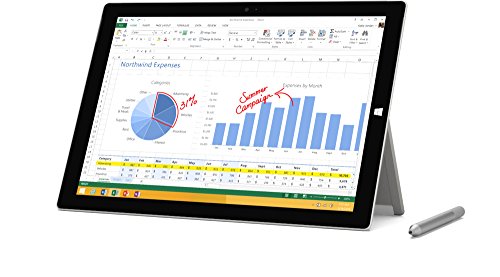
Microsoft Surface Pro 6 (Intel Core i7, 16GB RAM, 512 GB) Black

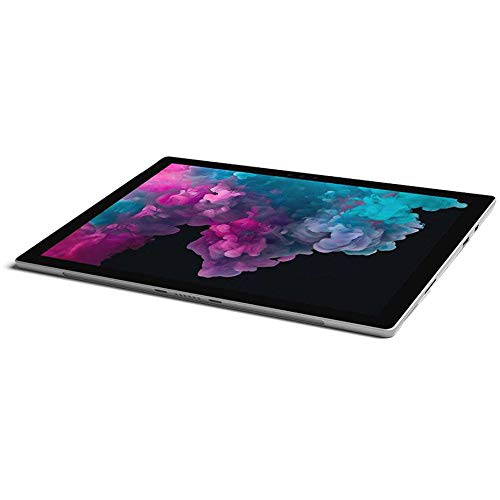


Key features
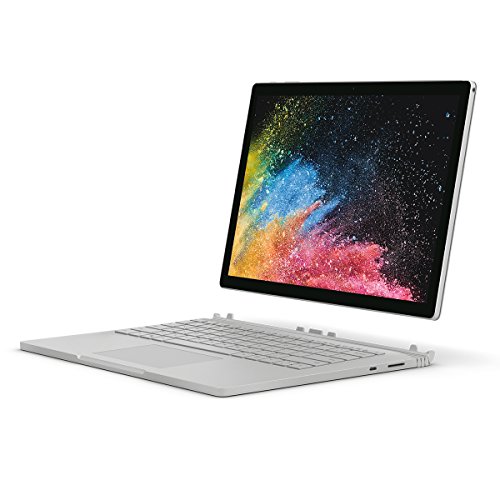
- •A best-in-class laptop with the versatility of a studio and tablet.
- •More power - now with the new 8th Generation Intel Core processor.
- •Ultra-slim and light, starting at just 1.70 pounds. All-day battery life, with up to 13.5 hours of video playback.
Microsoft Surface Pro 6 (Intel Core i7, 16GB RAM, 512 GB) Black
List Price: $1366.25$1229.63DEALYou Save: $136.62 (10%)
Free shippingFree Returns – 30 daysFree Order CancellationSecure Payment2–3 Days DeliveryGet It October 24, 2026In Stock (2)No marketing spamNo account requiredFulfilment by FedEx / Amazon / UPS / ShipwirePayPal / Card Buyer Protection
Customer Reviews
Reviews sourced from verified Amazon purchasers4.5
out of 5
Based on 10 reviews
5★
70%
4★
30%
3★
0%
2★
0%
1★
0%
Average PC replacement
Xfertime✓ Verified Purchase•November 29, 2023
I was a bit skeptical about ordering the Surface Pro 6 (8GB RAM, 2.6GHz i5, Windows 10 Home) because of it's size vs power. I didn't think a device so small could be as functional as a laptop or PC. It is for everything I do. I'm not a gamer (that's what consoles are for, in my opinion), but I'll include some of the programs I use, that work better on this Surface Pro 6 than they did on my former PC (Asus MAXIMUS V GENE Z77, i7-3770, 16GB DDR3, Corsair 256 SSD, Windows 10 Ultimate) . Programs: MacXHD Video Converter, ConvertXtoDVD, Adobe Photoshop CS5, AutoCAD 2019 and Inventor 2019.
The Surface I have is fan-less, and I haven't had any heat issued when using intense programs like converting videos, burning DVD's (with an external, USB DVD drive) nor whilst using Inventor creating 3D assemblies. The 12 inch screen will certainly suffice when surfing the net and doing simple tasks, however I use a 24 inch monitor while working via the mini display port.
I would recommend the Surface Pen for tablet use, and a mouse when using for longer work periods. The Surface keyboard for the Surface series is all I need, but if you prefer you could easily use any bluetooth keyboard. I leave the power cable connected when working and the battery exceeds my needs when using as portable, I haven't timed it's drain frequency so I can't comment on the batter use under load.
The only thing I would complain about it the lack of USB C, but that really isn't an issue since I don't own any USB C devices.
The Surface I have is fan-less, and I haven't had any heat issued when using intense programs like converting videos, burning DVD's (with an external, USB DVD drive) nor whilst using Inventor creating 3D assemblies. The 12 inch screen will certainly suffice when surfing the net and doing simple tasks, however I use a 24 inch monitor while working via the mini display port.
I would recommend the Surface Pen for tablet use, and a mouse when using for longer work periods. The Surface keyboard for the Surface series is all I need, but if you prefer you could easily use any bluetooth keyboard. I leave the power cable connected when working and the battery exceeds my needs when using as portable, I haven't timed it's drain frequency so I can't comment on the batter use under load.
The only thing I would complain about it the lack of USB C, but that really isn't an issue since I don't own any USB C devices.
It's Great but Get the 7 Instead
Amazon Customer✓ Verified Purchase•November 20, 2023
The base model pro 6 is great and a great deal. It's a full on laptop that can easily handle almost any productivity task, from massive Excel files to Bloomberg and FactSet. It's weak on gaming, but who uses a convertible for that anyway? The keyboard and touchpad are better than many laptops I've used, which is saying something given the thinness. Battery life is also very good, although don't expect it to last a transatlantic flight on full brightness without a boost. It also works very well as a tablet. I don't have the stylus, but the screen is nice and responsive, and the 3/2 aspect ratio is an awesome bonus. The large-ish bezels, which are a negative in laptop mode are a big plus in tablet mode, as you aren't accidentally tapping the edges of the screen because of your grip on the device.
There are two big drawbacks to the device: Storage and Connectivity. 128GB of storage in 2018/19 is just plain insulting. Who can live with that little if they are say, flying without wifi? Luckily there is an easy workaround, it has a microSD slot, and half-TB cards are getting cheap. (as of this writing I see three brand name cards under $80 here) It is insulting that Microsoft is being so cheap with storage and charges so much for more when its so cheap. Connectivity is tougher to deal with. You have one USB-3(A) port (Traditional USB) and a mini-DP port on the tablet, along with a headphone jack and a USB charging port on the brick which doesn't talk to the PC. Essentially you have one data connection, with the USB port, which the Pro 7 swaps out for a much more useful USB-C port, which is unquestionably the future. While I like the device, the 7 solved the one issue that has bugged me. (and yes, I have a dongle to split the USB port) If the specs and price are close, I would recommend it instead. Dongle-Land isn't a fun place to live.
There are two big drawbacks to the device: Storage and Connectivity. 128GB of storage in 2018/19 is just plain insulting. Who can live with that little if they are say, flying without wifi? Luckily there is an easy workaround, it has a microSD slot, and half-TB cards are getting cheap. (as of this writing I see three brand name cards under $80 here) It is insulting that Microsoft is being so cheap with storage and charges so much for more when its so cheap. Connectivity is tougher to deal with. You have one USB-3(A) port (Traditional USB) and a mini-DP port on the tablet, along with a headphone jack and a USB charging port on the brick which doesn't talk to the PC. Essentially you have one data connection, with the USB port, which the Pro 7 swaps out for a much more useful USB-C port, which is unquestionably the future. While I like the device, the 7 solved the one issue that has bugged me. (and yes, I have a dongle to split the USB port) If the specs and price are close, I would recommend it instead. Dongle-Land isn't a fun place to live.
BUY IT IF IT SUITS YOUR NEEDS
Alvo✓ Verified Purchase•November 12, 2023
I do feel as though this is a bit overpriced especially when you add in the pen, the keyboard, upgraded RAM & Memory, as well as a protective case but it checks off most of my wishlist- fast, Win10, good battery life, great note taking pen, solid build, not too big and not too small (a little less weight will always be nice), great display.
It has features that I probably will not even use but it is always nice to have.
I use the pen mainly for note taking which does not disappoint. The pen is responsive and there are no problems with my palm touching the screen while writing.
The keyboard is nice but you have to research protective cases that accommodate it being connected and that also allow full use of the great kickstand that the Surface has.
The ports are limited (no usb-c as everyone knows) but I knew this going in and it does not affect my use.
BOTTOMLINE- buy what suits your personal needs. There are cheaper alternatives that may lack some of the power or display quality & size etc. but you may not need that stuff for your use and you can save some money- the Surface GO may be a good alternative.
Also, there are always bundle deals with the keyboard and pen to look out for.
It has features that I probably will not even use but it is always nice to have.
I use the pen mainly for note taking which does not disappoint. The pen is responsive and there are no problems with my palm touching the screen while writing.
The keyboard is nice but you have to research protective cases that accommodate it being connected and that also allow full use of the great kickstand that the Surface has.
The ports are limited (no usb-c as everyone knows) but I knew this going in and it does not affect my use.
BOTTOMLINE- buy what suits your personal needs. There are cheaper alternatives that may lack some of the power or display quality & size etc. but you may not need that stuff for your use and you can save some money- the Surface GO may be a good alternative.
Also, there are always bundle deals with the keyboard and pen to look out for.
Great
Uclear 4 life✓ Verified Purchase•November 11, 2023
I am in class and a lot of students are on tablets but can't do what I can with mine. It is fast and has full Microsoft office on it. This is goinf to be great for real estate
Good to know while buying used Microsoft surface pro
Cathy Vogel✓ Verified Purchase•November 9, 2023
I am a hug fan and surface pro user and run my business off of them. I recently try to buy one used off of amazon. The item came in good condition. The only problem is the computer batter was dead for some time. When I plugged in, and it turned on and started resetting computer up. The only problem when computer was updating the firmware was corrupted, and my battery charging driver was capote. No problem, just update. Wrong, there is a safety in computer that will not let you update this without 40% of battery life. If that driver is corrupted, you are in a pickle. Only Microsoft can fix, and you have a fancy looking desktop, with touch screen.
Make sure you plug computer in with light lit on cable solid and leave over night to make sure it is charged before turning on. The person sending to you will have it automatically set up when you turn on and this is good as long as battery life is sufficient case this happens to you.
Make sure you plug computer in with light lit on cable solid and leave over night to make sure it is charged before turning on. The person sending to you will have it automatically set up when you turn on and this is good as long as battery life is sufficient case this happens to you.
Page 1 of 2