Pantum M7102DW Laser Printer Scanner Copier 3 in 1, Wireless Connectivity and Auto Two-Sided Printing with 1 Year Warranty, 35 Pages Per Minute (V6W81B)


Key features
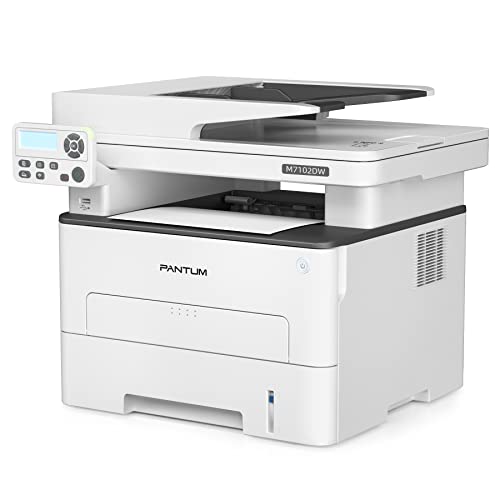
- •Multi-function 3-in-1 with ADF(printing, copying, scanning) laser printer. Fast and high definition printing up to 33ppm(A4) / 35ppm(Letter) in black and white. Support multiple media sizes, and media weight up to 200g/㎡.
- •ADF scan with max. Scan size 216 x 356mm, Scan to E-mail, PC, FTP, and USB drive. High ADF scanning speed up to 24ppm(A4) / 25ppm(Letter). Easy copy with ID copy, N-up copy functions.
- •Easy one-step wireless installation. Connect with Hi-speed USB 2.0, network, and WIFI. Mobile device printing with IOS and Android system, Pantum APP available.
- •Separate drum and toner. Starter cartridge capacity 1500 pages. Drum unit lifetime 12000 pages(at 5% coverage based on ISO 19752 standard).
- •1-year standard warranty from the date of purchase. Pantum online customer service available.
Pantum M7102DW Laser Printer Scanner Copier 3 in 1, Wireless Connectivity and Auto Two-Sided Printing with 1 Year Warranty, 35 Pages Per Minute (V6W81B)
List Price: $261.89$235.70DEALYou Save: $26.19 (10%)
Free shippingFree Returns – 30 daysFree Order CancellationSecure Payment2–3 Days DeliveryGet It October 26, 2026In Stock (1)No marketing spamNo account requiredFulfilment by FedEx / Amazon / UPS / ShipwirePayPal / Card Buyer Protection
Customer Reviews
Reviews sourced from verified Amazon purchasers3.8
out of 5
Based on 10 reviews
5★
40%
4★
60%
3★
0%
2★
0%
1★
0%
Affordable price and good quality, made from China!
PH✓ Verified Purchase•August 20, 2023
This printer is very affordable for the printing quality and functionalities that it offers. Thank you for the affordable product made from China.
The only issue is the wireless setup is not very helpul from the printer document. I read some customer review to learn the trick of how to reconnect printer to wi-fi after I change my router-modem.
I installed the patium app on my computer; connected the USB printer cable from pc to printer; ran the setup64 file; when it prompted different installation methods, I run the wired installation first , choice #1. It can print.
I ran the same program again, using one click install option #3 while the USB cable is still connected; when it done with the installation, it prompted me to REMOVE THE USB CABLE and print a test page. I did so, the test page was wirelessly print successfully from this computer.
I tried to print wirelessly from a different computer, and it also works!
must keep the USB Cable connect while you install the wireless printing option was miss by many user causing problem. I would give 5 stars if it was not the unclear instruction. this is common in product made from China.
The second problem I have is when this printer is running, my lights blink. Look like it draws a lot of power from my house electric current. it is annoying, but I have this problem with other laser printer in my house as well.
The only issue is the wireless setup is not very helpul from the printer document. I read some customer review to learn the trick of how to reconnect printer to wi-fi after I change my router-modem.
I installed the patium app on my computer; connected the USB printer cable from pc to printer; ran the setup64 file; when it prompted different installation methods, I run the wired installation first , choice #1. It can print.
I ran the same program again, using one click install option #3 while the USB cable is still connected; when it done with the installation, it prompted me to REMOVE THE USB CABLE and print a test page. I did so, the test page was wirelessly print successfully from this computer.
I tried to print wirelessly from a different computer, and it also works!
must keep the USB Cable connect while you install the wireless printing option was miss by many user causing problem. I would give 5 stars if it was not the unclear instruction. this is common in product made from China.
The second problem I have is when this printer is running, my lights blink. Look like it draws a lot of power from my house electric current. it is annoying, but I have this problem with other laser printer in my house as well.
VERY IMPORTANT! Almost returned this printer till I figured this out.
Marlee Edgar✓ Verified Purchase•August 6, 2023
Got everything up and running quickly and as soon as I put paper in to print something I get an error message "PaperSetMismatch". Customer support is based in China and you have to skype or email them, as this is a cheap Chinese printer/scanner. So I downloaded the instruction manual and there is nothing about this issue or even how to put the paper in the tray correctly.
I almost returned this printer the same day till I figured this out!
What you have to do to fix this issue; you have to pull the paper tray out and at the top left corner there is a blue tab. You will have to slide the tab to the left and make sure that arrow lines up with LTR. Now go ahead and put your paper in the tray and install the tray to the printer. (Your paper will fit much better and you will be able to fill the tray with about 50 pieces of printer paper) Now look at the dial and notice it is asking you to reset paper. Scroll down for "Yes" and click on it then "OK." Now change it to "2. Letter." This will solve your issue and you will be able to print and use your machine. It does work well after I figured this out. It didn't jam the first 9 pages it printed, but if it does I will update this review.
I almost returned this printer the same day till I figured this out!
What you have to do to fix this issue; you have to pull the paper tray out and at the top left corner there is a blue tab. You will have to slide the tab to the left and make sure that arrow lines up with LTR. Now go ahead and put your paper in the tray and install the tray to the printer. (Your paper will fit much better and you will be able to fill the tray with about 50 pieces of printer paper) Now look at the dial and notice it is asking you to reset paper. Scroll down for "Yes" and click on it then "OK." Now change it to "2. Letter." This will solve your issue and you will be able to print and use your machine. It does work well after I figured this out. It didn't jam the first 9 pages it printed, but if it does I will update this review.
It works and worth the money spent.
johnsonmft✓ Verified Purchase•July 24, 2023
Was easy to get started and work very well. I like it better than the Brother one I got rid of before getting this one. I enjoy the UBS, the quickness of the printing pages, the easy-to-use the front buttons, and ease of the printing both sides of the paper. I am very pleased with the Pantum product.
Why pay more when this will do the job
Terance✓ Verified Purchase•July 19, 2023
I have personally installed hundreds if not thousands of printers in some of the largest organizations in the world. You can go buy a very expensive HP printer and it will work great, but you don't need to. This Pantum printer works great. This printer is simple to install. I really didn't know what to expect from this manufacturer but I am impressed. Right out the box it was printing wirelessly. I attached it to my network using a Cat5 cable plugged into the back and it connected immediately. I went to the Pantum website downloaded the drivers for my Mac and now print and scan easily. Feeder works great, copying is a breeze and its very fast. Why spend the extra money when this does the same thing. Not a single problem to report and I've been using it for over a month. One last thing, it's a machine built with hundreds of parts. Sometimes one doesn't work. Don't blame the manufacturer, I can tell you this happens with all manufacturers. Just let them know and a good company will replace it.
Device drivers were easy to install and printer was easy to set up. Works well out of box.
Steven Crawford✓ Verified Purchase•June 21, 2023
I f****ing hate printers. I just threw my my $400+ Hell sPawn out of a window because it stopped scanning. Let me be clear, everything on the printer worked, but it no longer wished to communicate with my computer unless I downloaded their useless proprietary app. Those apps only exists so yet another tech company can compile more data on me. I'm not paranoid, you're just complacent.
Anyway, so I bought this printer because I figured some B list printer company I've never heard of would still make printers that work without an intermediary application. Turns out it's not some B list printer company, they're just Chinese. This isn't about the printers. It's about Western Democracy versus an Autocratic Dictatorship.
But I was right about not needing to download an app. It came with a disk, which is great. I think they stopped putting disk drives in laptops like eight years ago. But downloading the device driver off of the website was quick and easy, and setting up WiFi was painless. I just connect the printer to a WiFi-connected laptop and I was printing in under 5 minutes. I am able to print and scan directly from my laptop. I haven't tried a phone or tablet.
Design wise, I like that the printer sits on top of the paper tray. It creates a smaller footprint. My old Hell sPawn had the paper tray out in front because, as an AMERICAN printer, it should take up as much space as humanly possible. Like SUVs and Ranch style housing. Why do people need trucks that get 8 MPG and don't fit in a parking spot when they're just tooling around the burbs? Posers.
I also like that it has a directional pad on it's controls rather than one of those touch screens. I have fat fingers and can't select the little 5mm icons on the touch screens without also selecting five other icons and send the machine into a panic. But I play video games an could write a novella with a d-pad.
Anyway, these Chinese designed printers kick the shit out of the American one I just destroyed. If Western Democracies want to maintain their global influence, they need to make better printers and stop selling us out to tech companies. ISN'T THAT RIGHT JEFF?
Anyway, so I bought this printer because I figured some B list printer company I've never heard of would still make printers that work without an intermediary application. Turns out it's not some B list printer company, they're just Chinese. This isn't about the printers. It's about Western Democracy versus an Autocratic Dictatorship.
But I was right about not needing to download an app. It came with a disk, which is great. I think they stopped putting disk drives in laptops like eight years ago. But downloading the device driver off of the website was quick and easy, and setting up WiFi was painless. I just connect the printer to a WiFi-connected laptop and I was printing in under 5 minutes. I am able to print and scan directly from my laptop. I haven't tried a phone or tablet.
Design wise, I like that the printer sits on top of the paper tray. It creates a smaller footprint. My old Hell sPawn had the paper tray out in front because, as an AMERICAN printer, it should take up as much space as humanly possible. Like SUVs and Ranch style housing. Why do people need trucks that get 8 MPG and don't fit in a parking spot when they're just tooling around the burbs? Posers.
I also like that it has a directional pad on it's controls rather than one of those touch screens. I have fat fingers and can't select the little 5mm icons on the touch screens without also selecting five other icons and send the machine into a panic. But I play video games an could write a novella with a d-pad.
Anyway, these Chinese designed printers kick the shit out of the American one I just destroyed. If Western Democracies want to maintain their global influence, they need to make better printers and stop selling us out to tech companies. ISN'T THAT RIGHT JEFF?
Page 1 of 2