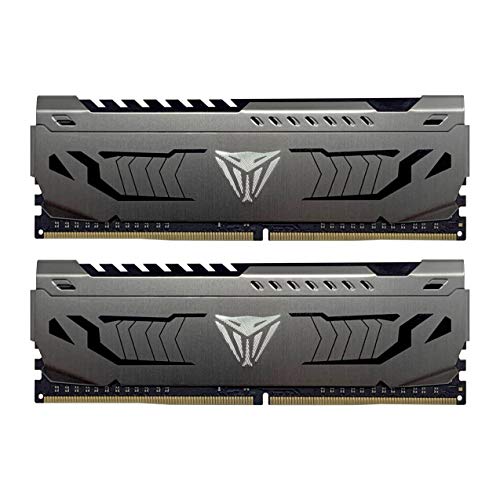
Patriot Viper Steel DDR4 RAM 32GB (2X16GB) 3200MHz CL16 UDIMM Desktop Gaming Memory Kit - PVS432G320C6K


Key features
- •Capacity: DDR4 32GB (2 x 16GB)
- •Base Frequency: PC4-17000 (2133MHz); Tested Frequency Profile 1: PC4-25600 (3200MHz)
- •Base Timings: 15-15-15-36; Tested Timings: 16-18-18-36
- •COMPATIBILITY: Tested on the latest Intel & AMD platforms
- •Custom design and series: All aluminum heat shield featuring gunmetal grey sides with diamond- cut viper logo and black top.
Patriot Viper Steel DDR4 RAM 32GB (2X16GB) 3200MHz CL16 UDIMM Desktop Gaming Memory Kit - PVS432G320C6K
List Price: $85.32$76.79DEALYou Save: $8.53 (10%)
Free shippingFree Returns – 30 daysFree Order CancellationSecure Payment2–3 Days DeliveryGet It October 26, 2026In Stock (7)No marketing spamNo account requiredFulfilment by FedEx / Amazon / UPS / ShipwirePayPal / Card Buyer Protection
Customer Reviews
Reviews sourced from verified Amazon purchasers4.6
out of 5
Based on 10 reviews
5★
70%
4★
30%
3★
0%
2★
0%
1★
0%
Excellent ram! 2x16GB kit will make your DDR4 platform last a lot longer!
Nicole P.✓ Verified Purchase•August 25, 2023
I bought and installed the 2x16GB 3600 mhz kit (32GB) to replace my older 2x8GB 3200 mhz ram, and things are running way faster again! If you have trouble getting to post, make sure you choose an XMP profile in your bios, and update your bios itself - in my case the Asus TUF GAMING X570-PLUS needed the bios update to run the kit at advertised 3600 mhz in Windows 10. Check your Task Manager under the Performance tab to make sure it's up to speed!
Good memory for the average user.
Adrian Mercado✓ Verified Purchase•August 13, 2023
The manufacturer indicates a 3200Mhz speed, but my system runs it at 2660 by default. I was able to increase the clock speed on these to a stable 2800Mhz. I think that with the system setup I have this is the most speed I'm going to get from this ram. I have it on a MSI creator with a Threadripper 3960x and a 3090ti 24gb video card.
Patriot Memory Viper Steel DDR4 16GB (2 x 8GB) 4400MHz
Necro 2✓ Verified Purchase•August 3, 2023
I have four 8gb sticks of this ram and it works great and as it should. No real complaints as it is is ram and either works or it doesnt.
XMP 3200 works, good reliable memory. But be aware of compatibility problems of older versions.
Dominic Mason✓ Verified Purchase•July 11, 2023
Patriot Memory Viper Steel DDR4 32GB (1 x 32GB) 3200 MHz Module. Good reliable memory modules that work at XMP 3200mhz well. I have exact module running in system for over a year at XMP 3200 and no problems on a z490 MSI Unify 10850k system. However, be aware that there are different versions of this same product. I have an older version of this module 1x32GB that i bought in July 2022 off of amazon here. That would not work when paired with this newer version module here bought Aug 2023. So don't try to pair with older versions of same product. All I can figure is that the module I purchased in July of 2022 off here used a different controllers or memory type. I am sure two of these modules ordered together will work fine. Just don't try and upgrade an already older purchased version.
DDR4 4400 MT/s -Superb, Especially for the Money
Aaron✓ Verified Purchase•July 1, 2023
Before I get on to the specifics, please keep a few things in mind:
1.) Forget about XMP, this is going to be manual tuning all the way. Probably even on an Intel platform.
2.) If you just want to game or run some other app that requires fast memory with a minimum of hassle, this kit is not for you.
3.) If you have a Ryzen platform, you probably won't get useful performance out of this kit above 3800 MT/s.
4.) Unless you have won the silicon lottery with your specific Ryzen CPU sample, even 3800 MT/s isn't going to happen.
5.) Likewise, even if you have a golden chip. you are going to need some luck with your motherboard.
6.) You should expect to spend hours and hours tweaking and testing to get something usable. If that is not your idea of fun, this kit is not for you.
Now, if you are undeterred by all of the above and are still interested in this kit, please read on.
The kit comes in some rather plain packaging. Some people are unhappy with this, but I say that the plainer the packaging, the easier it is to recycle, so I am good there. I want my money to go to R&D, quality binned B-die chips, and QA. Not to marketing or packaging.
Another complaint I hear about this kit is that the heat spreader is kind of cheap. This is fact. However, fancy heat spreaders are a bit of a scam. Even at high voltage and clock, you are not sinking much more than 5W of power into each stick, so whatever. I would prefer no heat spreader, same binned b-die, same quality PCB, and $1 less for the product. That being said, these sticks are a little on the tall side. Keep this in mind if there might be a clearance problem between your RAM and your tower cooler. If I wanted two kits of this, it would be an issue for me. But since I only want one and the slot nearest to the CPU is unoccupied, I have no clearance issue.
I spent hours trying to get these to run at 3800 MT/s, to no avail. It is either the IMC inside my R5 3600XT or my motherboard (MSI B450 Pro Carbon WiFi), not the kit's fault. I had no trouble at all running at 3733 MT/s, and I got timings that were even better than were suggested by DRAM Calculator for Ryzen. I used 'fast' settings, 'A3/A2/B1' for for PCB rev, and (of course) "Samsung B-die' for memory type.
I used the exact recommended primary, secondary, and tertiary timings. However, the termination resistances didn't work for me; I went with the board's defaults for those. After testing extensively at 15-15-15-15-30-1T and passing, I went for 14-14-14-14-28-1T. Those passed my quick testing and I am half way through the full battery of MemTest86 as I write this review. I am really, really comfortable with the looser settings and they are giving me everything I want.
That being said, I am looking forward to hours and hours more fun tightening down the secondary and tertiary timings to not leave even one cycle of performance on the floor. If I get bored with that, I might be forced to game instead of benching -)
For $125 I got a kit of the highest possible bin of B-die memory and it suits me perfectly. You can buy more expensive kits if you need the name "G.Skill" printed on the side, and still more expensive kits if you want that plus RGB. As for me, I don't care about anything except the bin quality and quality time at my bench. I figure I saved somewhere between $50 and $100 making this choice as opposed to the best bin of TridentZ RGB and lost exactly zero performance doing it. That is going to be my down payment on a shiny new R5 5600X as soon as I can get my sweaty little hands on one.
Now, if you are still planning on buying these, I have a few quick tips for you to save some time:
1.) Have your bootable USB stick with MemTest86 on it ready before your package arrives.
2.) Use the same stick to save your OC profiles, unless your mobo will retain your profiles after clearing CMOS
3.) Plan on testing outside of your case unless you have a clear CMOS button on your back panel.
4.) For initial testing, cut the address range down to 4G and skip the last two tests, and do two passes instead of four. this will save you a ton of time.
5.) Once you have settings you like, run all tests, full address range over night before using them 24/7.
6.) Start at DRAM voltage of 1.5V. Once you have settings you like, you can experiment with cutting some voltage, if you like. This won't hurt anything and will save you some time upfront.
7.) Enjoy the ride. If this doesn't sound fun, just get a 3600 CL16 kit for $80, boot it in XMP and call it a day.
I hope this helps and thank you for reading.
1.) Forget about XMP, this is going to be manual tuning all the way. Probably even on an Intel platform.
2.) If you just want to game or run some other app that requires fast memory with a minimum of hassle, this kit is not for you.
3.) If you have a Ryzen platform, you probably won't get useful performance out of this kit above 3800 MT/s.
4.) Unless you have won the silicon lottery with your specific Ryzen CPU sample, even 3800 MT/s isn't going to happen.
5.) Likewise, even if you have a golden chip. you are going to need some luck with your motherboard.
6.) You should expect to spend hours and hours tweaking and testing to get something usable. If that is not your idea of fun, this kit is not for you.
Now, if you are undeterred by all of the above and are still interested in this kit, please read on.
The kit comes in some rather plain packaging. Some people are unhappy with this, but I say that the plainer the packaging, the easier it is to recycle, so I am good there. I want my money to go to R&D, quality binned B-die chips, and QA. Not to marketing or packaging.
Another complaint I hear about this kit is that the heat spreader is kind of cheap. This is fact. However, fancy heat spreaders are a bit of a scam. Even at high voltage and clock, you are not sinking much more than 5W of power into each stick, so whatever. I would prefer no heat spreader, same binned b-die, same quality PCB, and $1 less for the product. That being said, these sticks are a little on the tall side. Keep this in mind if there might be a clearance problem between your RAM and your tower cooler. If I wanted two kits of this, it would be an issue for me. But since I only want one and the slot nearest to the CPU is unoccupied, I have no clearance issue.
I spent hours trying to get these to run at 3800 MT/s, to no avail. It is either the IMC inside my R5 3600XT or my motherboard (MSI B450 Pro Carbon WiFi), not the kit's fault. I had no trouble at all running at 3733 MT/s, and I got timings that were even better than were suggested by DRAM Calculator for Ryzen. I used 'fast' settings, 'A3/A2/B1' for for PCB rev, and (of course) "Samsung B-die' for memory type.
I used the exact recommended primary, secondary, and tertiary timings. However, the termination resistances didn't work for me; I went with the board's defaults for those. After testing extensively at 15-15-15-15-30-1T and passing, I went for 14-14-14-14-28-1T. Those passed my quick testing and I am half way through the full battery of MemTest86 as I write this review. I am really, really comfortable with the looser settings and they are giving me everything I want.
That being said, I am looking forward to hours and hours more fun tightening down the secondary and tertiary timings to not leave even one cycle of performance on the floor. If I get bored with that, I might be forced to game instead of benching -)
For $125 I got a kit of the highest possible bin of B-die memory and it suits me perfectly. You can buy more expensive kits if you need the name "G.Skill" printed on the side, and still more expensive kits if you want that plus RGB. As for me, I don't care about anything except the bin quality and quality time at my bench. I figure I saved somewhere between $50 and $100 making this choice as opposed to the best bin of TridentZ RGB and lost exactly zero performance doing it. That is going to be my down payment on a shiny new R5 5600X as soon as I can get my sweaty little hands on one.
Now, if you are still planning on buying these, I have a few quick tips for you to save some time:
1.) Have your bootable USB stick with MemTest86 on it ready before your package arrives.
2.) Use the same stick to save your OC profiles, unless your mobo will retain your profiles after clearing CMOS
3.) Plan on testing outside of your case unless you have a clear CMOS button on your back panel.
4.) For initial testing, cut the address range down to 4G and skip the last two tests, and do two passes instead of four. this will save you a ton of time.
5.) Once you have settings you like, run all tests, full address range over night before using them 24/7.
6.) Start at DRAM voltage of 1.5V. Once you have settings you like, you can experiment with cutting some voltage, if you like. This won't hurt anything and will save you some time upfront.
7.) Enjoy the ride. If this doesn't sound fun, just get a 3600 CL16 kit for $80, boot it in XMP and call it a day.
I hope this helps and thank you for reading.
Page 1 of 2