Lenovo Flex 14 2-in-1 Convertible Laptop, 14 Inch FHD, Touchscreen, AMD Ryzen 5 3500U Processor, Radeon Vega 8 Graphics, 8GB DDR4 RAM, 256GB NVMe SSD, Win 10, Black, Pen Included


Key features
- •Up to 8 hours of battery life with quick recharge technology to power your laptop computer up to 80%
- •Comprehensive protection with Windows 10 helps protect against viruses, malware, and ransomware
- •Convenient TrueBlock privacy shutter allows you to physically close your webcam when you're not using it
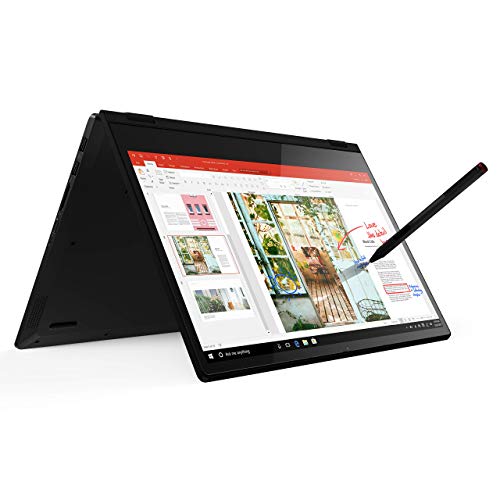
- •The included Active Pen lets you draw or take notes directly on the screen, anywhere you go
- •With a full HD touch display and the AMD Ryzen processor, you can work, stream, game, and edit videos
- •Includes HDMI, USB-C, USB 3.1 inputs, fingerprint reader
BrandLenovo
Category2 in 1 Laptops
Size8GB RAM | 256GB SSD
ColorOnyx Black
Warranty1 Year Limited Parts and Labor
Lenovo Flex 14 2-in-1 Convertible Laptop, 14 Inch FHD, Touchscreen, AMD Ryzen 5 3500U Processor, Radeon Vega 8 Graphics, 8GB DDR4 RAM, 256GB NVMe SSD, Win 10, Black, Pen Included
List Price: $829.34$746.41DEALYou Save: $82.93 (10%)
Free shippingFree Returns – 30 daysFree Order CancellationSecure Payment2–3 Days DeliveryGet It October 28, 2026In Stock (6)No marketing spamNo account requiredFulfilment by FedEx / Amazon / UPS / ShipwirePayPal / Card Buyer Protection
Customer Reviews
Reviews sourced from verified Amazon purchasers4.2
out of 5
Based on 10 reviews
5★
60%
4★
40%
3★
0%
2★
0%
1★
0%
Great in most aspects, but starved for RAM
Olof Salberger✓ Verified Purchase•September 9, 2023
This laptop has amazingly good build quality, and is very snappy to use. The achiles heel is that it only has 6 GB of RAM available to the OS, since it is capped at 8 GB non upgradeable, and 2 GB are dedicated to the integrated graphics. 8 GB would be OK if fully usable, but 6 GB is getting a bit tight these days due to the horrible new trend of desktop apps written in Javascript.
Apart from 8 GB instead of 16 GB RAM, this laptop is amazing, and I hope that Lenovo will continue to consider the AMD Ryzen processors instead of Intel processors for future laptops in this price range. The latest-gen Ryzen has excellent multicore performance. AMD's integrated graphics are also surprisingly good, especially considering that you get it for free from the processor. This computer should be able to run basically any AAA game released in 2013ish or before at high settings despite being an ultralight notebook with no dedicated graphics card. It can also run relatively less demanding modern games like Overwatch or Fortnite at high settings well.
The SSD could maybe be a bit bigger in this age of cheap 3DNAND SSD's, but it is very fast. The computer boots up instantly and has very little post-startup lag, making the fingerprint reader very nice to have as login time would be the time bottleneck in getting started otherwise.
The screen is great, both as an HD screen and as a touchscreen. It is larger than any ipad and gives an amazing touch experience. I expected it to be a bit bulky, but the laptop has an evenly distributed weight and balances well despite its size, so the tablet + pen experience is great. Used the pen to try writing and solving some physics equations with subscripts and superscripts, and it worked great, better than my old early-gen surface.
At this price level, this is the best offering out there imho for a 2 in 1 laptop. A microsoft surface tablet with similar performance would cost you twice as much.
EDIT: After learning that the RAM is in fact upgradeable, I increased my review to a 5. I ended up installing a 16 GB ram stick to increase the RAM to 20 GB (18 GB usable with 2 going to the GPU), and a 1 TB SSD stick from Sabrent:
https://www.amazon.com/gp/product/B071KP8CGJ
https://www.amazon.com/gp/product/B07LGF54XR/
This laptop is a pleasure to open up & work with. Replacing the RAM and SSD was a very straightforward operation. Might also add a new networking card as well. The current networking card works great on a strong wifi network, but frequently drops connectivity when the signal is weaker.
Apart from 8 GB instead of 16 GB RAM, this laptop is amazing, and I hope that Lenovo will continue to consider the AMD Ryzen processors instead of Intel processors for future laptops in this price range. The latest-gen Ryzen has excellent multicore performance. AMD's integrated graphics are also surprisingly good, especially considering that you get it for free from the processor. This computer should be able to run basically any AAA game released in 2013ish or before at high settings despite being an ultralight notebook with no dedicated graphics card. It can also run relatively less demanding modern games like Overwatch or Fortnite at high settings well.
The SSD could maybe be a bit bigger in this age of cheap 3DNAND SSD's, but it is very fast. The computer boots up instantly and has very little post-startup lag, making the fingerprint reader very nice to have as login time would be the time bottleneck in getting started otherwise.
The screen is great, both as an HD screen and as a touchscreen. It is larger than any ipad and gives an amazing touch experience. I expected it to be a bit bulky, but the laptop has an evenly distributed weight and balances well despite its size, so the tablet + pen experience is great. Used the pen to try writing and solving some physics equations with subscripts and superscripts, and it worked great, better than my old early-gen surface.
At this price level, this is the best offering out there imho for a 2 in 1 laptop. A microsoft surface tablet with similar performance would cost you twice as much.
EDIT: After learning that the RAM is in fact upgradeable, I increased my review to a 5. I ended up installing a 16 GB ram stick to increase the RAM to 20 GB (18 GB usable with 2 going to the GPU), and a 1 TB SSD stick from Sabrent:
https://www.amazon.com/gp/product/B071KP8CGJ
https://www.amazon.com/gp/product/B07LGF54XR/
This laptop is a pleasure to open up & work with. Replacing the RAM and SSD was a very straightforward operation. Might also add a new networking card as well. The current networking card works great on a strong wifi network, but frequently drops connectivity when the signal is weaker.
Awesome bang for buck. Best choice at this price point!
Daveheart✓ Verified Purchase•September 4, 2023
This 2-in-1 combines a great feature set at just the right price.
I've been an Intel guy for years, and usually prefer i7 cpus. I have one in my gaming rig, and one in my old laptop and had been planning to get a 2-in-1 with an i7 cpu as well.
Then I saw this laptop. It was the exception to the rule because the price and features.
There's alot of bang for your buck here and when I finally decided to go back to school (after 23 years), I went ahead and bought it.
THE OUTSIDE: Lenovo always makes classy laptops and this one is no different. No cheap, flashy visual aesthetics or shiny fake gold plating here. Just the basics and I like that. I don't really want a laptop that draws too much attention.
The display is gorgeous, and plenty bright, even outdoors on a sunny day. Usually indoors, I'm setting the brightness down to lowest setting. The touchscreen aspect of it works perfectly, with fingers, or the pen.
The fingerprint sensor works great as well.
I use a mechanical keyboard on my gaming rig, and while this keyboard is not mechanical, nor would I expect it to be, it's fantastic. It's been easy to adapt to and I can still maintain about 70 WPM on it, easily.
The speakers work really well, no matter how you are using this laptop. I've yet to take them to max volume. They also have great channel separation.
Battery life is fantastic and it charges fast.
Plenty of ports, and I'm really glad to see a USB-C, and a headphone jack.
Only weighs about 3 and a half pounds, and the hinges seems strong and durable. The hold the screen in which ever position I want it.
THE INSIDE:
AMD's Ryzen 5 3500u processor is a mid-tier mobile processor that scores between Intel's i5 8265u and their i7 8550u. What really sets this one apart from those processors, is it's Vega 8 graphics that are built-in. The built-in Vega 8 out-performs Intel's built-in UHD 620 which allows you a little room for some gaming.
The 256 GB PCI-E M.2 SSD is faster than M.2 SATA SSDs, standard SATA SSDs and certainly HDDs. Compared to other M.2 NVMEs, it's not breaking any records, but that's not really a bad thing because it's still quick enough that you don't really feel like you're waiting anyway. Also, at this price point, it's hard to expect much more anyway.
Technically, you can upgrade the storage, if you're willing to take it apart, but you WILL VOID your WARRANTY, so better make sure you know what you're doing if you're gonna go that route.
The 8GB of RAM is good enough for now, but doesn't leave much for future use as 16GB is pretty much becoming standard. Given the price point, it's hard to have a valid complaint about that.
Technically, you can replace the 4GB stick with a larger capacity, but it would require opening your laptop, which, you know, VOIDS the warranty. Plus, you'd lose some of the speed benefit you get from running in dual channel.
THE PEN:
This was a heavy draw for me. There IS a use for pens and I really wish all 2-in-1s included one by default, especially since ones sold separately often cost more than $50.
Included is also a holder that slides into one of your 2 USB ports.
I'm glad that it not only included a pen, but also a holder for the pen, though sometimes it can still get in the way.
If there were anything I would change about the pen aspect of this laptop, it would be a hold in the side to slide the pen into so it's completely hid and out of the way, no matter which way you use it.
That said, I'm glad it came with a pen and a holder.
Overall, I'm really satisfied with this 2-in-1. There's alot of bang for your buck here. It's more than enough for schooling, and for gaming I'll just use Steam's Remote-Play.
I've been an Intel guy for years, and usually prefer i7 cpus. I have one in my gaming rig, and one in my old laptop and had been planning to get a 2-in-1 with an i7 cpu as well.
Then I saw this laptop. It was the exception to the rule because the price and features.
There's alot of bang for your buck here and when I finally decided to go back to school (after 23 years), I went ahead and bought it.
THE OUTSIDE: Lenovo always makes classy laptops and this one is no different. No cheap, flashy visual aesthetics or shiny fake gold plating here. Just the basics and I like that. I don't really want a laptop that draws too much attention.
The display is gorgeous, and plenty bright, even outdoors on a sunny day. Usually indoors, I'm setting the brightness down to lowest setting. The touchscreen aspect of it works perfectly, with fingers, or the pen.
The fingerprint sensor works great as well.
I use a mechanical keyboard on my gaming rig, and while this keyboard is not mechanical, nor would I expect it to be, it's fantastic. It's been easy to adapt to and I can still maintain about 70 WPM on it, easily.
The speakers work really well, no matter how you are using this laptop. I've yet to take them to max volume. They also have great channel separation.
Battery life is fantastic and it charges fast.
Plenty of ports, and I'm really glad to see a USB-C, and a headphone jack.
Only weighs about 3 and a half pounds, and the hinges seems strong and durable. The hold the screen in which ever position I want it.
THE INSIDE:
AMD's Ryzen 5 3500u processor is a mid-tier mobile processor that scores between Intel's i5 8265u and their i7 8550u. What really sets this one apart from those processors, is it's Vega 8 graphics that are built-in. The built-in Vega 8 out-performs Intel's built-in UHD 620 which allows you a little room for some gaming.
The 256 GB PCI-E M.2 SSD is faster than M.2 SATA SSDs, standard SATA SSDs and certainly HDDs. Compared to other M.2 NVMEs, it's not breaking any records, but that's not really a bad thing because it's still quick enough that you don't really feel like you're waiting anyway. Also, at this price point, it's hard to expect much more anyway.
Technically, you can upgrade the storage, if you're willing to take it apart, but you WILL VOID your WARRANTY, so better make sure you know what you're doing if you're gonna go that route.
The 8GB of RAM is good enough for now, but doesn't leave much for future use as 16GB is pretty much becoming standard. Given the price point, it's hard to have a valid complaint about that.
Technically, you can replace the 4GB stick with a larger capacity, but it would require opening your laptop, which, you know, VOIDS the warranty. Plus, you'd lose some of the speed benefit you get from running in dual channel.
THE PEN:
This was a heavy draw for me. There IS a use for pens and I really wish all 2-in-1s included one by default, especially since ones sold separately often cost more than $50.
Included is also a holder that slides into one of your 2 USB ports.
I'm glad that it not only included a pen, but also a holder for the pen, though sometimes it can still get in the way.
If there were anything I would change about the pen aspect of this laptop, it would be a hold in the side to slide the pen into so it's completely hid and out of the way, no matter which way you use it.
That said, I'm glad it came with a pen and a holder.
Overall, I'm really satisfied with this 2-in-1. There's alot of bang for your buck here. It's more than enough for schooling, and for gaming I'll just use Steam's Remote-Play.
Good bang for the buck, warning about RAM upgrade
Steven Hughes✓ Verified Purchase•August 28, 2023
This is a solid 4-star device sold at 3-star pricing right now (I got the seemingly-amazing prime day deal), so I'm giving it a full 5. The battery, screen, track pad, keyboard, speakers, performance, and overall construction are all good but not great. The screen could indeed use more brightness, and using it in tablet mode isn't really compelling for something this size (i.e. roughly average laptop size). WARNING about RAM upgrade: it is possible, but be careful which RAM module you try to install. I had some in an older mini-tower I thought I could use, but it turns out the heat spreader made it too thick to lock into the clips. Also, it appears that the factory-installed RAM is rated for 2666, but the machine only runs it at 2400. I'm not sure if that's an actual chipset/bios/whatever limitation, or just done for for power conservation, but I am guessing you'll be able to get by using either speed in this machine... just don't expect a good fit if it has a heat shield.
Also, I suspect this is normal for modern portables, but you won't get full potential out of the processor without the power adapter being plugged in. Search on geekbench for lenovo 81SS and you'll see two common scores, with single/multi around either 2300/7500 (battery) or 3800/11000 (AC). I think it mostly has to do with limiting the boost frequency while on battery power. Plugged in, it will boost to 3.7GHz, but on battery it seems to be capped at 2.4GHz. I wasn't able to change this behavior in Windows, even after adding the ultimate performance power mode, and the bios settings seemed really limited too. I haven't put the Vega 8 iGPU through its paces yet, but I would expect about 70% better than intel HD 6000 or 630 based on benchmarks, which would be sufficient to play something like league, minecraft, or even fortnite quite smoothly.
Pros:
Excellent specs for the price
SSD is blazing fast
Privacy shutter
Fingerprint reader
Backlit keyboard
Pen w/ USB clip included
Not much bloatware
Nice medium size, fairly slim and lightweight
Touchpad, keyboard, speakers, battery better than expected
Cons:
RAM not super easy to upgrade
No secondary storage slot/bay
Limited bios settings
2.1GB of RAM donated to Vega 8 means only 5.9GB system memory
Screen not very bright
A bit unwieldy as a tablet
Also, I suspect this is normal for modern portables, but you won't get full potential out of the processor without the power adapter being plugged in. Search on geekbench for lenovo 81SS and you'll see two common scores, with single/multi around either 2300/7500 (battery) or 3800/11000 (AC). I think it mostly has to do with limiting the boost frequency while on battery power. Plugged in, it will boost to 3.7GHz, but on battery it seems to be capped at 2.4GHz. I wasn't able to change this behavior in Windows, even after adding the ultimate performance power mode, and the bios settings seemed really limited too. I haven't put the Vega 8 iGPU through its paces yet, but I would expect about 70% better than intel HD 6000 or 630 based on benchmarks, which would be sufficient to play something like league, minecraft, or even fortnite quite smoothly.
Pros:
Excellent specs for the price
SSD is blazing fast
Privacy shutter
Fingerprint reader
Backlit keyboard
Pen w/ USB clip included
Not much bloatware
Nice medium size, fairly slim and lightweight
Touchpad, keyboard, speakers, battery better than expected
Cons:
RAM not super easy to upgrade
No secondary storage slot/bay
Limited bios settings
2.1GB of RAM donated to Vega 8 means only 5.9GB system memory
Screen not very bright
A bit unwieldy as a tablet
Really decent for the price
Everett Hewington✓ Verified Purchase•August 10, 2023
Disclaimer: this is my first day using it, so I will try to update this review if anything changes over time.
Performance: This computer is fast. I honestly don't think you would notice any speed increase in a $1000 laptop when doing normal tasks. It has 4 cores/8 threads that all work very well. Ryzen is no slouch when it comes to performance. I have yet to test it with many games, but it runs Borderlands 2 on high settings without dropping below 30 FPS and usually staying 40-60 FPS. The 8 GB of RAM are reduced to 6 GB, as two are used by the graphics processing, but overall it seems plenty for most work, especially when you consider the NVMe SSD drive--this Samsung-made drive is beautiful and makes everything boot and install quickly and smoothly. Altogether, this is a great build for such a price.
Screen: The display is nice. It isn't perfect though. The color and brightness are fine, and the viewing angles are great. My one complaint is that there is a degree of motion blur. It isn't terrible, and you can still enjoy watching videos, but it is somewhat noticeable. Also, the screen responds easily to the pressure when adjusting the angle, but it doesn't really cause any harm.
Look/Feel: It feels great, looks great, and is a great size for a portable laptop. It can flex and bend a little, but it doesn't seem to be a problem with structure.
Bloatware: Now this impressed me. There is a surprising lack of bloatware. There is McAfee (which I quickly uninstalled), Windows' few things they always install (Candy Crush, Groove music, and the like), and Lenovo's apps. Lenovo's apps are mostly unobtrusive and are not altogether useless (like one for setting up the pen).
Battery: So far so good. I'm getting the amount of life advertized (about 8 hours with normal loads).
Keyboard: I'm not a picky keyboard user, but I will say this seems like a nice one. The keys respond well and do not feel wobbly.
Touchpad: This touchpad is really pleasant. Better than any other laptops I've had around the same price point.
Active Pen: It is neat, but I am disappointed by the fact that there is no means to attach it to the computer, meaning that I will probably lose it.
Thermals: This is something that bothers me with most laptops, but this one does well. I ran Prime95 stress test and it was able to sustain full 3.1 Ghz on all cores while not getting any hotter than 62C. I then tried it while intentionally covering the air intakes by setting it on my lap. It eventually throttled down to about 2 Ghz, but still, not bad for a fun stress test, any normal load should be fine.
Speakers: These seem decent, better than most laptops in its price. They won't amaze you, but I don't think they will disappoint.
Other thoughts:
-Amazon is terrible at their spec sheet, so don't trust it. The title of this laptop is more accurate.
-I personally prefer this 14 inch size, because it is much easier to carry around, but isn't so small that you have a cramped keyboard.
-The fingerprint sensor works great.
Performance: This computer is fast. I honestly don't think you would notice any speed increase in a $1000 laptop when doing normal tasks. It has 4 cores/8 threads that all work very well. Ryzen is no slouch when it comes to performance. I have yet to test it with many games, but it runs Borderlands 2 on high settings without dropping below 30 FPS and usually staying 40-60 FPS. The 8 GB of RAM are reduced to 6 GB, as two are used by the graphics processing, but overall it seems plenty for most work, especially when you consider the NVMe SSD drive--this Samsung-made drive is beautiful and makes everything boot and install quickly and smoothly. Altogether, this is a great build for such a price.
Screen: The display is nice. It isn't perfect though. The color and brightness are fine, and the viewing angles are great. My one complaint is that there is a degree of motion blur. It isn't terrible, and you can still enjoy watching videos, but it is somewhat noticeable. Also, the screen responds easily to the pressure when adjusting the angle, but it doesn't really cause any harm.
Look/Feel: It feels great, looks great, and is a great size for a portable laptop. It can flex and bend a little, but it doesn't seem to be a problem with structure.
Bloatware: Now this impressed me. There is a surprising lack of bloatware. There is McAfee (which I quickly uninstalled), Windows' few things they always install (Candy Crush, Groove music, and the like), and Lenovo's apps. Lenovo's apps are mostly unobtrusive and are not altogether useless (like one for setting up the pen).
Battery: So far so good. I'm getting the amount of life advertized (about 8 hours with normal loads).
Keyboard: I'm not a picky keyboard user, but I will say this seems like a nice one. The keys respond well and do not feel wobbly.
Touchpad: This touchpad is really pleasant. Better than any other laptops I've had around the same price point.
Active Pen: It is neat, but I am disappointed by the fact that there is no means to attach it to the computer, meaning that I will probably lose it.
Thermals: This is something that bothers me with most laptops, but this one does well. I ran Prime95 stress test and it was able to sustain full 3.1 Ghz on all cores while not getting any hotter than 62C. I then tried it while intentionally covering the air intakes by setting it on my lap. It eventually throttled down to about 2 Ghz, but still, not bad for a fun stress test, any normal load should be fine.
Speakers: These seem decent, better than most laptops in its price. They won't amaze you, but I don't think they will disappoint.
Other thoughts:
-Amazon is terrible at their spec sheet, so don't trust it. The title of this laptop is more accurate.
-I personally prefer this 14 inch size, because it is much easier to carry around, but isn't so small that you have a cramped keyboard.
-The fingerprint sensor works great.
Here is what you need to know.
Thomas Derk✓ Verified Purchase•July 30, 2023
No matter what the YouTubes show, leave the little rubber feet alone. To upgrade memory you must difficultly remove all 10 bottom screws. Older versions one had to remove the bottom rubber foot pads, but not with this model.
I used Crucial 16GB Single DDR4 2400 (PC4 19200) 260-Pin SODIMM Memory - CT16G4SFD824A
This took my OS memory from 4GB to about 20GB. The soldered in 4GB seems totally for the display adapter/GPU.
Taking out the 10 bottom screws and especially prying and popping the bottom is absolutely best to be done by an experienced for real soul, and even then with a sense of adventure.
The replaceable RAM slot is covered in the center with a cooler, big silver cooler, which must be pried off/popped. It's easily popped.
I did not touch the SSD, hardware wise.
I am going to say it, this upgrade is NOT FOR NOVICES.
The upgrade SSD replacement is easily there for you, but I was not remotely interested, yet.
I am running a dual boot Win10 and Ubuntu/Linux, and the boot, performance, all of it, even the touchpad, are off the wall fantastic. I gave Ubuntu about 64GB for now.
I have had three ThinkPads, and while I miss the little red mouse toggle between G & H, and I cannot believe I am saying this, the touchpad is FANTASTIC. The keyboard is not ultimately great, but the LED backlighting and the travel of the keys is fantastic for the thickness and weight of the unit.
Pros: The most powerful computer I have ever owned, as upgraded with 16 GB of ram.
Cons: Pulling the ten screws on the bottom, (do NOT remove the foot pads), requires the exact right tool. Prying the unit apart for the upgrade is terrifying.
Getting into the BIOS or boot order, is a very strange business. You must start with a cold cpu, I must have my screen open, and one puts a paper clip end into a just big enough hole to the right of the power on button, and with the paper clip hitting that very small button, then you power on, and release the paper clip.
BTW, unlike my previous ThinkPads, you cannot join HDD security password with System On password, so after much testing, I just have just a system on password on this new platform.
I really like a LOT of Chinese products, and my first three ThinkPads were made in the U.S.A. My last ThinkPad was made in China, and drawtfted, without mitigation, my prior versions.
I believe the cpu and integrated gpu are absolutely monsters. I've given it the read comic books on Kindle test, and the screen passes, full grades.
While I have not thrown my UHD Netflix at a 4K screen on my newest platform, I have no doubts.
Most folk do not understand the dif between UHD (Ultra High Defintion) and 4K. The terse answer is not much. Mostly, steaming great resolution services are UHD, while 4K TVs can do some very little more provided with the right signal. This laptop can stream Netflix to a 4K TV in UHD resolution via a HDMI cable.
OK, bottom line: If you want just Ubuntu/Linux, your will be satisfied, but you still want to upgrade the ram. If you want Win10, absolutely pop in a 16GB stick of ram.
Update: I had a Win 95 ThinkPad with a USB port, no kidding. Totally kludged. I had the last ThinkPad made in the USA. My Made in China Thinkpad, for $500 refurbished, 2 core, 4 threads, is barely alive. I LOVE the touchpad on this new unit. I never thought I'd write those words.
The screen is PERFECT. Sound is as good as it gets on a dinky laptop. Fn-Spacebar turns the keyboard LEDs on and off. I LOVE that, because although I am a touch typist extreme, the fancy keys show up.
My speculation is that ALL ram will be soldered before I die. BTW, one must pop the ten screws off the bottom to replace the battery.
I might buy another to have a spare, or as the ultimate gift. It comes with Win10 Home, and Ubuntu/Linux works beautifully, dual boot.
I am astonished. I do not need a bigger SSD, as I have a NAS. I have five Cat 7 Ethernet cables planted, and one is a spare. This laptop is on Wi-Fi and I will never buy the Ethernet cable dongle. The screen is spectacular, and I simply cannot imagine a better screen. I have seen OLED screens but at this size and this cost, this is an unreal deal.
For $520 ish including tax and delivery and 16 GB ram upgrade, well, goofy Window cheats aside, when Windows is good to go on the screen, but not for reals, this thing boots so quickly, skip hibernation altogether, EXCEPT, been there done that, always just leave the swap files of Windows and Ubuntu, and hibernation files stuff, ALONE. Our lives are too short to screw with any of those.
I used Crucial 16GB Single DDR4 2400 (PC4 19200) 260-Pin SODIMM Memory - CT16G4SFD824A
This took my OS memory from 4GB to about 20GB. The soldered in 4GB seems totally for the display adapter/GPU.
Taking out the 10 bottom screws and especially prying and popping the bottom is absolutely best to be done by an experienced for real soul, and even then with a sense of adventure.
The replaceable RAM slot is covered in the center with a cooler, big silver cooler, which must be pried off/popped. It's easily popped.
I did not touch the SSD, hardware wise.
I am going to say it, this upgrade is NOT FOR NOVICES.
The upgrade SSD replacement is easily there for you, but I was not remotely interested, yet.
I am running a dual boot Win10 and Ubuntu/Linux, and the boot, performance, all of it, even the touchpad, are off the wall fantastic. I gave Ubuntu about 64GB for now.
I have had three ThinkPads, and while I miss the little red mouse toggle between G & H, and I cannot believe I am saying this, the touchpad is FANTASTIC. The keyboard is not ultimately great, but the LED backlighting and the travel of the keys is fantastic for the thickness and weight of the unit.
Pros: The most powerful computer I have ever owned, as upgraded with 16 GB of ram.
Cons: Pulling the ten screws on the bottom, (do NOT remove the foot pads), requires the exact right tool. Prying the unit apart for the upgrade is terrifying.
Getting into the BIOS or boot order, is a very strange business. You must start with a cold cpu, I must have my screen open, and one puts a paper clip end into a just big enough hole to the right of the power on button, and with the paper clip hitting that very small button, then you power on, and release the paper clip.
BTW, unlike my previous ThinkPads, you cannot join HDD security password with System On password, so after much testing, I just have just a system on password on this new platform.
I really like a LOT of Chinese products, and my first three ThinkPads were made in the U.S.A. My last ThinkPad was made in China, and drawtfted, without mitigation, my prior versions.
I believe the cpu and integrated gpu are absolutely monsters. I've given it the read comic books on Kindle test, and the screen passes, full grades.
While I have not thrown my UHD Netflix at a 4K screen on my newest platform, I have no doubts.
Most folk do not understand the dif between UHD (Ultra High Defintion) and 4K. The terse answer is not much. Mostly, steaming great resolution services are UHD, while 4K TVs can do some very little more provided with the right signal. This laptop can stream Netflix to a 4K TV in UHD resolution via a HDMI cable.
OK, bottom line: If you want just Ubuntu/Linux, your will be satisfied, but you still want to upgrade the ram. If you want Win10, absolutely pop in a 16GB stick of ram.
Update: I had a Win 95 ThinkPad with a USB port, no kidding. Totally kludged. I had the last ThinkPad made in the USA. My Made in China Thinkpad, for $500 refurbished, 2 core, 4 threads, is barely alive. I LOVE the touchpad on this new unit. I never thought I'd write those words.
The screen is PERFECT. Sound is as good as it gets on a dinky laptop. Fn-Spacebar turns the keyboard LEDs on and off. I LOVE that, because although I am a touch typist extreme, the fancy keys show up.
My speculation is that ALL ram will be soldered before I die. BTW, one must pop the ten screws off the bottom to replace the battery.
I might buy another to have a spare, or as the ultimate gift. It comes with Win10 Home, and Ubuntu/Linux works beautifully, dual boot.
I am astonished. I do not need a bigger SSD, as I have a NAS. I have five Cat 7 Ethernet cables planted, and one is a spare. This laptop is on Wi-Fi and I will never buy the Ethernet cable dongle. The screen is spectacular, and I simply cannot imagine a better screen. I have seen OLED screens but at this size and this cost, this is an unreal deal.
For $520 ish including tax and delivery and 16 GB ram upgrade, well, goofy Window cheats aside, when Windows is good to go on the screen, but not for reals, this thing boots so quickly, skip hibernation altogether, EXCEPT, been there done that, always just leave the swap files of Windows and Ubuntu, and hibernation files stuff, ALONE. Our lives are too short to screw with any of those.
Page 1 of 2


