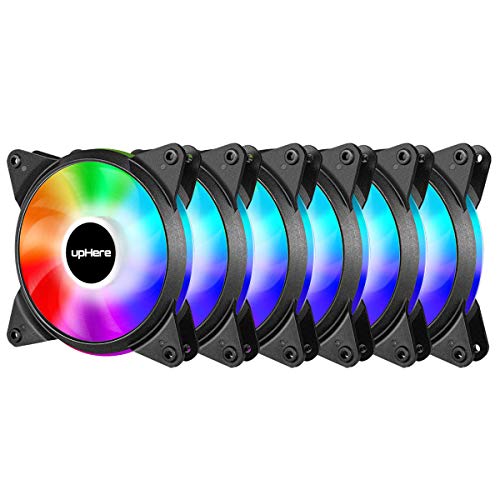
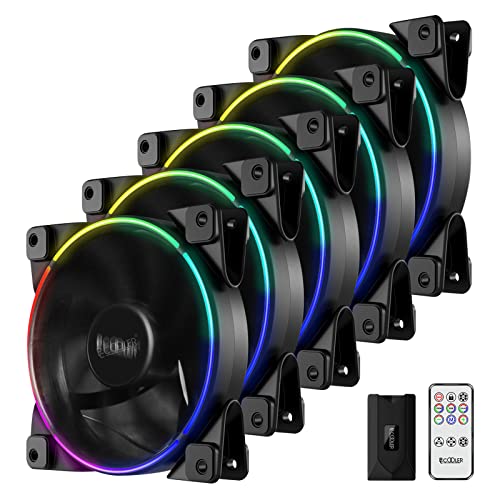
PCCOOLER 120mm Case Fan 5 Pack PC Computer Fans RGB PC Case Fans with Wireless Controller Dual Light Loop LED Computer Fan High Performance PWM Cooling Fan for PC Case


Key features
- •【Intelligent Speed Control】5 pcs 120mm full function PWM fans. The intelligent temperature controls the speed at 1000~1800±10% RPM, so the fan speed can be controlled and keep the fans quiet. Please connect the fan 4Pin PWM connector with 1-to-5 strip cable's female port, do not connect it with motherboard. There's switch fan speed control by motherboard's PWM signal. These fans are 4pin 5v ARGB connector that connect with RGB control box one by one.
- •【Dual Light Loop Design - Controlled by RGB Remote Controller】Addressable RGB LEDs can be controlled by RGB remote controller - 12 lighting modes, 8 different colors and multiple RGB light speeds, provide colorful streamer lighting effects. Double-sided ring ARGB glare effect design, creating a practical and beautiful cooling system. You also can turn on / off the fan light effect and switch fan hub's RGB signal to motherboard 5V ARGB / 12V RGB port by remote.
- •【Shockproof Design】The fan frame is fixed on both sides with 8 pieces of shock absorbing rubber pads. The rubber soft material which is not easy to peel off has good shock absorbing effect, which can make the internal operation of the computer case stably and reduce the noise output between the fan and the computer case.
- •【Top Bearing Technology】Hydraulic bearing with longer service life to reduce noise and improve heat dissipation efficiency. Lifetime 30,000 Hrs. Wireless RGB controller, more advanced wireless control dimming technology than infrared, you can still switch the light mode without aligning the light source.
- •【Sync with Motherboard's RGB/ARGB Port】12V RGB sync and 5V ARGB sync connector, 4 pin PWM power connector. Please connect the fan ARGB connector with control box one by one. To avoid making reverse connector, please follow the silk mark instruction strictly when you insert the connector to the control box. Suitable for liquid cooler and support 120/240/360mm radiators. (CPU Cooler/Computer Case/GPU etc)
PCCOOLER 120mm Case Fan 5 Pack PC Computer Fans RGB PC Case Fans with Wireless Controller Dual Light Loop LED Computer Fan High Performance PWM Cooling Fan for PC Case
List Price: $74.05$66.65DEALYou Save: $7.40 (10%)
Free shippingFree Returns – 30 daysFree Order CancellationSecure Payment2–3 Days DeliveryGet It October 25, 2026In Stock (1)No marketing spamNo account requiredFulfilment by FedEx / Amazon / UPS / ShipwirePayPal / Card Buyer Protection
Customer Reviews
Reviews sourced from verified Amazon purchasers4.5
out of 5
Based on 10 reviews
5★
80%
4★
20%
3★
0%
2★
0%
1★
0%
Great RGB LEDs, good airflow
Amazon Customer✓ Verified Purchase•October 31, 2023
Great kit. In the 5-pack (but not the 3-pack) the fans use the normal 5v ARGB addressable "3-pin" SIGNAL type. BUT they actually use a 4-pin connector like the old 12v RGB system. This sounds bad and proprietary at first, but this is really cool though, because with 4-pins you get data-in and data-out on the LED signal lines, so you can run multiple fans in serial instead of parallel.
Each fan LED in the line is actually uniquely addressable. All these 5v "3-pin" RBG devices are really just WS2812B devices under the hood, just like the common 5v addressable LED strips that are 5v 4-pin ARGB. So you can use much more exotic effects if you wire up your fans in serial, which you can do if you have all 4-pins available.
Do note that this requires some custom wiring and associated skills, but its great that these fans include all 4-pins so you can connect them in serial. Otherwise, like most motherboard "5v 3-pin" all the fans do the same effect, which is fine, but already dated compared to what you can do if each LED on each fan is uniquely addressable down the line.
It makes sense they force the "3-pin" paradigm to try to help people from accidentally plugging in an older 12v 4-pin RGB fan into the newer 5v 3pin standard. But the 5v 3-pin standard actually SHOULD have that 4th pin to connect these things in serial; just like the RGB led light strips they are built with.
Great fans too, high pressure, high CFM ratings. The included controller is a little intimidating to figure out the wiring for novices, but is simple enough.
The FAN controller is great too. It passes through the motherboards PWM signal to all attached fans, but the power comes from the SATA connector to avoid over-loading the single motherboard output. The RPM reading is read only from the 1st fan in the chain, but since all these fans are identical, the reading the motherboard gets will reflect all the attached fans. This is the right way to wire up multiple fans to a single header, good to see they've done it right in the controller.
You can also bypass the PWM entirely, and just use the High-Med-Low control on the remote.
This is a high-end fan kit at a great price. I highly suggest the 5-pack for advanced usage and possibilities with the 4-pin fans connections for the ARGB (which is technically seen as proprietary in the PC world, but is actually the standard for 5v ARGB LED light strips). And I suggest the 3-pack for beginner and normal ARGB usage because of the normal "standard PC 3-pin 5v ARGB" connections on all the included fans. But note these will forever be limited to parralel wiring where each fan's LEDS will always be doing the same thing relative to each other. No option for individual addressing across fans.
You can convert the 5-pack's 4-pin connector to a 3-pin connector just fine, but not vice-versa, so the 5-pack would be recommended if you think you'll ever want to start doing more advanced ARGB setups and effects.
Take note the controller by default starts up each time with its internal default settings. You can override this and "lock" your settings for each startup. Hold the Lock button on the remote for 5 seconds, then set your settings how you like, then press "lock" again on the remote. Now it will retain your desired boot-up settings.
In my final setup I'm actually bypassing the motherboard and this ARGB controller entirely, and controlling these with custom ARGB wiring in serial, which was easy to do since all 4-pins are available at each fans 5v ARGB connector. The 5v ARGB input connects to an ESP32 running WLED software which uses the FastLED library for TONS of advanced effects compared to what motherboard software lets you do. This custom controller combined with custom wiring, allows for 100% unique RGB layouts, and no modifications to the actual fans was needed either. Just how they all wire up. ESP32's are about $10, and the WLED software is opensource/free. So go to town and do something unique with all these addressable LEDs!
Each fan LED in the line is actually uniquely addressable. All these 5v "3-pin" RBG devices are really just WS2812B devices under the hood, just like the common 5v addressable LED strips that are 5v 4-pin ARGB. So you can use much more exotic effects if you wire up your fans in serial, which you can do if you have all 4-pins available.
Do note that this requires some custom wiring and associated skills, but its great that these fans include all 4-pins so you can connect them in serial. Otherwise, like most motherboard "5v 3-pin" all the fans do the same effect, which is fine, but already dated compared to what you can do if each LED on each fan is uniquely addressable down the line.
It makes sense they force the "3-pin" paradigm to try to help people from accidentally plugging in an older 12v 4-pin RGB fan into the newer 5v 3pin standard. But the 5v 3-pin standard actually SHOULD have that 4th pin to connect these things in serial; just like the RGB led light strips they are built with.
Great fans too, high pressure, high CFM ratings. The included controller is a little intimidating to figure out the wiring for novices, but is simple enough.
The FAN controller is great too. It passes through the motherboards PWM signal to all attached fans, but the power comes from the SATA connector to avoid over-loading the single motherboard output. The RPM reading is read only from the 1st fan in the chain, but since all these fans are identical, the reading the motherboard gets will reflect all the attached fans. This is the right way to wire up multiple fans to a single header, good to see they've done it right in the controller.
You can also bypass the PWM entirely, and just use the High-Med-Low control on the remote.
This is a high-end fan kit at a great price. I highly suggest the 5-pack for advanced usage and possibilities with the 4-pin fans connections for the ARGB (which is technically seen as proprietary in the PC world, but is actually the standard for 5v ARGB LED light strips). And I suggest the 3-pack for beginner and normal ARGB usage because of the normal "standard PC 3-pin 5v ARGB" connections on all the included fans. But note these will forever be limited to parralel wiring where each fan's LEDS will always be doing the same thing relative to each other. No option for individual addressing across fans.
You can convert the 5-pack's 4-pin connector to a 3-pin connector just fine, but not vice-versa, so the 5-pack would be recommended if you think you'll ever want to start doing more advanced ARGB setups and effects.
Take note the controller by default starts up each time with its internal default settings. You can override this and "lock" your settings for each startup. Hold the Lock button on the remote for 5 seconds, then set your settings how you like, then press "lock" again on the remote. Now it will retain your desired boot-up settings.
In my final setup I'm actually bypassing the motherboard and this ARGB controller entirely, and controlling these with custom ARGB wiring in serial, which was easy to do since all 4-pins are available at each fans 5v ARGB connector. The 5v ARGB input connects to an ESP32 running WLED software which uses the FastLED library for TONS of advanced effects compared to what motherboard software lets you do. This custom controller combined with custom wiring, allows for 100% unique RGB layouts, and no modifications to the actual fans was needed either. Just how they all wire up. ESP32's are about $10, and the WLED software is opensource/free. So go to town and do something unique with all these addressable LEDs!
Solid Fans, ARGB only works with ASUS motherboards
Chad D. Langley✓ Verified Purchase•October 25, 2023
*The remote reset ARGB light show is great on it's own
*Works best with ASUS motherboard / LED software
*Great build material
*5 for $65 great price
*Seek Corsair for more control over LED's will cost 150% more but if you're OCD Corsair is almost always
the way to go just make sure anything you buy with LED's from Corsair says iCUE, and enjoy the show.
(ARGB = Addressable Red Green Blue LED / Lights)
The difference you ask from ARGB and RGB is -
"If you have a regular rgb strip and plug it into an rgb header, the whole strip is 1 color. ... If you have an ARGB strip and plug into a compatible ARGB header, you can customize each individual led color." - Reddit.com ( Much better light show)
It's only ARGB if you have a ASUS motherboard, doesn't work as ARGB with MSI or any of the other RGB software for ARGB. It will sync up with MSI for the RGB part but the lights do things different from the rest of the ARGB stuff, they try to tie but it looks "not good" lol, other then that the fans are well built 100% feel better then bigger name brands like the NZXT that came with my case. And the air-flow is insane tbh not sure why I read others saying the air flow is horrible but the silent setting moves plenty of air for my case temps over-all went down roughly 3%, and if you don't mind a bit of noise then the 2 other speeds will keep the case cool when running at medium speeds I saw a temp drop of roughly 20%, during a 4 hours of gaming. At max speed and let me tell you there is some noise, but I seen 36% temp drop over my other fans being control strictly by my motherboard, the fans also adjust via the motherboard control if you plug the controller into the CPU fan controller, and it allows me to still manually control the speeds as well when I feel the need to do so.
I give it 4 stars because of the ARGB issue, and because the wiring was a nightmare buyer be warn use lots of zip ties and it may just be my mid tower case and not having a lot of wiring choices.
3 pin ARGB connects as follow " * ** / will not work with ** * " HAHA should have posted pics I know !
*Works best with ASUS motherboard / LED software
*Great build material
*5 for $65 great price
*Seek Corsair for more control over LED's will cost 150% more but if you're OCD Corsair is almost always
the way to go just make sure anything you buy with LED's from Corsair says iCUE, and enjoy the show.
(ARGB = Addressable Red Green Blue LED / Lights)
The difference you ask from ARGB and RGB is -
"If you have a regular rgb strip and plug it into an rgb header, the whole strip is 1 color. ... If you have an ARGB strip and plug into a compatible ARGB header, you can customize each individual led color." - Reddit.com ( Much better light show)
It's only ARGB if you have a ASUS motherboard, doesn't work as ARGB with MSI or any of the other RGB software for ARGB. It will sync up with MSI for the RGB part but the lights do things different from the rest of the ARGB stuff, they try to tie but it looks "not good" lol, other then that the fans are well built 100% feel better then bigger name brands like the NZXT that came with my case. And the air-flow is insane tbh not sure why I read others saying the air flow is horrible but the silent setting moves plenty of air for my case temps over-all went down roughly 3%, and if you don't mind a bit of noise then the 2 other speeds will keep the case cool when running at medium speeds I saw a temp drop of roughly 20%, during a 4 hours of gaming. At max speed and let me tell you there is some noise, but I seen 36% temp drop over my other fans being control strictly by my motherboard, the fans also adjust via the motherboard control if you plug the controller into the CPU fan controller, and it allows me to still manually control the speeds as well when I feel the need to do so.
I give it 4 stars because of the ARGB issue, and because the wiring was a nightmare buyer be warn use lots of zip ties and it may just be my mid tower case and not having a lot of wiring choices.
3 pin ARGB connects as follow " * ** / will not work with ** * " HAHA should have posted pics I know !
I love how these Look in my case. Pictures do not do it justice!
Jonathan Seferino✓ Verified Purchase•October 14, 2023
The media could not be loaded. Update:
These fans work very well. Many of my controlling issues are from the motherboard software itself. Please use Asus AI Suite 3 to adjust and auto tune the fans. My idle temps are now 45c. With Cinebench R20 i hit 73 on load. Gaming is still at 65 with H100i. I still use the fans that came with the H100 as they have static pressure to move that air. Fans stay super quiet. I order another 3 to complete the build. 1 for rear exhaust and 2 for push pull for side exhaust.
--------------------------------------------------------
These fans are really nice looking. I have 9 in my 011 Dynamic XL case. The pictures from my phone really does not do it any justice. The colors are vibrant and stand out.
As for performance, these move air but not in the way you would think. It seems to push air at a 45% angle not forward. It does keep my case cool, but their are fans out their that can move a lot more air. I dont want to really comment on temps of the cpu because i have an AIO (Corsair H100i Platium). My idle is 59C with a 3700X on auto overclock. It boost to 75C when doing heavy loads. When gaming i dont go above 65C . Have the fans in a push pull configuration for the AIO.
Quietness is OK. It is not dead silent. I am still working out this new board (X570-E - ASUS) to help adjust fan speed. So it is quiet enough for me. I might need a command pro for Corsair but that is more of a Motherboard issue.
Tips: The iCUE software does not support ARGB 5V 3 pin as of 8-29-2020. They do however support 12v 4pin. I use ASUS Aura software to change the RGB with the exception of the AIO which drives me a little crazy. So its not a full RGB sync.
I daisy-chained the RGB cables for all 9 fans together using the included 3 -1 sync cable. It has an RGB out on each of them. So i am only using 1 ARGB 5V connector on the motherboard.
Conclusion. Would i buy it again. Definitely! Just the right amount of RGB without looking like a rainbow puked inside your case.
These fans work very well. Many of my controlling issues are from the motherboard software itself. Please use Asus AI Suite 3 to adjust and auto tune the fans. My idle temps are now 45c. With Cinebench R20 i hit 73 on load. Gaming is still at 65 with H100i. I still use the fans that came with the H100 as they have static pressure to move that air. Fans stay super quiet. I order another 3 to complete the build. 1 for rear exhaust and 2 for push pull for side exhaust.
--------------------------------------------------------
These fans are really nice looking. I have 9 in my 011 Dynamic XL case. The pictures from my phone really does not do it any justice. The colors are vibrant and stand out.
As for performance, these move air but not in the way you would think. It seems to push air at a 45% angle not forward. It does keep my case cool, but their are fans out their that can move a lot more air. I dont want to really comment on temps of the cpu because i have an AIO (Corsair H100i Platium). My idle is 59C with a 3700X on auto overclock. It boost to 75C when doing heavy loads. When gaming i dont go above 65C . Have the fans in a push pull configuration for the AIO.
Quietness is OK. It is not dead silent. I am still working out this new board (X570-E - ASUS) to help adjust fan speed. So it is quiet enough for me. I might need a command pro for Corsair but that is more of a Motherboard issue.
Tips: The iCUE software does not support ARGB 5V 3 pin as of 8-29-2020. They do however support 12v 4pin. I use ASUS Aura software to change the RGB with the exception of the AIO which drives me a little crazy. So its not a full RGB sync.
I daisy-chained the RGB cables for all 9 fans together using the included 3 -1 sync cable. It has an RGB out on each of them. So i am only using 1 ARGB 5V connector on the motherboard.
Conclusion. Would i buy it again. Definitely! Just the right amount of RGB without looking like a rainbow puked inside your case.
Incredible Fans - Noctua’s Rival!
Branden J.✓ Verified Purchase•September 15, 2023
Pc cooking is highly important for the stability of any build, and I'd you're trying to get top tier, seriously give these a try.
I read up on Reddit about these being Noctua rivals and decided to pull the plug and purchase the 5 pack. Well, I was not disappointed.
- Build quality is fantastic, and they feel like expensive Corsair fans. I had Corsair LL120s in the case prior to these, so the comparison was made side by side.
- Speed beats out most fans on the market, going up to 2000RPM in bios (even though the box says 1800). I ram a few tests with these and they were so good, even at 1200RPM, that I put my CPU AIO side mounted in order to use three of these up top as exhaust without any radiator obstruction. At 1200-1500RPM they make as much noise as any quiet fan, at 1800-2000 you can definitely hear them (but that's any fan on the market). With a headset on you will not however. Fan speeds are completely if connected to a fan header and daisy chained.
- My temps with these as 1200-1500 were nuts. Cyberpunk 1440p, Psycho settings, everything maxed out to the highest potential, WITH mods to increase graphical fidelity, I was sitting around 58-63 for my RTX4080. To put it into perspective that's INSANE. With all Corsair LL120s in the same config I was hitting 74 degrees, and the lowest was 65.
- Aesthetics are nice and classy. The thin but bright RGB ring looks very high end IMO vs. the entire fan being a color vomit. They don't work with Mystic Light through MSI so I just installed them through the RGB hub it came with and used the remote (honestly way easier anyway..). There are a TON of RGB options for these!
- Wiring for me was easy, but I'm also very experienced in building.
My only grip is I wish there was 6 in the box! I could EASILY use another 3 for my build if I swap the bottom fans. PCcooler master if you're listening, hook me up please ;)!
I think I'll settle on these forever to be honest.
I read up on Reddit about these being Noctua rivals and decided to pull the plug and purchase the 5 pack. Well, I was not disappointed.
- Build quality is fantastic, and they feel like expensive Corsair fans. I had Corsair LL120s in the case prior to these, so the comparison was made side by side.
- Speed beats out most fans on the market, going up to 2000RPM in bios (even though the box says 1800). I ram a few tests with these and they were so good, even at 1200RPM, that I put my CPU AIO side mounted in order to use three of these up top as exhaust without any radiator obstruction. At 1200-1500RPM they make as much noise as any quiet fan, at 1800-2000 you can definitely hear them (but that's any fan on the market). With a headset on you will not however. Fan speeds are completely if connected to a fan header and daisy chained.
- My temps with these as 1200-1500 were nuts. Cyberpunk 1440p, Psycho settings, everything maxed out to the highest potential, WITH mods to increase graphical fidelity, I was sitting around 58-63 for my RTX4080. To put it into perspective that's INSANE. With all Corsair LL120s in the same config I was hitting 74 degrees, and the lowest was 65.
- Aesthetics are nice and classy. The thin but bright RGB ring looks very high end IMO vs. the entire fan being a color vomit. They don't work with Mystic Light through MSI so I just installed them through the RGB hub it came with and used the remote (honestly way easier anyway..). There are a TON of RGB options for these!
- Wiring for me was easy, but I'm also very experienced in building.
My only grip is I wish there was 6 in the box! I could EASILY use another 3 for my build if I swap the bottom fans. PCcooler master if you're listening, hook me up please ;)!
I think I'll settle on these forever to be honest.
The Best for the price, BUT you have to do a little work that's all.
Lefty✓ Verified Purchase•August 24, 2023
Hands down for the price there is nothing out there that comes close.
Quality solid build even on cables.
The little hub is also good could be better but it's also pretty solid. trust me i jammed it then took it out then jammed it again forcefully and still solid.
Now here is the DEAL super cheap great quality but there has to be a catch right? There is...if they don't work 100% on first try.
Sometimes you are going to have to do a little work!! I know a little trouble shooting soooo hard!!!!
Hook them up-
Led's on but no spinning: possible solution cables, ok take all cables and push in the cable ends into the connectors, then plug all in again make sure all the ends are ok in the connector, bingo fans spinning!
Fans spin but out of 5 only X turn on Led's-
Maybe cables are in the wrong way turn them around (only the ones not on)
Freaking cool effects but won't work with MoBo software- I have Asus but should be the same basics.
Header does not show ram and header is not registered and if I apply an effect the back glow on mobo and fans Led's shut off-
Well cables wrong way let's try that turning them again 4pin(12v) and or 3pin(5v) connector, now try again
now should see on MoBo software Mem, Aura and Header pick an effect and test that is working.
Now on to speed
These are dead silent at stock low by mobo not remote) but when at 60%+ yes they can get loud but the thing is they are so good you don't need to bring them up that high,only times I heard them is when doing the Aida stress test and they didn't even go full because they cool the noctua NHu12s so good they barely need to ramp up.
I used MoBo's Bios and set a PMW fan curve. But you can also do this by software on most motherborads.
KEY!**
For it to work when you log in to windows press the top right button on the remote ( the fan blade icon) once the fans blink it means it relinquished the control and gave it to the MoBo, now on the Mobo apply your fan settings and they should ramp up and down as you set it.
Hope it helps! Remember all you need to do is a little work that's all i know in this day and age we all expect plug in play but hey stuff happens and for this price hell i can overlook that.
Quality solid build even on cables.
The little hub is also good could be better but it's also pretty solid. trust me i jammed it then took it out then jammed it again forcefully and still solid.
Now here is the DEAL super cheap great quality but there has to be a catch right? There is...if they don't work 100% on first try.
Sometimes you are going to have to do a little work!! I know a little trouble shooting soooo hard!!!!
Hook them up-
Led's on but no spinning: possible solution cables, ok take all cables and push in the cable ends into the connectors, then plug all in again make sure all the ends are ok in the connector, bingo fans spinning!
Fans spin but out of 5 only X turn on Led's-
Maybe cables are in the wrong way turn them around (only the ones not on)
Freaking cool effects but won't work with MoBo software- I have Asus but should be the same basics.
Header does not show ram and header is not registered and if I apply an effect the back glow on mobo and fans Led's shut off-
Well cables wrong way let's try that turning them again 4pin(12v) and or 3pin(5v) connector, now try again
now should see on MoBo software Mem, Aura and Header pick an effect and test that is working.
Now on to speed
These are dead silent at stock low by mobo not remote) but when at 60%+ yes they can get loud but the thing is they are so good you don't need to bring them up that high,only times I heard them is when doing the Aida stress test and they didn't even go full because they cool the noctua NHu12s so good they barely need to ramp up.
I used MoBo's Bios and set a PMW fan curve. But you can also do this by software on most motherborads.
KEY!**
For it to work when you log in to windows press the top right button on the remote ( the fan blade icon) once the fans blink it means it relinquished the control and gave it to the MoBo, now on the Mobo apply your fan settings and they should ramp up and down as you set it.
Hope it helps! Remember all you need to do is a little work that's all i know in this day and age we all expect plug in play but hey stuff happens and for this price hell i can overlook that.
Page 1 of 2