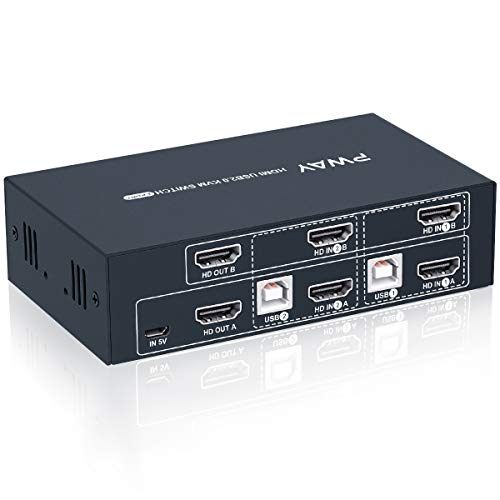
MT-VIKI VGA KVM Switch, 2 Port USB VGA KVM Switch for 2 Computers Share 1 Monitor Keyboard Mouse Printer, + 2 KVM Cables


Key features
- •MT-VIKI 260KL, 2 port USB VGA KVM Switch enables 2 PCs to share 1 set of monitor, keyboard, mouse, one U-disk, printer or USB speaker (not 3.5mm jack)
- •Different from USB switches, 260KL enables 2 computers to share keyboard & mouse, but also 1 monitor, printer and U disk for both. Not support mechanical keyboard and mouse.
- •Package includes everything needed like 2 special USB KVM VGA cable (2in1). please plug the VGA cable w/ USB pigtail into computer port.
- •The USB VGA KVM cable is 4ft/1.2m, to require 10ft/3m, please order ASIN: B08ZJ41YD4
- •Support 1920 x 1440 resolution and DDC. Support windows 10/8/7 / XP / Vista (32/64-bit), Mac, Linux, DOS, Win3, WINNT, Netware, and Unix. But not support docking Station
MT-VIKI VGA KVM Switch, 2 Port USB VGA KVM Switch for 2 Computers Share 1 Monitor Keyboard Mouse Printer, + 2 KVM Cables
List Price: $32.96$29.66DEALYou Save: $3.30 (10%)
Free shippingFree Returns – 30 daysFree Order CancellationSecure Payment2–3 Days DeliveryGet It October 26, 2026In Stock (20)No marketing spamNo account requiredFulfilment by FedEx / Amazon / UPS / ShipwirePayPal / Card Buyer Protection
Customer Reviews
Reviews sourced from verified Amazon purchasers4.2
out of 5
Based on 10 reviews
5★
80%
4★
20%
3★
0%
2★
0%
1★
0%
it was exactly as described
Gabrielle M. Toupence✓ Verified Purchase•March 9, 2024
it was perfect for what I needed it for
Just follow hookup directions and you'll be fine
d✓ Verified Purchase•March 4, 2024
Had problems initially due to having unplugged my webcam and had the loose usb cable laying beside my computer, got everything hooked up and monitor switched ok between my win 7 and win 10 computer but mouse and keyboard would not work on my win 10, reached out to Amazon for assistance and finally to vendor, still no resolution, finally tried to turn my webcam off and found that I'd plugged it into the KVM, DUH! Swapped cables and all was well with the world, switch works great, going to get another on so can switch between my Win XP, Win 7 and Win 10, clear up lots of desk space.
Priced right and good performance
Mario Herrera✓ Verified Purchase•February 5, 2024
We started using this KVM model a couple of years ago and (knock on wood!) we have not had any issues with the first installs. We install these on any Restaurant that does not have a lot of room on their Manager's office as they have 2 PCs.
The only issue for me is cable management, cables are a bit too thick and not as easy to hide.
The only issue for me is cable management, cables are a bit too thick and not as easy to hide.
Works as expected, good price not an ideal design
Joe Ambrosino✓ Verified Purchase•January 18, 2024
The unit is fine it does what it needs to do, and does it flawlessly so far. The only issue, and this is typical of these low cost KVMs, the connector for the monitor is on the front of the device and the usb port is on the side, out of sight. That means that there is no graceful way of routing the monitor cable and have the control button visible. If there were a hot key to switch monitors, you could tuck it away out of sight, or if the monitor jack was on the side, you route the cable to the left or right. But as configured, the cable comes out towards the user, and then has to be directed back towards the monitor.
Like I said, it works well, I'd buy it again if I needed a small low cost KVM, but it just isn't very elegant.
Like I said, it works well, I'd buy it again if I needed a small low cost KVM, but it just isn't very elegant.
EASY QUICK AND USEFUL
L✓ Verified Purchase•January 16, 2024
This is a good unit for the bucks... I did receive the first one which was actually defective. It was an easy return and and replacement. So I give the seller A+++. They unit functions well. I liked the fact that the usb cable is built right into the long cable. I have another one in my music studio and had to run separate cables for usb and more tangle, more mess. So this was a definite plus... WHEN READY TO INSTALL: Make sure and watch the included clips for easier installation. The only thing that was a disappointment is that there is no plug-in for sound and so because my computers are older, I had to choose which one that I wanted to dedicate the sound and plug the speakers directly. I do understand that everything is going blue tooth and this is probably why the manufacturer cut corners. For the price, it's worth it.
I CAME BACK AND ADDED 1 MORE PARAGRAPH AFTER USING FOR A MONTH. I took away 1 star and for this reason: My other unit that I use downstairs in my music studio has an input for SOUND as well. It provides sound between BOTH COMPUTERS with this function. After using this one, I had to put a manual switch (another gadget to be hooked up and in the way!) so I could switch sound between computers. So I am taking 1 star away... If you need sound between computers to your speakers, buy the upgraded one with the little orange/aqua blue 1/8 inch inputs included on the unit.
I CAME BACK AND ADDED 1 MORE PARAGRAPH AFTER USING FOR A MONTH. I took away 1 star and for this reason: My other unit that I use downstairs in my music studio has an input for SOUND as well. It provides sound between BOTH COMPUTERS with this function. After using this one, I had to put a manual switch (another gadget to be hooked up and in the way!) so I could switch sound between computers. So I am taking 1 star away... If you need sound between computers to your speakers, buy the upgraded one with the little orange/aqua blue 1/8 inch inputs included on the unit.
Page 1 of 2