UtechSmart Venus Pro RGB Wireless MMO Gaming Mouse, 16,000 DPI Optical Sensor, 2.4 GHz Transmission Technology, Ergonomic Design, 16M Chroma RGB Lighting, 16 programmable Buttons, Up to 70 Hours



Key features
- •【Extensive Fully Programmable Buttons】16 customizable buttons can improve your gaming skills and performance by complex custom button macro coding of reconfiguration and assignment. The button custom function combines multiple keys into one button that reducing your arsenal of spells (actions) and response time. 12 of 16 thumb grip programmable buttons were designed by different inclination angles to fit for your thumb tip to click.
- •【Dual Modes with Ultra-Speed Wireless Technology】UtechSmart VENUS Pro RGB Wireless MMO Gaming Mouse is a new revolution of RGB MMO gaming mouse. It has 2.4 GHz data transmission technology with Mini signal receiver(Nano) and stable 1. 5m wire transmission that provides professional-level performance. VENUS Pro overcomes the traditional limitation of wireless latency and connectivity which offers stable and fast data transmission with 10-meter reception boundary. You can take this mouse anywhere!
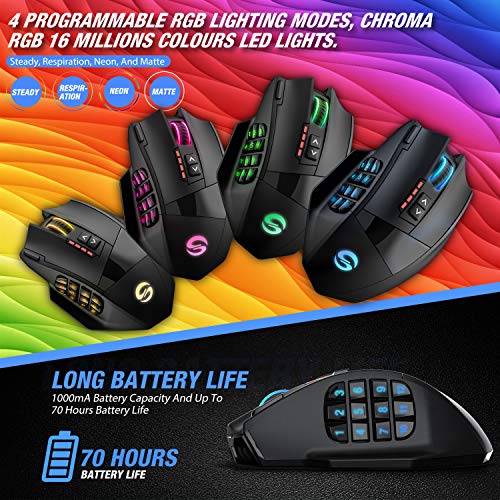
- •【Endurable Battery Lifetime】 UtechSmart Venus Pro Wireless RGB MMO gaming mouse has special auto sleeping mode and low power consumption mode or extending the battery life of wireless mode. Large battery (1000mA) capacity which offers to recharge over 300 times and single 2 hours fully charge. The wireless mode lasts up to 70 hours that fulfill your long-time gaming experience. Moreover, UtechSmart actuation software provides battery specify consumption monitoring for you.
- •【Customizable Mouse High Precision Optical Sensor】Thousands of customers and professional gamers have tested and verified its function. Venus Pro has an UtechSmart custom PixArt PMW3335 ultra-accurate Optical sensor. Up to 16000 DPI with 5 DPI switchable stages and 1000 Hz polling rate that offers you an incomparable MMO and FPS gaming experience. The huge adjustable DPI range from 100-16000 comes with UtechSmart user-friendly software that can perfectly tweak the performance of mouse accuracy.
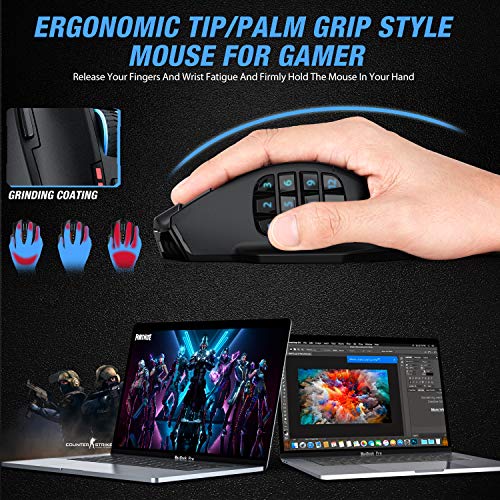
- •【Ergonomic Design Ensures Your Comfortable】Great as a real mouse stuck in your hand. The UtechSmart Venus Pro Wireless RGB MMO gaming mouse is flawlessly designed to alleviate wrist fatigue while being able to firmly hold the mouse in your hand. The grinding coating on the mouse surface increases the friction between your hand and the mouse. Grinding coating also provides gamer a extra comfortable sweat-resistant and skin-friendly gaming mouse.
- •【Amazing RGB Lighting and Reliable Buttons】Fully customize RGB lighting up to 16 Million colors and 4 programmable RGB modes (Steady Respiration Neon and Matte) by UtechSmart software. Software can be easily installed by inserting the drive software card into the USB port of your laptop. It's compatible for Windows98SE/ME/2000/XP/Vista/Win7-10/Mac. For the gamer, the switch of a button is applied with a great microswitch which provides 10 million times click duration and without double click problem!
BrandUtechSmart
CategoryGaming Mice
SizeMedium
ColorClassic black
WarrantyFriendly customer service with 12-Month refund & replacement warranty.
UtechSmart Venus Pro RGB Wireless MMO Gaming Mouse, 16,000 DPI Optical Sensor, 2.4 GHz Transmission Technology, Ergonomic Design, 16M Chroma RGB Lighting, 16 programmable Buttons, Up to 70 Hours
List Price: $77.27$69.54DEALYou Save: $7.73 (10%)
Free shippingFree Returns – 30 daysFree Order CancellationSecure Payment2–3 Days DeliveryGet It October 26, 2026In Stock (2)No marketing spamNo account requiredFulfilment by FedEx / Amazon / UPS / ShipwirePayPal / Card Buyer Protection
Customer Reviews
Reviews sourced from verified Amazon purchasers4.5
out of 5
Based on 10 reviews
5★
80%
4★
20%
3★
0%
2★
0%
1★
0%
Updated review for Wireless Version
IvyX✓ Verified Purchase•May 18, 2024
Wireless Version Review:
After many years, it was finally time to replace my beloved wired Venus gaming mouse. The left click button was consistently double clicking when I only clicked once, but after 7 years everything else was still working great including all the other buttons and profiles in the software. Unfortunately when I bought the same mouse last year, the software and drivers no longer work and made using the profiles and changing settings in the UtechSmart application impossible. I decided to go back to my old (although dysfunctional) one and this year decided to try the wireless version.
Set up was surprisingly easy given how much trouble I had last time, I really like how the software and drivers come on a usb flashdrive now instead of on the website or a mini disc. This ensures you have some drivers that should make the mouse work in it's most basic iteration. It worked as soon as I plugged it in, and the flash drive as well. You can only have two profiles with the wireless version (and switch between then using the button on the bottom of the mouse), but all the buttons are still programmable and you can the light settings on the mouse or turn them off entirely if you don't like the feature or want to save battery, and you can do this on both the app or the mouse itself. The light also goes into sleep mode until you move it again if you don't use it for awhile but leave the mouse on. One thing I don't like is that I think it was easier to program the buttons in the old version, now you have to use macros multi-key input if you want to set hotkeys for buttons that aren't already in it's drop down menu.
The buttons and scroll wheel feel as nice as I expected. The side buttons are a little less mushy than the wired version, but to be honest that never bothered me much. I don't play competitive games and like having a mouse like this for MMO's and sandbox games like Ark that have a lot of actions that we can hotkey. Overall I think this mouse will still fit my needs and I have always loved the design. The only other mouse I've ever seen that was similar is by Razr but their products have always felt really cheap for how expensive they are. This mouse is half the price and feels a lot nicer. The slightly rubberized texture feels nice in the hand and wears well over time. The curve is very ergonomic for my average to smallish sized hands. I'm really happy to have found a version that still works for me.
Below is my original review for the wired version from 2015, not sure it combines them and I'm unable to write a separate/new review.
I have been using this mouse for about 10 months. I'm not sure when exactly but at some point it started to turn off and on if I accidentally bumped the USB part of the cable when it was plugged in. For the longest time I thought it was just my computer's USB port (the mouse and cable itself still look physically perfect and I took very good care of it) but over the last few weeks it started to do it quite frequently when even just moving the mouse and eventually it stopped turning on all together when plugged in. At that point I realized it had been the cord all along as it would not turn on no matter what USB port I plugged it into. I had purchased an extended warranty when I bought the mouse but when I called the provider they directed me to contact the manufacturer first as they offer an 18 month warranty. It was a bit difficult to find any contact information on the UtechSmart website (and all I did find was an email address) but I was pleasantly surprised by the level of customer service I received in response. They responded within 24 hours (they were more responsive at night which I thought was a bit weird but this worked well with my schedule) and after a few email questions back and forth over the next business day agreed to send me a replacement. The replacement was sent within one business day and was sent with One Day shipping. Needless to say I was very happy as I had already been without a working mouse for my gaming for a few days.
The new mouse seems to be working perfectly but there are a few differences I've noticed from the first one I received 10 months ago that I think are worth noting. The braided cord feels more durable now, the profile color selection now changes the scroll button glow as well, and the texture of the mouse itself has changed. Previously it had a smooth grip texture which I really liked but the new one has a rough/grainy texture which caught me off guard at first. After a few hours I actually came to like it better than the smooth grip the mouse had before.
I have read some of the previous views as well and wanted to comment on the mouse and software itself. I have never used a Razer mouse but based on a previous experience with their products and some feedback from my friends I have never been impressed with their quality or durability (a console controller should not break after two months of normal use). I don't really play competitive online games but this mouse has been great for the games I do play (Dragon Age, Rebel Galaxy, Skyrim, Guild Wars 2, etc). I wanted a quality mouse with tons of side buttons to make it easier to get to and use a lot of skills quickly. This mouse has worked out perfectly for that.
Yes, the buttons may be considered a bit squishy compared to some of the name brand mice as they are not mechanical but the keys are easy to reach and work well, after a few hours your thumb develops the muscle memory to use the side buttons without issue. Yes, you may not have quite as much control over the settings as you would with one of the name brand mice. However there are still tons of settings you do have control over and I found the software very intuitive and easy to use (especially considering I have not had much experience using these settings in the past). I love the glow feature because it helps me remember to change profiles depending on which game I want to play and it's also just aesthetically pleasing (lol!). Like all the other reviewers have said the mouse is also just super ergonomic, it is probably one of the most comfortable gaming accessories I have ever used. If you are on a budget but need a new gaming mouse this is definitely a great option.
For the price, quality and level of customer service I would definitely buy again and recommend to any of my friends who are considering a customize-able gaming mouse.
Update: Two years later and this mouse is still working great. I havent had any issues with ghosting or dpi like some other users have mentioned. I would highly encourage any users with these issues to contact the manufacturer to see about a replacement, every once in a while there will be a lemon.
Update 5 Years Later:
I have been regularly using this mouse every day for five years now with zero problems, I am actually really surprised. The cable has held up well, and I'm considering replacing it with the same model just because mine has gotten kind of gunky and gross from so many years of use. Still love this mouse.
Update July 2021:
I did end up purchasing a new one, but unfortunately the drivers are broken and don't recognize the mouse when you go into the customization software. Luckily my old mouse still works so when I plugged it back in, all of my settings were still saved on the old mouse which means this is an issue with the new model. In researching this issue seems to have been going on for a few months now, I hope they fix it soon. It does work as a normal mouse, but if you're buying it for it's intended purpose (gaming) you won't be able to change the settings to fit your preferred keybinds/button configurations. Very disappointed and contemplating returning and waiting to see if a new version comes out.
After many years, it was finally time to replace my beloved wired Venus gaming mouse. The left click button was consistently double clicking when I only clicked once, but after 7 years everything else was still working great including all the other buttons and profiles in the software. Unfortunately when I bought the same mouse last year, the software and drivers no longer work and made using the profiles and changing settings in the UtechSmart application impossible. I decided to go back to my old (although dysfunctional) one and this year decided to try the wireless version.
Set up was surprisingly easy given how much trouble I had last time, I really like how the software and drivers come on a usb flashdrive now instead of on the website or a mini disc. This ensures you have some drivers that should make the mouse work in it's most basic iteration. It worked as soon as I plugged it in, and the flash drive as well. You can only have two profiles with the wireless version (and switch between then using the button on the bottom of the mouse), but all the buttons are still programmable and you can the light settings on the mouse or turn them off entirely if you don't like the feature or want to save battery, and you can do this on both the app or the mouse itself. The light also goes into sleep mode until you move it again if you don't use it for awhile but leave the mouse on. One thing I don't like is that I think it was easier to program the buttons in the old version, now you have to use macros multi-key input if you want to set hotkeys for buttons that aren't already in it's drop down menu.
The buttons and scroll wheel feel as nice as I expected. The side buttons are a little less mushy than the wired version, but to be honest that never bothered me much. I don't play competitive games and like having a mouse like this for MMO's and sandbox games like Ark that have a lot of actions that we can hotkey. Overall I think this mouse will still fit my needs and I have always loved the design. The only other mouse I've ever seen that was similar is by Razr but their products have always felt really cheap for how expensive they are. This mouse is half the price and feels a lot nicer. The slightly rubberized texture feels nice in the hand and wears well over time. The curve is very ergonomic for my average to smallish sized hands. I'm really happy to have found a version that still works for me.
Below is my original review for the wired version from 2015, not sure it combines them and I'm unable to write a separate/new review.
I have been using this mouse for about 10 months. I'm not sure when exactly but at some point it started to turn off and on if I accidentally bumped the USB part of the cable when it was plugged in. For the longest time I thought it was just my computer's USB port (the mouse and cable itself still look physically perfect and I took very good care of it) but over the last few weeks it started to do it quite frequently when even just moving the mouse and eventually it stopped turning on all together when plugged in. At that point I realized it had been the cord all along as it would not turn on no matter what USB port I plugged it into. I had purchased an extended warranty when I bought the mouse but when I called the provider they directed me to contact the manufacturer first as they offer an 18 month warranty. It was a bit difficult to find any contact information on the UtechSmart website (and all I did find was an email address) but I was pleasantly surprised by the level of customer service I received in response. They responded within 24 hours (they were more responsive at night which I thought was a bit weird but this worked well with my schedule) and after a few email questions back and forth over the next business day agreed to send me a replacement. The replacement was sent within one business day and was sent with One Day shipping. Needless to say I was very happy as I had already been without a working mouse for my gaming for a few days.
The new mouse seems to be working perfectly but there are a few differences I've noticed from the first one I received 10 months ago that I think are worth noting. The braided cord feels more durable now, the profile color selection now changes the scroll button glow as well, and the texture of the mouse itself has changed. Previously it had a smooth grip texture which I really liked but the new one has a rough/grainy texture which caught me off guard at first. After a few hours I actually came to like it better than the smooth grip the mouse had before.
I have read some of the previous views as well and wanted to comment on the mouse and software itself. I have never used a Razer mouse but based on a previous experience with their products and some feedback from my friends I have never been impressed with their quality or durability (a console controller should not break after two months of normal use). I don't really play competitive online games but this mouse has been great for the games I do play (Dragon Age, Rebel Galaxy, Skyrim, Guild Wars 2, etc). I wanted a quality mouse with tons of side buttons to make it easier to get to and use a lot of skills quickly. This mouse has worked out perfectly for that.
Yes, the buttons may be considered a bit squishy compared to some of the name brand mice as they are not mechanical but the keys are easy to reach and work well, after a few hours your thumb develops the muscle memory to use the side buttons without issue. Yes, you may not have quite as much control over the settings as you would with one of the name brand mice. However there are still tons of settings you do have control over and I found the software very intuitive and easy to use (especially considering I have not had much experience using these settings in the past). I love the glow feature because it helps me remember to change profiles depending on which game I want to play and it's also just aesthetically pleasing (lol!). Like all the other reviewers have said the mouse is also just super ergonomic, it is probably one of the most comfortable gaming accessories I have ever used. If you are on a budget but need a new gaming mouse this is definitely a great option.
For the price, quality and level of customer service I would definitely buy again and recommend to any of my friends who are considering a customize-able gaming mouse.
Update: Two years later and this mouse is still working great. I havent had any issues with ghosting or dpi like some other users have mentioned. I would highly encourage any users with these issues to contact the manufacturer to see about a replacement, every once in a while there will be a lemon.
Update 5 Years Later:
I have been regularly using this mouse every day for five years now with zero problems, I am actually really surprised. The cable has held up well, and I'm considering replacing it with the same model just because mine has gotten kind of gunky and gross from so many years of use. Still love this mouse.
Update July 2021:
I did end up purchasing a new one, but unfortunately the drivers are broken and don't recognize the mouse when you go into the customization software. Luckily my old mouse still works so when I plugged it back in, all of my settings were still saved on the old mouse which means this is an issue with the new model. In researching this issue seems to have been going on for a few months now, I hope they fix it soon. It does work as a normal mouse, but if you're buying it for it's intended purpose (gaming) you won't be able to change the settings to fit your preferred keybinds/button configurations. Very disappointed and contemplating returning and waiting to see if a new version comes out.
More than a gaming mouse...
Sonflower✓ Verified Purchase•April 17, 2024
Buckle up guys, this review is gonna be long,Amazing mouse. I started using it on January 4th, 2018, and here it is, over a year later, still working flawlessly. Not sure what other reviews mean with the software being a nightmare. Literally all I did was search "utechsmart software" and it's the first result, it's really straightforward. Now, *claps hands together* m o u s e r e v i e w !
Build quality: 10/10
It's grippy and textured, which, when I first got it, seemed odd and kind of weird. That is, until I got used to it, which was very quickly. It has a teflon coating or something that makes your hands not stick to it when your hands get sweaty. It also has adjustable weight, which is a godsend. It feels really solid and makes other, expensive, non textured mice feel like cheap trash. *cough cough* "I'm looking at you, Razer Naga!" I've never had a button stick or be unresponsive, and, as hard as I am with them, and as much as I use them, is truly impressive.
Ergonomics: 9/10
The ergonomics are awesome, when I first got it, I found myself trying to right click by pushing down with my ring finger on the side groove. Speaking of side grooves, I kinda wish they had a groove for your pinky as well as your ring finger, but don't get me wrong, you don't notice it unless you're thinking about it, and the grippy texture almost completely makes up for it by keeping your pinky held up on the side. If you use the claw grip on your mouse though, it just negates it and it's fine, and while this mouse isn't really made for that grip. There's also a thumb rest below the buttons, but once again, it would be nice if it fit my thumb a bit better, it's kinda blocky and not really ergonomic, but not uncomfortable at all, and most of the time, my thumb is on the buttons rather than the rest anyway. Some of you may be worried about how your hands will fit, and fear not! I have huge hands, and this mouse fits me like a glove. Those of you with smaller hands, also fear not! My sister who has small hands has used it and has said it's the best feeling mouse she's used yet! It's basically a one-size-fits-all.
Features and usability/functions: 10/10
Once you use a mouse with 12 buttons, you can't go back. Believe me, I've tried, and I'm perfectly content with that. I thought there's no way I can keep track of all this, but I did and it's way easier than I thought. This is advertised as an MMO mouse, and I don't even play MMO's, but but I can almost guarantee you will have no regrets. It's completely programmable and I use it for way more things than just gaming. In fact, I'll list all the mapped buttons now just so you can see what I mean.
1: Alt+Tab
2: Page Down
3: Page Up
4: Ctrl+Tab (selecting different tabs)
5: Volume Down
6: Volume Up
7: Forward (mouse 5)
8: Delete
9: Enter
10: Backward (mouse 4)
11: Ctrl+C (Copy)
12: Ctrl+V (Paste)
See how useful that is? What sense does it make to have your left hand on a massive keyboard of 100 buttons, and your left only to 2-4 buttons? That's right, it doesn't.
Software/Lighing: 8/10
The software offers a lot of customizable options, such as DPI, button mapping, and lighting. It's relatively easy to use, and is decently simple. I really wish it had the option of customizing each part of the mouse a different color though, since it has a lot of places for it, or gave the option to breath through different colors, but this is more of a personal thing though. The software offers 5 different profiles, with each profile offering 5 different DPI switches and complete customization of button mapping and lighting etc. The default button to switch is on the underside of the mouse, but is also able to be mapped to any button of your choice.
Comparison/price: 10/10
This is an all around astounding mouse to have, especially for the price. It easily shatters expensive competitors, like the Razer Naga, even the Trinity version, which I have owned and tried, and falls short in every area, except for the lighting, which is pretty cool. Some people may say the Logitech G600 and G602 mouse is better, and I haven't tried them yet, but for now, I know for a fact that this mouse is the best bang for your buck mouse of this kind you can get. It could easily be sold for 70$+
Build quality: 10/10
It's grippy and textured, which, when I first got it, seemed odd and kind of weird. That is, until I got used to it, which was very quickly. It has a teflon coating or something that makes your hands not stick to it when your hands get sweaty. It also has adjustable weight, which is a godsend. It feels really solid and makes other, expensive, non textured mice feel like cheap trash. *cough cough* "I'm looking at you, Razer Naga!" I've never had a button stick or be unresponsive, and, as hard as I am with them, and as much as I use them, is truly impressive.
Ergonomics: 9/10
The ergonomics are awesome, when I first got it, I found myself trying to right click by pushing down with my ring finger on the side groove. Speaking of side grooves, I kinda wish they had a groove for your pinky as well as your ring finger, but don't get me wrong, you don't notice it unless you're thinking about it, and the grippy texture almost completely makes up for it by keeping your pinky held up on the side. If you use the claw grip on your mouse though, it just negates it and it's fine, and while this mouse isn't really made for that grip. There's also a thumb rest below the buttons, but once again, it would be nice if it fit my thumb a bit better, it's kinda blocky and not really ergonomic, but not uncomfortable at all, and most of the time, my thumb is on the buttons rather than the rest anyway. Some of you may be worried about how your hands will fit, and fear not! I have huge hands, and this mouse fits me like a glove. Those of you with smaller hands, also fear not! My sister who has small hands has used it and has said it's the best feeling mouse she's used yet! It's basically a one-size-fits-all.
Features and usability/functions: 10/10
Once you use a mouse with 12 buttons, you can't go back. Believe me, I've tried, and I'm perfectly content with that. I thought there's no way I can keep track of all this, but I did and it's way easier than I thought. This is advertised as an MMO mouse, and I don't even play MMO's, but but I can almost guarantee you will have no regrets. It's completely programmable and I use it for way more things than just gaming. In fact, I'll list all the mapped buttons now just so you can see what I mean.
1: Alt+Tab
2: Page Down
3: Page Up
4: Ctrl+Tab (selecting different tabs)
5: Volume Down
6: Volume Up
7: Forward (mouse 5)
8: Delete
9: Enter
10: Backward (mouse 4)
11: Ctrl+C (Copy)
12: Ctrl+V (Paste)
See how useful that is? What sense does it make to have your left hand on a massive keyboard of 100 buttons, and your left only to 2-4 buttons? That's right, it doesn't.
Software/Lighing: 8/10
The software offers a lot of customizable options, such as DPI, button mapping, and lighting. It's relatively easy to use, and is decently simple. I really wish it had the option of customizing each part of the mouse a different color though, since it has a lot of places for it, or gave the option to breath through different colors, but this is more of a personal thing though. The software offers 5 different profiles, with each profile offering 5 different DPI switches and complete customization of button mapping and lighting etc. The default button to switch is on the underside of the mouse, but is also able to be mapped to any button of your choice.
Comparison/price: 10/10
This is an all around astounding mouse to have, especially for the price. It easily shatters expensive competitors, like the Razer Naga, even the Trinity version, which I have owned and tried, and falls short in every area, except for the lighting, which is pretty cool. Some people may say the Logitech G600 and G602 mouse is better, and I haven't tried them yet, but for now, I know for a fact that this mouse is the best bang for your buck mouse of this kind you can get. It could easily be sold for 70$+
nice
Dale R. Sines III✓ Verified Purchase•April 6, 2024
I own two of the previous wired model of this mouse (work & home). I love it. My wife bough the wireless version recently and loved it as well. I then bought the wireless version for work so I wouldn't have to have my "go to meetings mouse" in addition to my main wired mouse. The pricing (on both versions) is also very reasonable.
There are good & bad between the models. There are aspects to the new software that I like and some that I dislike. The wired version was hampered by having to use older software to get all the functionality. This one can use the new software.
Lighting:
There are additional lighting effects that were not available on the wired version. These features are still lacking in variety and options, but that is a minor complaint. Specifically, while plugged in it pulses a color (based on battery charge) rather than the light setting chosen. I'd love to just use it wired when at my desk and wireless when off to meetings and such. I love the light color cycling and miss that when it is plugged in.
Weight Compartment:
The wired version had the bottom compartment with additional weights. This version is lacking that and thus a bit lighter than I am used to. While I liked the heavier weight it isn't a deal breaker for me.
Software:
The software, while newer, has fewer options for programming the keys compared to the older version. The older version had a ton of pre-made keys that were easy and available. You can get to the same functionality, but you have to add them as key combinations. An example was the old software had a pre-done entry for copy, paste, and other basic functions. On this one I had to manually create a "ctrl + c" hotkey. Again, not a huge issue for me, but I could see it being less useful for others who may not have an idea of what to put on all the keys. It certainly felt like a step backwards on that aspect. I suspect this has to do with them storing the profile on the mouse directly rather than in a file.
Profiles:
The software not having the profiles or way to toggle between them was odd. There is no indicator for which profile you are on. The button on the bottom to toggle profiles just felt odd as well. This might be worth the trade-off for having the two profiles on the mouse though. I absolutely hated that I couldn't convert my current profile onto the new mouse (.pdf profile in older version vs .jmk in this one). This forced me to re-create all my macros and re-assign them. Again, not a deal breaker as it is a one time setup and only impacts people with prior versions. Note, the software is PC only. You can set the mouse up on a Windows machine, it stores the profiles on the mouse, then you can use the mouse without issue on a Mac.
Misc:
The slot for the dongle on the bottom of the mouse is a bit odd. It sticks out just far enough that you can't use the mouse with the wired charger while the dongle is put in the mouse for storage. I don't understand why they didn't do the recessed tabs on top/bottom of it so you could grip it to pull the dongle out (like most other dongle storage layouts are). I suspect it is mostly a non-issue since you don't remove the dongle while you have it plugged in, it just seemed like an odd design choice (maybe something they can fix in the next hardware revision/version).
The Good:
Good size that fits hand very comfortably with the nice textured finish
Good quantity of buttons to program
High precision with adjustable DPI to get mouse movements just right
Multiple profiles for different tasks
Better lighting options compared to prior versions
profiles stored on mouse (limit 2)
The Less Good:
no additional weight compartment in wireless version (wired version has it)
lighting options, while better, are still underwhelming
lighting option when plugged in is not existent
less pre-created macro/key options in software compared to earlier versions (can manually create for functionality, just lose the ease of it)
The Bad
nothing that would sway my purchase decision
Summary:
This is a great mouse for the price. It is very comfortable to use and ticks off all the quality items needed for a functional mouse for gaming or customization of buttons. The software is its greatest weakness, but not detrimental to the point where it has a functional impact (just the area they should focus more effort on). I back this up with this wireless mouse version being my third of this style/brand of mouse for my own use (2 wired, 1 wireless) plus my wife's use of both the wired and wireless version too.
Mac users need to be aware of the software limitation so they can get it setup on a Windows machine first, then they'll be ready to go.
There are good & bad between the models. There are aspects to the new software that I like and some that I dislike. The wired version was hampered by having to use older software to get all the functionality. This one can use the new software.
Lighting:
There are additional lighting effects that were not available on the wired version. These features are still lacking in variety and options, but that is a minor complaint. Specifically, while plugged in it pulses a color (based on battery charge) rather than the light setting chosen. I'd love to just use it wired when at my desk and wireless when off to meetings and such. I love the light color cycling and miss that when it is plugged in.
Weight Compartment:
The wired version had the bottom compartment with additional weights. This version is lacking that and thus a bit lighter than I am used to. While I liked the heavier weight it isn't a deal breaker for me.
Software:
The software, while newer, has fewer options for programming the keys compared to the older version. The older version had a ton of pre-made keys that were easy and available. You can get to the same functionality, but you have to add them as key combinations. An example was the old software had a pre-done entry for copy, paste, and other basic functions. On this one I had to manually create a "ctrl + c" hotkey. Again, not a huge issue for me, but I could see it being less useful for others who may not have an idea of what to put on all the keys. It certainly felt like a step backwards on that aspect. I suspect this has to do with them storing the profile on the mouse directly rather than in a file.
Profiles:
The software not having the profiles or way to toggle between them was odd. There is no indicator for which profile you are on. The button on the bottom to toggle profiles just felt odd as well. This might be worth the trade-off for having the two profiles on the mouse though. I absolutely hated that I couldn't convert my current profile onto the new mouse (.pdf profile in older version vs .jmk in this one). This forced me to re-create all my macros and re-assign them. Again, not a deal breaker as it is a one time setup and only impacts people with prior versions. Note, the software is PC only. You can set the mouse up on a Windows machine, it stores the profiles on the mouse, then you can use the mouse without issue on a Mac.
Misc:
The slot for the dongle on the bottom of the mouse is a bit odd. It sticks out just far enough that you can't use the mouse with the wired charger while the dongle is put in the mouse for storage. I don't understand why they didn't do the recessed tabs on top/bottom of it so you could grip it to pull the dongle out (like most other dongle storage layouts are). I suspect it is mostly a non-issue since you don't remove the dongle while you have it plugged in, it just seemed like an odd design choice (maybe something they can fix in the next hardware revision/version).
The Good:
Good size that fits hand very comfortably with the nice textured finish
Good quantity of buttons to program
High precision with adjustable DPI to get mouse movements just right
Multiple profiles for different tasks
Better lighting options compared to prior versions
profiles stored on mouse (limit 2)
The Less Good:
no additional weight compartment in wireless version (wired version has it)
lighting options, while better, are still underwhelming
lighting option when plugged in is not existent
less pre-created macro/key options in software compared to earlier versions (can manually create for functionality, just lose the ease of it)
The Bad
nothing that would sway my purchase decision
Summary:
This is a great mouse for the price. It is very comfortable to use and ticks off all the quality items needed for a functional mouse for gaming or customization of buttons. The software is its greatest weakness, but not detrimental to the point where it has a functional impact (just the area they should focus more effort on). I back this up with this wireless mouse version being my third of this style/brand of mouse for my own use (2 wired, 1 wireless) plus my wife's use of both the wired and wireless version too.
Mac users need to be aware of the software limitation so they can get it setup on a Windows machine first, then they'll be ready to go.
Lasted over three years; is a good mouse; have become reliant on the macros for workflows
kluj✓ Verified Purchase•April 1, 2024
This is the best mouse design I've ever owned, I think, with some trouble spots I'll get into. The macros on the side are easy to use with thumb; the most important buttons I've found to set up being back (alt+left) on key 4, forward (alt+right) on key 1, close tab (ctrl+w) on key 6, open tab (ctrl+t) on key 3, and an autoclicker macro on key 13. I find this to be very ergonomic for browsing and probably could no longer go back to having to use a keyboard to work in a web browser; these keys are also widely used for other applications and inside Windows (e.g. File Explorer). I found the compatible macro software to be pretty intuitive. It's easy to toggle off the RGB lighting with a button on the mouse itself.
The left-click button failed on me after around 3.5 years, was no longer able to click and drag. This is not a bad lifespan at all for a mouse I use every single day (excepting maybe one week per year), and I should point out the battery still holds charge just fine, too, which I find impressive. I think my bigger concern is that it's very difficult to clean this mouse, particularly the scroll wheel, which on mine is often filthy and I need to use a pick to clean it out. You can't remove any of the parts. All the parts are still intact and functioning well outside the click mechanism failing on one button, though; notably, all the rubber pads on the bottom remain attached and in good condition, could've lasted another 3.5 years, I think.
I re-ordered one, and if it weren't for battery lifespan issues, I'd order 20 and be done for life on ordering mice.
The left-click button failed on me after around 3.5 years, was no longer able to click and drag. This is not a bad lifespan at all for a mouse I use every single day (excepting maybe one week per year), and I should point out the battery still holds charge just fine, too, which I find impressive. I think my bigger concern is that it's very difficult to clean this mouse, particularly the scroll wheel, which on mine is often filthy and I need to use a pick to clean it out. You can't remove any of the parts. All the parts are still intact and functioning well outside the click mechanism failing on one button, though; notably, all the rubber pads on the bottom remain attached and in good condition, could've lasted another 3.5 years, I think.
I re-ordered one, and if it weren't for battery lifespan issues, I'd order 20 and be done for life on ordering mice.
Great Mouse for Gaming, Video Editing, and General Computer Use
W.W.✓ Verified Purchase•March 28, 2024
This mouse is well worth the price. The buttons are just the right size to click with your thumb and the pressure needed to press them make them easy enough to press in tense moments while also making mistakes fairly rare. I use the back of my thumb to press the last column and this even works pretty well. The rapid fire button feels quite nice to press as well. The scroll wheel is segmented but also smooth.
Minor complaints include the fact that I am not a huge fan of the sandpaper feel on the left/right buttons and on the edge. In particular, I found that my ring/pinky fingers started to feel chafed by it when first using it, though I believe use of the device quickly wore it in and I no longer get this feeling. I do also wish the thumb rest was extended a bit further out from the mouse. I do not use it that often, but it is not really wide enough to fit the entire thumb without it hanging off the edge.
I love that the mouse is wireless, as I could never get used to the cord snag that occurs with wired models, though it can also be used with a wire if that is your preference. The battery life is superb. I can forget to charge it for days at a time and it will still have juice. The sleep mode activates pretty quickly after not using the mouse for a period of time and will automatically awaken after any movement/button presses and will register said input.
The two DPI buttons are placed in a nice spot and there are four red lights, or the absence of light, which indicate five different profiles. These are set to 1000/2000/4000/8000/16000 by default, but you can set them to whatever your preference is. As I find any lights on my mouse/keyboard distracting, I set my preferred DPI on the lowest profile. That said, the RGB lights on the mouse are great. The thumb buttons look particularly cool when it is shining through them. If you want to show off a cool new mouse, this is the one for you.
The program for this mouse is also pretty great and easy to understand. The default profile for the thumb buttons sets them to 1-0 on the number row and -/+ on the number pad. I'm not sure why they decided to use the numpad rather than the number row for the last two, as I have played games which contain item slots on the latter number row keys, though they are easily remappable in the program or in-game. The program allows for importing/exporting profiles, which is necessary if using more than two. The profile switch button on the bottom can cycle between the default, which is itself remappable, and an imported profile. The program also allows the user to design macros which is very convenient for the sake of productivity.
For gaming, the number row mapping already makes perfect sense for many games. Even though I do not really play MMO games, I found that being able to swap weapons in GTA and items/shouts in Skyrim with the touch of a button was quite an improvement over using the number row, which takes fingers that could be pressing other keys and has an inconveniently placed second half for the left hand to reach. Of course, you can feel free to map it to whichever buttons you want.
I also personally use this for video editing and general productivity shortcuts on my PC and I can report that it is excellent for both. My left hand has to move around far less than what it used to, and overall things feel more balanced. Overall extremely pleased with my decision to purchase this mouse and recommend it to anyone who wants a versatile instrument for any of a multitude of computing needs.
EDIT: I have dropped this review to four stars because of an issue with the scroll wheel. After having the mouse on for some time the scroll wheel takes two notches to start scrolling in the opposite direction (for instance, if I am scrolling down and I try to scroll up the first notch on the wheel that is scrolled up will do nothing). If I turn the mouse off and then on again it will return to normal, but will, in time, begin to act up again. It is rather minor, but is quite annoying. And I can see this being a detriment in games. I have reached out to Utech's support and have not gotten a response. I am trying again. If my issue is resolved I will return the review to five stars.
EDIT: I managed to get in contact with them through the email for the gift inside the box. They were very nice and sent me a new one. While the second one was on the way, my original somehow started working again. I can only surmise that it has something to do with being kept on for a long enough period of time, rather than being turned off and on again after acting up. Anyhow, I am pleased that it has started working again and that I now have a backup in case it messes up once more, and am now raising it back to five stars!
Minor complaints include the fact that I am not a huge fan of the sandpaper feel on the left/right buttons and on the edge. In particular, I found that my ring/pinky fingers started to feel chafed by it when first using it, though I believe use of the device quickly wore it in and I no longer get this feeling. I do also wish the thumb rest was extended a bit further out from the mouse. I do not use it that often, but it is not really wide enough to fit the entire thumb without it hanging off the edge.
I love that the mouse is wireless, as I could never get used to the cord snag that occurs with wired models, though it can also be used with a wire if that is your preference. The battery life is superb. I can forget to charge it for days at a time and it will still have juice. The sleep mode activates pretty quickly after not using the mouse for a period of time and will automatically awaken after any movement/button presses and will register said input.
The two DPI buttons are placed in a nice spot and there are four red lights, or the absence of light, which indicate five different profiles. These are set to 1000/2000/4000/8000/16000 by default, but you can set them to whatever your preference is. As I find any lights on my mouse/keyboard distracting, I set my preferred DPI on the lowest profile. That said, the RGB lights on the mouse are great. The thumb buttons look particularly cool when it is shining through them. If you want to show off a cool new mouse, this is the one for you.
The program for this mouse is also pretty great and easy to understand. The default profile for the thumb buttons sets them to 1-0 on the number row and -/+ on the number pad. I'm not sure why they decided to use the numpad rather than the number row for the last two, as I have played games which contain item slots on the latter number row keys, though they are easily remappable in the program or in-game. The program allows for importing/exporting profiles, which is necessary if using more than two. The profile switch button on the bottom can cycle between the default, which is itself remappable, and an imported profile. The program also allows the user to design macros which is very convenient for the sake of productivity.
For gaming, the number row mapping already makes perfect sense for many games. Even though I do not really play MMO games, I found that being able to swap weapons in GTA and items/shouts in Skyrim with the touch of a button was quite an improvement over using the number row, which takes fingers that could be pressing other keys and has an inconveniently placed second half for the left hand to reach. Of course, you can feel free to map it to whichever buttons you want.
I also personally use this for video editing and general productivity shortcuts on my PC and I can report that it is excellent for both. My left hand has to move around far less than what it used to, and overall things feel more balanced. Overall extremely pleased with my decision to purchase this mouse and recommend it to anyone who wants a versatile instrument for any of a multitude of computing needs.
EDIT: I have dropped this review to four stars because of an issue with the scroll wheel. After having the mouse on for some time the scroll wheel takes two notches to start scrolling in the opposite direction (for instance, if I am scrolling down and I try to scroll up the first notch on the wheel that is scrolled up will do nothing). If I turn the mouse off and then on again it will return to normal, but will, in time, begin to act up again. It is rather minor, but is quite annoying. And I can see this being a detriment in games. I have reached out to Utech's support and have not gotten a response. I am trying again. If my issue is resolved I will return the review to five stars.
EDIT: I managed to get in contact with them through the email for the gift inside the box. They were very nice and sent me a new one. While the second one was on the way, my original somehow started working again. I can only surmise that it has something to do with being kept on for a long enough period of time, rather than being turned off and on again after acting up. Anyhow, I am pleased that it has started working again and that I now have a backup in case it messes up once more, and am now raising it back to five stars!
Page 1 of 2
![Hotline Games [Grip Upgrade] 2.0 Plus Anti Slip Grip Tape Compatible with Endgame Gear XM1 / XM1 RGB Gaming Mouse Skins,Sweat Resistant,Cut to Fit,Easy to Apply,Professional Mice Upgrade](https://m.media-amazon.com/images/I/517+llojfSS._SL500_.jpg)




![Hotline Games [Grip Upgrade] 2.0 Plus DIY Hexagon Version Gaming Mouse Grip Tape, Professional Mice Upgrade Kit,Sweat Resistant,Cut to Fit,Easy to Use](https://m.media-amazon.com/images/I/51OcrjLkMOS._SL500_.jpg)