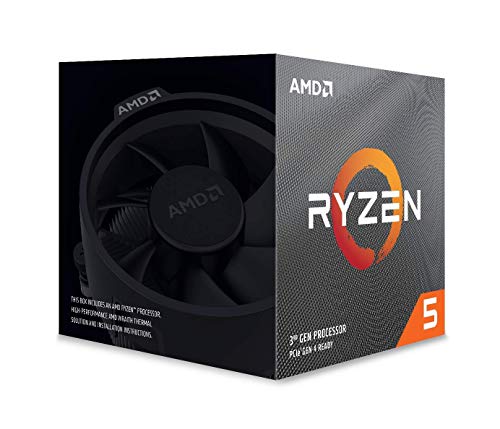
AMD Ryzen 5 1600 65W AM4 Processor with Wraith Stealth Cooler (YD1600BBAFBOX)


Key features
- •-
BrandAMD
CategoryCPU Processors
AMD Ryzen 5 1600 65W AM4 Processor with Wraith Stealth Cooler (YD1600BBAFBOX)
List Price: $174.60$157.14DEALYou Save: $17.46 (10%)
Free shippingFree Returns – 30 daysFree Order CancellationSecure Payment2–3 Days DeliveryGet It October 25, 2026In Stock (2)No marketing spamNo account requiredFulfilment by FedEx / Amazon / UPS / ShipwirePayPal / Card Buyer Protection
Customer Reviews
Reviews sourced from verified Amazon purchasers4.8
out of 5
Based on 10 reviews
5★
100%
4★
0%
3★
0%
2★
0%
1★
0%
Really awesome processor
Cash U.✓ Verified Purchase•July 25, 2023
This thing was king back in the day, At its peak this processor went for around 85 dollars and for that, this processor was literally unbeatable, even to this day this processor is an awesome budget option. I have a friend who still uses this processor and they have no problem. I also recently built a new computer around this processor and it is solid.
If you get it on sale, buy it, but right now a 5700 is a better option.
Sebastian✓ Verified Purchase•July 18, 2023
It is a good processor, I lasted with it for more than 1 year and for a 1600 it has good performance in almost all games, I used it with a 1650 super and it was always great
Amazing cpu for reasonable price.
mlp02692008-1608✓ Verified Purchase•June 14, 2023
I understand that it is a common practice but the installation instructions provided are general directions that have the installation process for all the different versions of Ryzen processors instead of just the one that is in the box. This could lead to confusion if someone isn't careful which set of instructions they start following and they could end up damaging they're motherboard or cpu. Years ago I had a fm2 system and ordered an fm2+ cpu to upgrade, I went through two Amazon replacements before I realized that I was ordering the wrong type of cpu. Point is the exchange and return policy was very helpful and convinient. Basically, as long as you order the correct cpu for your system and follow the correct instructions for your cpu, installation will be quick and easy. Though I've read that this cpu was priced lower previously (as low as $85) I purchased it at $104 and I believe that the $19 difference is well worth it my last system had an integrated A6 5200 Apu and was painfully slow for around $300 (cpu $104, motherboard $70, 16 gb ram $70, 120 gb ssd $25, 600 w PSU $50 free shipping) my system is about 300% faster. Using an old GeForce gt 710 GPU I can even do some lightweight gaming until I upgrade to a more modern card for AAA titles.
1600 AF is the CPU Value King!
ClockRocket✓ Verified Purchase•June 12, 2023
Like a lot of others have said, this is the AF version of this CPU, which means a 12nm node with Zen+ updates. This is basically an underclocked Ryzen 5 2600. Gamer's Nexus did a really good YouTube video on this CPU if you are interested in the more technical details.
My personal experience is using this with an ASUS Strix B450-F Gaming motherboard and a Fractal Design Celsius S24 AIO cooler. This booted no problem with my motherboard. After doing some initial stress tests to make sure it was stable and everything was working ok, I went back to the BIOS to overclock it.
Also, I should note that I did not do a fresh install of my OS after swapping CPUs. I run Windows 10 with whatever the current update is as of Jan 2020. On intial boot, my WiFi was disabled, but I had already loaded the chipset drivers onto a USB drive. I installed the chipset driver, rebooted, and everything was more or less back to normal. I did show all my hidden devices in Device Manager, then went through and removed everything related to my old CPU and old Motherboard. Not really sure that was needed, but it's what I did. Windows did not seem to mind at all, and it is still showing up as activated.
I was able to hit 4.0 GHz pretty easily. All I did was change the multiplier from Auto to 40, and TPU from Auto to TPU II. Rebooted and stress tested again, rock solid at 4.0 GHz with occasional single core boosts to 4.4 GHz and multi core boosts to 4.2 GHz. Note that I did not use PBO or really anything else to do this.
Temperatures while testing never went above 50c. The interesting part about that is my AIO has a hardware based auto mode that seems to throttle the fans independently of the motherboard. The fans never really seemed to ramp up to maintain the 50c temperature.
One other thing I wanted to note was a comparison to my old processor, an Intel 4790k running at stock speeds. I lost the silicon lottery with that CPU, and it would never really OC past 4.4 GHz without running up the voltage quite a bit, to the point where the CPU was running very hot. However, it would undervolt pretty well while running at stock speeds, so I just ran it undervolted for about 5 years. Setup like this, it would run at around 70-77c with the same cooler, and the fans were working much harder.
The R5 1600AF runs most of my games with a few more frames at the top end and average (maybe 5-10 depending on the game). However, my low frames and perceived smoothness is night and day. I am easily gaining 10-30 frames on the low end. The desktop also feels a lot snappier.
So overall, I am happy. While I didn't gain an amazing FPS boost, my PC is much quieter and my experience is much better. If I did any actual productivity work, I would probably notice even more of a difference. For $85, I am thrilled with this processor. Easily the best CPU I have ever purchased.
My personal experience is using this with an ASUS Strix B450-F Gaming motherboard and a Fractal Design Celsius S24 AIO cooler. This booted no problem with my motherboard. After doing some initial stress tests to make sure it was stable and everything was working ok, I went back to the BIOS to overclock it.
Also, I should note that I did not do a fresh install of my OS after swapping CPUs. I run Windows 10 with whatever the current update is as of Jan 2020. On intial boot, my WiFi was disabled, but I had already loaded the chipset drivers onto a USB drive. I installed the chipset driver, rebooted, and everything was more or less back to normal. I did show all my hidden devices in Device Manager, then went through and removed everything related to my old CPU and old Motherboard. Not really sure that was needed, but it's what I did. Windows did not seem to mind at all, and it is still showing up as activated.
I was able to hit 4.0 GHz pretty easily. All I did was change the multiplier from Auto to 40, and TPU from Auto to TPU II. Rebooted and stress tested again, rock solid at 4.0 GHz with occasional single core boosts to 4.4 GHz and multi core boosts to 4.2 GHz. Note that I did not use PBO or really anything else to do this.
Temperatures while testing never went above 50c. The interesting part about that is my AIO has a hardware based auto mode that seems to throttle the fans independently of the motherboard. The fans never really seemed to ramp up to maintain the 50c temperature.
One other thing I wanted to note was a comparison to my old processor, an Intel 4790k running at stock speeds. I lost the silicon lottery with that CPU, and it would never really OC past 4.4 GHz without running up the voltage quite a bit, to the point where the CPU was running very hot. However, it would undervolt pretty well while running at stock speeds, so I just ran it undervolted for about 5 years. Setup like this, it would run at around 70-77c with the same cooler, and the fans were working much harder.
The R5 1600AF runs most of my games with a few more frames at the top end and average (maybe 5-10 depending on the game). However, my low frames and perceived smoothness is night and day. I am easily gaining 10-30 frames on the low end. The desktop also feels a lot snappier.
So overall, I am happy. While I didn't gain an amazing FPS boost, my PC is much quieter and my experience is much better. If I did any actual productivity work, I would probably notice even more of a difference. For $85, I am thrilled with this processor. Easily the best CPU I have ever purchased.
It's truly a 2nd gen Zen+ 12nm part. Code named "Pinnacle Ridge" under CPUz.
backwards1✓ Verified Purchase•June 7, 2023
July 2021 - At $150 they are far less valuable. I would just go for a sub $200 3600 if you can get one. This is a great chip (for $85 a piece what I paid in 2020) and I have four systems in the house paired with these but in 2021 for $150 I would shop at least Zen2 3000 series. If these drop down to $100 or less then yes I would recommend. Even on Intel they have a the 10400F which is a great buy.
Update Feb 14th : I just bought two more of these and pairing them with Amazon Warehouse Tomahawk B450 boards($76 a piece). I decided to sell my old Sandybridge cpu/board/ram and would even upgrade my kids hand me down PC's to these as the price isn't that much considering I get about $80-100 for each of my old hardware setups. What those systems do overclocked with more watts and temps, this does effortlessly stock , cool and quiet. I am a bang for the buck shopper with 7 PC's around the house , so these 1600AF can someday replace my Intel Dual core setups.
I recently upgraded my Sandybridge 8yr old 4.7ghz i7 with a 2700x for $136 after cash back from Amazon card(Thanks Tech Deals youtube channel). I liked the upgrade so much that I also wanted a similar feel for 1 of my MediaPC's that I run a GTX970 in. Figured this 1600AF would likely be a great value for a budget HD/4k TV gaming setup. I just finished installing it and I ran a benchmark on my 2700x and then dropped in the 1600AF all stock settings with 3200mhz C16. Without changing a thing except CPU, both runs showed my GTX1070 is 99% GPU bound under "The Shadow of the Tomb Raider" benchmark. I know lower detail would help show performance differences in the CPU but for my quick test I am very pleased with the performance at stock. No difference than my 2700x. Max temp is 34c with a Noctua 14 cooler. I will soon move this 1600AF CPU/MB/RAM over to the Media PC case with Prism RGB cooler from my 2700x purchase.(update it's running great as the MediaPC, cool,quiet and smooth) Loving this value. Check out my attached screenshots of afterburner CPU utilization and benchmark results. Hope this helps someone!
Update Feb 14th : I just bought two more of these and pairing them with Amazon Warehouse Tomahawk B450 boards($76 a piece). I decided to sell my old Sandybridge cpu/board/ram and would even upgrade my kids hand me down PC's to these as the price isn't that much considering I get about $80-100 for each of my old hardware setups. What those systems do overclocked with more watts and temps, this does effortlessly stock , cool and quiet. I am a bang for the buck shopper with 7 PC's around the house , so these 1600AF can someday replace my Intel Dual core setups.
I recently upgraded my Sandybridge 8yr old 4.7ghz i7 with a 2700x for $136 after cash back from Amazon card(Thanks Tech Deals youtube channel). I liked the upgrade so much that I also wanted a similar feel for 1 of my MediaPC's that I run a GTX970 in. Figured this 1600AF would likely be a great value for a budget HD/4k TV gaming setup. I just finished installing it and I ran a benchmark on my 2700x and then dropped in the 1600AF all stock settings with 3200mhz C16. Without changing a thing except CPU, both runs showed my GTX1070 is 99% GPU bound under "The Shadow of the Tomb Raider" benchmark. I know lower detail would help show performance differences in the CPU but for my quick test I am very pleased with the performance at stock. No difference than my 2700x. Max temp is 34c with a Noctua 14 cooler. I will soon move this 1600AF CPU/MB/RAM over to the Media PC case with Prism RGB cooler from my 2700x purchase.(update it's running great as the MediaPC, cool,quiet and smooth) Loving this value. Check out my attached screenshots of afterburner CPU utilization and benchmark results. Hope this helps someone!
Page 1 of 2