NVIDIA SHIELD Android TV Pro Streaming Media Player; 4K HDR movies, live sports, Dolby Vision-Atmos, AI-enhanced upscaling, GeForce NOW cloud gaming, Google Assistant Built-In, Works with Alexa


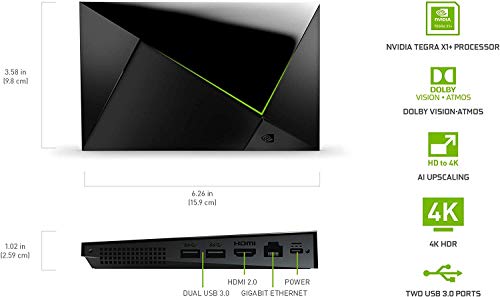


Key features
- •The Best of the Best. The world's most powerful Android TV streaming media player, thanks to the new NVIDIA Tegra X1+ chip. Enhance HD video in real-time to 4K for clearer, crisper visuals using next-generation AI upscaling. 2x USB 3.0 ports for storage expansion, USB cameras, keyboards, controllers, and more. Plex Media Server built-in, 3GB RAM, and 16GB storage.
- •Dolby Vision - Atmos. Bring your home theater to life with Dolby Vision HDR, and surround sound with Dolby Atmos and Dolby Digital Plus-delivering ultra-vivid picture quality and immersive audio.
- •Unlimited Entertainment. Enjoy the most 4K HDR content of any streaming media player, and access to thousands of apps and games, including top apps like Netflix,YouTube, Prime Video, Disney + and Hulu. Add a game controller (sold separately) and play today's most popular games like Fortnite and GeForce Now. Even stream from your phone with built-in Chromecast 4K.
- •Best-In-Class Design. Designed for the most demanding users and beautifully designed to be the perfect centerpiece of your entertainment center, SHIELD TV Pro levels you up to more storage space, more RAM, the expandability of 2x USB 3.0 ports, and Plex Media Server. Get the best connectivity with Gigabit Ethernet, dual-band AC Wi-Fi, and Bluetooth 5.0. The all-new remote is more advanced than ever with motion-activated, backlit buttons-including a customizable menu button. Plus, with voice control, Bluetooth, IR control for your TV, and a built-in remote control locator, you have the most advanced remote yet.
- •Voice Control. The built-in Google Assistant is at your command. See photos, live camera feeds, weather, sports scores, and more on the big screen. Dim the lights and immerse yourself in your favorite show or music using only your voice. And control your SHIELD hands-free with Google Home or Alexa and Amazon Echo.
BrandNVIDIA
CategoryStreaming Media Players
Size1.02 x 6.26 x 3.86 inches
ColorBlack
WarrantyOne (1) year from the date of purchase of your new Warranted Product.
NVIDIA SHIELD Android TV Pro Streaming Media Player; 4K HDR movies, live sports, Dolby Vision-Atmos, AI-enhanced upscaling, GeForce NOW cloud gaming, Google Assistant Built-In, Works with Alexa
List Price: $289.55$260.60DEALYou Save: $28.95 (10%)
Free shippingFree Returns – 30 daysFree Order CancellationSecure Payment2–3 Days DeliveryGet It October 28, 2026In Stock (17)No marketing spamNo account requiredFulfilment by FedEx / Amazon / UPS / ShipwirePayPal / Card Buyer Protection
Customer Reviews
Reviews sourced from verified Amazon purchasers4.5
out of 5
Based on 10 reviews
5★
60%
4★
40%
3★
0%
2★
0%
1★
0%
Almost perfect but not without important flaws you need to know before buying.
Mark Twain✓ Verified Purchase•August 21, 2023
I've been a shield owner since the original release back in 2015.
The NVidia shield TV is the best in class when comes to media streaming devices that is the most important point that needs to be made at the start of this review. I base that statement not on opinion but fact. I could write five pages of features and abilities this device is capable of that the nearest competitor can't touch. I would make the comparison the Nvidia Shield TV reminds me of time when you saw people with large satellite dishes in their back yard bragging about how they could watch TV stations from all over the world for free compared to their neighbors who were force fed whatever their cable provider would sell them. Even though I have mixed feelings about this release I need to make that clear.
Now with that in mind I'll list the most important issues in this review you should know before buying.
First - This is an important long term issue that can't be fixed with any software update the Shield TV Pro 2019 is HDMI 2.0B not the new HDMI 2.1 standard rolling out. HDMI 2.0B is at the end of its life cycle and when I saw this it did make me cringe because I know this device is not future proof. Recently Vizio has announced their entire lineup of TVs for 2020 will have HDMI 2.1 and many in the industry consider Vizio a budget brand. I'm a home theater enthusiast and I understand the importance of having HDMI 2.1 and at $199 this is a mind numbing let down. I'm expecting NVidia to release a hardware refresh of this device within 18-24 months at the latest with HDMI 2.1 and most likely add back the extras now missing (more on that below.)
Second - This might be a deal breaker for some is the lack of YouTube HDR 60 FPS VP9 codec support per NVIDIA'S own website. NVidia has come out refusing to support VP9 for some unknown reason and shield owners have been waiting over a year for an update supporting YouTube HDR but to no avail have users received it. It's confusing that Andriod's TV flagship device is lacking such an important feature.
Third - Missing items, in the box there no longer a gaming controller, the shield TV remote is now missing a head phone jack (sigh) but this does seem to be trend so not much of a surprise and in box there is no 4k HDR HDMI cable. Yes you read that right, for a $199 how much more skimpy can you get, seriously NVidia? Make sure you order a 4K HDR HDMI cable. Not all cables are equal and that has been the cause of many of the complaints in other reviews I've read here. I recommend an HDMI cable that can support 22.28 Gbps of bandwidth to avoid any issues and Zeskit makes an excellent cable sold on Amazon.
NVidias website currently lists the gaming controller for $59.99 which I don't recommend you buy (its not that great) but on the plus side Playstation 4 and XBOX controllers will work via Bluetooth and if you own the older NVidia shield gaming controller or TV remote those are compatible too. I tested the headphone jack from the original Nvidia shield TV remote on the new shield and luckily it worked but it doesn't currently work for the PlayStation 4 controller. There are after market shield remotes if you do need a headphone jack.
Since owning my first shield since 2015 there have been some ups and downs. Even though NVidia has been good with constant updates for the device over the years NVidia has not been good at listening to the community when it comes to features that are actually need like YouTube HDR. Nvida can be extremely hard nosed and that last reason is why I left my king of streaming boxes years ago on my older TV when I upgraded. NVidia refused to support Dolby Vision at the time. Now you can have it.
Why did I buy this device?
I ordered the 2019 Shield TV Pro because the AI-enhanced upscaling that experts are calling the "best they've ever seen." Upscaling is usually a gimmick and current TVs and receivers do a poor job at it nearly all of the time. The norm when reading expert TV reviews is a recommendation to disable the onboard video upscaling for the best picture quality. I can attest the Shields A.I upscaling does make a big difference and newer TV's will see the biggest difference especially in animations. Some examples I'll note when looking at a video frame paused with upscaling turned off all the roof shingles on top of a home blurred together/turned on I could make out each shingle with lines between them. On Neflix HD source material the natural light reflection off an actors eyes was missing but once the A.I was enabled the video looked like true 4k there was natural light reflection off the actor's pupils. One of the most dramatic changes was an HD video scene of the ocean the source material was Netflix HD with the option off the waves all blurred together but turned on you could see each ripple between the waves and sun light shimmered off each individual wave as they moved. HBO's streaming service while watching Game of Thrones I can now see the wrinkles on the actors faces and snow never looked so white and detailed! The amount of blur this device removes from standard HD is impressive and the detail it adds is just as good! I have no doubt Nvidia will keep improving this feature over time. To take advantages added to the 2019 shield you need a newer TV otherwise I find no reasons to upgrade from even the 2015 model.
The Price: - Thumbs Down - Minus 1 star
This device is not priced fairly, nearly 3 years ago the same device released lacking Dolby Vision and A.I upscaling which can now be had for feels like a $199 upgrade fee! I have no doubt at least one of the previous mentioned features could be enabled for the 2017 shield if not both. I'm disappointed in Nvidia because this is not a next gen device but only a minor refresh before what will most likely be another release. I've read multiple benchmark comparisons that all came to the same conclusion, if you take a 2017 shield and 2019 shield there is no processing power increase worth mentioning not even the slight 25% NVidia is claiming. Think about that for a second, if you bought a computer 3 years ago wouldn't you expect at least a 50% speed increase for the same money?
All in all this is the King of streaming devices and I found it nice to be able to switch from a small streaming stick with little freedom back to the shield that has once again taken the top spot as the King.
One last note.
I see something concerning the claims the older Shield models are somehow better than the 2019 Shield TV Pro. I own the oldest and the newest Shields and side by side you can't compare the picture quality or the sound. I put away my older Shield because of the lack Dolby Vision and better audio formats Amazon Prime and Netflix both support the previous Shield models lack. Another issue with older Shields is the poor quality remote prone to random disconnects or flat out dying and I replaced 3 last generation remotes myself. The 2019 Shield has a far superior remote that lights up when touched and if misplaced can be found by basically calling out for it to beep.
The NVidia shield TV is the best in class when comes to media streaming devices that is the most important point that needs to be made at the start of this review. I base that statement not on opinion but fact. I could write five pages of features and abilities this device is capable of that the nearest competitor can't touch. I would make the comparison the Nvidia Shield TV reminds me of time when you saw people with large satellite dishes in their back yard bragging about how they could watch TV stations from all over the world for free compared to their neighbors who were force fed whatever their cable provider would sell them. Even though I have mixed feelings about this release I need to make that clear.
Now with that in mind I'll list the most important issues in this review you should know before buying.
First - This is an important long term issue that can't be fixed with any software update the Shield TV Pro 2019 is HDMI 2.0B not the new HDMI 2.1 standard rolling out. HDMI 2.0B is at the end of its life cycle and when I saw this it did make me cringe because I know this device is not future proof. Recently Vizio has announced their entire lineup of TVs for 2020 will have HDMI 2.1 and many in the industry consider Vizio a budget brand. I'm a home theater enthusiast and I understand the importance of having HDMI 2.1 and at $199 this is a mind numbing let down. I'm expecting NVidia to release a hardware refresh of this device within 18-24 months at the latest with HDMI 2.1 and most likely add back the extras now missing (more on that below.)
Second - This might be a deal breaker for some is the lack of YouTube HDR 60 FPS VP9 codec support per NVIDIA'S own website. NVidia has come out refusing to support VP9 for some unknown reason and shield owners have been waiting over a year for an update supporting YouTube HDR but to no avail have users received it. It's confusing that Andriod's TV flagship device is lacking such an important feature.
Third - Missing items, in the box there no longer a gaming controller, the shield TV remote is now missing a head phone jack (sigh) but this does seem to be trend so not much of a surprise and in box there is no 4k HDR HDMI cable. Yes you read that right, for a $199 how much more skimpy can you get, seriously NVidia? Make sure you order a 4K HDR HDMI cable. Not all cables are equal and that has been the cause of many of the complaints in other reviews I've read here. I recommend an HDMI cable that can support 22.28 Gbps of bandwidth to avoid any issues and Zeskit makes an excellent cable sold on Amazon.
NVidias website currently lists the gaming controller for $59.99 which I don't recommend you buy (its not that great) but on the plus side Playstation 4 and XBOX controllers will work via Bluetooth and if you own the older NVidia shield gaming controller or TV remote those are compatible too. I tested the headphone jack from the original Nvidia shield TV remote on the new shield and luckily it worked but it doesn't currently work for the PlayStation 4 controller. There are after market shield remotes if you do need a headphone jack.
Since owning my first shield since 2015 there have been some ups and downs. Even though NVidia has been good with constant updates for the device over the years NVidia has not been good at listening to the community when it comes to features that are actually need like YouTube HDR. Nvida can be extremely hard nosed and that last reason is why I left my king of streaming boxes years ago on my older TV when I upgraded. NVidia refused to support Dolby Vision at the time. Now you can have it.
Why did I buy this device?
I ordered the 2019 Shield TV Pro because the AI-enhanced upscaling that experts are calling the "best they've ever seen." Upscaling is usually a gimmick and current TVs and receivers do a poor job at it nearly all of the time. The norm when reading expert TV reviews is a recommendation to disable the onboard video upscaling for the best picture quality. I can attest the Shields A.I upscaling does make a big difference and newer TV's will see the biggest difference especially in animations. Some examples I'll note when looking at a video frame paused with upscaling turned off all the roof shingles on top of a home blurred together/turned on I could make out each shingle with lines between them. On Neflix HD source material the natural light reflection off an actors eyes was missing but once the A.I was enabled the video looked like true 4k there was natural light reflection off the actor's pupils. One of the most dramatic changes was an HD video scene of the ocean the source material was Netflix HD with the option off the waves all blurred together but turned on you could see each ripple between the waves and sun light shimmered off each individual wave as they moved. HBO's streaming service while watching Game of Thrones I can now see the wrinkles on the actors faces and snow never looked so white and detailed! The amount of blur this device removes from standard HD is impressive and the detail it adds is just as good! I have no doubt Nvidia will keep improving this feature over time. To take advantages added to the 2019 shield you need a newer TV otherwise I find no reasons to upgrade from even the 2015 model.
The Price: - Thumbs Down - Minus 1 star
This device is not priced fairly, nearly 3 years ago the same device released lacking Dolby Vision and A.I upscaling which can now be had for feels like a $199 upgrade fee! I have no doubt at least one of the previous mentioned features could be enabled for the 2017 shield if not both. I'm disappointed in Nvidia because this is not a next gen device but only a minor refresh before what will most likely be another release. I've read multiple benchmark comparisons that all came to the same conclusion, if you take a 2017 shield and 2019 shield there is no processing power increase worth mentioning not even the slight 25% NVidia is claiming. Think about that for a second, if you bought a computer 3 years ago wouldn't you expect at least a 50% speed increase for the same money?
All in all this is the King of streaming devices and I found it nice to be able to switch from a small streaming stick with little freedom back to the shield that has once again taken the top spot as the King.
One last note.
I see something concerning the claims the older Shield models are somehow better than the 2019 Shield TV Pro. I own the oldest and the newest Shields and side by side you can't compare the picture quality or the sound. I put away my older Shield because of the lack Dolby Vision and better audio formats Amazon Prime and Netflix both support the previous Shield models lack. Another issue with older Shields is the poor quality remote prone to random disconnects or flat out dying and I replaced 3 last generation remotes myself. The 2019 Shield has a far superior remote that lights up when touched and if misplaced can be found by basically calling out for it to beep.
Viable replacement for WD Media Player. Works well with a DAC with some effort.
88 notes✓ Verified Purchase•August 6, 2023
A couple of weeks ago, my Western Digital Live TV Media Player (almost 20 years old) gave up the ghost. I had been prepared for this eventuality, and was thinking I could replace it with a customized Raspberry Pi, the Roku Ultra, or the Nvidia Shield TV Pro. When the WD Media Player died, I called a couple of online audiophile dealers to determine what were their options -- and their recommendations were twice or more the price of the Nvidia Shield option.
I looked again the helpful Amazon pictures and though the Shield Pro had not optical output for my much higher priced (and very musical) DAC, it did have two USB ports, which would possibly work with the USB port for my DAC. I am not very technical or good with hardware, so instead of taking on what might be a challenging Raspberry PI project, I decided to roll the dice on the Nvidia Shield TV Pro.
It was delivered next day, and to my disappointment, no sound came when hooked up to my DAC. This was after going through the settings and enabling the USB out option.
Time for additional searching on Google, and eventually I came across a post titled "HOW TO SETUP THE NVIDIA SHIELD PRO AS A BIT PERFECT AUDIO STREAMER/PLAYER." Now there may have been other, and even better or easier options, then what the article recommended, but I did as it said, and searched for the Sony Music Centre in the Google Play Store on my Amazon Fire tablet, installed an app called Side Launcher on the Nvidia Shield Pro as well as the tablet, and then sent the downloaded apk (a term I had not previously heard) from my tablet to the Shield via the Side Launcher App. With the Sony Music Centre/Center installed, I plugged in the DAC chord from DAC to Shield, the Music Center recognized it and gave me the option (as indicated in the article) to allow pass through audio. I then went to play something via the X-Plore file manager I had just installed on the Shield.
I was prepared for no sound -- and that is what happened the first couple of seconds -- but, to my delight, the sound went from the Shield to my DAC to my amplifier to my speakers! This worked for files on my attached 4 hard drives (attached via a hub to the other USB port available in the Shield) to my PC, to the streaming on Youtube, Peacock and Plex TV which used the Plex Server on my PC for the files there.
Next steps, was to expose those 4 attached drives to the Shield so I could see them in the PC which I was able to do with some trial and error, after watching a youtube video on how to set up a the Shield as a Network Attached Storage Device. (This had taken no effort to do with the WD TV Media Player, but was not so easy for me with the Shield. I did this so I can move files back and forth from PC to those drives attached to the Shield, just like I was able to do with the WD Media Player.)
Sound was as good (or better -- I couldn't, to A to B comparisons since the WD player was inoperable) as my old WD Media Player solution but the file manager I was using (X-plore) couldn't work with cue files like the WD Media Player. In addition, though the WD Media Player didn't support .ape files, it could sometimes play them and always see them, but not so with the X-Plore app.
After more googling, I found out about Kodi (yes, I was pretty clueless about all this stuff) and installed that. It also has an option for audio pass through, which I enabled, and unlike X-Plore, I could see the individual tracks on single flac files that had associated .cue files. And an improvement over the WD Media Player, it could play not only .flac files, but also .ape files!
So at this point I am happy with the sound of the Nvidia, happy with the ability to play my audio files and how well Kodi works, and even find that it has made my old Roku redundant. (I had considered replacing the old Roku and WD Media Player with the Roku Ultra, but didn't after Roku support indicated that it wouldn't work with a USB hub with multiple drives -- maybe it really would have, but not sure it wouldn't have allowed me all the functionality that I have with the Shield.)
So at this point very happy with the Shield, particularly the quality of pictures when watching streaming channels (I set the AI video enhancement option -- a great feature) and most importantly happy with the quality of the audio! It was great listening to Gentle Giant's remastered Power and the Glory with the sounds appearing from multiple parts of the room (my setup is traditional stereo but this effect happens with two well placed speakers) and some Haydn Keyboard Trios on original instruments (each note of the fortepiano is so clear, and most importantly the humor in the music, so well interpreted by the musicians, is so effectively conveyed.) At first I had thought I had wasted $200 on the Shield, but after taking the time to learn some of what it is capable of, found it to be a great audiophile-level solution!
I looked again the helpful Amazon pictures and though the Shield Pro had not optical output for my much higher priced (and very musical) DAC, it did have two USB ports, which would possibly work with the USB port for my DAC. I am not very technical or good with hardware, so instead of taking on what might be a challenging Raspberry PI project, I decided to roll the dice on the Nvidia Shield TV Pro.
It was delivered next day, and to my disappointment, no sound came when hooked up to my DAC. This was after going through the settings and enabling the USB out option.
Time for additional searching on Google, and eventually I came across a post titled "HOW TO SETUP THE NVIDIA SHIELD PRO AS A BIT PERFECT AUDIO STREAMER/PLAYER." Now there may have been other, and even better or easier options, then what the article recommended, but I did as it said, and searched for the Sony Music Centre in the Google Play Store on my Amazon Fire tablet, installed an app called Side Launcher on the Nvidia Shield Pro as well as the tablet, and then sent the downloaded apk (a term I had not previously heard) from my tablet to the Shield via the Side Launcher App. With the Sony Music Centre/Center installed, I plugged in the DAC chord from DAC to Shield, the Music Center recognized it and gave me the option (as indicated in the article) to allow pass through audio. I then went to play something via the X-Plore file manager I had just installed on the Shield.
I was prepared for no sound -- and that is what happened the first couple of seconds -- but, to my delight, the sound went from the Shield to my DAC to my amplifier to my speakers! This worked for files on my attached 4 hard drives (attached via a hub to the other USB port available in the Shield) to my PC, to the streaming on Youtube, Peacock and Plex TV which used the Plex Server on my PC for the files there.
Next steps, was to expose those 4 attached drives to the Shield so I could see them in the PC which I was able to do with some trial and error, after watching a youtube video on how to set up a the Shield as a Network Attached Storage Device. (This had taken no effort to do with the WD TV Media Player, but was not so easy for me with the Shield. I did this so I can move files back and forth from PC to those drives attached to the Shield, just like I was able to do with the WD Media Player.)
Sound was as good (or better -- I couldn't, to A to B comparisons since the WD player was inoperable) as my old WD Media Player solution but the file manager I was using (X-plore) couldn't work with cue files like the WD Media Player. In addition, though the WD Media Player didn't support .ape files, it could sometimes play them and always see them, but not so with the X-Plore app.
After more googling, I found out about Kodi (yes, I was pretty clueless about all this stuff) and installed that. It also has an option for audio pass through, which I enabled, and unlike X-Plore, I could see the individual tracks on single flac files that had associated .cue files. And an improvement over the WD Media Player, it could play not only .flac files, but also .ape files!
So at this point I am happy with the sound of the Nvidia, happy with the ability to play my audio files and how well Kodi works, and even find that it has made my old Roku redundant. (I had considered replacing the old Roku and WD Media Player with the Roku Ultra, but didn't after Roku support indicated that it wouldn't work with a USB hub with multiple drives -- maybe it really would have, but not sure it wouldn't have allowed me all the functionality that I have with the Shield.)
So at this point very happy with the Shield, particularly the quality of pictures when watching streaming channels (I set the AI video enhancement option -- a great feature) and most importantly happy with the quality of the audio! It was great listening to Gentle Giant's remastered Power and the Glory with the sounds appearing from multiple parts of the room (my setup is traditional stereo but this effect happens with two well placed speakers) and some Haydn Keyboard Trios on original instruments (each note of the fortepiano is so clear, and most importantly the humor in the music, so well interpreted by the musicians, is so effectively conveyed.) At first I had thought I had wasted $200 on the Shield, but after taking the time to learn some of what it is capable of, found it to be a great audiophile-level solution!
Much better than streaming sticks...
JediMasterNerd✓ Verified Purchase•August 4, 2023
I have a personal Plex Server and have always used FireTV Sticks to stream from it, but as I've noticed problems with certain movies and the audio output. After discussing with others, I found out that the streaming sticks really don't handle 7 channel audio properly nor DTS audio. The Shield TV Pro was recommended so I waited for a sale and bought one and love it! As a Google product there seems to be more general apps available for it, everything I used is supported and more. And, yes, the audio works as I had hoped!!
Best Android TV box
Amazon Customer✓ Verified Purchase•July 20, 2023
I have tried fire sticks, and other android based tv boxes, but after buying this, I have found the best. The interface is excellent, never had any issues with this tv box. Yes it is expensive, but well worth the money in my opinion...If you have IPTV service this is the box you want...I'm not a gamer, but have seen this box is excellent for gamers...What I most enjoy about this box is something a lot of people don't know. You can record live tv with IPTV services if you add a USB memory stick (At least 32gb or higher).
Very happy with my purchase....Save your money and buy this one!
Very happy with my purchase....Save your money and buy this one!
Much faster than android boxes!
Mike V✓ Verified Purchase•July 11, 2023
Spend the extra bit of money, you deserve it after waiting all those years of loading time on the Chinese android boxes. Starts up and loads the "media player with builds" almost instantly, without the lag and questionable video graphics. Yeah, you can do alot more than just stream, and everything's quicker!
Page 1 of 2


