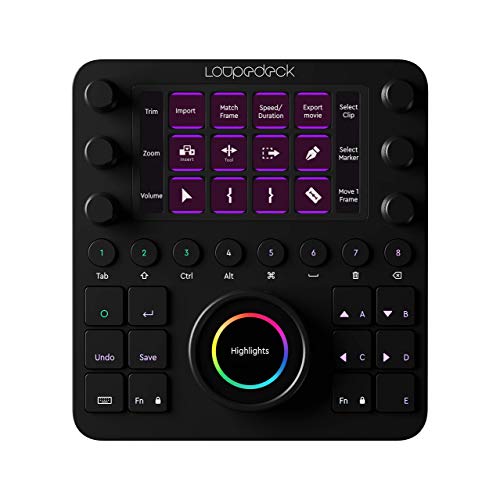
Loupedeck Creative Tool - Professional Custom Editing Console for Photo, Video, Music and Design


Key features
- •NATIVE INTEGRATION WITH: Adobe Lightroom Classic, Photoshop CC with Camera Raw, Premiere Pro CC, After Effects, Illustrator, Audition, Final Cut Pro X, Ableton Live 10 and Streamlabs.
- •READY RIGHT OUT OF THE BOX: By default, Loupedeck CT comes with a set of predefined tools and workspaces, to kickstart your creative journey, so you can begin to boost your productivity and focus on achieving the perfect edit.
- •POWERFUL CUSTOMIZABLE SOFTWARE: Assign tools and functions to almost any button, touchscreen, wheel or dial according to your workflow. Experience precision editing with features such as full-screen editing mode, available exclusively through the Loupedeck software.
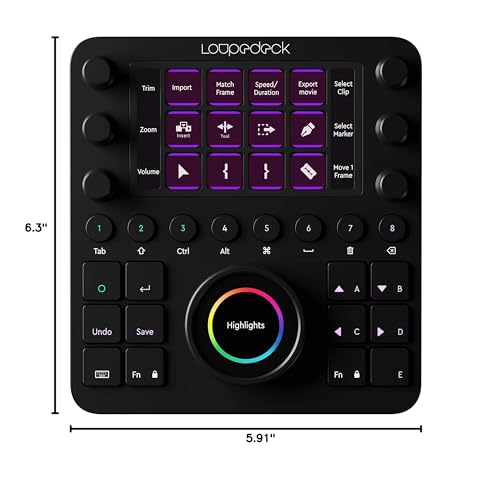
- •PREMIUM GRADE TOOL FOR PROS: With high-quality aluminum cover and dials, touchscreens, LED backlighting, machine-quality ball bearings Loupedeck CT delivers a powerful and precise experience within an array of creative environments and software.
- •MAKE IT YOUR OWN: Create Custom Profiles using shortcuts and macros for any application you wish to use. We have provided several profiles including, DaVinci Resolve, Cubase, and more to get you started with building and sharing your own Custom Profiles.
Loupedeck Creative Tool - Professional Custom Editing Console for Photo, Video, Music and Design
List Price: $1163.99$1047.59DEALYou Save: $116.40 (10%)
Free shippingFree Returns – 30 daysFree Order CancellationSecure Payment2–3 Days DeliveryGet It October 26, 2026In Stock (2)No marketing spamNo account requiredFulfilment by FedEx / Amazon / UPS / ShipwirePayPal / Card Buyer Protection
Customer Reviews
Reviews sourced from verified Amazon purchasers4.1
out of 5
Based on 10 reviews
5★
40%
4★
60%
3★
0%
2★
0%
1★
0%
Solid piece of hardware
Kristophr✓ Verified Purchase•September 7, 2023
Not sure why there's so many negative comments on this product. It does exactly what it states. I bought this to use with DaVinci Resolve and it works perfectly. There were a few key mappings I had to remap but thats because I wanted it to work in a certain way.
The device itself is super well built and sturdy. I had a stand 3d printed which made it better. I did wish it came with a stand so that it sits at an angle but that wasn't a deal breaker.
The device itself is super well built and sturdy. I had a stand 3d printed which made it better. I did wish it came with a stand so that it sits at an angle but that wasn't a deal breaker.
Expensive but is it worth it?
KAU✓ Verified Purchase•September 6, 2023
Looks cool. Wish is a little bigger with 15 or more touch buttons. The dials are my favorite. The wheel is too tall and too close to the #4 & #5 round buttons. Wheel should be more finger friendly as you turn to location your edit frames or scrolling webpage with one finger. I'm constantly lifting my pinky to avoid touching the very sensitive center wheel when I use the square buttons on the right side. A wrist pad is a must and need a bit of incline for better ergonomic. You can only program 7 of the 12 square buttons. For the price more buttons would be my wish.
I don't use Adobe apps that much so I've to customize base on hotkeys for my professional app. My software is a node base compositor & timeline editor. It has over 100+ hotkeys. I've had this controller for a week and will take some time to train my muscle memory as to how I like to design and navigation. Will add an update in a few months. For now I'm still going back & forth with my keyboard with my left hand and my right hand hold a pen stylist.
Like most review build quality is good & software will take time to refine. I totally agree and if it saves me a few minutes of time everyday in the long run I see the controller being worth the cost.
I don't use Adobe apps that much so I've to customize base on hotkeys for my professional app. My software is a node base compositor & timeline editor. It has over 100+ hotkeys. I've had this controller for a week and will take some time to train my muscle memory as to how I like to design and navigation. Will add an update in a few months. For now I'm still going back & forth with my keyboard with my left hand and my right hand hold a pen stylist.
Like most review build quality is good & software will take time to refine. I totally agree and if it saves me a few minutes of time everyday in the long run I see the controller being worth the cost.
Works pretty well with supported apps. Little support for non-supported apps though (of course)
C. Fletcher✓ Verified Purchase•September 1, 2023
The Loupedeck CT looks and feels nice. I mainly wanted the large wheel for scrubbing video and audio. The wheel works okay in Final Cut, but not super smooth. A larger, weighted wheel with a finger indent would be better, but... this works pretty well. It isn't worth the cost, although I got it discounted from retail a bit.
Very handy tool!
Mr 3D✓ Verified Purchase•August 15, 2023
Beside looking cool with all the shiny illuminated buttons and controls, the device has a lot to offer:
Pros:
- Beside the presets for several creativity tools I have - which come out of the box - I have also found some more profiles from other companies in the web (e.g. on1 - limited, but something is there) which is awesome.
- With 6 programmable & rotatable knobs and a jog shuttle like controller +12 programmable buttons and so on really nice to adjus to your own liking!
- With the nice task assignment functionality I was able to even use the device for other use cases (e.g. programming tools, app launcher, etc.)
- Adding it behind a KVM let you share easily the device with multiple computers and each computer can have its own set of settings!
- Uses USB-C - nice!
Downs:
- Not cheap!
- Do not expect to get support for Lightroom 6 or before - or any non CC Adobe products. That would be really awesome - but those versions are apparently not supported (anymore). Makes you really wonder.
- The support for Capture one is in there - and it is claimed that e.g. version 20 would be supported, but many functions do not work for the old version (even on the first screen). If you want to have nice display buttons and more controls you can buy the presets from another company for 35$. It's not that I do not want to earn more folks some money - but if you pay more than 500$'s you would guess that this is somehow included?
- I couldn't see problems reported by other testers - however - I can see that with a lower viewing angle on the display in front of the monitor, the LCD display has a shimmering effect like oil in the water (rainbow pattern - starting with - When adding app shortcuts (under "Run") you should not use quotes around the file names (like when copying them from Windows shortcuts) as these quotes will make the extcutable path unusable. So remove.
Comments:
- I did test on Windows so far, not on Mac yet. Only saw that the device didn't came on when it was connected over the lightning cable behind a KVM. But I didn't install the SW there yet.
- Plan to watch some of the training videos (~20 minutes total) and it will help you to safe a lot of time later on as some things are not as obvious from the getgo but are getting really good to understand once you have heard the explanation.
- Once you have set it up you can save your profile. You can then apply the same profile to another computer, correct the paths if neccessary and you are done!
General verdict:
The device is really useful and helped me to optimize my workflow for many things - and it is also a great eye catcher for sure.
Plan to take some time to get into the device and all the controls to learn how it is getting used! E.g. I did not realize first that you can use a swipe on the display to advance to the next page.
And - of course: It is quite a lot of money.
Pros:
- Beside the presets for several creativity tools I have - which come out of the box - I have also found some more profiles from other companies in the web (e.g. on1 - limited, but something is there) which is awesome.
- With 6 programmable & rotatable knobs and a jog shuttle like controller +12 programmable buttons and so on really nice to adjus to your own liking!
- With the nice task assignment functionality I was able to even use the device for other use cases (e.g. programming tools, app launcher, etc.)
- Adding it behind a KVM let you share easily the device with multiple computers and each computer can have its own set of settings!
- Uses USB-C - nice!
Downs:
- Not cheap!
- Do not expect to get support for Lightroom 6 or before - or any non CC Adobe products. That would be really awesome - but those versions are apparently not supported (anymore). Makes you really wonder.
- The support for Capture one is in there - and it is claimed that e.g. version 20 would be supported, but many functions do not work for the old version (even on the first screen). If you want to have nice display buttons and more controls you can buy the presets from another company for 35$. It's not that I do not want to earn more folks some money - but if you pay more than 500$'s you would guess that this is somehow included?
- I couldn't see problems reported by other testers - however - I can see that with a lower viewing angle on the display in front of the monitor, the LCD display has a shimmering effect like oil in the water (rainbow pattern - starting with - When adding app shortcuts (under "Run") you should not use quotes around the file names (like when copying them from Windows shortcuts) as these quotes will make the extcutable path unusable. So remove.
Comments:
- I did test on Windows so far, not on Mac yet. Only saw that the device didn't came on when it was connected over the lightning cable behind a KVM. But I didn't install the SW there yet.
- Plan to watch some of the training videos (~20 minutes total) and it will help you to safe a lot of time later on as some things are not as obvious from the getgo but are getting really good to understand once you have heard the explanation.
- Once you have set it up you can save your profile. You can then apply the same profile to another computer, correct the paths if neccessary and you are done!
General verdict:
The device is really useful and helped me to optimize my workflow for many things - and it is also a great eye catcher for sure.
Plan to take some time to get into the device and all the controls to learn how it is getting used! E.g. I did not realize first that you can use a swipe on the display to advance to the next page.
And - of course: It is quite a lot of money.
Best Purchase I've Made in a While
Karen Parlato✓ Verified Purchase•August 6, 2023
During the pandemic video editing has gone from something I did on the side to my sole source of income. I decided to treat myself to the Loupedeck CT, not knowing if it would really be worth the significant cost. I'm so glad I did! It immediately made a huge difference in my quality of life. Not only can I work faster, I produce better work because it's so much easier to fine-tune aspects of my videos. I've gotten much more creative with color because of how intuitive it is to just grab one of the dials and play with it until it's just right. And sometimes it just makes me approach my work with more positivity because it's so satisfying to use.
If you're debating between this or the cheaper Loupedeck Live, I probably spend 95% of my time using the top half of the device, which is what you would get with the Live. If you're on a budget, that's a big savings for, in my opinion, all the important functionality. I do think the Loupedeck software underutilizes the possibilities for the main control dial, but just last week an update came out that enhanced it somewhat, so maybe I will find more use for that in the future.
As an aside, while I bought the Loupedeck for video editing in MacOS, I've also taken advantage of it for gaming in Windows, and it's been lots of fun to program it to enhance my controls. The possibilities of what it can do in any app are pretty broad, and I feel like I've only scratched the surface.
On the physical side, it feels well-built and solid, but also small, thin, and easily portable, and it tucks away easily when I don't need it. I put some tall rubber bumpers on the back edge to make it stand up at more of an angle, as it normally sits very flat.
If you're debating between this or the cheaper Loupedeck Live, I probably spend 95% of my time using the top half of the device, which is what you would get with the Live. If you're on a budget, that's a big savings for, in my opinion, all the important functionality. I do think the Loupedeck software underutilizes the possibilities for the main control dial, but just last week an update came out that enhanced it somewhat, so maybe I will find more use for that in the future.
As an aside, while I bought the Loupedeck for video editing in MacOS, I've also taken advantage of it for gaming in Windows, and it's been lots of fun to program it to enhance my controls. The possibilities of what it can do in any app are pretty broad, and I feel like I've only scratched the surface.
On the physical side, it feels well-built and solid, but also small, thin, and easily portable, and it tucks away easily when I don't need it. I put some tall rubber bumpers on the back edge to make it stand up at more of an angle, as it normally sits very flat.
Page 1 of 2