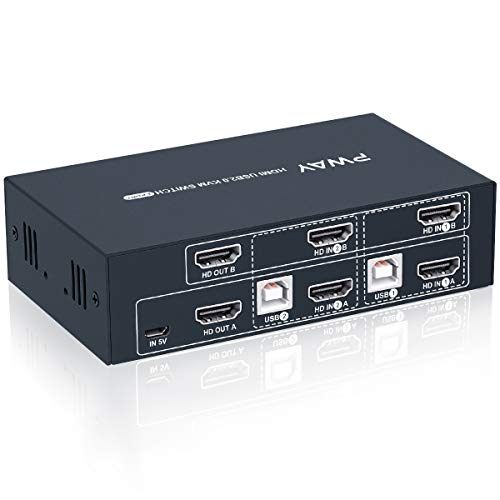
HDMI KVM Switch Dual Monitor Extended Display 4 Port, 2 USB 2.0 Hub, UHD 4K@30Hz YUV4:4:4 Downward Compatible, Hotkey Switch, with All Needed Cables, No Adapter Required


Key features
- •【One Set Of Keyboard & Mouse Control 4 PCs Share 2 Monitors 】This Dual Monitor HDMI KVM help you control 4 PCs share 2 monitors (Extend display mode or copy display mode) by only one set of USB keyboard & mouse, under the condition of your computers or laptops support multi-display or dual display. If your computer has only one HDMI output, you can use a converter or conversion cable, such as VGA to HDMI converter or conversion cable, DVI to HDMI converter or conversion cable, etc.
- •【Ultra HD 4K Visual Enjoyment】This small & exquisite kit supporting high resolution max up to 4Kx2K@30Hz, and also supports 3D and 1080P@60Hz or other lower resolution (Downward Compatible). It supports most wireless keyboards and mice or mechanical keyboards on the market (ergonomic keyboards are not supported), plug and play, no extra power adapter required. Note: Only when your sources and monitor support 4K@30Hz then you can get 4K effect.
- •【Support 2 Modes Switching】1. Buttons switching;2.Hotkey Switch:Use hotkey switch need to insert the keyboard and mouse into the HDMI dual monitor KVM K/M USB ports on the panel(Hotkey switch: Scroll Lock+ Scroll Lock+ 1/2/3/4 or Ctrl+Ctrl+1/2/3/4).Note: when you insert the keyboard and mouse to the USB 2.0 port, it will not support hotkey switch, you can only using button switch under this condition.
- •【High Compatibility, Match Various Devices】This HDMI Dual Monitor KVM has 2 USB 2.0 ports for sharing USB devices, such as scanner and USB printer or U-disk etc. It can identify and match various display devices automatically. Also capacitate itself supports many kinds of input devices or signal sources, such as PCs, Laptop, PS4, PS3 etc. Compatible with a variety of computer systems. It can be widely used in various fields, such as education, finance, studios, offices, software development, etc
- •【Important notes】Only when your computer supports dual display or multi display, you can use this product to achieve 4 computers to share dual monitor, extended mode or copy mode. If your computer only supports single display, then this product cannot help you get dual display function. Our products include 8 HDMI cables, 4 USB-B cables, and 1 mini USB charging cable. When using the product, please make sure that all cables are connected tightly, and make sure that all cables are good.
HDMI KVM Switch Dual Monitor Extended Display 4 Port, 2 USB 2.0 Hub, UHD 4K@30Hz YUV4:4:4 Downward Compatible, Hotkey Switch, with All Needed Cables, No Adapter Required
List Price: $247.34$222.61DEALYou Save: $24.73 (10%)
Free shippingFree Returns – 30 daysFree Order CancellationSecure Payment2–3 Days DeliveryGet It October 26, 2026In Stock (1)No marketing spamNo account requiredFulfilment by FedEx / Amazon / UPS / ShipwirePayPal / Card Buyer Protection
Customer Reviews
Reviews sourced from verified Amazon purchasers4.1
out of 5
Based on 10 reviews
5★
60%
4★
40%
3★
0%
2★
0%
1★
0%
Almost perfect.
djplong✓ Verified Purchase•October 14, 2023
The first unit I was shipped didn't work. The return was processed promptly and the 2nd unit works *perfectly*.
This is pretty much the only HDMI KVM that supports TWO output screens. My setup has a 1440p ultra-widescreen (21:9) as my primary display and an 'ordinary' 1080p 16:9 secondary monitor. I have two desktops and a laptop hooked up to this and the resolution changes are handled flawlessly. I'm VERY happy with the speed and performance of this unit.
The ONLY issue I had was that it's powered only by a MicroUSB cable - I had to find a USB charger plug of my own to power the thing. Fortunately, I have plenty to spare.
This is pretty much the only HDMI KVM that supports TWO output screens. My setup has a 1440p ultra-widescreen (21:9) as my primary display and an 'ordinary' 1080p 16:9 secondary monitor. I have two desktops and a laptop hooked up to this and the resolution changes are handled flawlessly. I'm VERY happy with the speed and performance of this unit.
The ONLY issue I had was that it's powered only by a MicroUSB cable - I had to find a USB charger plug of my own to power the thing. Fortunately, I have plenty to spare.
A dual monitor KVM at reasonable price
Deal✓ Verified Purchase•October 6, 2023
This review is for the dual monitor, 4 port HDMI KVM. It connects to two monitors, and has 4 sets of input sources. Powered by USB C wire, which can be attached to a computer, or a transformer\adapter.
At one point, it seemed that finding a KVM for all my disparate systems was gonna be impossible. And this unit was half the price of other similar KVMs. Even a quarter the price of some really expensive equivalents. So I had my doubts, but bought it anyway. But I just set this sucker up, and so far it works flawlessly.
If I notice any issues, I will update this review.
Here is what is attached to my PWay KVM:
FRONT
- wireless keyboard receiver - Logitech K360
- wireless mouse receiver - MS 1850
- NexiGo N930AF Webcam
BACK
- USB C cable as power source
- Dell D6000 docking station connects HDMI to KVM HDMI, DP to KVM HDMI, USB to KVM USB B
- - Dell laptop to docking station
- Dell D6000 docking station connects HDMI to KVM HDMI, DP to KVM HDMI, USB to KVM USB B
- - MacBook Air (2012) to docking station (MacBook runs Amphetamine app)
- Dell Inspiron GPU connects HDMI to KVM HDMI, DVI-D to KVM HDMI, USB to KVM USB B
- Dell Optiplex connects HDMI to KVM HDMI, HDMI to KVM HDMI, USB to KVM USB B
- KVM HDMI Out1 to Dell U2412 VGA in
- KVM HDMI Out2 to Dell S2721HS HDMI in
At one point, it seemed that finding a KVM for all my disparate systems was gonna be impossible. And this unit was half the price of other similar KVMs. Even a quarter the price of some really expensive equivalents. So I had my doubts, but bought it anyway. But I just set this sucker up, and so far it works flawlessly.
If I notice any issues, I will update this review.
Here is what is attached to my PWay KVM:
FRONT
- wireless keyboard receiver - Logitech K360
- wireless mouse receiver - MS 1850
- NexiGo N930AF Webcam
BACK
- USB C cable as power source
- Dell D6000 docking station connects HDMI to KVM HDMI, DP to KVM HDMI, USB to KVM USB B
- - Dell laptop to docking station
- Dell D6000 docking station connects HDMI to KVM HDMI, DP to KVM HDMI, USB to KVM USB B
- - MacBook Air (2012) to docking station (MacBook runs Amphetamine app)
- Dell Inspiron GPU connects HDMI to KVM HDMI, DVI-D to KVM HDMI, USB to KVM USB B
- Dell Optiplex connects HDMI to KVM HDMI, HDMI to KVM HDMI, USB to KVM USB B
- KVM HDMI Out1 to Dell U2412 VGA in
- KVM HDMI Out2 to Dell S2721HS HDMI in
A life saver
Mike & Bec G✓ Verified Purchase•August 31, 2023
Needed to figure out how to make 4 computers work on one workstation. After searching many different KVM switches, this seemed like this would take care of my problem. Easy to use out of the box - just plug in the cords and go. I had to buy a couple different HDMI cords due to having to use a USBc for one of the laptops. Other than that, it works flawlessly so far. No issues with switching from one computer to another. The USB ports work without issue.
Works without a drawback
Mark K✓ Verified Purchase•August 16, 2023
I have several other KVM switches accumulated over year's as my needs evolved. This one provides all the cables, but you'll need an always-on USB power source to plug into. It does draw power from other things plugged in, but to insure consistent behavior give it its own juice. The connection states of two hdmi monitors and keyboard and mouse are properly maintained across all switching scenarios.
Be patient in your setup. If you juggle HDMI wiring order it can confuse HDMI hardware on both sides of the switch. A reset is then recommended so that computers know what the monitor capabilities truly are (powering everything off, waiting, powering on) This is not the fault of the switch but the people who designed HDMI interface standards.
Be patient in your setup. If you juggle HDMI wiring order it can confuse HDMI hardware on both sides of the switch. A reset is then recommended so that computers know what the monitor capabilities truly are (powering everything off, waiting, powering on) This is not the fault of the switch but the people who designed HDMI interface standards.
So Far So Good, but watch your connections
Vallie Joseph✓ Verified Purchase•August 14, 2023
After trying out some other switches, this one finally works for me. It was pretty easy to plug-and-play, but I did notice a few things:
1. Make sure your monitor has the correct ports. I thought I could use adapters to get my displayport monitor to work with this set up, but I couldn't get it to work. I might have missed this somewhere in the product description, but your monitors must have HDMI ports.
2. When I power up something on the second PC slot, one of my monitors flickers for about 1 minute. After that, the monitor stops flickering and everything works fine, but it did make me think the switch was defective.
If tech support can help address the flicker issue I'll update this review, but as it stands this looks like one of the better options out there.
1. Make sure your monitor has the correct ports. I thought I could use adapters to get my displayport monitor to work with this set up, but I couldn't get it to work. I might have missed this somewhere in the product description, but your monitors must have HDMI ports.
2. When I power up something on the second PC slot, one of my monitors flickers for about 1 minute. After that, the monitor stops flickering and everything works fine, but it did make me think the switch was defective.
If tech support can help address the flicker issue I'll update this review, but as it stands this looks like one of the better options out there.
Page 1 of 2