Epson Workforce Pro WF-4830 Wireless All-in-One Printer, Auto 2-Sided Print Copy, Scan/Fax, 50-Page ADF, 500-sheet Paper Capacity, and 4.3" Color Touchscreen, Works with Alexa - Black




Key features
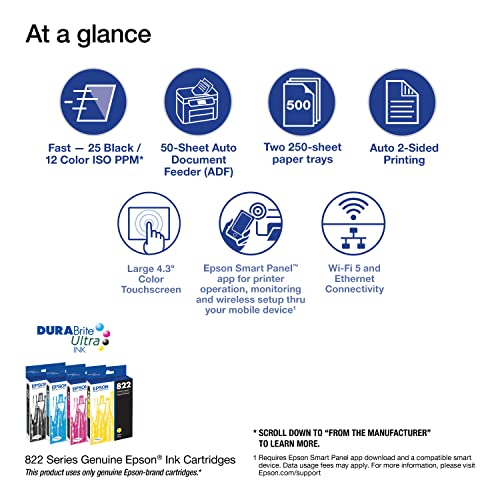
- •High-speed printing — PrecisionCore Heat-Free Technology delivers high-speed, high-volume printing with 25 black/12 color ISO ppm () and fast first-page-out.
- •High-precision printing — accurate dot placement and DURABrite Ultra instant-dry pigment inks for professional-quality prints.
- •High-volume reliability for heavy workloads — innovative heat-free technology designed for reliability and reduced downtime.
- •Complete duplex solution — auto 2-sided print, copy, scan and fax; plus 50-sheet ADF.
- •Maximize productivity — with 500-sheet paper capacity; includes two 250-sheet trays for added convenience.
- •Easy to use — 4.3" color touchscreen for quick navigation and control, plus all-new Epson Smart Panel App (1) for enhanced connectivity and productivity from your mobile device.
Epson Workforce Pro WF-4830 Wireless All-in-One Printer, Auto 2-Sided Print Copy, Scan/Fax, 50-Page ADF, 500-sheet Paper Capacity, and 4.3" Color Touchscreen, Works with Alexa - Black
List Price: $247.34$222.61DEALYou Save: $24.73 (10%)
Free shippingFree Returns – 30 daysFree Order CancellationSecure Payment2–3 Days DeliveryGet It October 25, 2026In Stock (23)No marketing spamNo account requiredFulfilment by FedEx / Amazon / UPS / ShipwirePayPal / Card Buyer Protection
Customer Reviews
Reviews sourced from verified Amazon purchasers4.1
out of 5
Based on 10 reviews
5★
60%
4★
40%
3★
0%
2★
0%
1★
0%
Great
annette r.✓ Verified Purchase•September 17, 2023
Great
Much harder to install than expected - especially if you have a comma in your Wifi password
user x✓ Verified Purchase•July 17, 2023
I found this printer surprisingly hard to install. First, I used the software on the DVD that came with the system. That caused my computer to crash and reboot! After it rebooted, I downloaded the (presumably newer) combo installer from the Epson web site. That ran, but when it came time to connect the printer to the wifi network, I found that there is no way in the Epson network configuration wizard to use a comma in the wifi password. There is a period and many other symbols, but I didn't see a comma. But our system admin used a comma in our wifi password, so I couldn't connect the printer to the wireless network. I had to dig up a LAN cable and plug the printer into a network switch, restart the installation and configure the printer for a LAN connection. That seemed to work, at least according to the installer, but when I tried to print a test page there was a print connection failure. After running the "Epson Printer Connection Checker", it found a printer port error and tried to fix it, but was unable to. So, I removed the printer entirely from the computer using Windows device management and had Windows try to detect the printer. That finally worked, although now the Fax device is missing. But at least now I can print, and the print quality looks good. But I'm still frustrated by the inability to connect to the wifi.
So far so good
MTSTEEL✓ Verified Purchase•July 6, 2023
Well my HP printer head died -(had it for the last 8 years, so I got my moneys worth out of it, trick is leave it one all the time)
I compared this with a similar HP and decided to try Epson because of the ink.
Cheaper ink and suppose to last longer -(well do a update when the ink runs out)
Pros:
Easy to set up
Has two printer trays and I loaded in about 400 pages.
Printer quality is crisp and clear -(we shall see in about 6 months to a year if this lasts)
Scanning is great at 600 dpi very crisp.
Haven't test the fax.
Cons:
It is a bit bigger due to the two paper trays, so make sure you have space to open up the top.
Printing, I always used draft to save on ink with HP it was good and clear.
Epson, draft is useless as it comes out light and blurry, so this might affect ink usage having to use standard all the time -(will update in 6 months to a year)
You have to go searching for a icon to put on your desktop to scan from your computer and to check ink levels. I had one icon for HP now I have two icons for Epson.
That's about it for now, so 4 stars because of the draft setting and having to put my own icons on my desktop.
Overall I like it a lot so far but time will tell if it holds up as well as my old one.
I compared this with a similar HP and decided to try Epson because of the ink.
Cheaper ink and suppose to last longer -(well do a update when the ink runs out)
Pros:
Easy to set up
Has two printer trays and I loaded in about 400 pages.
Printer quality is crisp and clear -(we shall see in about 6 months to a year if this lasts)
Scanning is great at 600 dpi very crisp.
Haven't test the fax.
Cons:
It is a bit bigger due to the two paper trays, so make sure you have space to open up the top.
Printing, I always used draft to save on ink with HP it was good and clear.
Epson, draft is useless as it comes out light and blurry, so this might affect ink usage having to use standard all the time -(will update in 6 months to a year)
You have to go searching for a icon to put on your desktop to scan from your computer and to check ink levels. I had one icon for HP now I have two icons for Epson.
That's about it for now, so 4 stars because of the draft setting and having to put my own icons on my desktop.
Overall I like it a lot so far but time will tell if it holds up as well as my old one.
Great printer!
Mitzi✓ Verified Purchase•July 6, 2023
Over the past years I have been ordering Hewlett-Packard printers. However, I decided to try this Epson printer because the ink cartridges were less expensive than Hewlett-Packard's ink. I have had no regrets. This printer is quiet, prints nicely, large digital screen. Love the extra duplex printing and scanning and fax features. I would strongly recommend this printer and I would buy it again. 🥰
It's ok for now
G. Ochoa✓ Verified Purchase•July 3, 2023
My HP of 10 yrs bit the dust and finding something that worked like that was tough. We tried 2 other printers before finding this one. For the most part, it does what we need it to do but some functions I really miss from my old printer this one doesn't have. (ie: print in draft ... this printer is two choices, color or black/white--for me draft not only saved on ink on my old printer but would still print in color--this new one does not do that). It prints a bit slower and colorprint isn't as sharp as they claim for photo prints. For the most part, again, it does what we need.
Page 1 of 2


