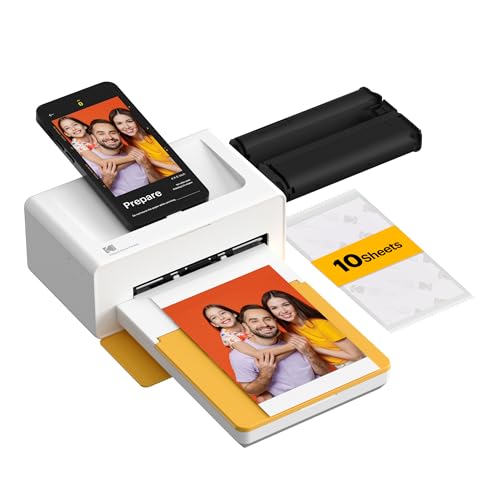
KODAK Dock Plus 4x6'' Photo Printer, 10 Sheets, Docking & Bluetooth Smartphone Printer for iPhone & Android, Instant Color Prints, 4PASS Dye Sublimation




Key features
- •PRINT YOUR MEMORIES: With the Kodak Dock Plus, you can print your favorite pics instantly from your mobile devices! Using a reliable and stable Bluetooth connection, this instant photo printer can help you save timeless memories.
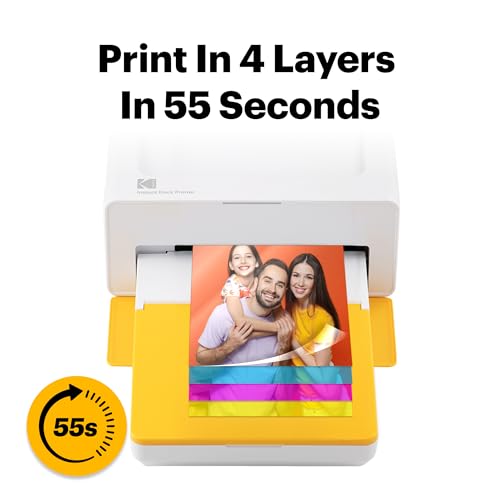
- •STELLAR PHOTO QUALITY: Kodak Dock Plus uses 4Pass Technology to print flawless photos instantly. Each photo is printed in layers of ribbon with a laminating process so it's fingerprint proof and water-resistant for long-lasting quality.
- •FREE KODAK APP: We have developed a free Kodak app that allows you to print anywhere and anytime. You can enjoy decorating real photos with stickers, frames and filters with a simple and intuitive app that is compatible with iOS and Android devices.
- •USER-FRIENDLY: Our Dock Plus instant photo printer can be used anytime and anywhere to help you portray timeless memories. It uses an USB-C pre-installed docking pin and it includes a Lightning connector for iOS devices. This printer no longer uses the PictBridge function so it's less complicated and a lot more effective.
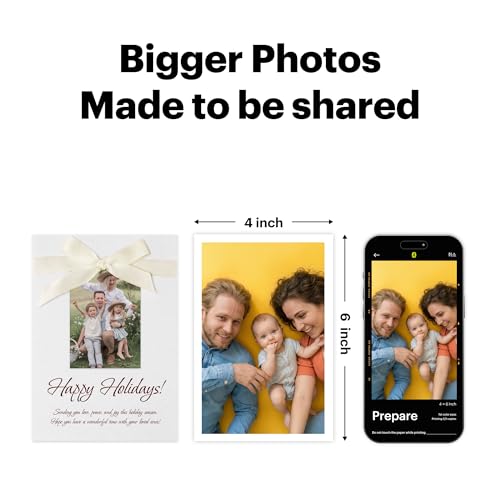
- •SHARE WITH YOUR LOVED ONES: This instant printer allows you to share unique and timeless memories with your family and friends. Print your favorite moments and keep them intact forever!
KODAK Dock Plus 4x6'' Photo Printer, 10 Sheets, Docking & Bluetooth Smartphone Printer for iPhone & Android, Instant Color Prints, 4PASS Dye Sublimation
List Price: $193.50$174.15DEALYou Save: $19.35 (10%)
Free shippingFree Returns – 30 daysFree Order CancellationSecure Payment2–3 Days DeliveryGet It October 25, 2026In Stock (3)No marketing spamNo account requiredFulfilment by FedEx / Amazon / UPS / ShipwirePayPal / Card Buyer Protection
Customer Reviews
Reviews sourced from verified Amazon purchasers4.2
out of 5
Based on 10 reviews
5★
60%
4★
40%
3★
0%
2★
0%
1★
0%
Nice photo printer once you understand it.
wolfman181✓ Verified Purchase•August 1, 2023
Kodak has produced a nice compact photo printer that once you understand its functionality you will get a lot of use out of. Do not believe all the bad reviews that this product is getting. I have experience none of that. So lets get down to it. Here is what you need to know. On start up or when starting a new batch of paper.
1.Before loading the paper first clean the gray roller that feeds the paper with contact cleaner and cloth/papertowel. Do this often.
2.Fan the paper first before putting them into the paper cartridge. Not more than 10 or so into the cartridge.
3.Download the latest app for the printer for your phone and then upgrade first.
4.Gently remove the ink cartridge from the unit first and make sure it is tight buy carefully turning it using the gear. You will see it. Slowly return it to the printer before any printing is done. It can get messed up during shipping.
Now a few things that are now so good.
1.You can not directly send a picture to the printer by Bluetooth. You must use the app ONLY. If you try to it will say failed. Use the app!
2.When setting up a print to get the best quality you will need to edit the picture a bit each time. Picture will print light unless you darken them a bit. Also sharpen a bit once you darken them so they will look sharp and clear. Once that done you will print store quality prints.
I hope this helps everyone and enjoy your photo printer like I am going too.
1.Before loading the paper first clean the gray roller that feeds the paper with contact cleaner and cloth/papertowel. Do this often.
2.Fan the paper first before putting them into the paper cartridge. Not more than 10 or so into the cartridge.
3.Download the latest app for the printer for your phone and then upgrade first.
4.Gently remove the ink cartridge from the unit first and make sure it is tight buy carefully turning it using the gear. You will see it. Slowly return it to the printer before any printing is done. It can get messed up during shipping.
Now a few things that are now so good.
1.You can not directly send a picture to the printer by Bluetooth. You must use the app ONLY. If you try to it will say failed. Use the app!
2.When setting up a print to get the best quality you will need to edit the picture a bit each time. Picture will print light unless you darken them a bit. Also sharpen a bit once you darken them so they will look sharp and clear. Once that done you will print store quality prints.
I hope this helps everyone and enjoy your photo printer like I am going too.
Great for pics
Scott✓ Verified Purchase•July 31, 2023
Little hard to use
Mostly positive
seeker✓ Verified Purchase•July 11, 2023
My biggest dislike for this printer is that the docking connector is ONLY for charging your phone. All of the data is transferred via Bluetooth. I can't even begin to fathom why they put the cost of the connector into the product without using it for its most obvious functionality. It's completely asinine.
My next dislike is the software. The Android version wants tons of permissions. I'm a software developer and have written apps for my phone, so I know that this is largely due to the way Google crafts the libraries that developers need to use to include functionality. The pairing process should be a lot smoother than it is. I feel like the software could have been better designed, and Kodak is being highly proprietary, forcing us to use their software to use the printer. I think that is shortsighted; they will be making the bulk of the profit by selling us refill kits, so allowing others to write better software for the hardware and consumables that they're profiting from is in their best interests.
I bought two of these, one for me and one for my mother. She has an Apple phone, and as difficult as mine was to set up with my Android phone, getting hers set up was very nearly painful. The IOS software has several differences and I was a bit disappointed to see that it's even worse to use than the Android version, specifically the way you frame the shot for what will be printed.
I like the printer itself. There are several negative reviews regarding print quality. I don't get it. I'm far from being a professional photographer - out of thousands of shots I've taken over the years, only one or two have been what I would consider 'stunning' - I just don't have the eye. As an average Joe I feel like I need all the help I can get, and the photos look quite nice to me. I think the dye sublimation process produces better photos than my ink jet printers, and should hold their colors for much longer.
The printer prints faster than I thought it would. It does take several seconds since it's doing separate passes, but I actually expected it to take a lot more time.
There have been a number of reviews that mention jams. I haven't had a jam yet. Before purchasing the printers, I ran across a reviewer who recommended cleaning the roller surfaces when switching to a new cartridge. He also recommended using a pencil or other similar tool to stick into the ends of the ink cartridge rollers to make sure they were wound tight. That seemed like good advice, and may very well be why my own experience has been problem free.
Overall and considering the price of the printer, the cost per print, and the convenience of the printer's size, I believe this to be a reasonably good purchase. The software could stand a lot of improvement but it's usable. Nothing mechanical is absolutely maintenance free, so paying attention to the state of the moving parts that you can see and examining the ink cartridge before use seems reasonable to me.
My next dislike is the software. The Android version wants tons of permissions. I'm a software developer and have written apps for my phone, so I know that this is largely due to the way Google crafts the libraries that developers need to use to include functionality. The pairing process should be a lot smoother than it is. I feel like the software could have been better designed, and Kodak is being highly proprietary, forcing us to use their software to use the printer. I think that is shortsighted; they will be making the bulk of the profit by selling us refill kits, so allowing others to write better software for the hardware and consumables that they're profiting from is in their best interests.
I bought two of these, one for me and one for my mother. She has an Apple phone, and as difficult as mine was to set up with my Android phone, getting hers set up was very nearly painful. The IOS software has several differences and I was a bit disappointed to see that it's even worse to use than the Android version, specifically the way you frame the shot for what will be printed.
I like the printer itself. There are several negative reviews regarding print quality. I don't get it. I'm far from being a professional photographer - out of thousands of shots I've taken over the years, only one or two have been what I would consider 'stunning' - I just don't have the eye. As an average Joe I feel like I need all the help I can get, and the photos look quite nice to me. I think the dye sublimation process produces better photos than my ink jet printers, and should hold their colors for much longer.
The printer prints faster than I thought it would. It does take several seconds since it's doing separate passes, but I actually expected it to take a lot more time.
There have been a number of reviews that mention jams. I haven't had a jam yet. Before purchasing the printers, I ran across a reviewer who recommended cleaning the roller surfaces when switching to a new cartridge. He also recommended using a pencil or other similar tool to stick into the ends of the ink cartridge rollers to make sure they were wound tight. That seemed like good advice, and may very well be why my own experience has been problem free.
Overall and considering the price of the printer, the cost per print, and the convenience of the printer's size, I believe this to be a reasonably good purchase. The software could stand a lot of improvement but it's usable. Nothing mechanical is absolutely maintenance free, so paying attention to the state of the moving parts that you can see and examining the ink cartridge before use seems reasonable to me.
Compact photo printer - perfect for on the go printing
Doris✓ Verified Purchase•June 23, 2023
What a gem! The printer is compact, comes with easy-to-understand instructions, the setup is quick and uncomplicated, and the picture quality really surprised me. It takes a little bit of time to print the photo since it will take 4 passes, but it is well worth it! The first pass threw me off a little when the picture looked all yellow, but not to worry, it will pull it back in and add 2 more layers of colors AND a protective layer before it is done! The colors are vibrant and beautiful! I also like that I can connect to the printer via Bluetooth, or I can plug my phone into the dock. A great, portable little photo printer!
Awesome photo printer
Patricia Cavanagh✓ Verified Purchase•May 18, 2023
I love this little photo printer and carrying case. It's easy to use, either via blue tooth or USB cable, and the pictures are great. You will receive a waning if the photo may not be optimal for printing. It's very convenient and a lot of fun.
Page 1 of 2