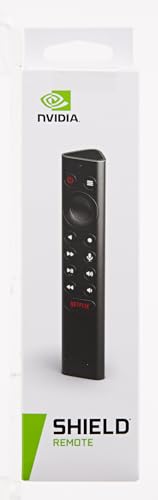
NVIDIA SHIELD Remote; Voice Search, Motion-Activated, Backlit Buttons, Customizable Menu Buttons, and IR Blaster to Control your TV




Key features
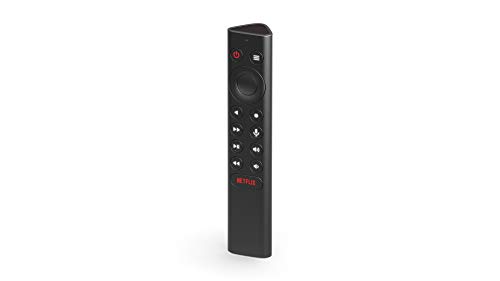
- •Works with SHIELD TV 2015/2017/2019 models. Requires upgrade to the latest SHIELD Experience.
- •Easy to use in the most darkly lit room. Pick up the remote and the buttons will instantly light up.
- •Press the microphone button to access the powerful Google Assistant on your Android TV. Search for new movies, TV shows, or YouTube videos, look up stock prices, or check your commute time, all on your SHIELD TV.
- •Customize your menu button with more than 25 choices. Launch your favorite app, enable AI upscaling, or mute your sound, or more! Different options can be applied to up to 3 actions: single press, double press, long press.
- •Control your home entertainment center with SHIELD Remote's built in IR blaster. Control volume, power, or input source.
- •Use the SHIELD remote app to activate the remote locator. Say goodbye to lost remotes.
NVIDIA SHIELD Remote; Voice Search, Motion-Activated, Backlit Buttons, Customizable Menu Buttons, and IR Blaster to Control your TV
List Price: $52.36$47.12DEALYou Save: $5.24 (10%)
Free shippingFree Returns – 30 daysFree Order CancellationSecure Payment2–3 Days DeliveryGet It October 25, 2026In Stock (3)No marketing spamNo account requiredFulfilment by FedEx / Amazon / UPS / ShipwirePayPal / Card Buyer Protection
Customer Reviews
Reviews sourced from verified Amazon purchasers4.7
out of 5
Based on 10 reviews
5★
90%
4★
10%
3★
0%
2★
0%
1★
0%
Improved design
Wes M.✓ Verified Purchase•December 23, 2023
Works as expected. New design improves the battery cover, making it snap in and held by a tab instead of just sliding on like my original remote. This stops the cover from popping off every time it drops and figuring out the direction to reassemble (there are no markings and easy to reverse). This new design is solid.
Good, the official replacement remote for the 2019 Nvidia Shield
Snuffleupagus✓ Verified Purchase•December 14, 2023
I've dropped my original Nvidia Shield (2019 model) remote a gazillion times and cracked the plastic, and held the back case on with tape. I finally bought a replacement and what is there to say? It's exactly the same as my original remote, but the replacement works perfectly! I will try to be less clumsy with this one.
The only thing I dislike about the remote is the Netflix button because it can be accidentally pressed, moving me from what I'm watching in another app and then loading Netflix. It is super annoying, but the official remotes for most streaming boxes have these 'quick access' buttons, so they're all equal in that regard.
The only thing I dislike about the remote is the Netflix button because it can be accidentally pressed, moving me from what I'm watching in another app and then loading Netflix. It is super annoying, but the official remotes for most streaming boxes have these 'quick access' buttons, so they're all equal in that regard.
Great remote for your Nivida shield
tad✓ Verified Purchase•October 29, 2023
profile picture
Write a review on Mysa Smart Thermostat for Electric Baseboard Heaters
The Mysa Smart Thermostat for Electric Baseboard Heaters is a great option for anyone looking to upgrade their home's heating system. It's easy to install, works with a variety of smart home platforms, and can help you save money on your energy bill.
Here are some of the things I like about the Mysa Smart Thermostat:
It's easy to install. The Mysa Smart Thermostat can be installed in just a few minutes, even for those with no experience in home improvement.
It works with a variety of smart home platforms. The Mysa Smart Thermostat can be used with Alexa, Google Assistant, and Apple HomeKit, so you can control it with your voice or with an app on your phone.
It can help you save money on your energy bill. The Mysa Smart Thermostat uses a variety of features to help you save money on your energy bill, such as scheduling, geofencing, and energy reports.
Overall, I highly recommend the Mysa Smart Thermostat for Electric Baseboard Heaters. It's a great way to upgrade your home's heating system and save money on your energy bill.
Here are some things to consider before purchasing the Mysa Smart Thermostat:
It's only compatible with electric baseboard heaters. If you have a different type of heating system, the Mysa Smart Thermostat won't work for you.
It requires a neutral wire. If your home doesn't have a neutral wire, you'll need to have one installed before you can install the Mysa Smart Thermostat.
It's more expensive than traditional thermostats. The Mysa Smart Thermostat costs more than a traditional thermostat, but it's worth the investment if you're looking to save money on your energy bill.
profile picture
Write every view on NVIDIA SHIELD Remote
Here is a summary of the most common reviews on the NVIDIA SHIELD Remote:
Positive reviews
Praise the remote's voice control, motion-activated backlit buttons, and IR blaster.
Say that it is a great way to control your TV and other devices.
Indicate that it is a comfortable and easy-to-use remote.
Negative reviews
Complain about the remote's battery life.
Say that it is not as responsive as some other remotes.
Indicate that it is not compatible with all devices.
Overall, the NVIDIA SHIELD Remote is a well-received remote that offers a variety of features and is a great way to control your TV and other devices. However, it is important to note that the remote does have some limitations, such as battery life and compatibility.
profile picture
Write a review on NVIDIA SHIELD Remote
View other drafts
The NVIDIA SHIELD Remote is a great remote for controlling your NVIDIA SHIELD TV. It has a number of features that make it easy to use, including voice control, motion-activated backlit buttons, and an IR blaster.
Voice control is one of the best features of the SHIELD Remote. You can use it to search for movies and TV shows, launch apps, and control your TV's volume. The voice control is very accurate, and it usually understands what you're saying even in noisy environments.
Motion-activated backlit buttons are another great feature of the SHIELD Remote. The buttons light up when you move the remote, so you can easily find them in the dark. This is especially helpful if you're using the remote in a bedroom or other dark room.
The IR blaster is a great way to control your TV's volume and power. You can also use it to control other devices in your home theater, such as your soundbar or projector.
Overall, the NVIDIA SHIELD Remote is a great remote for controlling your NVIDIA SHIELD TV. It has a number of features that make it easy to use, and it's very comfortable to hold. If you're looking for a remote for your NVIDIA SHIELD TV, the SHIELD Remote is a great option.
Here are some of the pros and cons of the NVIDIA SHIELD Remote:
Pros:
Voice control
Motion-activated backlit buttons
IR blaster
Comfortable to hold
Easy to use
Cons:
Battery life could be better
Not compatible with all devices
Some users have reported problems with the remote not responding properly
Write a review on Mysa Smart Thermostat for Electric Baseboard Heaters
The Mysa Smart Thermostat for Electric Baseboard Heaters is a great option for anyone looking to upgrade their home's heating system. It's easy to install, works with a variety of smart home platforms, and can help you save money on your energy bill.
Here are some of the things I like about the Mysa Smart Thermostat:
It's easy to install. The Mysa Smart Thermostat can be installed in just a few minutes, even for those with no experience in home improvement.
It works with a variety of smart home platforms. The Mysa Smart Thermostat can be used with Alexa, Google Assistant, and Apple HomeKit, so you can control it with your voice or with an app on your phone.
It can help you save money on your energy bill. The Mysa Smart Thermostat uses a variety of features to help you save money on your energy bill, such as scheduling, geofencing, and energy reports.
Overall, I highly recommend the Mysa Smart Thermostat for Electric Baseboard Heaters. It's a great way to upgrade your home's heating system and save money on your energy bill.
Here are some things to consider before purchasing the Mysa Smart Thermostat:
It's only compatible with electric baseboard heaters. If you have a different type of heating system, the Mysa Smart Thermostat won't work for you.
It requires a neutral wire. If your home doesn't have a neutral wire, you'll need to have one installed before you can install the Mysa Smart Thermostat.
It's more expensive than traditional thermostats. The Mysa Smart Thermostat costs more than a traditional thermostat, but it's worth the investment if you're looking to save money on your energy bill.
profile picture
Write every view on NVIDIA SHIELD Remote
Here is a summary of the most common reviews on the NVIDIA SHIELD Remote:
Positive reviews
Praise the remote's voice control, motion-activated backlit buttons, and IR blaster.
Say that it is a great way to control your TV and other devices.
Indicate that it is a comfortable and easy-to-use remote.
Negative reviews
Complain about the remote's battery life.
Say that it is not as responsive as some other remotes.
Indicate that it is not compatible with all devices.
Overall, the NVIDIA SHIELD Remote is a well-received remote that offers a variety of features and is a great way to control your TV and other devices. However, it is important to note that the remote does have some limitations, such as battery life and compatibility.
profile picture
Write a review on NVIDIA SHIELD Remote
View other drafts
The NVIDIA SHIELD Remote is a great remote for controlling your NVIDIA SHIELD TV. It has a number of features that make it easy to use, including voice control, motion-activated backlit buttons, and an IR blaster.
Voice control is one of the best features of the SHIELD Remote. You can use it to search for movies and TV shows, launch apps, and control your TV's volume. The voice control is very accurate, and it usually understands what you're saying even in noisy environments.
Motion-activated backlit buttons are another great feature of the SHIELD Remote. The buttons light up when you move the remote, so you can easily find them in the dark. This is especially helpful if you're using the remote in a bedroom or other dark room.
The IR blaster is a great way to control your TV's volume and power. You can also use it to control other devices in your home theater, such as your soundbar or projector.
Overall, the NVIDIA SHIELD Remote is a great remote for controlling your NVIDIA SHIELD TV. It has a number of features that make it easy to use, and it's very comfortable to hold. If you're looking for a remote for your NVIDIA SHIELD TV, the SHIELD Remote is a great option.
Here are some of the pros and cons of the NVIDIA SHIELD Remote:
Pros:
Voice control
Motion-activated backlit buttons
IR blaster
Comfortable to hold
Easy to use
Cons:
Battery life could be better
Not compatible with all devices
Some users have reported problems with the remote not responding properly
just wish it had a mute button
nj28sharp✓ Verified Purchase•October 26, 2023
The NVIDIA SHIELD Remote is a great option for anyone who wants a comprehensive and easy-to-use remote control for their NVIDIA SHIELD TV. It has a number of features that make it stand out from other remotes, including:
Voice search: You can use your voice to search for content, launch apps, and more.
Backlit buttons: The buttons are backlit, so you can easily see them in the dark.
Customizable menu buttons: You can customize the menu buttons to launch your favorite apps or perform other actions.
IR blaster: The remote has an IR blaster, so you can use it to control your TV's volume, input, and other settings.
Overall, the NVIDIA SHIELD Remote is a great option for anyone who wants a powerful and versatile remote control for their NVIDIA SHIELD TV. It's easy to use, has a number of great features, and is well-made.
Here are some of the pros and cons of the NVIDIA SHIELD Remote:
Pros:
Voice search
Backlit buttons
Customizable menu buttons
IR blaster
Easy to use
Well-made
Cons:
no mute button
Can be a bit expensive
Voice search: You can use your voice to search for content, launch apps, and more.
Backlit buttons: The buttons are backlit, so you can easily see them in the dark.
Customizable menu buttons: You can customize the menu buttons to launch your favorite apps or perform other actions.
IR blaster: The remote has an IR blaster, so you can use it to control your TV's volume, input, and other settings.
Overall, the NVIDIA SHIELD Remote is a great option for anyone who wants a powerful and versatile remote control for their NVIDIA SHIELD TV. It's easy to use, has a number of great features, and is well-made.
Here are some of the pros and cons of the NVIDIA SHIELD Remote:
Pros:
Voice search
Backlit buttons
Customizable menu buttons
IR blaster
Easy to use
Well-made
Cons:
no mute button
Can be a bit expensive
Game changer for your Shield TV
Mike Felix✓ Verified Purchase•October 25, 2023
I needed to bring my 2017 Shield Pro back into service to replace a failed Roku. A large part of the reason I retired the Shield was how slow and unreliable the stock remote was, as well as very poor IR blaster functionality for faster and more reliable TV power / audio control. I have so say, I really wish I had picked up this upgraded remote when they first came out. Besides being backlit, it has physical buttons for almost all the features you would want. The IR control is far better, and there is no lag waiting for the remote to wake up all the time. At $30 it is a bit pricey and could use a physical mute and assignable app buttons, but it solves every single problem I had with the Shield and much of why it ultimately got retired for a Roku.
Page 1 of 2


