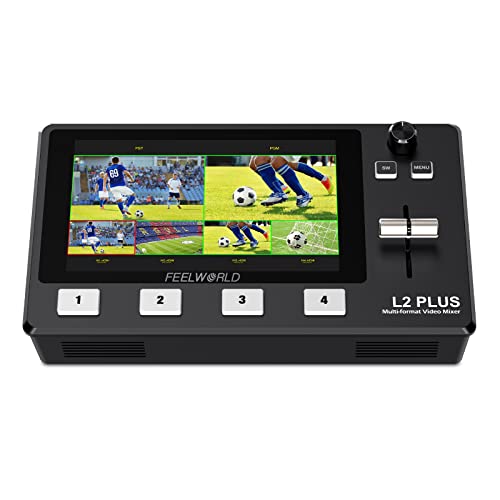
FEELWORLD LIVEPRO L1 4 x HDMI Inputs Multi Format Video Mixer Switcher USB 3.0 Output Real Time Live Streaming Multi Camera Production


Key features
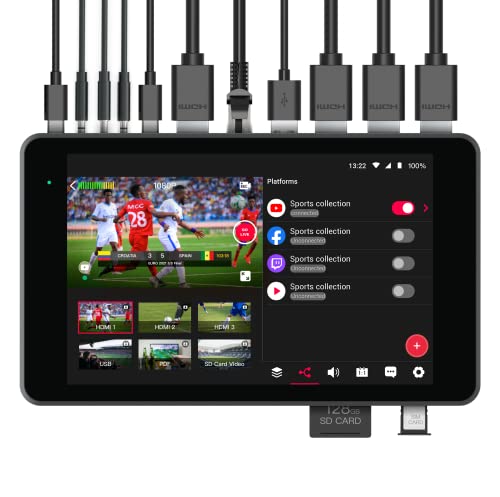
- •【Live Streaming】The USB 3.0 output of LIVEPRO L1 connects to any computer and looks like a built in webcam, so all streaming software for social media platforms work! With up to 4 HDMI inputs you can set up multiple camera angles, view and stream images from different angles
- •【Exquisite and Flexible Control Panel】The 4 buttons are for selecting input signals. We can preview 4 HDMI signals and easily do menu setting. The T-Bar of LIVEPRO L1 support 14 transition effects and signal switching
- •【USB 3.0 Live Streaming】Multifunctional, dramatically better quality images. USB3.0 interface can connect to PC and smart phone that as a simple webcam source, can works with software and platforms make live streaming more convenient and fast
- •【APP Control】Download the APP on smart phone or connecting the LAN port to the computer, can remotely control the switcher. Achieve the control room be separated from the performance or interview area
- •【Package Include】1× 1.5A Adaptor, 1× USB 3.0 Cable, 1× Manual. 【Audio In and Out】LIVEPRO L1 with AUDIO IN and OUT. The output interface can be connected to speakers, headsets, etc.; The AUDIO IN interface is a linear input interface, which is connected to digital signal
FEELWORLD LIVEPRO L1 4 x HDMI Inputs Multi Format Video Mixer Switcher USB 3.0 Output Real Time Live Streaming Multi Camera Production
List Price: $357.92$322.13DEALYou Save: $35.79 (10%)
Free shippingFree Returns – 30 daysFree Order CancellationSecure Payment2–3 Days DeliveryGet It October 26, 2026In Stock (1)No marketing spamNo account requiredFulfilment by FedEx / Amazon / UPS / ShipwirePayPal / Card Buyer Protection
Customer Reviews
Reviews sourced from verified Amazon purchasers4.4
out of 5
Based on 10 reviews
5★
70%
4★
30%
3★
0%
2★
0%
1★
0%
Excellent live switch
Dad of 2 Kids✓ Verified Purchase•October 16, 2023
Excellent switch for value.
Compared to $2400 Roland this is a great first step to live stream switch.
Compared to $2400 Roland this is a great first step to live stream switch.
No audio mixing, but nice PIP transitions with just the T-bar once set up right
Kelly✓ Verified Purchase•October 1, 2023
I don't know if they will change this with firmware or not, but the two choices for audio are (paraphrasing) "follow the active video input" or "lock it onto a single input". I don't believe you can have audio flowing from multiple inputs at the same time and have it mixed together. For my uses, that's actually fine. I use it to bring Zoom desktop shares into my local HDMI recordings, and I always want my table mics to stay active in that situation. My other use is picking a laptop vs document reader for Elmo meetings, and again, the table mics need to stay on.
The interface is tricky, and I have to play with it each time I use it to get familiarity back. The j5create JVA06 (only two inputs) is MUCH simpler, and you can configure audio choices without going into a menu.
Also, the Livepro also seems to reduce audio level compared to my Roland 2 port mixer. Even with the volume knob at full, there is some noticeable attenuation. Not a huge amount, but noticeable. I can make up for some of it by driving my levels a little hotter going into the Livepro mixer, but since my main camera works off that audio, there's only so much I can do without clipping the master recording. So I don't use it for a situations where my main recording's audio will go through it, but it's great for the cases I mentioned in the first paragraph.
One very nice thing about this mixer is that once you get it configured right, you can transition from full screen input to a pre-configured PIP picture on the other side with just the T bar. This is the only mixer I know that allows that without a two or three button/slide sequence. Just simple sliding back and forth as needed is wonderful, but takes a few minutes of doinking around to get it set up right.
It does run quite hot. I have a small fan I use to cool my Atomos Ninja and this mixer. The new firmware addresses the heat issue, but I haven't applied that yet.
The interface is tricky, and I have to play with it each time I use it to get familiarity back. The j5create JVA06 (only two inputs) is MUCH simpler, and you can configure audio choices without going into a menu.
Also, the Livepro also seems to reduce audio level compared to my Roland 2 port mixer. Even with the volume knob at full, there is some noticeable attenuation. Not a huge amount, but noticeable. I can make up for some of it by driving my levels a little hotter going into the Livepro mixer, but since my main camera works off that audio, there's only so much I can do without clipping the master recording. So I don't use it for a situations where my main recording's audio will go through it, but it's great for the cases I mentioned in the first paragraph.
One very nice thing about this mixer is that once you get it configured right, you can transition from full screen input to a pre-configured PIP picture on the other side with just the T bar. This is the only mixer I know that allows that without a two or three button/slide sequence. Just simple sliding back and forth as needed is wonderful, but takes a few minutes of doinking around to get it set up right.
It does run quite hot. I have a small fan I use to cool my Atomos Ninja and this mixer. The new firmware addresses the heat issue, but I haven't applied that yet.
Compact, good for travel, good resolution, extra monitor feature, update firmwares when can.
Jonathan Eliu✓ Verified Purchase•September 12, 2023
I use this to run video feed for livestream at church. And it serves its purpose. I love it a whole lot. I just updated the firmware, so no I can choose which camera to receive sound from. One of my cameras has an xlr input which is awesome. Please do research before buying. I chose this over the Black Magic Atem Mini because of Extra Monitor feature.
Had lots of fun setting up my production case. Now I get paid to do livestreams. :)
Had lots of fun setting up my production case. Now I get paid to do livestreams. :)
Must have
AJ✓ Verified Purchase•August 23, 2023
This item is superb. Used it at a virtual and live conference we had at church. Through zoom I was able to have a camera on the speaker as well as the in person audience for those at home could see them.
full of Features and build quality.
Clarence Rose✓ Verified Purchase•August 11, 2023
full of Features and build quality.
Page 1 of 2