YOLOLIV YoloBox Pro, All-in-one Portable Multi-Cam Live Streaming Studio Encoder Recorder Switcher


Key features
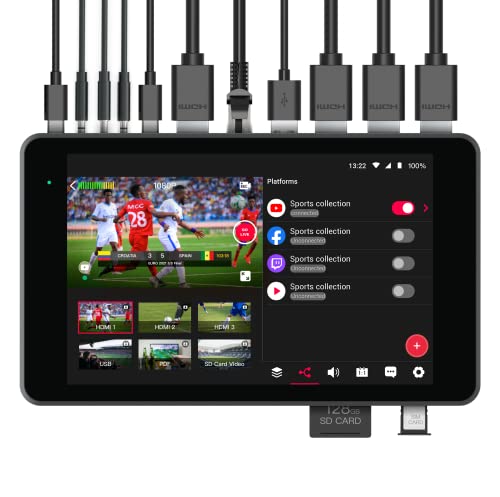
- •【All in One】 YoloBox Pro is a full HD live broadcast device integrating encoder, switcher, monitor and recorder, with built-in battery and native support for 4G LTE, WiFi, Ethernet. Perfect for Worship, Weddings/Funerals, Sport, Events, Corporate, Education, Retail Business and Much More.
- •【Stronger and More Powerful】 YoloBox Pro has more HDMI Inputs, Bigger & Brighter Display, Longer Battery Life, Enhanced CPU. The 8-inch touch screen design is still super-easy to operate, control at your fingertip, just as your smartphone. It's brighter with 400 nits and more responsive! With a much increased built-in 10,000mAh battery, it has over 4-hour battery life. The NEW CPU from QualComm SnapDragon has 2 times more processing power than the original for demanding tasks.
- •【More Inputs & Capabilities】 YoloBox Pro has 3 HDMI inputs, 1 USB input, 1 Full Featured USBC input, plus local SD card video sources and PDF source from SD card, 1 Mic in, 1 Line in, 1 HDMI out, 1 Audio out. It can live switch up to a total of 8 sources. YoloBox Pro works perfectly with Blackmagic ATEM Mini series and other switchers, Rode microphones and Wireless Transmitters. The Enhanced CPU opens the door to expanded capabilities of upcoming software features to make it more powerful.
- •【Desktop features you won't find anywhere else】 No subscription needed for multi-streaming to up to 3 platforms simultaneously; No subscription required for Featuring Comment Overlays to the Stream to engage with your audience in real time. All customizable graphic overlays(Logos/Watermarks/Customized Rolling /Captions/Scoreboard/Lower-Thirds To Make Your Stream Look Pro) are all built-in with no additional cost.
- •【Continuous Improvement & NEW Features】 Our dedicated engineering team will continuously add customers' requested features to make your production the next-level. Customers could always easily get the update by a simple tap. As our company mission is to build Next Generation Live Streaming Tools.
YOLOLIV YoloBox Pro, All-in-one Portable Multi-Cam Live Streaming Studio Encoder Recorder Switcher
List Price: $1888.59$1699.73DEALYou Save: $188.86 (10%)
Free shippingFree Returns – 30 daysFree Order CancellationSecure Payment2–3 Days DeliveryGet It October 27, 2026In Stock (2)No marketing spamNo account requiredFulfilment by FedEx / Amazon / UPS / ShipwirePayPal / Card Buyer Protection
Customer Reviews
Reviews sourced from verified Amazon purchasers4.1
out of 5
Based on 10 reviews
5★
70%
4★
30%
3★
0%
2★
0%
1★
0%
Awesome Customer Service!
Ricky Stanley✓ Verified Purchase•September 9, 2023
Purchased this unit to stream our church services. We are a smaller/mid size church and was great for our budget. Super easy to use with very little setup time. Loved by our sound and media guys. I highly recommend this product. Lastly, We did come across an issue with the 3.5 mm jack cutting in and out a few weeks in. Contacted company and received swift response. Sent them our unit to check out and found it was a small manufacturing defect. Sent us brand new unit and is working great! Best customer service/follow up i have seen from a company in a long time. You will not be disappointed with this product.
Need Just Two Missing pieces
Akapello Di General✓ Verified Purchase•September 4, 2023
If there was a way to put hyper links connect through only wifi from all devices just like switcher studio
And a way pull in youtube videos or any link along with twitter Tik Tok and LinkedIn this would be a five for me for this price we need to see a little bit more please.
And a way pull in youtube videos or any link along with twitter Tik Tok and LinkedIn this would be a five for me for this price we need to see a little bit more please.
Swiss Army Knife
AlphaTribe✓ Verified Purchase•September 1, 2023
I was originally looking for a solid state, stand alone, video recorder. I saw this and watched some reviews. It looked promising so I bought it.
It is easy to connect to the platforms supported by the device.
Stream is smooth with no frame drops via wifi. Recordings onto the SD card look pretty much the same as the streams.
Recordings on sd card are automatically split every 10 minutes, this can be a con, or a pro. If you would like to further edit your recordings, 10 minute clips may be easier to handle. But on the downside, it creates more bulk files, and forces you to compile clips if you want the full recording.
I've only been able to select one audio source at a time. It seems that sometimes you have to connect everything you'll need before turning on the unit, and other signal cables are not detected when connected after the unit has been turned on.
Thankfully, this device runs Android. And software patches and updates are possible. I'm hopeful and somewhat positive this will be addressed in the future.
The first time I turned on the Yolobox Pro, it asked me to connect to the internet and then asked me to create an account. It ran quite a few updates one after another.
I was recording to the SD card (that was included) in no time.
The next time I used the Yolobox Pro, I purposely disconnected from wifi. To my surprise, there was no way to start a new session unless I was connected to my account. This was a huge letdown, since I originally bought this for recordings, not streaming.
So here's the good part.
The developers listen to the community of users. I addressed the issue, (not being able to record without internet connection). I got a direct response the same day, and the issue was resolved in less than a month!
This is hard work and dedication at hand. A company like this deserves the praise. Not one product is perfect, but even less companies release a "Finished" product and keep working at it to meet it's consumers' needs.
Thanks for a great product!
It is easy to connect to the platforms supported by the device.
Stream is smooth with no frame drops via wifi. Recordings onto the SD card look pretty much the same as the streams.
Recordings on sd card are automatically split every 10 minutes, this can be a con, or a pro. If you would like to further edit your recordings, 10 minute clips may be easier to handle. But on the downside, it creates more bulk files, and forces you to compile clips if you want the full recording.
I've only been able to select one audio source at a time. It seems that sometimes you have to connect everything you'll need before turning on the unit, and other signal cables are not detected when connected after the unit has been turned on.
Thankfully, this device runs Android. And software patches and updates are possible. I'm hopeful and somewhat positive this will be addressed in the future.
The first time I turned on the Yolobox Pro, it asked me to connect to the internet and then asked me to create an account. It ran quite a few updates one after another.
I was recording to the SD card (that was included) in no time.
The next time I used the Yolobox Pro, I purposely disconnected from wifi. To my surprise, there was no way to start a new session unless I was connected to my account. This was a huge letdown, since I originally bought this for recordings, not streaming.
So here's the good part.
The developers listen to the community of users. I addressed the issue, (not being able to record without internet connection). I got a direct response the same day, and the issue was resolved in less than a month!
This is hard work and dedication at hand. A company like this deserves the praise. Not one product is perfect, but even less companies release a "Finished" product and keep working at it to meet it's consumers' needs.
Thanks for a great product!
Perfect product but needs a charger
Thompson✓ Verified Purchase•August 31, 2023
This Yolobox requires a weird power supply, 5V 3Amps which is not more than what most phones use. It is just surprising that the iteme didn't ship with the recommended charger. But outside that. This is great for Livestreaming . It makes the workflow easy . Also the video delay or lag is minimal and this can be corrected with any cheap audio processor
In all, I am happy with the purchase.
In all, I am happy with the purchase.
A Solid Alternative to SlingStudio
Sandra D.✓ Verified Purchase•July 15, 2023
10/1/22
I can say I was bummed when I had to take on the adventure of finding a different outfit for supporting our church services since SlingStudio's going out of the business. I needed something that was easy to use and would not require a full on media room setup with tons of boards...I just did not have that kind of time to deal with the mechanics of repurposing space to support those needs. On top of that, I needed to be able to train others as a backup.
Because the YoloBox diagram is so poor, I am going to provide some notations from my experience in setting things up:
1. When selecting cameras for pairing with this, make certain they have HDMI output and not just USB. (I am going to tell you from trials/testing, attempting to use USB only cameras with converters will NOT work successfully.) The HDMI route provides the true plug and play experience when connecting to the YoloBox.
2. For the video stream from YoloBox to your computer, as a Mac user using USB 3 I relied on the HDMI out port. I connected this HDMI cable to DIGITNOW's Audio Video Capture Card-4K HDMI, which was then connected to my computer. Works FANTASTICALLY.
3. For streaming, I do not rely on YoloBox. I am using my computer for the internet connection functions given the connection as additional camera for YoloBox to the computer. You will need to connect the equipment to ethernet connection during the initial booting to allow for software updates. I did not purchase an additional SIM card for use in the device because my focus is on direct connection to Zoom.
4. With connecting to Zoom, the computer recognizes immediately the USB 3.0 link to DIGITNOW's Audio Video Capture Card-4K HDMI converter as another camera. You simply change your camera setting to the USB connection. From there, you have all cameras linked to YoloBox displayed within your Zoom session.
5. When using the SD Card, be certain it is a native format for a PC and not a Mac!!! I use the SD card for storing pictures and jpg versions of the weekly program. I display this as an overlay during service for those who are connected virtual will know the order of service.
From this point, you refer back to YoloBox for all of the wonderful features you can utilize out-the-box. The touchscreen feature makes it super easy to do things on the fly, or automatically based on your settings.
As a side note, YoloBox DOES work while plugged in at the same time. I read somewhere where it would not work while plugged in...this is a good thing because I have not noticed an extremely long battery life with the three cameras attached.
Overall, I am pleased after being bummed. SlingStudio was fantastic in the ability to connect multiple cameras without the cords. For YoloBox, you just have to be creative in mapping out things that work best for your requirements.
I can say I was bummed when I had to take on the adventure of finding a different outfit for supporting our church services since SlingStudio's going out of the business. I needed something that was easy to use and would not require a full on media room setup with tons of boards...I just did not have that kind of time to deal with the mechanics of repurposing space to support those needs. On top of that, I needed to be able to train others as a backup.
Because the YoloBox diagram is so poor, I am going to provide some notations from my experience in setting things up:
1. When selecting cameras for pairing with this, make certain they have HDMI output and not just USB. (I am going to tell you from trials/testing, attempting to use USB only cameras with converters will NOT work successfully.) The HDMI route provides the true plug and play experience when connecting to the YoloBox.
2. For the video stream from YoloBox to your computer, as a Mac user using USB 3 I relied on the HDMI out port. I connected this HDMI cable to DIGITNOW's Audio Video Capture Card-4K HDMI, which was then connected to my computer. Works FANTASTICALLY.
3. For streaming, I do not rely on YoloBox. I am using my computer for the internet connection functions given the connection as additional camera for YoloBox to the computer. You will need to connect the equipment to ethernet connection during the initial booting to allow for software updates. I did not purchase an additional SIM card for use in the device because my focus is on direct connection to Zoom.
4. With connecting to Zoom, the computer recognizes immediately the USB 3.0 link to DIGITNOW's Audio Video Capture Card-4K HDMI converter as another camera. You simply change your camera setting to the USB connection. From there, you have all cameras linked to YoloBox displayed within your Zoom session.
5. When using the SD Card, be certain it is a native format for a PC and not a Mac!!! I use the SD card for storing pictures and jpg versions of the weekly program. I display this as an overlay during service for those who are connected virtual will know the order of service.
From this point, you refer back to YoloBox for all of the wonderful features you can utilize out-the-box. The touchscreen feature makes it super easy to do things on the fly, or automatically based on your settings.
As a side note, YoloBox DOES work while plugged in at the same time. I read somewhere where it would not work while plugged in...this is a good thing because I have not noticed an extremely long battery life with the three cameras attached.
Overall, I am pleased after being bummed. SlingStudio was fantastic in the ability to connect multiple cameras without the cords. For YoloBox, you just have to be creative in mapping out things that work best for your requirements.
Page 1 of 2