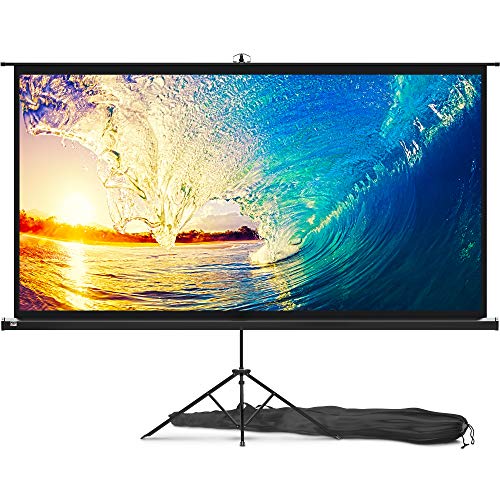
Akia Screens ALR Projector Screen 123 inch 16:9 4K UST Ultra Short Throw Projection, High Black Levels, Ceiling Ambient Light Rejecting Screen, Edge Free Fixed Frame Movie Screen AK-NB123H-CLR4


Key features
- •Impressive Dimensions: Diagonal screen size of 123 inches, providing a substantial viewing experience. Widescreen aspect ratio of 16:9, ideal for HD content. Overall assembled dimensions of 60 inches in height, 106.6 inches in width, and 1.3 inches in depth.
- •CLR4 Screen Technology: Utilizes Ceiling Light Rejecting 4 (CLR4) material. Tailored for ultra-short-throw projectors placed on tables. Boasts a wide 170° viewing angle and a gain of 0.8 for vibrant colors and clear images. Engineered to counteract washout effects from room lighting. Supports 8K/4K Ultra HD and Active 3D content, rejecting 90% of overhead light and enhancing contrast by 85% compared to standard matte white screens.
- •Sleek EDGE FREE Design: The modern design resembles a flat-panel TV. Zero-edge finish for a seamless viewing experience. Aimed at having immersive entertainment experience for the viewers.
- •Easy Installation and Customization: Complete installation kit included. Optional ultra-thin bezel frame. Sliding wall mount brackets for convenient wall hanging and centering.
- •Warranty, Support, and Certification: 2-year manufacturer's warranty from an ISO9001 certified manufacturer since 2004. Lifetime tech support available via email, web chat, or toll-free phone call, provided by a U.S.-based professional service team. ISF Certification ensures accurate color reproduction for a realistic viewing experience.
- •ISF Certified for accurate color reproduction. Enjoy close to reality colorful presentations on Akia Screens.
BrandAKIA SCREENS
CategoryProjection Screens
Size123"/16:9
ColorCLR4
Warranty2 Year Manufactures Warranty
Akia Screens ALR Projector Screen 123 inch 16:9 4K UST Ultra Short Throw Projection, High Black Levels, Ceiling Ambient Light Rejecting Screen, Edge Free Fixed Frame Movie Screen AK-NB123H-CLR4
List Price: $1745.99$1571.39DEALYou Save: $174.60 (10%)
Free shippingFree Returns – 30 daysFree Order CancellationSecure Payment2–3 Days DeliveryGet It October 27, 2026In Stock (1)No marketing spamNo account requiredFulfilment by FedEx / Amazon / UPS / ShipwirePayPal / Card Buyer Protection
Customer Reviews
Reviews sourced from verified Amazon purchasers4.1
out of 5
Based on 10 reviews
5★
70%
4★
30%
3★
0%
2★
0%
1★
0%
Great Screen. Take your time, and you will get a perfectly flat quality screen
M. Silva✓ Verified Purchase•February 10, 2024
I am very pleased with the final result of the 125-inch fixed frame series AKIA screen. I was able to fully assemble the screen alone. I originally was concerned that the screen material would not stretch over the frame, and was certain that I was sent the wrong size screen. I contacted customer support by phone and was given encouragement that convinced me to continue. I reviewed several videos on assembly of these type of screens that use springs and slowly but surely was able to complete the process.
My setup may be different than most. I basically did a ceiling mount (Actually floated from L brackets), so the frame is about 8 inches from my wall. This was needed as I had 2 windows behind my wall that would limit the size of the screen. Previously I had a 82 inch custom build projection screen that fit between the 2 windows on the wall. I always wanted to go much bigger on the screen but originally felt that would not be possible. Here is what I finally did:
I added 6 L-brackets to the top of my wall. Four of the brackets would be to support the screen using the supplied Wall Brackets. (The directions tell you to use 2 of the brackets for the top and 2 of the brackets for the bottom. I changed this and placed all 4 of the wall brackets on the top.
I purchased a large curtain rod from Amazon that was adjustable from 120 to 170 inches. This Rod was simply supported on the top of the 6 L-Brackets. I also purchased 8 Theater Grade Extreme 100% Blackout Grommet Curtain Panels, 52" x 95". 6 of the panels were black and for the ends, I used 2 red panels. This took care of blacking out the background from the 2 windows, and I was now able to have full light control in the room.
I was able to make 4 custom metal bracket adapters that I painted flat black, which allowed me to mount the screen to the L-Bracket and wall mounting brackets to float the screen. Wire or other mounting options would have worked here as well.
The screen had a tendency to angle in toward the wall slightly. For this reason, I placed 2 additional L-Brackets at the bottom of the screen hitting the Frame so that the screen was now perfectly vertical. The curtain panels completely hide all brackets and the screen has a nice floating look.
I am considering adding 2 4x4 blocks cut to size from floor to the bottom of the screen to relieve any pressure on the bottom of the screen. In all honesty, I am not sure this is even needed as the frame this screen is supported on is very heavy duty, and I doubt any sagging would occur over time.
Overall, I am very happy with how this has turned out and I believe the screen is of exceptional quality and a very good product. The only issues I had are as follows:
Tension Rods: Horizontal rods, were fine with proper overlap. The 2 Vertical rods were too short. The rod length just matched the length of the outside holes of the fabric. This result on one of the sides tearing through the mounting hole. I ended up having to purchase 2 brass rods of the same diameter to get some overlap for the springs to attach to the frame.
While nowhere in the manual is this mentioned, I found it much easier to mount the screens with the spring oriented in a certain direction. One end of the spring seems to make a perfect half circle (Better for tension rod), and the other end, is less angled, and that end seems to more easily mount to the metal frame. Also, I found that in many cases it was easier to first start the spring by attaching it to the frame, and then pull it over through the tension rod hole.
The supplied Allen wrench was not of the greatest quality. It was starting to strip as I was tightening the screws. I switched to a much higher quality Allen wrench I had, which greatly improved my ability to tighten down all screws without slippage or striping.
Overall, I am very pleased with the result. It is a bit of work, and my fingers are still a bit numb from stretching the springs into position, but the supplied tool does get the job done.
My setup may be different than most. I basically did a ceiling mount (Actually floated from L brackets), so the frame is about 8 inches from my wall. This was needed as I had 2 windows behind my wall that would limit the size of the screen. Previously I had a 82 inch custom build projection screen that fit between the 2 windows on the wall. I always wanted to go much bigger on the screen but originally felt that would not be possible. Here is what I finally did:
I added 6 L-brackets to the top of my wall. Four of the brackets would be to support the screen using the supplied Wall Brackets. (The directions tell you to use 2 of the brackets for the top and 2 of the brackets for the bottom. I changed this and placed all 4 of the wall brackets on the top.
I purchased a large curtain rod from Amazon that was adjustable from 120 to 170 inches. This Rod was simply supported on the top of the 6 L-Brackets. I also purchased 8 Theater Grade Extreme 100% Blackout Grommet Curtain Panels, 52" x 95". 6 of the panels were black and for the ends, I used 2 red panels. This took care of blacking out the background from the 2 windows, and I was now able to have full light control in the room.
I was able to make 4 custom metal bracket adapters that I painted flat black, which allowed me to mount the screen to the L-Bracket and wall mounting brackets to float the screen. Wire or other mounting options would have worked here as well.
The screen had a tendency to angle in toward the wall slightly. For this reason, I placed 2 additional L-Brackets at the bottom of the screen hitting the Frame so that the screen was now perfectly vertical. The curtain panels completely hide all brackets and the screen has a nice floating look.
I am considering adding 2 4x4 blocks cut to size from floor to the bottom of the screen to relieve any pressure on the bottom of the screen. In all honesty, I am not sure this is even needed as the frame this screen is supported on is very heavy duty, and I doubt any sagging would occur over time.
Overall, I am very happy with how this has turned out and I believe the screen is of exceptional quality and a very good product. The only issues I had are as follows:
Tension Rods: Horizontal rods, were fine with proper overlap. The 2 Vertical rods were too short. The rod length just matched the length of the outside holes of the fabric. This result on one of the sides tearing through the mounting hole. I ended up having to purchase 2 brass rods of the same diameter to get some overlap for the springs to attach to the frame.
While nowhere in the manual is this mentioned, I found it much easier to mount the screens with the spring oriented in a certain direction. One end of the spring seems to make a perfect half circle (Better for tension rod), and the other end, is less angled, and that end seems to more easily mount to the metal frame. Also, I found that in many cases it was easier to first start the spring by attaching it to the frame, and then pull it over through the tension rod hole.
The supplied Allen wrench was not of the greatest quality. It was starting to strip as I was tightening the screws. I switched to a much higher quality Allen wrench I had, which greatly improved my ability to tighten down all screws without slippage or striping.
Overall, I am very pleased with the result. It is a bit of work, and my fingers are still a bit numb from stretching the springs into position, but the supplied tool does get the job done.
a fantastic choice
Grammy & Papa✓ Verified Purchase•February 9, 2024
Overall good CLR screen for UST projector
Ian Leong✓ Verified Purchase•January 19, 2024
I had been projecting my Samsung LSP7T onto a plain white wall for a couple months while researching ALR/CLR screens for ultra short throw projectors. The picture quality was good, but very washed out during daylight hours. The projector is being used in a living room with 12' ceilings and 9' windows so it was no surprise, hence the need for a UST screen. I wasn't prepared to spend $2K+ on the higher tier options, but didn't want to go with entry level either. From my research, Akia Screens are produced by Elite Screens, and at $549 for the 103" it seemed like a good compromise.
Bought it, built it in about 2 hours, hung it, and am pleased overall. It is tensioned all around using small springs to keep the screen perfectly flat. Make sure you alternate opposing sides as you put the springs in. If you've ever put together a trampoline for kids, it's the same theory. Put on spring on, then put one on the exact opposite side. This will keep the tension even. I actually did top middle and bottom middle. Then left middle and right middle. And worked my way out from there. Figured it was worth the extra time and effort to ensure a perfectly flat surface with no ripples. In the end, maybe it was overkill, but the results were perfect.
Daylight viewing is great for bright content like sporting events. Not so much for movies especially with dark scenes. The black level is simply not good enough to overcome the ambient light from my large windows. To be fair, I don't think this is the fault of the screen of projector. The blacks can only be as dark as the viewing surface and the daylight coming in at screen level can't be overcome. However, I am pleased to be able to watch sports in good quality in the middle of the day with no blinds drawn and windows wide open.
At night or with light control is where the screen really shines. It improves the contrast and sharpness against projecting on a plain white wall. Movies really pop and I have to turn down the brightness and contrast on the projector. The only reason I'm giving the overall rating four stars is the instructions to mount the screen are minimal at best. I measured thrice and drilled once, but still had to use the adjustments on the mounting brackets to make the screen fit perfectly without using image adjustments on the projector. You want to avoid image correction as much as possible for the best possible image and to prevent oversplash of light outside the borders of the screen.
Bought it, built it in about 2 hours, hung it, and am pleased overall. It is tensioned all around using small springs to keep the screen perfectly flat. Make sure you alternate opposing sides as you put the springs in. If you've ever put together a trampoline for kids, it's the same theory. Put on spring on, then put one on the exact opposite side. This will keep the tension even. I actually did top middle and bottom middle. Then left middle and right middle. And worked my way out from there. Figured it was worth the extra time and effort to ensure a perfectly flat surface with no ripples. In the end, maybe it was overkill, but the results were perfect.
Daylight viewing is great for bright content like sporting events. Not so much for movies especially with dark scenes. The black level is simply not good enough to overcome the ambient light from my large windows. To be fair, I don't think this is the fault of the screen of projector. The blacks can only be as dark as the viewing surface and the daylight coming in at screen level can't be overcome. However, I am pleased to be able to watch sports in good quality in the middle of the day with no blinds drawn and windows wide open.
At night or with light control is where the screen really shines. It improves the contrast and sharpness against projecting on a plain white wall. Movies really pop and I have to turn down the brightness and contrast on the projector. The only reason I'm giving the overall rating four stars is the instructions to mount the screen are minimal at best. I measured thrice and drilled once, but still had to use the adjustments on the mounting brackets to make the screen fit perfectly without using image adjustments on the projector. You want to avoid image correction as much as possible for the best possible image and to prevent oversplash of light outside the borders of the screen.
Good screen, not great
Mr Romo✓ Verified Purchase•December 23, 2023
I've done a large number of Home Theater installs & AV Conference room installs. This screen is OK, if you have reflected Ceiling light, this screen really shows its ALR weaknesses. First of all, you cant reverse the screen for Ceiling Mounted projectors. The angle of which this screen uses to reflect light makes that impossible. So you will have to table/below screen mount your projector. And again, in large rooms with Uplighting the reflection of light will wash out the screen. There are better options. If however you do not have up lights, and just normal down lights, this screen does pretty well. It will take you a few hours to assemble.
Excellent Product in Materials, Workmanship and Packaging and best of all the Screen Material
Satcruiser✓ Verified Purchase•December 15, 2023
I ordered a 135" Elite Screen for myself and a 125" Akia Screen for a friend. The Elite Screen never showed up supposedly damaged in transit and by the time they cancelled my order they ran out of stock. The Akia 125" screen was one day late and my friend decided to go another route. The Akia screen was very well packaged and no damage to the box so I decided to use it for myself. even though I wanted the larger screen.
Packaging, build/material quality and instructions are excellent. If installed correctly everything fits perfectly. The screen type I received was type Z which I think stands for velvet frame with springs. Installation was very easy and springs were easy to install with the provided tool.
I really wanted to install an LED light kit which the manufacturer told me was possible but, the instructions clearly state that they do not recommend the LED light kit due to the "nature of the square design". Manufacturer replied again that it was possible to do this so I will call up their support line and find out how. The problem I see is that the frame is flat against the wall so there is no gap for the light to reflect outside the frame. I will update this review when I get this working.
The Cinewhite UHD-B screen material is fabulous. I have a light controlled home theater room and am replacing an old Elite Screen with a Powergain (1.8 gain) screen material which has served me very well over the past few years. The Cinewhite is more matte like with much more uniform colors/brightness from any angle.
In summary I am very happy with this purchase and the product. Akia's website is very organized and up to date with the latest products and user questions on Amazon are answered right away by the manufacturer which is greatly appreciated. I recommend Akia Screens both for their support and excellent product workmanship.
BTW: For those interested the box indicated that the Akia Screen 125" Cinewhite UHD-B was made in Vietnam
Packaging, build/material quality and instructions are excellent. If installed correctly everything fits perfectly. The screen type I received was type Z which I think stands for velvet frame with springs. Installation was very easy and springs were easy to install with the provided tool.
I really wanted to install an LED light kit which the manufacturer told me was possible but, the instructions clearly state that they do not recommend the LED light kit due to the "nature of the square design". Manufacturer replied again that it was possible to do this so I will call up their support line and find out how. The problem I see is that the frame is flat against the wall so there is no gap for the light to reflect outside the frame. I will update this review when I get this working.
The Cinewhite UHD-B screen material is fabulous. I have a light controlled home theater room and am replacing an old Elite Screen with a Powergain (1.8 gain) screen material which has served me very well over the past few years. The Cinewhite is more matte like with much more uniform colors/brightness from any angle.
In summary I am very happy with this purchase and the product. Akia's website is very organized and up to date with the latest products and user questions on Amazon are answered right away by the manufacturer which is greatly appreciated. I recommend Akia Screens both for their support and excellent product workmanship.
BTW: For those interested the box indicated that the Akia Screen 125" Cinewhite UHD-B was made in Vietnam
Page 1 of 2