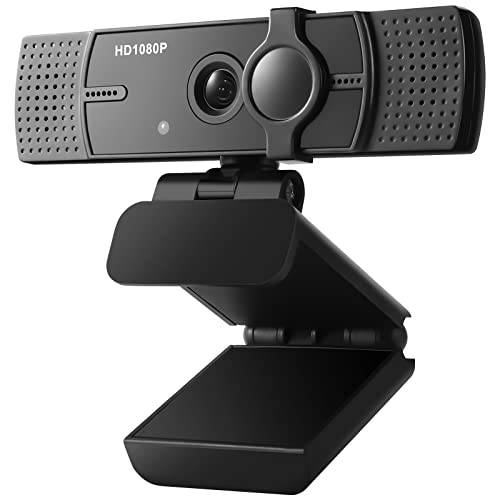
Anker PowerConf C300 Smart Full HD, AI-Powered Framing & Autofocus, 1080p Webcam with Noise-Cancelling Microphones, Adjustable FoV, HDR, 60 FPS, Low-Light Correction, Zoom Certified


Key features
- •Look Like a Pro: Make a great first impression with clients and impress your boss with PowerConf C300's crisp HD webcam 1080p/60FPS camera with true-to-life colors.
- •Clear Voice Pickup: Be heard loud and clear via HD webcam while working from home thanks to the ultra-sensitive dual microphones.
- •Shine Bright in Low Light: When working late or calling clients in different time zones, the HD webcam's AI-powered auto low-light correction kicks in to ensure you stand out, even in poor lighting conditions.
- •Fit Everyone In Frame: Whether you're calling solo from home or huddled with colleagues in the office, our revolutionary AI technology automatically adjusts the field of view depending on the number of people in your meeting.
- •No Time Wasted: Automatically focuses on people or objects within just 0.35 seconds. Use auto-focus AI to show off every detail of your latest samples and prototypes without waiting for the focus to catch up.
BrandAnker
CategoryWebcams
ColorBlack
WarrantyPlease contact the seller directly for warranty information for this product.
Anker PowerConf C300 Smart Full HD, AI-Powered Framing & Autofocus, 1080p Webcam with Noise-Cancelling Microphones, Adjustable FoV, HDR, 60 FPS, Low-Light Correction, Zoom Certified
List Price: $145.49$130.94DEALYou Save: $14.55 (10%)
Free shippingFree Returns – 30 daysFree Order CancellationSecure Payment2–3 Days DeliveryGet It October 26, 2026In Stock (1)No marketing spamNo account requiredFulfilment by FedEx / Amazon / UPS / ShipwirePayPal / Card Buyer Protection
Customer Reviews
Reviews sourced from verified Amazon purchasers4.5
out of 5
Based on 10 reviews
5★
40%
4★
60%
3★
0%
2★
0%
1★
0%
Good enough for average use.
Jeff T. Munn✓ Verified Purchase•September 22, 2023
The picture quality on this camera is OK, but nothing stellar. It definitely looks better than some of the built-in cameras on laptops. That being said, don't expect this to suffice as an HD streaming camera.
Nice upgrade from built-in webcam
Dane Alexander O'Leary✓ Verified Purchase•September 18, 2023
Does the Anker PowerConf C300 produce mind-blowingly crisp and accurate footage? No, it doesn't. But for most people, this thing is going to be head and shoulders above the webcam that's built into your laptop.
WHAT I LIKE
+ Plug-and-play
+ Works with Zoom, Hangouts, and other video conferencing platforms
+ Solid video quality
+ Mics seem to work well (although I'd recommend using a designated mic or headphones)
+ Comes with a stick-on privacy slider
+ Flexible in terms of how it mounts on your setup
+ USB C connectivity
+ AnkerWork app is very easy to use
WHAT I DISLIKE
- Unit feels larger than it needs to be
- Color accuracy isn't the greatest (I had to reduce the saturation significantly)
- Doesn't have 2K/4K resolution
- Somewhat pricey
- Firmware updates require jumping some hurdles
It may seem like I have a lot of dislikes, but I'm mostly just nitpicking. However, firmware updates are cumbersome to say the least. Basically, I'd been using this camera for about 10 months, during which time the AnkerWork app was never updated. Meanwhile, every time I checked to see if the C300 had a firmware update, it told me that the unit already had the latest firmware.
You see, the issue is that the AnkerWork app doesn't update itself over time. This means you have to periodically return to the Anker website to download newer versions of the AnkerWork app that comes bundled with the latest firmware updates for Anker cams. In other words, you have to re-download and reinstall AnkerWork, again and again and again, to even check for firmware updates, much less to actually install one. Or at least this is how it worked for me while using a Mac.
Nitpicks notwithstanding, this camera is definitely an improvement over most built-in webcams I've used, including the one on my 2021 16-inch M1 MacBook Pro. Overall, I'd say I'm satisfied with the performance and will continue to use the Anker PowerConf C300 until something comes along at a comparable price with even better performance.
WHAT I LIKE
+ Plug-and-play
+ Works with Zoom, Hangouts, and other video conferencing platforms
+ Solid video quality
+ Mics seem to work well (although I'd recommend using a designated mic or headphones)
+ Comes with a stick-on privacy slider
+ Flexible in terms of how it mounts on your setup
+ USB C connectivity
+ AnkerWork app is very easy to use
WHAT I DISLIKE
- Unit feels larger than it needs to be
- Color accuracy isn't the greatest (I had to reduce the saturation significantly)
- Doesn't have 2K/4K resolution
- Somewhat pricey
- Firmware updates require jumping some hurdles
It may seem like I have a lot of dislikes, but I'm mostly just nitpicking. However, firmware updates are cumbersome to say the least. Basically, I'd been using this camera for about 10 months, during which time the AnkerWork app was never updated. Meanwhile, every time I checked to see if the C300 had a firmware update, it told me that the unit already had the latest firmware.
You see, the issue is that the AnkerWork app doesn't update itself over time. This means you have to periodically return to the Anker website to download newer versions of the AnkerWork app that comes bundled with the latest firmware updates for Anker cams. In other words, you have to re-download and reinstall AnkerWork, again and again and again, to even check for firmware updates, much less to actually install one. Or at least this is how it worked for me while using a Mac.
Nitpicks notwithstanding, this camera is definitely an improvement over most built-in webcams I've used, including the one on my 2021 16-inch M1 MacBook Pro. Overall, I'd say I'm satisfied with the performance and will continue to use the Anker PowerConf C300 until something comes along at a comparable price with even better performance.
Great camera amazing. Focus.
Joshua Fischman✓ Verified Purchase•September 16, 2023
Once again, anket delivers a great product. The focus is great. The lens is great. the features are you able to control the computer zoom and tell them everything works extremely well the only potentially about this camera is that something once in a while the USB-C cord doesn't recognize correctly. Well, your connection might be bad with the camera but that's pretty much all USB-C cord, that process video
Good quality - works with Linux if you have a Windows or macOS computer to configure
Tony✓ Verified Purchase•September 6, 2023
The camera and microphone work well enough for video conferencing needs. This camera has a wider field of view than the one I was replacing; even at the narrowest setting it is a bit wider than ideal for the way I have it positioned on top of my main monitor. I primarily use the camera with Linux, and it does work well there. However, the application you need to use to change settings on the camera is only available for Windows and macOS, so you will want access to a computer running one of those operating systems if you're a Linux user.
A really nice upgrade, with room to grow
J. Stevenson✓ Verified Purchase•August 16, 2023
**UPDATE after 3 weeks**
Anker has continued to release firmware and software updates. At this point, I'd say the HDR feature definitely has an impact on color quality. It's noticeably better with HDR turned on. But then, why is it even an option? Who's choosing to turn off better color reproduction??
There's still no option to manually zoom and crop the image, which I'm wanting more and more. The "Solo-Frame" feature turned out to be really distracting in most meetings. If you lean forward, turn to the side, or whatever, then the camera zooms and crops to center your face. EVERYONE on a meeting notices this happen, comments on it, wonders about it. It's distracting and unnecessary for most meetings at your desk.
Although I'm still hoping for software improvements, the image quality is still very good and a huge upgrade from what I had before. Still happy with this purchase; just hoping for more.
*** ORIGINAL REVIEW ***
For reference, my comparison cameras are 1) the built-in camera on my MacBook Pro and 2) a $50 external camera (3MP, 1080p) that I picked up when I started working from home.
PHYSICAL FORM
Physically, the Anker C300 feels good and substantial. The USB-C port is recessed pretty far into the body of the camera, so it actually took some finagling to be sure the cable was fully plugged in. The cable is about 5ft long, USB-C to USB-C. The box also includes a USB-C to USB-A adapter if you need it.
VIDEO QUALITY
Without adjusting any settings, the C300 has noticeably better picture quality than both my built-in camera and my external camera. Those cameras really struggled to pick up variations in color and lighting. For example, when I wear a black sweater on my old camera it just looks like a dark blob. With the C300, it's much more like being in person "” you can see the variations of lighting and much more detail.
SOUND QUALITY
I use an external condenser mic already, so I wasn't expecting the C300 to be an improvement. But, surprisingly, it's not really much of a step down either! In fact, it does a much better job of focusing on voices vs. all the other noises that might be in the room. If you work from home and have kids, pets, and other sounds around you, this mic should do a better job of keeping some of that off your Zoom calls.
SOFTWARE
The AnkerWork software runs great on MacOS 10.15. Right now, the options within AnkerWork are somewhat limited. You can adjust the resolution (360p, 720p, 1080p), frames per second (30, 60), brightness, sharpness, saturation, and contrast ratio. The default settings for each were good. I couldn't really improve the image by adjusting them.
The more interesting & unique settings are called Fixed Angle (78°, 90°, and 115°) and Flexible Angle (Auto-Frame, Solo-Frame). Fixed Angle settings acts like a zoom level. At the widest field of view (115°) you'll get a lot of the surrounding room, at the smallest (78°) you'll get less. It's not that dramatic of a difference, but it does help to have some flexibility. Alternatively, you can choose Auto-Frame to have the software automatically zoom and crop the image to include everyone in the picture, or you can choose Solo-Frame to zoom and crop the image to include just the one face closest to the camera. It actually tracks your face and adjusts as you move around! I *wanted* to like Solo-Frame, but it puts your face in the exact center of the picture, whereas I think it looks better to put the face a little above center. What this really made me wish for was a way to just manually zoom and crop the image however I wanted. (It's not like I move around that much in a normal meeting from my desk.) I'm hoping manual zoom & crop can be added to the software in the future.
There was a firmware update to enable HDR and Anti-Flicker. I tried those settings under a variety of lighting conditions (lots of natural light, artificial light, low light) and I never really noticed HDR doing anything! Anti-Flicker is only meant to be used if all your fluorescent or LED lighting is causing a flicker on the image. I had a hard time creating a lighting scenario where I got that flicker. Overall, I don't think HDR and Anti-Flicker do very much.
OVERALL
This camera is a significant upgrade for my home video, with a much more nuanced and lifelike picture than I was able to get from my built-in camera or my cheaper external camera. The software has room to grow, and I'm optimistic Anker will do that with future software updates. I feel really good about the value at the price point I paid, and hopefully the value will go up as the software improves.
Anker has continued to release firmware and software updates. At this point, I'd say the HDR feature definitely has an impact on color quality. It's noticeably better with HDR turned on. But then, why is it even an option? Who's choosing to turn off better color reproduction??
There's still no option to manually zoom and crop the image, which I'm wanting more and more. The "Solo-Frame" feature turned out to be really distracting in most meetings. If you lean forward, turn to the side, or whatever, then the camera zooms and crops to center your face. EVERYONE on a meeting notices this happen, comments on it, wonders about it. It's distracting and unnecessary for most meetings at your desk.
Although I'm still hoping for software improvements, the image quality is still very good and a huge upgrade from what I had before. Still happy with this purchase; just hoping for more.
*** ORIGINAL REVIEW ***
For reference, my comparison cameras are 1) the built-in camera on my MacBook Pro and 2) a $50 external camera (3MP, 1080p) that I picked up when I started working from home.
PHYSICAL FORM
Physically, the Anker C300 feels good and substantial. The USB-C port is recessed pretty far into the body of the camera, so it actually took some finagling to be sure the cable was fully plugged in. The cable is about 5ft long, USB-C to USB-C. The box also includes a USB-C to USB-A adapter if you need it.
VIDEO QUALITY
Without adjusting any settings, the C300 has noticeably better picture quality than both my built-in camera and my external camera. Those cameras really struggled to pick up variations in color and lighting. For example, when I wear a black sweater on my old camera it just looks like a dark blob. With the C300, it's much more like being in person "” you can see the variations of lighting and much more detail.
SOUND QUALITY
I use an external condenser mic already, so I wasn't expecting the C300 to be an improvement. But, surprisingly, it's not really much of a step down either! In fact, it does a much better job of focusing on voices vs. all the other noises that might be in the room. If you work from home and have kids, pets, and other sounds around you, this mic should do a better job of keeping some of that off your Zoom calls.
SOFTWARE
The AnkerWork software runs great on MacOS 10.15. Right now, the options within AnkerWork are somewhat limited. You can adjust the resolution (360p, 720p, 1080p), frames per second (30, 60), brightness, sharpness, saturation, and contrast ratio. The default settings for each were good. I couldn't really improve the image by adjusting them.
The more interesting & unique settings are called Fixed Angle (78°, 90°, and 115°) and Flexible Angle (Auto-Frame, Solo-Frame). Fixed Angle settings acts like a zoom level. At the widest field of view (115°) you'll get a lot of the surrounding room, at the smallest (78°) you'll get less. It's not that dramatic of a difference, but it does help to have some flexibility. Alternatively, you can choose Auto-Frame to have the software automatically zoom and crop the image to include everyone in the picture, or you can choose Solo-Frame to zoom and crop the image to include just the one face closest to the camera. It actually tracks your face and adjusts as you move around! I *wanted* to like Solo-Frame, but it puts your face in the exact center of the picture, whereas I think it looks better to put the face a little above center. What this really made me wish for was a way to just manually zoom and crop the image however I wanted. (It's not like I move around that much in a normal meeting from my desk.) I'm hoping manual zoom & crop can be added to the software in the future.
There was a firmware update to enable HDR and Anti-Flicker. I tried those settings under a variety of lighting conditions (lots of natural light, artificial light, low light) and I never really noticed HDR doing anything! Anti-Flicker is only meant to be used if all your fluorescent or LED lighting is causing a flicker on the image. I had a hard time creating a lighting scenario where I got that flicker. Overall, I don't think HDR and Anti-Flicker do very much.
OVERALL
This camera is a significant upgrade for my home video, with a much more nuanced and lifelike picture than I was able to get from my built-in camera or my cheaper external camera. The software has room to grow, and I'm optimistic Anker will do that with future software updates. I feel really good about the value at the price point I paid, and hopefully the value will go up as the software improves.
Page 1 of 2