ECOVACS Deebot N8 Pro+ Robot Vacuum and Mop Cleaner - up to 60-Day Self Cleaning, Laser Navigation, Obstacle Avoidance, Multi-Floor Mapping, 2600Pa Suction, Alexa Compatible,Black


Key features
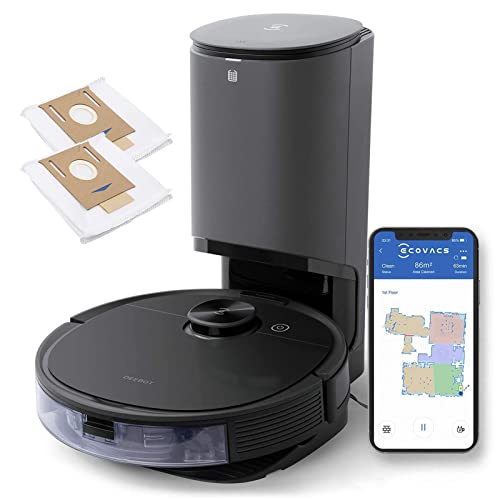
- •30-Day HANDS-FREE CLEANING WITH SELF-EMPTY STATION. ECOVACS DEEBOT N8 Pro+ automatically self-empties its dustbin after cleaning. The station's disposable dust bag holds up to 30 days' dirt and debris.
- •VACUUMING AND OZMO MOPPING IN ONE-GO. Plus, automatically avoids carpets when mopping hard floors and doubles the suction power when vacuuming carpets.
- •CLEAN MORE EFFECTIVELY WITH SUPERIOR 2600Pa SUCTION that draws out dirt and dust from wherever it's hidden in your hard floors and carpets, while optimizing energy and maintaining low noise levels.
- •HASSLE-FREE CLEANING WITH TRUEDETECT, a laser-based 3D technology that lets N8 Pro+ detect and avoid objects such as cables, slippers and pet mess to reduce the risk of getting stuck.
- •CLEAN MORE EFFICENTLY WITH TRUEMAPPING, an advanced laser-based LiDAR navigation with aerospace-standard dToF detection sensors, generate maps with 4X greater precision and 2X greater range than standard laser mapping to ensure the fastest and most efficient cleaning path.
- •BOX CONTENTS: (1) DEEBOT N8 Pro+ Robot, (1) Auto-Empty Station, (2) Auto-Empty Station Bags, (1) Washable Mopping Pad, (10) Disposable Mopping Pads, (2) Side Brushes, (1) High-Efficiency Air Filter, (1) Instruction Manual. 12 months Limited Warranty
ECOVACS Deebot N8 Pro+ Robot Vacuum and Mop Cleaner - up to 60-Day Self Cleaning, Laser Navigation, Obstacle Avoidance, Multi-Floor Mapping, 2600Pa Suction, Alexa Compatible,Black
List Price: $717.75$645.98DEALYou Save: $71.77 (10%)
Free shippingFree Returns – 30 daysFree Order CancellationSecure Payment2–3 Days DeliveryGet It October 26, 2026In Stock (1)No marketing spamNo account requiredFulfilment by FedEx / Amazon / UPS / ShipwirePayPal / Card Buyer Protection
Customer Reviews
Reviews sourced from verified Amazon purchasers4.1
out of 5
Based on 10 reviews
5★
40%
4★
60%
3★
0%
2★
0%
1★
0%
La mejor compra que he hecho
Luz✓ Verified Purchase•August 31, 2023
Para los que tenemos animales, sabemos que lidiar con el tema de los pelos es complejo y está aspiradora llego a solucionarme la vida. La tengo hace más de 3 años y aún funciona Perfecto, los repuestos son fáciles de conseguir (filtros y demás). La verdad me encanta este producto!
Excellent but don't buy just for TrueDetect
SvÄ›xr Pnĺəğ✓ Verified Purchase•August 29, 2023
One month ownership update: Dropped a star because of bad navigation and half baked TrueDetect.
More on Navigation/TrueDetect: It is simply not worth the extra cost over the N8 Plus. It will not work if the object is not directly in front of the sensor. For example, the N8 Pro was trying to navigate in between my couch and the coffee table in a space with a width of about 3 feet. About 8 inches from the couch my cat had thrown up, providing the perfect test for TrueDetect. Unfortunately, it never detected it and if I wasn't monitoring it, it would have rolled right over it making an even bigger mess. I tried other more systematic tests near the couch using cat toys. Whenever the cat toy was directly in the front of the sensor (about 5 inches from the edge of the couch), the N8 plus would avoid it, however, it never worked if it was closer or further away from the couch during the N8 Pro's approach. It had to be in that 5 inch sweet spot for the sensor to trigger and work as expected.
Issues with navigation also persist. It seems to get confused often. For example, I noticed that it got sort of trapped between a potted plant and a cat scratching toy. There was just enough room for the bot to squeeze between the two where is spent 80 minutes spinning in a circle until the battery was low, at which point, oddly, it backed out and went right to the charging dock all by itself. After recharging for five hours, it came out, and finished the run without issue. So, clearly something is wrong with the navigation algorithm. Also, Ecovacs still has not fixed the recharge and resume issue. Since the N8 knows how much it has left to clean, it should only charge enough to complete that run, instead of spending 5 hours to fully charge.
There have also been other times, where it has gotten confused. A couple of times, it kept vacuuming one of my area rugs until the battery was low. Another time, it just randomly got confused right in the middle of my kitchen and alerted me to help it get unstuck. I simply restarted it and it went back to behaving normally.
**************************************************************************************************
Summary: Overall, it's great, it mapped the house in the first run and it has all the features one expects for the price. However, the battery life is abysmal, it had to go back and recharge twice before building the full map for my 2000 square foot home. Also, TrueDetect is half baked and not worth the extra $100 over the N8. I have a long hair cat that sheds her body weight per day and even with a full bin the auto empty works perfectly for me. Unlike others, I did not have issues with clogging. If I had to do it all again, I would have gotten the cheaper N8 Plus, which for $600 is an almost unbeatable value.
Support: This is my second Deebot. My first one was the OZMO 930, which was the Ecovacs flagship three years ago (released 2018). It has been faithfully cleaning daily and only recently began falling apart. First, Ecovacs, suspiciously screwed up the app so that my OZMO always showed up as disconnected. I was able to install an older version of the APK to get around that. Then one of the wheels started to jam, then the brush motor broke (so suction only), then finally it ran into a suspicious wifi problem, where it would only connect after a hard reset for about fifteen minutes (perhaps a firmware issue). I was only able to fix the first problem. I am on this tangent to highlight that Ecovacs does not have the best support. Even if the app was accidentally made buggy, Ecovacs does not appear to have any drive to fix it for an older bot. Next, new parts for the OZMO 930 are nonexistent. Your best bet is to find used ones from auction sites. Companies like iRobot and Neato support their bots for life, with Ecovacs you're on your own after warranty. iRobot will basically sell you every part to rebuild your S9 or i7+. The i7+ is still receiving updates and support even though it was released just a bit after my OZMO 930. I paid $600 for the OZMO when it came out and it is basically a brick now. I really hope they don't continue that same trend with the N8 pro but you should factor bad support into your decision.
AutoEmpty bin: Works great. I haven't had any clogs yet and it seems to get 100% of the dust bin empty. I'm not sure if one bag will last me a month though. After the first two runs, it already looks more than half full. However, I think it is possible to just use a second vacuum to clean out and reuse the bag. I wish it had a reusable system instead of disposable bags.
Navigation: It is quite good, however the TrueDetect sensor is just alright. It did avoid slippers and a small cup that I deliberately left on the floor, but it's not perfect . Sometimes, for no reason, it will do a little backwards shuffle as if it is about to hit something. Other times, the TrueDetect does nothing. I have a chair with a metal ring base and the N8 Pro repeatedly tried to climb over it--it's a little too persistent. It also failed to avoid cords at several occasions but it never got stuck. Overall, Lidar bots haven't really progressed much. Navigation is about the same as my old Deebot OZMO 930. If anything the N8 pro takes a bit longer to do the same run, probably because of TrueDetect. TrueDetect really isn't a game changer and not worth the extra $100. Hopefully, they can fix it with software updates to justify the premium. I mainly got it because sometimes my cat throws up and I thought this would help with that but after seeing it in action, I don't trust it enough, which means I will continue to only run it when I'm home.
Battery life: Horrific battery life. Even left on standard power it is barely able to complete the same 800 square foot run my OZMO could do with over 40% life to spare, even though both are advertised with about 100 minute runtime. As the N8 pro gets older and the battery degrades, I doubt it will be able to even do the 800 square foot run without recharging. Ecovacs still hasn't fixed recharge and resume. If the bot runs out of battery, it will wait to fully recharge, which can take four or five hours. Instead, it needs to know how much cleaning it has left remaining and only charge enough to finish the run.
App: It has all the features you'd expect, scheduling, multiple floor maps, no go zones, custom power/mop level per room, room split/merge, voice assistant, etc. It's an average app with a lot of room for improvement. It is very slow to load and update. I wish there were options to adjust more features, such as TrueDetect sensitivity, route optimization (it will go around the edge of a room first before moving in a grid, which I would like to skip and go straight to a grid to speed up runs), side brush speed and aggressiveness when it gets stuck. They also really need to add widgets that will quickly show percent of run completed, let me start a run for pre-selected rooms, let me know maintenance status and such without launching the app. I also don't think the N8 Pro can be integrated with smart automation like IFTTT or SmartThings. Ideally, I want the N8 pro to start a run when the house is empty rather than having a fixed schedule. But, even in 2021, I cannot do that.
Suction: I have mostly hardwood floors so I never switched it off standard power but it did as expected. The auto boost also appears to work well on picking up most cat hair from carpets. On the same topic, the brush roll is about the same with hair tangles as my old OZMO. In three years, they've made zero progress on that front.
Mopping: Useless. Nothing more to say.
More on Navigation/TrueDetect: It is simply not worth the extra cost over the N8 Plus. It will not work if the object is not directly in front of the sensor. For example, the N8 Pro was trying to navigate in between my couch and the coffee table in a space with a width of about 3 feet. About 8 inches from the couch my cat had thrown up, providing the perfect test for TrueDetect. Unfortunately, it never detected it and if I wasn't monitoring it, it would have rolled right over it making an even bigger mess. I tried other more systematic tests near the couch using cat toys. Whenever the cat toy was directly in the front of the sensor (about 5 inches from the edge of the couch), the N8 plus would avoid it, however, it never worked if it was closer or further away from the couch during the N8 Pro's approach. It had to be in that 5 inch sweet spot for the sensor to trigger and work as expected.
Issues with navigation also persist. It seems to get confused often. For example, I noticed that it got sort of trapped between a potted plant and a cat scratching toy. There was just enough room for the bot to squeeze between the two where is spent 80 minutes spinning in a circle until the battery was low, at which point, oddly, it backed out and went right to the charging dock all by itself. After recharging for five hours, it came out, and finished the run without issue. So, clearly something is wrong with the navigation algorithm. Also, Ecovacs still has not fixed the recharge and resume issue. Since the N8 knows how much it has left to clean, it should only charge enough to complete that run, instead of spending 5 hours to fully charge.
There have also been other times, where it has gotten confused. A couple of times, it kept vacuuming one of my area rugs until the battery was low. Another time, it just randomly got confused right in the middle of my kitchen and alerted me to help it get unstuck. I simply restarted it and it went back to behaving normally.
**************************************************************************************************
Summary: Overall, it's great, it mapped the house in the first run and it has all the features one expects for the price. However, the battery life is abysmal, it had to go back and recharge twice before building the full map for my 2000 square foot home. Also, TrueDetect is half baked and not worth the extra $100 over the N8. I have a long hair cat that sheds her body weight per day and even with a full bin the auto empty works perfectly for me. Unlike others, I did not have issues with clogging. If I had to do it all again, I would have gotten the cheaper N8 Plus, which for $600 is an almost unbeatable value.
Support: This is my second Deebot. My first one was the OZMO 930, which was the Ecovacs flagship three years ago (released 2018). It has been faithfully cleaning daily and only recently began falling apart. First, Ecovacs, suspiciously screwed up the app so that my OZMO always showed up as disconnected. I was able to install an older version of the APK to get around that. Then one of the wheels started to jam, then the brush motor broke (so suction only), then finally it ran into a suspicious wifi problem, where it would only connect after a hard reset for about fifteen minutes (perhaps a firmware issue). I was only able to fix the first problem. I am on this tangent to highlight that Ecovacs does not have the best support. Even if the app was accidentally made buggy, Ecovacs does not appear to have any drive to fix it for an older bot. Next, new parts for the OZMO 930 are nonexistent. Your best bet is to find used ones from auction sites. Companies like iRobot and Neato support their bots for life, with Ecovacs you're on your own after warranty. iRobot will basically sell you every part to rebuild your S9 or i7+. The i7+ is still receiving updates and support even though it was released just a bit after my OZMO 930. I paid $600 for the OZMO when it came out and it is basically a brick now. I really hope they don't continue that same trend with the N8 pro but you should factor bad support into your decision.
AutoEmpty bin: Works great. I haven't had any clogs yet and it seems to get 100% of the dust bin empty. I'm not sure if one bag will last me a month though. After the first two runs, it already looks more than half full. However, I think it is possible to just use a second vacuum to clean out and reuse the bag. I wish it had a reusable system instead of disposable bags.
Navigation: It is quite good, however the TrueDetect sensor is just alright. It did avoid slippers and a small cup that I deliberately left on the floor, but it's not perfect . Sometimes, for no reason, it will do a little backwards shuffle as if it is about to hit something. Other times, the TrueDetect does nothing. I have a chair with a metal ring base and the N8 Pro repeatedly tried to climb over it--it's a little too persistent. It also failed to avoid cords at several occasions but it never got stuck. Overall, Lidar bots haven't really progressed much. Navigation is about the same as my old Deebot OZMO 930. If anything the N8 pro takes a bit longer to do the same run, probably because of TrueDetect. TrueDetect really isn't a game changer and not worth the extra $100. Hopefully, they can fix it with software updates to justify the premium. I mainly got it because sometimes my cat throws up and I thought this would help with that but after seeing it in action, I don't trust it enough, which means I will continue to only run it when I'm home.
Battery life: Horrific battery life. Even left on standard power it is barely able to complete the same 800 square foot run my OZMO could do with over 40% life to spare, even though both are advertised with about 100 minute runtime. As the N8 pro gets older and the battery degrades, I doubt it will be able to even do the 800 square foot run without recharging. Ecovacs still hasn't fixed recharge and resume. If the bot runs out of battery, it will wait to fully recharge, which can take four or five hours. Instead, it needs to know how much cleaning it has left remaining and only charge enough to finish the run.
App: It has all the features you'd expect, scheduling, multiple floor maps, no go zones, custom power/mop level per room, room split/merge, voice assistant, etc. It's an average app with a lot of room for improvement. It is very slow to load and update. I wish there were options to adjust more features, such as TrueDetect sensitivity, route optimization (it will go around the edge of a room first before moving in a grid, which I would like to skip and go straight to a grid to speed up runs), side brush speed and aggressiveness when it gets stuck. They also really need to add widgets that will quickly show percent of run completed, let me start a run for pre-selected rooms, let me know maintenance status and such without launching the app. I also don't think the N8 Pro can be integrated with smart automation like IFTTT or SmartThings. Ideally, I want the N8 pro to start a run when the house is empty rather than having a fixed schedule. But, even in 2021, I cannot do that.
Suction: I have mostly hardwood floors so I never switched it off standard power but it did as expected. The auto boost also appears to work well on picking up most cat hair from carpets. On the same topic, the brush roll is about the same with hair tangles as my old OZMO. In three years, they've made zero progress on that front.
Mopping: Useless. Nothing more to say.
Perfect
PT✓ Verified Purchase•August 28, 2023
Had a long time. Just set & forget. I don't even set programming, just go random & it cleans even my very large rooms completely. Will vacuum on bare floors, the pusher rugs ( slowly), under beds. I just make sure small obstacles (like shoe laces) are out of way. Easy to empty every time-important. Put near charger & it heads back to it's "home". Great investment
Life. Changing.
Nancy✓ Verified Purchase•July 31, 2023
I bought this for my daughter. She said:
This robot vacuum is a life-changer! I looked into iRobot and other robot vacuum cleaners a few years ago, but I was put off by the seemingly complicated, clunky, and time-consuming mapping and magnet boundaries. So, I didn't get one. Then. But, I still hated pushing a big, clunky, noisy vacuum around. Added to that, I got pet budgies. They are fun, but, oh my gosh, their food and feathers get everywhere! By the cage, in their play area, outside their domain in the living room, kitchen, bathroom, my bed- Everywhere! To make it worse, they despise the broom. To them, brooms are evil, vile, dangerous things. They riot at the mere sight of one!
After a year of working and finishing a master's program, I was tired and weary and had let my home go. I wanted help getting back on track. So, I decided to look into robot vacuums one more time. Then, I asked for one.
They've come so far! This little guy (Botie) is now indispensable to my housekeeping routine. Setting him up and mapping with the app was a breeze: Just set all the things that move around often (ottomans, trash cans) up off the floor for the first 3 times so he can get a better lay of the land. He empties himself (with a little help on occasion with all those feathers!) and navigates the changing landscape with ease: Ottoman in a new spot? No problem! He figures his way around it. Sock on the floor? He'll scoot on by it. I picked this particular model because of the lower price and because it can go over .75" transitions. I have a transition that's close to that, but Botie handles it with ease! Does he clean hardwood and carpet? You bet he does!
The first night I let him sweep the bird room with some trepidation: Would the birds, all snug on their perches for the night, wake and deem Botie a fearsome monster? Not at all! They slept right through his cleaning and have every night since. He is very quiet. The only time sounds like a regular vacuum is when he empties his dustbin when he's done cleaning.
Botie does get a little hung up on some things. He gets caught on shag rugs, needs practice with area rugs to perfect his technique so they don't slide all over, and has yet to master a cushioned mat by the sink. When he needs help, Botie nicely has the app send a message asking me for assistance. It's adorable! To me, these quirks are small matters. I simply pick up the shag bathroom rug and cushioned mat before releasing Botie to eat all the dirt, crumbs, and feathers he wants.
Thank you, Botie!
This robot vacuum is a life-changer! I looked into iRobot and other robot vacuum cleaners a few years ago, but I was put off by the seemingly complicated, clunky, and time-consuming mapping and magnet boundaries. So, I didn't get one. Then. But, I still hated pushing a big, clunky, noisy vacuum around. Added to that, I got pet budgies. They are fun, but, oh my gosh, their food and feathers get everywhere! By the cage, in their play area, outside their domain in the living room, kitchen, bathroom, my bed- Everywhere! To make it worse, they despise the broom. To them, brooms are evil, vile, dangerous things. They riot at the mere sight of one!
After a year of working and finishing a master's program, I was tired and weary and had let my home go. I wanted help getting back on track. So, I decided to look into robot vacuums one more time. Then, I asked for one.
They've come so far! This little guy (Botie) is now indispensable to my housekeeping routine. Setting him up and mapping with the app was a breeze: Just set all the things that move around often (ottomans, trash cans) up off the floor for the first 3 times so he can get a better lay of the land. He empties himself (with a little help on occasion with all those feathers!) and navigates the changing landscape with ease: Ottoman in a new spot? No problem! He figures his way around it. Sock on the floor? He'll scoot on by it. I picked this particular model because of the lower price and because it can go over .75" transitions. I have a transition that's close to that, but Botie handles it with ease! Does he clean hardwood and carpet? You bet he does!
The first night I let him sweep the bird room with some trepidation: Would the birds, all snug on their perches for the night, wake and deem Botie a fearsome monster? Not at all! They slept right through his cleaning and have every night since. He is very quiet. The only time sounds like a regular vacuum is when he empties his dustbin when he's done cleaning.
Botie does get a little hung up on some things. He gets caught on shag rugs, needs practice with area rugs to perfect his technique so they don't slide all over, and has yet to master a cushioned mat by the sink. When he needs help, Botie nicely has the app send a message asking me for assistance. It's adorable! To me, these quirks are small matters. I simply pick up the shag bathroom rug and cushioned mat before releasing Botie to eat all the dirt, crumbs, and feathers he wants.
Thank you, Botie!
Better than most reviewers have indicated, a great value considering the total package.
A. Pena✓ Verified Purchase•July 23, 2023
I have owned a few robot vacuums, most of them from Ecovacs and have been mostly happy with those purchases. Before this unit, my main floor Deebot was the 900, which has been retired to upstairs area. The main thing that drew me to the 900 was one of the first lidar based robots which did a pretty good job over the last few years avoiding obstacles, but it was never perfect even after years of updates. I was very reluctant to trust that the new models have come much further, but I can say I was happily wrong.
Initial unboxing and setup was straight forward, especially if you have ever used any robot vacuums. It was interesting to see the auto empty unit was already loaded with a vacuum bag, but others have noted the same thing. It is very possible they quality test the unit in the factory and load the first bag for this test. Not an issue. I placed the auto empty station next to the older 900 unit and its dock, and docked the N8 Pro+ robot after attaching the 2 side sweeping brushes and removing the protection sleeves with the pull tabs. Powered on the toggle switch and the unit indicated it was charging. I used the QR code found under the top cover to download the app (different from the old Ecovacs Deebot app, the Ecovacs Deebot 2017 app, and now called Ecovacs Home). The newer UI on the most recent app is more intuitive and better tools for map managing than the older 2 apps were. This was a welcome finding that they have updated this.
The app setup is a bit annoying it that it wants to map the house before any other options are available, so just note setting up no go "walls", rooms, new names, etc are not shown on the UI until the completion of the first cleaning run. Also to note, make sure you have the auto empty station dock flat against a wall that is somehow perpendicular to your house design. This was a major headache if you don't do this. What I mean is if your house is mostly a rectangle or square layout, make sure the wall you start with is 90 degrees to your home layout and not against a wall that is diagonal or circular to your house layout, otherwise, your home map will be weirdly placed on the map it generates forever and all time. You cannot (under the latest version as of 5-28-21) rotate the map once it is generated and the robot/app situates the map of the home based off the angles it detects on first undocking. So if the wall behind the dock isnt flat and perpendicular to the other walls, it may layout your map diagonally. This may not seem like any particular issue until you go to edit your map, generate zones, place no go walls, etc, because the map only uses rectangles to set zones and no mop areas and if you map is off on a diagonal direction, you will have no way to easily set these areas other than virtual no go "walls" which can be diagonal. This seems like a very big oversight and something that could easily be fixed, but there is no current provision for this and will force you to reset the entire map and start all over again. Not the end of the world, but quite an annoyance if you are not aware of what is going on. Hopefully this saves someone that pain.
Now for my first cleaning. That main reason I wanted to get this unit is the improved obstacle detection. I hate having to prepare the house for a run so that it doesnt get stuck anywhere only to come find it got stuck and a large reason my last vac didnt just run on a constant schedule. In a large home (4000 sqft) with 2 kids and a dog, it was really awful to assume it would run nonstop without issue. The old unit had horrible times with anything dangling from any possible reach. It was also bad about getting hung up on low pass areas under coffee tables, end tables, etc. This unit happily is not having those issues. The front sensors seem a lot more capable of sensing things it cant fit under perfectly and the map allowed to easily prevent any future (investigations) of those areas where it would only find it couldnt fit. Be very aware, it is known that the first mapping pass takes MUCH longer for the unit to finish and will almost always not happen in the first go and require a recharge and resume. This is as designed as the unit takes extra time to map the area more closely. Once a map exists, the unit will traverse a lot more efficiently and take less time to investigate areas.
I did notice this unit struggled slightly more than the 900 with tall rugs, at least at first, but then somehow it seemed to "learn" something and employ a turn around backup maneuver to get up on the rug in reverse since it has more clearance, turn around, and proceed to clean the rest of the rug (a tall pile rug on hard wood floor). I thought at first this would be a fluke, and it just happened to get up on the carpet this way, but multiple cleanings and it still does this to get over the lip of the tall pile rug. I really like the new mapping feature that detects carpet versus hardwood/tile and puts this on the map, even door mats that are carpet. This causes the vacuum to increase suction while over these areas which is a very welcomed feature. My family has already noted, this one if much quieter than the 900 and any other vacuum we have ever used while running. Slight increase over carpet, but being that it is now over carpet, not that audible since it is dampened by the carpet itself.
Battery life, many indicate how this has less battery capacity then the last unit, and this is true, but I feel this is a cost cutting measure and not something that is a real issue with the unit. In my opinion, this unit is used differently from before as you can let it run more constant scheduling since it is more capable and can auto empty. When you free your mind to this concept and use it that way, battery life is much less an issue. On the initial run, it needed another charge to finish the entire 1st floor, but subsequent runs can finish on 1 run as it takes 84 minutes to complete the whole floor with some room to spare. If you schedule rooms alternating, etc, you should never run into an issue. The do not disturb times allow you to set this and sort of forget it. Just check the vac bag in the unit from time to time for fullness.
One thing I want to mention from the old unit, the old unit was HORRIBLE at returning to the dock to charge, the N8 Pro+ is a lot better at finding the way back to the dock. The old unit would sometimes go in the opposite direction to get home first and sometimes run out of power while trying to find its way back. This unit generally drives right to it. Much better.
Initial unboxing and setup was straight forward, especially if you have ever used any robot vacuums. It was interesting to see the auto empty unit was already loaded with a vacuum bag, but others have noted the same thing. It is very possible they quality test the unit in the factory and load the first bag for this test. Not an issue. I placed the auto empty station next to the older 900 unit and its dock, and docked the N8 Pro+ robot after attaching the 2 side sweeping brushes and removing the protection sleeves with the pull tabs. Powered on the toggle switch and the unit indicated it was charging. I used the QR code found under the top cover to download the app (different from the old Ecovacs Deebot app, the Ecovacs Deebot 2017 app, and now called Ecovacs Home). The newer UI on the most recent app is more intuitive and better tools for map managing than the older 2 apps were. This was a welcome finding that they have updated this.
The app setup is a bit annoying it that it wants to map the house before any other options are available, so just note setting up no go "walls", rooms, new names, etc are not shown on the UI until the completion of the first cleaning run. Also to note, make sure you have the auto empty station dock flat against a wall that is somehow perpendicular to your house design. This was a major headache if you don't do this. What I mean is if your house is mostly a rectangle or square layout, make sure the wall you start with is 90 degrees to your home layout and not against a wall that is diagonal or circular to your house layout, otherwise, your home map will be weirdly placed on the map it generates forever and all time. You cannot (under the latest version as of 5-28-21) rotate the map once it is generated and the robot/app situates the map of the home based off the angles it detects on first undocking. So if the wall behind the dock isnt flat and perpendicular to the other walls, it may layout your map diagonally. This may not seem like any particular issue until you go to edit your map, generate zones, place no go walls, etc, because the map only uses rectangles to set zones and no mop areas and if you map is off on a diagonal direction, you will have no way to easily set these areas other than virtual no go "walls" which can be diagonal. This seems like a very big oversight and something that could easily be fixed, but there is no current provision for this and will force you to reset the entire map and start all over again. Not the end of the world, but quite an annoyance if you are not aware of what is going on. Hopefully this saves someone that pain.
Now for my first cleaning. That main reason I wanted to get this unit is the improved obstacle detection. I hate having to prepare the house for a run so that it doesnt get stuck anywhere only to come find it got stuck and a large reason my last vac didnt just run on a constant schedule. In a large home (4000 sqft) with 2 kids and a dog, it was really awful to assume it would run nonstop without issue. The old unit had horrible times with anything dangling from any possible reach. It was also bad about getting hung up on low pass areas under coffee tables, end tables, etc. This unit happily is not having those issues. The front sensors seem a lot more capable of sensing things it cant fit under perfectly and the map allowed to easily prevent any future (investigations) of those areas where it would only find it couldnt fit. Be very aware, it is known that the first mapping pass takes MUCH longer for the unit to finish and will almost always not happen in the first go and require a recharge and resume. This is as designed as the unit takes extra time to map the area more closely. Once a map exists, the unit will traverse a lot more efficiently and take less time to investigate areas.
I did notice this unit struggled slightly more than the 900 with tall rugs, at least at first, but then somehow it seemed to "learn" something and employ a turn around backup maneuver to get up on the rug in reverse since it has more clearance, turn around, and proceed to clean the rest of the rug (a tall pile rug on hard wood floor). I thought at first this would be a fluke, and it just happened to get up on the carpet this way, but multiple cleanings and it still does this to get over the lip of the tall pile rug. I really like the new mapping feature that detects carpet versus hardwood/tile and puts this on the map, even door mats that are carpet. This causes the vacuum to increase suction while over these areas which is a very welcomed feature. My family has already noted, this one if much quieter than the 900 and any other vacuum we have ever used while running. Slight increase over carpet, but being that it is now over carpet, not that audible since it is dampened by the carpet itself.
Battery life, many indicate how this has less battery capacity then the last unit, and this is true, but I feel this is a cost cutting measure and not something that is a real issue with the unit. In my opinion, this unit is used differently from before as you can let it run more constant scheduling since it is more capable and can auto empty. When you free your mind to this concept and use it that way, battery life is much less an issue. On the initial run, it needed another charge to finish the entire 1st floor, but subsequent runs can finish on 1 run as it takes 84 minutes to complete the whole floor with some room to spare. If you schedule rooms alternating, etc, you should never run into an issue. The do not disturb times allow you to set this and sort of forget it. Just check the vac bag in the unit from time to time for fullness.
One thing I want to mention from the old unit, the old unit was HORRIBLE at returning to the dock to charge, the N8 Pro+ is a lot better at finding the way back to the dock. The old unit would sometimes go in the opposite direction to get home first and sometimes run out of power while trying to find its way back. This unit generally drives right to it. Much better.
Page 1 of 2


