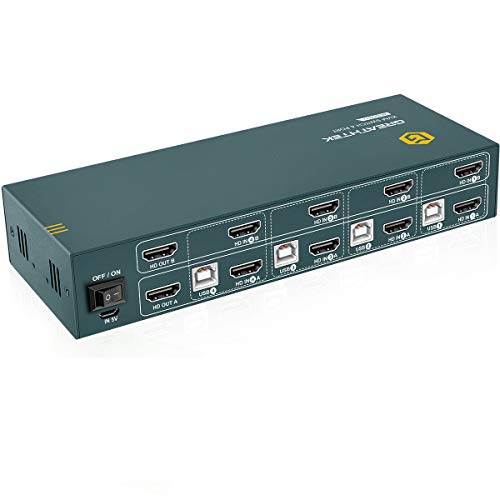
GREATHTEK KVM Switch HDMI Dual Monitor Extended Display 4 Port, Hotkey Switch, UHD 4K@60Hz Resolution YUV4:4:4 Downward Compatible, 4 in 2 Out, with All Needed Cables


Key features
- •【UHD 4K@60Hz Resolution】This small & exquisite kit supporting high resolution max up to 4Kx2K@60Hz, and also supports 3D and 1080P@60Hz or other lower resolution (Downward Compatible). Support most wireless keyboard and mouse (or mechanical keyboard) on market, plug and play, no extra power adapter required. Note: Only when both your source and monitor support 4K@60Hz then you can get 4K@60Hz effect, so if you want the max resolution you have to check your devices first.
- •【One Set Of Keyboard & Mouse Control 4 PCs Share Dual Monitor】This Dual Monitor HDMI KVM helps you control 4 PCs share 2 monitors (Extend display mode or copy display mode) by only one set of USB keyboard & mouse, under the condition of your computers or laptops support multi-display or dual display. If your computer has only one HDMI output, you can use a converter or conversion cable, such as VGA to HDMI converter or conversion cable, DVI to HDMI converter or conversion cable, etc.
- •【Support 2 Modes Switching】1. Buttons switching: Use the buttons on the KVM panel to select the signal source you want to switch to. 2.Hotkey Switching:Hotkey command: Scroll Lock+Scroll Lock+1/2/3/4 or Ctrl+Ctrl+1/2/3/4). Tips: In the process of product switching, the signal source needs to re-identify the display information, re-output the image signal, and the window interface position will be restored to the default position, Please switch manually.
- •【Important notes】Only when your computer supports dual display or multi display, you can use this product to achieve 4 computers to share dual monitor, extended mode or copy mode. If your computer only supports single display, then this product cannot help you get dual display function. Our products include 8 HDMI cables, 4 USB-B cables, and 1 mini USB charging cable. When using the product, please make sure that all cables are connected tightly, and make sure that all cables are good.
- •【Excellent after-sales service】It is our responsibility to ensure that every user has a great product experience and shopping experience. Therefore, if you encounter any problems during the use of this product, please do not hesitate to contact us , We will respond to your questions or problems as quickly as possible after receiving your email.
GREATHTEK KVM Switch HDMI Dual Monitor Extended Display 4 Port, Hotkey Switch, UHD 4K@60Hz Resolution YUV4:4:4 Downward Compatible, 4 in 2 Out, with All Needed Cables
List Price: $276.29$248.66DEALYou Save: $27.63 (10%)
Free shippingFree Returns – 30 daysFree Order CancellationSecure Payment2–3 Days DeliveryGet It October 26, 2026In Stock (1)No marketing spamNo account requiredFulfilment by FedEx / Amazon / UPS / ShipwirePayPal / Card Buyer Protection
Customer Reviews
Reviews sourced from verified Amazon purchasers4.1
out of 5
Based on 10 reviews
5★
60%
4★
40%
3★
0%
2★
0%
1★
0%
Great Overall
Gabriel✓ Verified Purchase•November 14, 2023
Bought it to clear the clutter of my desktop, having to work with two laptops (Windows and Mac) plus my home PC (Linux) and even a Raspberry PI that means a lot of space wasted, basically it was multiple screens and the anoyance of swapping mouse/keyboard dongles frecuently, I was tired.
After a few tweaks managed to put it to work, here it is my experience after almost a month of use:
Linux: Worked almost flawless out of the box, just one issue pending, after switching to linux, the desktop is behaving like its a new environment, my windows are still there, but things like the background wallpaper on the second screen randomly dissapear, when I open the desktop properties it opens multiple windows like there are more than two screens, this seems OS related but is the only thing pending to make it a perfect experience, i'm still googling to solve this.
Windows: Almost flawless out the box too, the mouse/keyboard weren't working after switching, I needed to unplug/plug the dongle to make it work again, after a few google searches found out that this could be solved unchecking the option "Allow the computer to turn off this device" on the device manager for the USB Bus, after that the experience has been perfect.
Mac: Here is were the experience hasn't been so good, I 3d printed a laptop stand to keep the two laptops with the lids closed to save space, the Mac won't wake up if the lid is closed... so, I thought that after all the space saved with this I can live with the Mac on one side, no problem, but... when switching to the Mac the behavior is always erratic, sometimes just one monitor is activated, sometime the two are activated but the order of the screen previously setted is lost, even had a pair of crashes that rebooted the Mac... again, this can be OS related, but its has been a real pain to put the Mac to work correctly.
This was my first experience with a KVM Switch, I can call it a hit, the device does what is supposed to do, this is my summary:
Pros:
- Up to 4 PC's with dual monitors @ 60 Hz.
- Linux and Windows experience almost flawless.
- All the HDMI/USB cables included.
- Includes a USB cable for power but the device works perfectly without it.
- Build quality feels very sturdy.
- It may seems expensive, but other options with 4 pc's and dual monitor are way more pricier.
Cons:
- My Mac experience has been very painfull, there is another review indicating that worked perfect with Mac, maybe there is some tweaks to do on my side, so if I make it work I will update this review.
- No USB port for sharing other devices like external drives or webcam, this would make the device perfect.
- I needed to buy a lot of adapters, this is not by any means a fault of the manufacturer or the product but i needed to buy 2 USB-C to HDMI adpater for the Mac, One for the PC, one DP to HDMI and one VGA to HDMI for my other laptop, so keep in mind depending the configuration of your devices this could be an extra cost.
After a few tweaks managed to put it to work, here it is my experience after almost a month of use:
Linux: Worked almost flawless out of the box, just one issue pending, after switching to linux, the desktop is behaving like its a new environment, my windows are still there, but things like the background wallpaper on the second screen randomly dissapear, when I open the desktop properties it opens multiple windows like there are more than two screens, this seems OS related but is the only thing pending to make it a perfect experience, i'm still googling to solve this.
Windows: Almost flawless out the box too, the mouse/keyboard weren't working after switching, I needed to unplug/plug the dongle to make it work again, after a few google searches found out that this could be solved unchecking the option "Allow the computer to turn off this device" on the device manager for the USB Bus, after that the experience has been perfect.
Mac: Here is were the experience hasn't been so good, I 3d printed a laptop stand to keep the two laptops with the lids closed to save space, the Mac won't wake up if the lid is closed... so, I thought that after all the space saved with this I can live with the Mac on one side, no problem, but... when switching to the Mac the behavior is always erratic, sometimes just one monitor is activated, sometime the two are activated but the order of the screen previously setted is lost, even had a pair of crashes that rebooted the Mac... again, this can be OS related, but its has been a real pain to put the Mac to work correctly.
This was my first experience with a KVM Switch, I can call it a hit, the device does what is supposed to do, this is my summary:
Pros:
- Up to 4 PC's with dual monitors @ 60 Hz.
- Linux and Windows experience almost flawless.
- All the HDMI/USB cables included.
- Includes a USB cable for power but the device works perfectly without it.
- Build quality feels very sturdy.
- It may seems expensive, but other options with 4 pc's and dual monitor are way more pricier.
Cons:
- My Mac experience has been very painfull, there is another review indicating that worked perfect with Mac, maybe there is some tweaks to do on my side, so if I make it work I will update this review.
- No USB port for sharing other devices like external drives or webcam, this would make the device perfect.
- I needed to buy a lot of adapters, this is not by any means a fault of the manufacturer or the product but i needed to buy 2 USB-C to HDMI adpater for the Mac, One for the PC, one DP to HDMI and one VGA to HDMI for my other laptop, so keep in mind depending the configuration of your devices this could be an extra cost.
UPDATE: Monitors, and usb devices constantly disconnect and reconnect
Jason Robinson✓ Verified Purchase•November 5, 2023
UPDATE: The seller worked with me to resolve the issue, which they did. They were nice to talk with and definitely cared about my experience and satisfaction. Great seller!
Original Review:
Owned for less than 5 months, and even if I don't switch between computers, the monitors will randomly turn off and back on, and sometimes the keyboard and mouse will randomly turn off and on. Disconnecting all cables and rebooting the KVM doesn't resolve the issue. I REALLY wanted to love this KVM. But it's unreliable, I hate to say.
Original Review:
Owned for less than 5 months, and even if I don't switch between computers, the monitors will randomly turn off and back on, and sometimes the keyboard and mouse will randomly turn off and on. Disconnecting all cables and rebooting the KVM doesn't resolve the issue. I REALLY wanted to love this KVM. But it's unreliable, I hate to say.
Awesome KVM, works with everything.
Jason P Ochs✓ Verified Purchase•November 4, 2023
I have:
Windows Gaming PC: 1 HDMI, 1 Displayport, 1 DVI.
Laptop w/Docking station: 2x Displayport
Windows mini PC: 2x Displayport
Mac mini: 1 HDMI.
Out of all the KVMs, I wanted a dual monitor setup for all my machines. This proved challenging due to all the machine types I have. As I read into it I decided to get an HDMI KVM as it seems everything converts to HDMI easier. I did have to buy some Displayport to HDMI cables; https://www.amazon.com/dp/B07Y1XM998?ref=ppx_yo2ov_dt_b_product_details&th=1.
Gaming PC has 1x HDMI cable direct to KVM. It also has DisplayPort cable to convert to HDMI.
Laptop has 2x DisplayPort to HDMI cables.
Windows Mini has 2x Displayport to HDMI cables.
Mac Mini only has 1x HDMI. No second monitor port.
They all worked right out of the box with this KVM switch. I was very happy I didn't run into display incompatibilities.
Primary monitor is a newer 27" with HDMI
Secondary monitor is an older 24" with DVI. I had a HDMI to DVI adapter to get that to work.
I seen some reviews where it looks like people ran into problems because they didn't have the right cables. Be prepared and get the right stuff before leaving a negative review.
Windows Gaming PC: 1 HDMI, 1 Displayport, 1 DVI.
Laptop w/Docking station: 2x Displayport
Windows mini PC: 2x Displayport
Mac mini: 1 HDMI.
Out of all the KVMs, I wanted a dual monitor setup for all my machines. This proved challenging due to all the machine types I have. As I read into it I decided to get an HDMI KVM as it seems everything converts to HDMI easier. I did have to buy some Displayport to HDMI cables; https://www.amazon.com/dp/B07Y1XM998?ref=ppx_yo2ov_dt_b_product_details&th=1.
Gaming PC has 1x HDMI cable direct to KVM. It also has DisplayPort cable to convert to HDMI.
Laptop has 2x DisplayPort to HDMI cables.
Windows Mini has 2x Displayport to HDMI cables.
Mac Mini only has 1x HDMI. No second monitor port.
They all worked right out of the box with this KVM switch. I was very happy I didn't run into display incompatibilities.
Primary monitor is a newer 27" with HDMI
Secondary monitor is an older 24" with DVI. I had a HDMI to DVI adapter to get that to work.
I seen some reviews where it looks like people ran into problems because they didn't have the right cables. Be prepared and get the right stuff before leaving a negative review.
Works fine and "holds" the monitor while PC not selected.
DLR✓ Verified Purchase•October 31, 2023
I bought a TESmart and it would not work at all. This is better because it does 2 monitors and TESmart only did 1 monitor for up to 4 PC's. This will hold or I call it "spoof" that a monitor is still connected while switching to another PC. Someone asked if it did and if you watch the video you should know that it does hold the monitor input because he does a demo with a different application on each screen and when he comes back to that PC both monitors still have the same unique display; It's been my experience that if the KVM switch does not hold the the monitor then all active applications get moved to the main monitor.
I only have 3 PC's and not 4. I have no 4 k monitors, so I assume it works for 4k but I'm not able to test that.
And 2 of my 3 PC's have an extra monitor (one PC has the 3rd monitor as the home camera system) that is not switched so they are doing 3 monitors and the other 2 switch with this and it works fine.
I do have a problem where keys won't be detected sometimes but I don't know if it's the KVM or the wireless keyboard. This only happens in the morning after the PC's have been asleep. I think it's the keyboard because if I pull the batteries out of the keyboard and put the back in the problem goes away. And I had a 2 monitor KVM switch before this one and I had the same problem on the 2 monitor KVM and the common component is the keyboard which as an Amazon Basics wireless keyboard.
I only have 3 PC's and not 4. I have no 4 k monitors, so I assume it works for 4k but I'm not able to test that.
And 2 of my 3 PC's have an extra monitor (one PC has the 3rd monitor as the home camera system) that is not switched so they are doing 3 monitors and the other 2 switch with this and it works fine.
I do have a problem where keys won't be detected sometimes but I don't know if it's the KVM or the wireless keyboard. This only happens in the morning after the PC's have been asleep. I think it's the keyboard because if I pull the batteries out of the keyboard and put the back in the problem goes away. And I had a 2 monitor KVM switch before this one and I had the same problem on the 2 monitor KVM and the common component is the keyboard which as an Amazon Basics wireless keyboard.
A dual monitor KVM at reasonable price
Deal✓ Verified Purchase•September 30, 2023
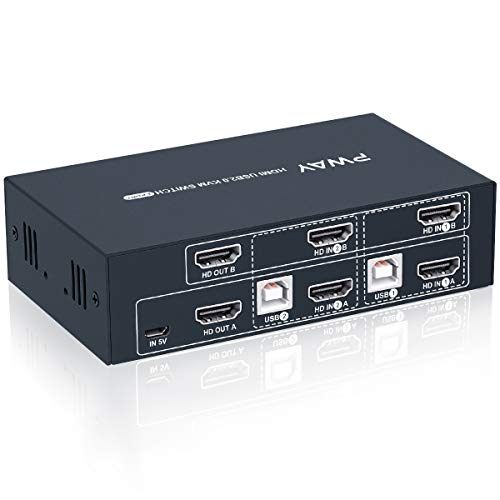
This review is for the dual monitor, 4 port HDMI KVM. It connects to two monitors, and has 4 sets of input sources. Powered by USB C wire, which can be attached to a computer, or a transformer\adapter.
At one point, it seemed that finding a KVM for all my disparate systems was gonna be impossible. And this unit was half the price of other similar KVMs. Even a quarter the price of some really expensive equivalents. So I had my doubts, but bought it anyway. But I just set this sucker up, and so far it works flawlessly.
If I notice any issues, I will update this review.
Here is what is attached to my PWay KVM:
FRONT
- wireless keyboard receiver - Logitech K360
- wireless mouse receiver - MS 1850
- NexiGo N930AF Webcam
BACK
- USB C cable as power source
- Dell D6000 docking station connects HDMI to KVM HDMI, DP to KVM HDMI, USB to KVM USB B
- - Dell laptop to docking station
- Dell D6000 docking station connects HDMI to KVM HDMI, DP to KVM HDMI, USB to KVM USB B
- - MacBook Air (2012) to docking station (MacBook runs Amphetamine app)
- Dell Inspiron GPU connects HDMI to KVM HDMI, DVI-D to KVM HDMI, USB to KVM USB B
- Dell Optiplex connects HDMI to KVM HDMI, HDMI to KVM HDMI, USB to KVM USB B
- KVM HDMI Out1 to Dell U2412 VGA in
- KVM HDMI Out2 to Dell S2721HS HDMI in
At one point, it seemed that finding a KVM for all my disparate systems was gonna be impossible. And this unit was half the price of other similar KVMs. Even a quarter the price of some really expensive equivalents. So I had my doubts, but bought it anyway. But I just set this sucker up, and so far it works flawlessly.
If I notice any issues, I will update this review.
Here is what is attached to my PWay KVM:
FRONT
- wireless keyboard receiver - Logitech K360
- wireless mouse receiver - MS 1850
- NexiGo N930AF Webcam
BACK
- USB C cable as power source
- Dell D6000 docking station connects HDMI to KVM HDMI, DP to KVM HDMI, USB to KVM USB B
- - Dell laptop to docking station
- Dell D6000 docking station connects HDMI to KVM HDMI, DP to KVM HDMI, USB to KVM USB B
- - MacBook Air (2012) to docking station (MacBook runs Amphetamine app)
- Dell Inspiron GPU connects HDMI to KVM HDMI, DVI-D to KVM HDMI, USB to KVM USB B
- Dell Optiplex connects HDMI to KVM HDMI, HDMI to KVM HDMI, USB to KVM USB B
- KVM HDMI Out1 to Dell U2412 VGA in
- KVM HDMI Out2 to Dell S2721HS HDMI in
Page 1 of 2