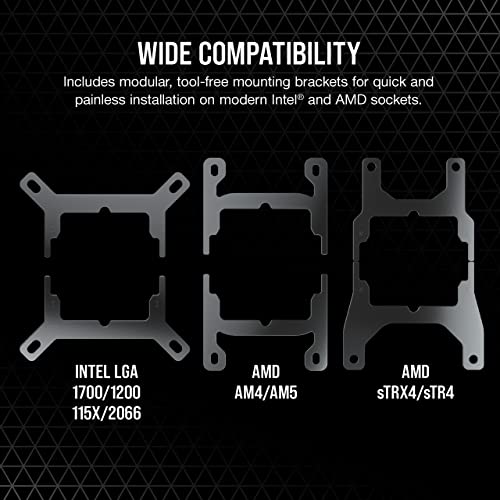
Corsair iCUE H150i RGB Elite Liquid CPU Cooler (16 Dynamic RGB LEDs, 120mm AF Elite Series FDB Fans, 360mm Radiator, iCUE Software Compatible, LGA 1700, 1200, 115X, 2066, and AM4 Sockets) Black





Key features
- •Advanced All-in-One CPU Cooling: Offers everything needed to keep your latest Intel or AMD CPU running at peak performance, while curbing the heat of even high-end processors.
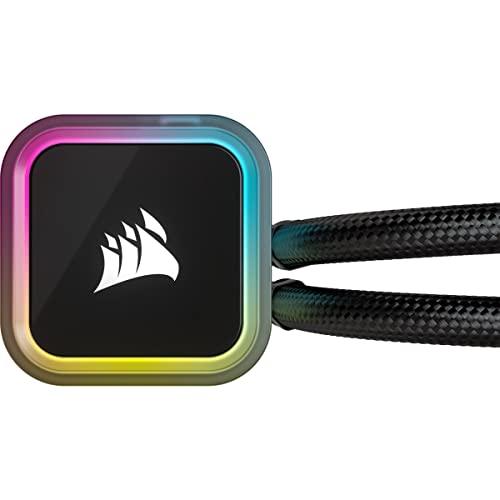
- •Refined Pump Head Design and 16 RGB LEDs: Contemporary pump head design, with 16 individually addressable diffused RGB LEDs, provides a unique look and stunning lighting effects.
- •Cutting-Edge Cooling Performance: Elevate your CPU performance with liquid cooling driven by three 120mm CORSAIR AF ELITE Series AirGuide fans, delivering powerful PWM-controlled airflow between 450 and 1,850 RPM.
- •Unite Your Setup: Powerful CORSAIR iCUE software enables you to control and synchronize your cooler's RGB lighting with all iCUE compatible devices, monitor CPU and coolant temperatures, and adjust fan and pump speeds.
- •Specialized Cooling Modes for Quiet Operation: Zero RPM fan and Variable Pump Speed specialized cooling modes in iCUE keep noise to a minimum when your system is idle or under light loads.
Corsair iCUE H150i RGB Elite Liquid CPU Cooler (16 Dynamic RGB LEDs, 120mm AF Elite Series FDB Fans, 360mm Radiator, iCUE Software Compatible, LGA 1700, 1200, 115X, 2066, and AM4 Sockets) Black
List Price: $225.51$202.96DEALYou Save: $22.55 (10%)
Free shippingFree Returns – 30 daysFree Order CancellationSecure Payment2–3 Days DeliveryGet It August 10, 2026In Stock (10)No marketing spamNo account requiredFulfilment by FedEx / Amazon / UPS / ShipwirePayPal / Card Buyer Protection
Customer Reviews
Reviews sourced from verified Amazon purchasers4.5
out of 5
Based on 10 reviews
5★
80%
4★
20%
3★
0%
2★
0%
1★
0%
Terrible instructions but works well
Jack Ganssle✓ Verified Purchase•August 30, 2023
The unit came with no instructions and no URL of where to find them. Those I located were in a zillion languages with only the minimum of info. The supplied screws seem to be philips-head, but were non-standard and my screwdrivers kept caming out. I had to grind one down a little. And the wiring! If you don't have a "Commander" (whatever that is), well, good luck.
I did finally get it all connected and, so far, find it keeps my I9-12900K cool as a cucumber. This replaced an Artic-brand cooler that kept failing, and the CPU temperatures are much lower than with the Artic. At idle the cores run in the teens or low 20s C. When I slam all of the cores with processing 1000 astrophotography images with Pixinsight (100 MB each) the cores run 60 to 75C - not bad at all.
I did finally get it all connected and, so far, find it keeps my I9-12900K cool as a cucumber. This replaced an Artic-brand cooler that kept failing, and the CPU temperatures are much lower than with the Artic. At idle the cores run in the teens or low 20s C. When I slam all of the cores with processing 1000 astrophotography images with Pixinsight (100 MB each) the cores run 60 to 75C - not bad at all.
Works great, super quiet
silly goose✓ Verified Purchase•July 25, 2023
Installation was a breeze. Cooling a 13700k, it's super quiet while idle. Even under stress testing, fans are barely audible. No pump noises either. RGB control via iCue is pretty easy.
Cool and quiet
bobbie b✓ Verified Purchase•July 11, 2023
Brought my temps down to 30c idle and 60's under high load. Nice and quiet. No instructions in the box but i have installed a ton of liquid cooling through the years so it was easy enough to goto the website to just double check everything in the online documentation. Standard installation though. Oh the lights are cute too
Great cooling with bad fan controller
F. Ganter✓ Verified Purchase•June 26, 2023
Before installing this H150i cooler, I was using a Cooler Master Hyper 212 EVO. That cooler was doing pretty good until I upgraded to an i9-10900K. Where (10900K) gaming CPU temp was mid-80s with the 212, this H150i got that to mid-60s with the included thermal paste. That's a big improvement. Intense workloads (transcoding with sustained 80%+ CPU load) was hitting the 100 Celsius max with the 212. With this H150i, transcoding maxed at 79 Celsius with ambient room temp of 24 Celsius.
Unfortunately, something was faulty with either the pump controller or the cables that connect the pump to the fans. (There is no Commander fan/RGB hub like some other Corsair AIOs.) One of the three fan connections forced whichever fan was connected to spin at maximum speed, and it could not be changed in the iCUE software. Corsair support advised to exchange the entire unit, as the cables are not available to purchase separately (strange). When getting ready to exchange, I noticed the H150i Capellix was available, so I ordered that. It turns out that Capellix has a few differences (besides RGB fans) for the better.
Unfortunately, something was faulty with either the pump controller or the cables that connect the pump to the fans. (There is no Commander fan/RGB hub like some other Corsair AIOs.) One of the three fan connections forced whichever fan was connected to spin at maximum speed, and it could not be changed in the iCUE software. Corsair support advised to exchange the entire unit, as the cables are not available to purchase separately (strange). When getting ready to exchange, I noticed the H150i Capellix was available, so I ordered that. It turns out that Capellix has a few differences (besides RGB fans) for the better.
Louder than expected
Tomas✓ Verified Purchase•June 22, 2023
Performs super well, i would recommend turning the pump to quiet mode in icue because it was annoying. The fans can stay at balance and you have a perfect cooler.
Page 1 of 2