Micca 4K Ultra-HD Digital Media Player for USB Drives and MicroSD Cards, Digital Signage, H.265/HEVC H.264/AVC MP4 MKV Videos MP3 Music JPG Photos, 4K HDMI, Analog AV, Auto Play and Resume




Key features
- •MAKE YOUR TV SMARTER - Enhance any TV with the ability to play videos, music, and photo slideshows from a USB drive or MicroSD Card! It's so simple and intuitive - anyone can use it. The Micca Speck 4K is amazingly compact and affordable, get one for each TV in the house!
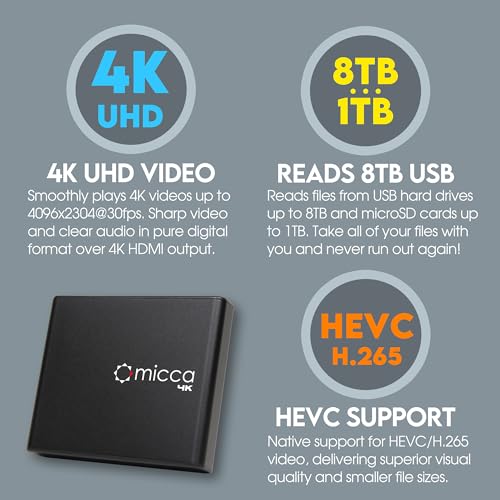
- •PLAYS 4K ULTRA-HD VIDEOS - Works with TVs old and new! Smoothly plays videos up to 4096x2304@30fps over UHD 4K/60Hz HDMI output. Sharp and clear video and audio in pure digital format, compatible with 4K and 1080p TVs, projectors, and monitor displays. Composite AV output for use with analog TVs or for sending sound to a stereo system.
- •DUAL USB AND MICRO SD READER - Play media files from USB flash drives and USB hard drives up to 8TB, or microSD cards up to 1TB. Supports FAT/FAT32, exFAT and NTFS file systems. Compatible with wireless air mouse remotes for non-line-of-sight control so that the player can be hidden away!
- •SIMPLE DIGITAL SIGNAGE - Automatic video playback with endless repeat and looping, and the ability to resume from the last stopping point. Configurable 90/180/270 degree video output rotation. Great for digital signage applications such as restaurant menu boards, lobby welcome videos, art and museum installations.
- •MEDIA FORMAT SUPPORT - Videos: MKV, MP4/M4V, AVI, MOV, MPG, VOB, M2TS, TS files encoded with H.265/HEVC, H.264/AVC, MPEG1/2/4, VC1, up to 4096x2304, 30fps, 200mbps. Subtitles: SRT, PGS, IDX+SUB. Music: MP3, OGG, WAV, FLAC, APE. Photos: JPG, GIF, BMP, PNG, TIF
Micca 4K Ultra-HD Digital Media Player for USB Drives and MicroSD Cards, Digital Signage, H.265/HEVC H.264/AVC MP4 MKV Videos MP3 Music JPG Photos, 4K HDMI, Analog AV, Auto Play and Resume
List Price: $88.54$79.69DEALYou Save: $8.85 (10%)
Free shippingFree Returns – 30 daysFree Order CancellationSecure Payment2–3 Days DeliveryGet It June 25, 2026In Stock (1)No marketing spamNo account requiredFulfilment by FedEx / Amazon / UPS / ShipwirePayPal / Card Buyer Protection
Customer Reviews
Reviews sourced from verified Amazon purchasers4.2
out of 5
Based on 10 reviews
5★
70%
4★
30%
3★
0%
2★
0%
1★
0%
A Real Treat - Full Review
Victor✓ Verified Purchase•December 26, 2023
As an avid consumer of technology and gadgets, I like trying newly released products. Some products such as modern smartphones are ostensible technical marvels. Others, like the Micca Speck in this review, are unassuming but warrant a closer look to see how well they perform. I've owned several different digital media players, built HTPCs with XBMC, and setup UPnP servers, so this product is familiar territory to me.
This is a very small media player, narrower and only slightly thicker than a pad of post-it sticky notes, and about as heavy. The case is made of matte black aluminum with plastic end caps. The front of the player contains a USB jack and a SD card reader slot, and the back holds the power jack, HDMI, and a 3.5mm AV jack. In all, the Speck is a simple looking player with just the essentials.
I used the Speck with my secondary TV, a 42-inch Panasonic 1080p plasma HDTV. An HDMI cable is not included with the player so I had to use my own. After plugging in the power, the main menu came up quickly after a delay of about 2 seconds, which is practically instant since modern TVs take longer than that to turn on. The default video output is 720p but the player can be set to remember to use 1080p instead. Speaking of settings, there are just a few of them in the player's setup menu for configuring the player's video, audio, and general behavior. While some may wish for more settings, I felt that the Speck's simplified configuration is ideal for its targeted casual users.
The player's menu system is reasonably intuitive and straightforward to use. Anyone who can browse for files and folders should feel immediately comfortable with it as I was. After selecting a media type from the main menu, the user can then go find what they want to play from an attached USB drive. Only media files of the selected type will be shown, so for example if you have a movie, its cover art JPG, the sound track MP3s, and a couple of subtitle files in the same folder, only the movie file will be listed, making it easier to find and play. In summary, the Speck's interface is a bit sparse, but is simple to use and is responsive without any perceived lag.
The Speck supports both USB and SD cards. I tried a variety of older USB thumb drives, SD cards of various sizes, as well as a recently purchased 1TB USB 3.0 hard drive. I did not encounter any issues with the drives. According to the manual, drives up to 2TB can be used. This means I can literally have my entire media library on a portable hard drive and play it using the Speck.
The biggest question for any digital media player is how well it plays videos. I don't have every single video format claimed to be supported by the Speck in my media collection, but I ran through all of the most popular formats such as MKV, MP4, AVI, MOV, ranging from standard definition TV shows to 1080p full movies. The player exhibited no issues with MKV, including newer files with compressed headers. Both internal and external subtitles were supported. The largest MKV file I tried was about 20GB, which played with no visible skips, freezes, lags, or dropped frames. All surround sound formats were supported but output was stereo only. Support for MP4 and AVI files was also good, though these were mostly older files with legacy codecs. I tried a few full BD ISO files and to my surprise they played, but with severe frame dropping at 1080p. Lowering the player's output to 720p made the BD ISOs play smoothly. This is the equivalent of using a knife to chop firewood, so I don't fault the Speck for not playing BD ISOs smoothly at 1080p.
Visually, the video playback has all of the sharpness of 1080p, with excellent colors that are accurate and well saturated. The screen shots provided in the manufacturer's product photos accurately portray this so take a look at those if you wonder what the image quality will be like. Some of the dark scenes show gradient bands, but I've seen this in more expensive players as well. I don't know if the video compression itself is more to blame, than the player's decoder. In consideration of its low price, however, the Speck's video output can only be described as spectacular (no pun intended).
Apart from playing videos, the Speck also plays music and photo slideshows. I gave a cursory try-out of these features and found them to be acceptable given that the player's primary purpose is to play videos. Lack of features such as play lists or random shuffling the entire music library limits the usefulness of these secondary capabilities.
Taking in the Micca Speck as a whole, what it does very well is delivering the type of "it just works" usage experience to casual users. It provides the convenience of being simple to use, while packing surprisingly powerful video playback hardware. The simplified interface with limited settings encourages even advanced users to just sit back and enjoy the show. If such a media player fits with what you are looking for, I recommend that you too take a close look at the Micca Speck.
This is a very small media player, narrower and only slightly thicker than a pad of post-it sticky notes, and about as heavy. The case is made of matte black aluminum with plastic end caps. The front of the player contains a USB jack and a SD card reader slot, and the back holds the power jack, HDMI, and a 3.5mm AV jack. In all, the Speck is a simple looking player with just the essentials.
I used the Speck with my secondary TV, a 42-inch Panasonic 1080p plasma HDTV. An HDMI cable is not included with the player so I had to use my own. After plugging in the power, the main menu came up quickly after a delay of about 2 seconds, which is practically instant since modern TVs take longer than that to turn on. The default video output is 720p but the player can be set to remember to use 1080p instead. Speaking of settings, there are just a few of them in the player's setup menu for configuring the player's video, audio, and general behavior. While some may wish for more settings, I felt that the Speck's simplified configuration is ideal for its targeted casual users.
The player's menu system is reasonably intuitive and straightforward to use. Anyone who can browse for files and folders should feel immediately comfortable with it as I was. After selecting a media type from the main menu, the user can then go find what they want to play from an attached USB drive. Only media files of the selected type will be shown, so for example if you have a movie, its cover art JPG, the sound track MP3s, and a couple of subtitle files in the same folder, only the movie file will be listed, making it easier to find and play. In summary, the Speck's interface is a bit sparse, but is simple to use and is responsive without any perceived lag.
The Speck supports both USB and SD cards. I tried a variety of older USB thumb drives, SD cards of various sizes, as well as a recently purchased 1TB USB 3.0 hard drive. I did not encounter any issues with the drives. According to the manual, drives up to 2TB can be used. This means I can literally have my entire media library on a portable hard drive and play it using the Speck.
The biggest question for any digital media player is how well it plays videos. I don't have every single video format claimed to be supported by the Speck in my media collection, but I ran through all of the most popular formats such as MKV, MP4, AVI, MOV, ranging from standard definition TV shows to 1080p full movies. The player exhibited no issues with MKV, including newer files with compressed headers. Both internal and external subtitles were supported. The largest MKV file I tried was about 20GB, which played with no visible skips, freezes, lags, or dropped frames. All surround sound formats were supported but output was stereo only. Support for MP4 and AVI files was also good, though these were mostly older files with legacy codecs. I tried a few full BD ISO files and to my surprise they played, but with severe frame dropping at 1080p. Lowering the player's output to 720p made the BD ISOs play smoothly. This is the equivalent of using a knife to chop firewood, so I don't fault the Speck for not playing BD ISOs smoothly at 1080p.
Visually, the video playback has all of the sharpness of 1080p, with excellent colors that are accurate and well saturated. The screen shots provided in the manufacturer's product photos accurately portray this so take a look at those if you wonder what the image quality will be like. Some of the dark scenes show gradient bands, but I've seen this in more expensive players as well. I don't know if the video compression itself is more to blame, than the player's decoder. In consideration of its low price, however, the Speck's video output can only be described as spectacular (no pun intended).
Apart from playing videos, the Speck also plays music and photo slideshows. I gave a cursory try-out of these features and found them to be acceptable given that the player's primary purpose is to play videos. Lack of features such as play lists or random shuffling the entire music library limits the usefulness of these secondary capabilities.
Taking in the Micca Speck as a whole, what it does very well is delivering the type of "it just works" usage experience to casual users. It provides the convenience of being simple to use, while packing surprisingly powerful video playback hardware. The simplified interface with limited settings encourages even advanced users to just sit back and enjoy the show. If such a media player fits with what you are looking for, I recommend that you too take a close look at the Micca Speck.
Finally, a simple solution for playing movies in the car!
D. Taylor✓ Verified Purchase•December 10, 2023
Overall this device is a great solution for my situation. Here are the details in case any of you are in a similar boat:
The challenge: I wanted to play movies from my digital library in the family minivan with as little fuss (equipment, time and dollars) as possible.
Current setup:
1. Minivan has a video system with RCA inputs and AC power.
2. Movies are on my home PC in various file formats, mostly MP4 and some MKV.
3. My phone: Nexus 6 (Motorola)
4. Wife's phone: iPhone 6 Plus
Goals:
1. Need to be able to play movies "offline." I don't want to stream them through my cell phone data plan.
2. Would prefer a solution that didn't require monopolizing my phone to be the media player.
3. System needs to be manageable by my wife and kids (I shouldn't have to be there to go from Off to Movie Watching)
The Phone Option:
I looked at several approaches online where folks would copy movies to their phone, use a series of adapters to covert digital output to analog (RCA), etc. But they were all very complex. First, my Nexus 6 as it turns out doesn't provide HDMI out. The iPhone might "“ but then I'd need to buy an HDMI to analog converter. Plus, assuming that all works, the system would require the phone be plugged in the back of the van with the kids, unavailable for use by my wife or myself. Sure, I could string longer cables around, but at this point it's become a very convoluted solution to the problem with several points of failure in a cramped environment. (In other words, my kids would just end up fighting over who gets to play with the phone).
The streaming box option:
The lower-end Rokus can output to RCA. I considered setting up a wifi network inside the van and then attaching a HDD to the roku directly or streaming to it from my phone. One major drawback "“ the Roku requires an internet connection. From what I've seen, this is primarily required during setup, so in theory I could do this through my phone's hotspot or home wifi while parked in the garage"¦ but even if that all works, my brief experience in the past is the roku will act up without internet. I wouldn't call this path dead, but at this point we're talking about running a router, roku, phone or hard drive all in the car"¦ again, feels like a lot of overkill and points of failure. Not the kind of thing I picture the wife and kids using when I'm not there for tech support.
This Option: The Micca Speck:
While searching for converters and media players I stumbled across this product. It's awesome. I load movies onto a SD card from my home computer and then play them from this device in the car. It supports both RCA and HDMI output "“ meaning I don't need some separate converter. There are no dependencies on my phone, a wifi network, streaming box, etc. The setup and interface is simple enough for the kids to use.
Limitations:
While I love this solution, there are some draw-backs if you're looking to make your car the ultimate multimedia machine. First, this is an "offline" solution "“ meaning you're not playing youtube videos or netflix in the car with this. It plays files you have in hand (video, music, pictures). This also means you're required to "sync" things the old-fashioned way "“ unplug the SD card, plug it into the computer, and drag and drop what you want onto it. It's not the end of the world, but keep in mind this means you don't have instant access to your whole library on demand (Plex has spoiled me). You need to plan ahead. Second, I really wish I'd read the fine print before buying on the SD card limitations. I didn't realize the max supported size was 32 GB and when I bought it I also bought a 64 GB card. I loaded it up with 64 GB of movies, TV shows and music. When I plugged it in to try it out for the first time I was really confused as to why some movies would play and others wouldn't. I wasted a lot of time troubleshooting file formats, potential codec differences, etc. only to eventually discover the SD card size limitation. That's not to say I wouldn't have bought this had I known the limitation was lower. I just mention it here in case you're having similar problems. Note: I haven't tried it yet, but it's also got a usb port (in addition to the SD card slot). So, in theory, you could hook up an external drive (up to 2TB) to take a lot more content with you.
Conclusion:
For the price and simplicity I'm completely happy with this option. I wish the SD card size limit was higher, but no big deal. At the end of the day I don't have to carry around a binder of DVD's in the car. When we're on a long drive the kids can fire up the movie themselves"¦ we don't have to deal with a convoluted chain of adapters, converters and duct tape to make it all work.
By the way, this is a perfectly viable option for viewing content on a TV as well"¦ wish I would have had this a year ago at our family reunion! Remote location, no internet but a big fancy TV, lots of kids and time"¦ we had to TALK to each other!
The challenge: I wanted to play movies from my digital library in the family minivan with as little fuss (equipment, time and dollars) as possible.
Current setup:
1. Minivan has a video system with RCA inputs and AC power.
2. Movies are on my home PC in various file formats, mostly MP4 and some MKV.
3. My phone: Nexus 6 (Motorola)
4. Wife's phone: iPhone 6 Plus
Goals:
1. Need to be able to play movies "offline." I don't want to stream them through my cell phone data plan.
2. Would prefer a solution that didn't require monopolizing my phone to be the media player.
3. System needs to be manageable by my wife and kids (I shouldn't have to be there to go from Off to Movie Watching)
The Phone Option:
I looked at several approaches online where folks would copy movies to their phone, use a series of adapters to covert digital output to analog (RCA), etc. But they were all very complex. First, my Nexus 6 as it turns out doesn't provide HDMI out. The iPhone might "“ but then I'd need to buy an HDMI to analog converter. Plus, assuming that all works, the system would require the phone be plugged in the back of the van with the kids, unavailable for use by my wife or myself. Sure, I could string longer cables around, but at this point it's become a very convoluted solution to the problem with several points of failure in a cramped environment. (In other words, my kids would just end up fighting over who gets to play with the phone).
The streaming box option:
The lower-end Rokus can output to RCA. I considered setting up a wifi network inside the van and then attaching a HDD to the roku directly or streaming to it from my phone. One major drawback "“ the Roku requires an internet connection. From what I've seen, this is primarily required during setup, so in theory I could do this through my phone's hotspot or home wifi while parked in the garage"¦ but even if that all works, my brief experience in the past is the roku will act up without internet. I wouldn't call this path dead, but at this point we're talking about running a router, roku, phone or hard drive all in the car"¦ again, feels like a lot of overkill and points of failure. Not the kind of thing I picture the wife and kids using when I'm not there for tech support.
This Option: The Micca Speck:
While searching for converters and media players I stumbled across this product. It's awesome. I load movies onto a SD card from my home computer and then play them from this device in the car. It supports both RCA and HDMI output "“ meaning I don't need some separate converter. There are no dependencies on my phone, a wifi network, streaming box, etc. The setup and interface is simple enough for the kids to use.
Limitations:
While I love this solution, there are some draw-backs if you're looking to make your car the ultimate multimedia machine. First, this is an "offline" solution "“ meaning you're not playing youtube videos or netflix in the car with this. It plays files you have in hand (video, music, pictures). This also means you're required to "sync" things the old-fashioned way "“ unplug the SD card, plug it into the computer, and drag and drop what you want onto it. It's not the end of the world, but keep in mind this means you don't have instant access to your whole library on demand (Plex has spoiled me). You need to plan ahead. Second, I really wish I'd read the fine print before buying on the SD card limitations. I didn't realize the max supported size was 32 GB and when I bought it I also bought a 64 GB card. I loaded it up with 64 GB of movies, TV shows and music. When I plugged it in to try it out for the first time I was really confused as to why some movies would play and others wouldn't. I wasted a lot of time troubleshooting file formats, potential codec differences, etc. only to eventually discover the SD card size limitation. That's not to say I wouldn't have bought this had I known the limitation was lower. I just mention it here in case you're having similar problems. Note: I haven't tried it yet, but it's also got a usb port (in addition to the SD card slot). So, in theory, you could hook up an external drive (up to 2TB) to take a lot more content with you.
Conclusion:
For the price and simplicity I'm completely happy with this option. I wish the SD card size limit was higher, but no big deal. At the end of the day I don't have to carry around a binder of DVD's in the car. When we're on a long drive the kids can fire up the movie themselves"¦ we don't have to deal with a convoluted chain of adapters, converters and duct tape to make it all work.
By the way, this is a perfectly viable option for viewing content on a TV as well"¦ wish I would have had this a year ago at our family reunion! Remote location, no internet but a big fancy TV, lots of kids and time"¦ we had to TALK to each other!
Nice little media player
David Boiano✓ Verified Purchase•November 23, 2023
I got this because I was getting tired of playing around with trying to watch videos. My dvd player would play certain file types and my roku would play certain ones. the roku changed on me recently, it used to play mp4s, but now it doesn't and every time I play something through it, it asks if I want to share the file - every time it asks, really annoying.
So I decided it was time to get one of these small media players that would play all the files those others would play and I decided this one based on the most reviews and percentage of positives. It was easy enough, plug it in, hook up the hdmi cable, a couple batteries in the remote and you're good to go. I've already played a couple videos through it and it works effortlessly. I am going to enjoy having this to use and recommend it.
So I decided it was time to get one of these small media players that would play all the files those others would play and I decided this one based on the most reviews and percentage of positives. It was easy enough, plug it in, hook up the hdmi cable, a couple batteries in the remote and you're good to go. I've already played a couple videos through it and it works effortlessly. I am going to enjoy having this to use and recommend it.
Awesome little device
Amazon Customer✓ Verified Purchase•November 22, 2023
This is pretty amazing for what you get. I'm used to playing all types of video types and some work on this some work on that, but never have I had a little pocket sized device that plays them all! You can pretty much take this anywhere with a short hdmi cable & a flash drive with ANYTHING on it and play it on your friends or families tv, computer or even projector with very decent quality & fast navigation. The remote isn't lightning speed but it does as advertised what it's supposed to. Great product!
Exactly what I needed, best money I've spent in awhile
N.D. MIrsky✓ Verified Purchase•October 29, 2023
This does not stream, you can't load apps. It's not fancy and does not have any bells or whistles. What it does do is THE ONE THING I need it to do; play media files from an external/usb drive.
I've tried a lot of different ways of getting there, a bunch of other (often times much more expensive) devices that do all of the other things but not the one thing I want or, they do it so poorly as to have been a total waste of money.
Here is what it is - a tiny box that you can connect up to 2 USB drives to (at a maximum of 8TB each, which is amazing), and/or a micro SD. You then can connect to your TV via an HDMI cable (the simplest way to get audio and video, or through older style av hook ups.
The remote is simple and the menu is composed of 4 options (clean and easy).
So far, I have tried out a number of file types and have not had an issue with any standard video format (avi, MP4, MKV, etc.), it even managed to find non-embedded subtitle files.
Everything has worked great, menus and files are large enough to read at a distance (one of the other issues I had with other devices) and navigation is simple and intuitive. I have not experienced any lag at all when sorting though some pretty big drives and playing large files (up to 4k).
I really did not expect this to perform well but I had run through most other options, and now I could not be happier. Works great, does exactly what I want/need, great price, Just wish I had found it 2 years and probably $500 ago.
I've tried a lot of different ways of getting there, a bunch of other (often times much more expensive) devices that do all of the other things but not the one thing I want or, they do it so poorly as to have been a total waste of money.
Here is what it is - a tiny box that you can connect up to 2 USB drives to (at a maximum of 8TB each, which is amazing), and/or a micro SD. You then can connect to your TV via an HDMI cable (the simplest way to get audio and video, or through older style av hook ups.
The remote is simple and the menu is composed of 4 options (clean and easy).
So far, I have tried out a number of file types and have not had an issue with any standard video format (avi, MP4, MKV, etc.), it even managed to find non-embedded subtitle files.
Everything has worked great, menus and files are large enough to read at a distance (one of the other issues I had with other devices) and navigation is simple and intuitive. I have not experienced any lag at all when sorting though some pretty big drives and playing large files (up to 4k).
I really did not expect this to perform well but I had run through most other options, and now I could not be happier. Works great, does exactly what I want/need, great price, Just wish I had found it 2 years and probably $500 ago.
Page 1 of 2


