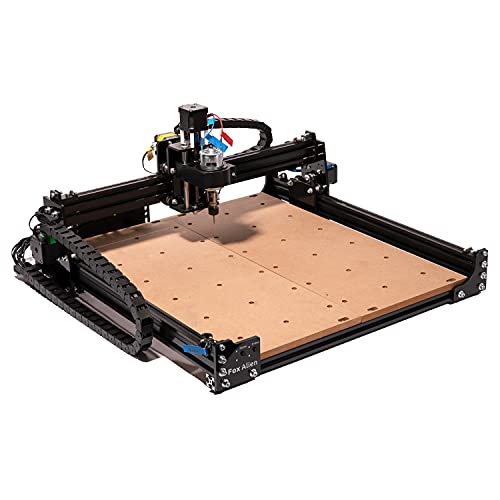
500W CNC Router Machine, MYSWEETY 4540 CNC Wood Router 3 Axis Metal Milling Machine for Engraving Carving Wood Acrylic MDF PCB Plastic, Working Area: 430 * 390 * 90mm(16.9 * 15.4 * 3.5inch)




Key features
- •👍【500W Spindle & High Speed】 The upgraded 3-axis 4540 engraving machine is equipped with an 500W spindle for more power and higher efficiency, making it possible to cut stainless steel, aluminum and other metals. The maximum movement speed can reach 5000mm/min, the spindle speed range is 0-11000rpm/min
- •👍【Larger Working Area】 The cnc router machine has a larger engraving area, increased to 430*390*90 mm(16.9*15.4*3.5inch). The working table has precise scale lines, which is convenient for you to locate and measure the engraving material size
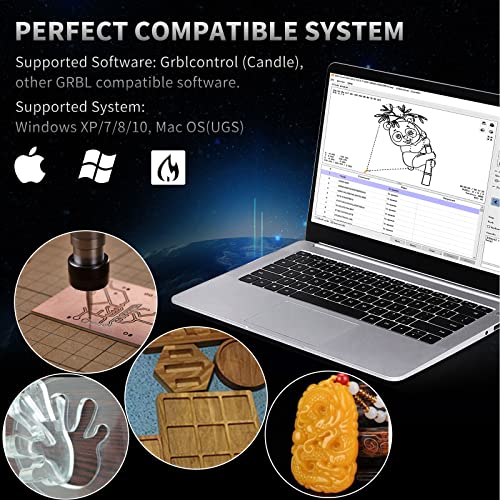
- •👍【Wide Application & Compatibility】 The CNC wood machine is compatible with GRBL software and supports systems such as Windows XP/7/8/10 and Mac OS. Suitable for engraving and carving stainless steel, wood, aluminum, brass, plexiglass, leather, PCB, MDF, acrylic, resin, nylon, carbon fiber, PCB, PVC, etc
- •👍【Easy to Assemble】 This CNC wood carving machine could be assembled in 15-30 minutes. The main components are already pre-assembled. Wires are clearly labeled for quick connection. The control board, power supply, emergency stop, and wires are integrated into a newly designed box for easy and safe operation. You just need several installation steps and wiring to start carving your projects
- •👍【Package Included】 Comes with everything you need. This engraving machine set included all parts to assemble 4540 cnc machine, integrated controller box, touchscreen cnc offline controller, Z-probe, CNC router bits, English manual, and more. We also provide a 1-year warranty and fantastic after-sales service, If any questions, please contact us as soon as possible
500W CNC Router Machine, MYSWEETY 4540 CNC Wood Router 3 Axis Metal Milling Machine for Engraving Carving Wood Acrylic MDF PCB Plastic, Working Area: 430 * 390 * 90mm(16.9 * 15.4 * 3.5inch)
List Price: $638.75$574.88DEALYou Save: $63.87 (10%)
Free shippingFree Returns – 30 daysFree Order CancellationSecure Payment2–3 Days DeliveryGet It June 25, 2026In Stock (1)No marketing spamNo account requiredFulfilment by FedEx / Amazon / UPS / ShipwirePayPal / Card Buyer Protection
Customer Reviews
Reviews sourced from verified Amazon purchasers3.8
out of 5
Based on 10 reviews
5★
30%
4★
70%
3★
0%
2★
0%
1★
0%
Ya la armé , falta ensayar
jtgrosso✓ Verified Purchase•August 3, 2023
Armarla es muy facil, hay que poner atención al manual y los videos, por ahora dejo 4 estrellas mientras instalo programas y la ensayo, por ahora es de muy buena calidad, espero no tener muchos problemas aprendiendo los programas.
Cuando la ensaye cambiaré la puntuación
Cuando la ensaye cambiaré la puntuación
Seems decent but not perfect.
Mike Pearson✓ Verified Purchase•July 25, 2023
I like the large format and most seems well enough made for the price class. The lm10luu guide bearings on the z axis are horribly sloppy. I've ordered replacements and hope that takes care of the alignment issues. If not then I'll be looking into swapping the 10mm guide dowels. Once this is cleared up I believe it'll be a usable desktop cnc.
The way it was initially, with a needle pointing bit about a mm deep, a forward and back pass on the y axis showed 2 gouges approximately 2 to 3 mms apart. NOT staying on track.
The way it was initially, with a needle pointing bit about a mm deep, a forward and back pass on the y axis showed 2 gouges approximately 2 to 3 mms apart. NOT staying on track.
Great for small projects!
Chris M.✓ Verified Purchase•June 26, 2023
First of all I'll give you a little of my background. I've been programming and operating CNC (Computer Numerical Control) machines for over 40 years. Everything from small 5 axis machines to machines with 50 feet of travel. I've written and published 2 CNC programming manuals that are used by major corporations to train their employees. So I've been around the block a few times.
Now. On to this cool little machine. I came up with a special personal project and didn't want, or need, to use a large CNC machining center to cut plastic. I searched long and hard and watched MANY YouTube videos regarding the desktop CNC engraver/routers that are on the market today. There are many sellers to choose from but only a couple different variations when it comes to the actual hardware and electronics. They all, like this one, have to be assembled! There's no way they could sell these at this price point if they put them together and then had to figure out how to ship them.
Assembly is really not that difficult if you watch some videos in advance and then take your time. I spent 1.5 hours assembling it while I watched a mindless movie in the background, my laptop at my side with the assembly instructions from the included CD.
In reading some of the reviews for this machine AND ALL of the others, the screws included to mount the table to the linear rail bearings are too short. No big deal. When I ordered this machine I also ordered M5x16 socket head cap screws (Actually I got a set of M5's from 8mm to 20mm long just in case). These replaced the M5x12 screws that are packaged with it. So that was a non-issue right from the start.
Like I said, the package came with a CD. It has the assembly instructions and all the software that's included. The instructions were easy to follow even though there were few written words. Look at the pictures and make it look the same in real life. There's only 1 dimension that needs to be fairly accurate during assembly. The manual points out that the vertical legs need to be 46.5MM (1.83") from the back end of the side rail. I had a dial caliper handy, so that was easy for me. If you don't have one, the distance isn't as critical as the fact that both legs need to be the same distance from the back end of the side rails. Use a tape measure and be as accurate as you can be. This is important because it controls how square the X axis of the machine is with the table. The front, back and side uprights are NOT CHEAP PLASTIC! They're phenolic resin. It's very durable stuff and this design makes assembly WAY easier and more accurate than the others. The structure will be much more rigid and use fewer parts in the process. So there will be less to align and less to loosen up as time goes on.
After everything was assembled it was time to look over and connect all the wiring. This unit came with the CAMTOOL CNC V3.3 GRBL control board with the most current version of GRBL installed (Version 1.1). The board is marked with where everything gets plugged in. However, the spindle motor has no markings as to which is positive (Red wire) and which is negative (Black wire). So I just randomly plugged the 2 in and paid attention to the direction it turned when I first powered it up. Looking at the spindle motor from the top, it should turn clockwise. If it doesn't, swap the red and black wires, like I had to, and it'll all be good. Running it backwards won't damage the motor, but milling tools and drills are designed to spin clockwise and don't work very well if they don't.
Once it was all wired I plugged in the offline controller and gave it power. It worked. First time. X, Y, Z all moved as they should. The spindle motor turned on and off. Pretty exciting. Since I understand how to write manual GCODE programs, I quickly whipped up a demo program. Copied it to a micro SD card. Inserted it into the offline controller and sent it. Huh. Off it went. It did exactly what I told it to do. But use CAUTION! The machine defaults to metric movements. If you run a program that is in inches (G20) and then manually move the machine with the offline controller, it will do bad things. The controller defaults to a 5mm step when you do a jog move. If it is still set to inches it moves 5 INCHES not 5 millimeters (.197")! It might be a good idea to have the power cord handy in case you need to unplug it before it goes too far! Better yet, be sure to change back to metric (G21) at the end of your GCODE program!
To do more than very simple movements you need 3 things:
1) Software to create a GCODE program.
2) Software to send your GCODE program to the control (Or the offline controller).
3) Firmware in the CNC control board to convert the GCODES to movements.
This machine comes with the firmware (GRBL V1.1) to translate the GCODE program installed on the controller board. That covers number 3 in the list of needed programs.
To cover number 2, it comes with the software to send the GCODES to the controller. Candle is the name of the GCODE sender. It's on the CD. There are other open source (free) GCODE senders available and they can be found by searching with Google. They all do pretty much the same thing. They send a line and wait for the machine to do it, then send another line until it completes the job. Candle also allows you to move the machine manually and set the X, Y and Z origin points that are necessary to tell the machine where you want it to start.
The package does not include any kind of software to actually create a GCODE program. There are MANY programs available that are open source, but difficult to master. There are also VERY expensive programs available that are also VERY hard to master. One of the easiest to learn is Easel. And it's free. It's web based and allows you to draw what you want and then export the Gcode. You can save it locally and send it through Candle. Or it can be loaded onto a microSD card and sent to the machine with the offline controller.
The offline controller can be a very good thing! It allows you to run the machine without a computer attached. As a matter of fact, a computer AND the offline controller MUST NOT be connected to the control board at the same time. They both send information to the control through the same ports and they will conflict with each other and neither will work. It's one or the other. Never both! The advantage of the offline controller is it'll keep you from having to keep a laptop or desktop computer near a machine that can make a mess.
So the flow is -> Draw (Easel) -> Convert to GCODE (Easel) -> Send GCODE (Candle or Offline Controller) -> Convert to movements (CAMTOOL CNC V3.3 Control board with GRBL) -> Finished project.
Once you have all that you're ready to cut something. The bits that come with this package may be good for engraving soft materials, but they're less than ideal to do anything else. I would suggest getting some real endmills. The machine comes with an ER11 collet holder mounted on the spindle motor. But it does NOT come with wrenches! You'll need a 13mm to hold the spindle and a 17mm to turn the collet holding nut. Otherwise, a couple of small adjustables will work fine. It does come with an 1/8" collet. A lot can be done with an 1/8" collet. Most endmills 1/8" and under in diameter have an 1/8" shank and will fit in this collet. ER11 collets are available from 1mm to 7mm (That's .04" to .275" in America). You may want to get a set. Or at least add one for 1/4" shank endmills.
Overall I think this machine is an excellent value. No, it won't cut aluminum or steel or anything hard. But for wood, plastic, acrylics and other "soft" materials, it does a good job and is surprisingly accurate and repeats very well. The noise level is reasonable. If you need more rigidity or higher accuracy, keep in mind you'll likely spend AT LEAST twice the price for a base model from anywhere else. Then you have to add to it to get up to the feature level of this machine.
*UPDATE* I bought a second one of these and the short socket head cap screw issue was solved. All the screws are good to go now! The new unit also came with wrenches for the spindle collet holder!
As long as your expectations are realistic, I don't think you'll be disappointed. Search out GRBL. Find some YouTube videos about assembly. Read a bit. It's quite satisfying to loosen the clamps, blow off the chips or dust, and show off something you worked hard to make.
But before you jump in I hope you realize this thing is just like a fishing pole. You can fish with it, but you need more stuff. Like lures and line and a cool hat and a net and waders and then comes a boat and a trailer.......
Now. On to this cool little machine. I came up with a special personal project and didn't want, or need, to use a large CNC machining center to cut plastic. I searched long and hard and watched MANY YouTube videos regarding the desktop CNC engraver/routers that are on the market today. There are many sellers to choose from but only a couple different variations when it comes to the actual hardware and electronics. They all, like this one, have to be assembled! There's no way they could sell these at this price point if they put them together and then had to figure out how to ship them.
Assembly is really not that difficult if you watch some videos in advance and then take your time. I spent 1.5 hours assembling it while I watched a mindless movie in the background, my laptop at my side with the assembly instructions from the included CD.
In reading some of the reviews for this machine AND ALL of the others, the screws included to mount the table to the linear rail bearings are too short. No big deal. When I ordered this machine I also ordered M5x16 socket head cap screws (Actually I got a set of M5's from 8mm to 20mm long just in case). These replaced the M5x12 screws that are packaged with it. So that was a non-issue right from the start.
Like I said, the package came with a CD. It has the assembly instructions and all the software that's included. The instructions were easy to follow even though there were few written words. Look at the pictures and make it look the same in real life. There's only 1 dimension that needs to be fairly accurate during assembly. The manual points out that the vertical legs need to be 46.5MM (1.83") from the back end of the side rail. I had a dial caliper handy, so that was easy for me. If you don't have one, the distance isn't as critical as the fact that both legs need to be the same distance from the back end of the side rails. Use a tape measure and be as accurate as you can be. This is important because it controls how square the X axis of the machine is with the table. The front, back and side uprights are NOT CHEAP PLASTIC! They're phenolic resin. It's very durable stuff and this design makes assembly WAY easier and more accurate than the others. The structure will be much more rigid and use fewer parts in the process. So there will be less to align and less to loosen up as time goes on.
After everything was assembled it was time to look over and connect all the wiring. This unit came with the CAMTOOL CNC V3.3 GRBL control board with the most current version of GRBL installed (Version 1.1). The board is marked with where everything gets plugged in. However, the spindle motor has no markings as to which is positive (Red wire) and which is negative (Black wire). So I just randomly plugged the 2 in and paid attention to the direction it turned when I first powered it up. Looking at the spindle motor from the top, it should turn clockwise. If it doesn't, swap the red and black wires, like I had to, and it'll all be good. Running it backwards won't damage the motor, but milling tools and drills are designed to spin clockwise and don't work very well if they don't.
Once it was all wired I plugged in the offline controller and gave it power. It worked. First time. X, Y, Z all moved as they should. The spindle motor turned on and off. Pretty exciting. Since I understand how to write manual GCODE programs, I quickly whipped up a demo program. Copied it to a micro SD card. Inserted it into the offline controller and sent it. Huh. Off it went. It did exactly what I told it to do. But use CAUTION! The machine defaults to metric movements. If you run a program that is in inches (G20) and then manually move the machine with the offline controller, it will do bad things. The controller defaults to a 5mm step when you do a jog move. If it is still set to inches it moves 5 INCHES not 5 millimeters (.197")! It might be a good idea to have the power cord handy in case you need to unplug it before it goes too far! Better yet, be sure to change back to metric (G21) at the end of your GCODE program!
To do more than very simple movements you need 3 things:
1) Software to create a GCODE program.
2) Software to send your GCODE program to the control (Or the offline controller).
3) Firmware in the CNC control board to convert the GCODES to movements.
This machine comes with the firmware (GRBL V1.1) to translate the GCODE program installed on the controller board. That covers number 3 in the list of needed programs.
To cover number 2, it comes with the software to send the GCODES to the controller. Candle is the name of the GCODE sender. It's on the CD. There are other open source (free) GCODE senders available and they can be found by searching with Google. They all do pretty much the same thing. They send a line and wait for the machine to do it, then send another line until it completes the job. Candle also allows you to move the machine manually and set the X, Y and Z origin points that are necessary to tell the machine where you want it to start.
The package does not include any kind of software to actually create a GCODE program. There are MANY programs available that are open source, but difficult to master. There are also VERY expensive programs available that are also VERY hard to master. One of the easiest to learn is Easel. And it's free. It's web based and allows you to draw what you want and then export the Gcode. You can save it locally and send it through Candle. Or it can be loaded onto a microSD card and sent to the machine with the offline controller.
The offline controller can be a very good thing! It allows you to run the machine without a computer attached. As a matter of fact, a computer AND the offline controller MUST NOT be connected to the control board at the same time. They both send information to the control through the same ports and they will conflict with each other and neither will work. It's one or the other. Never both! The advantage of the offline controller is it'll keep you from having to keep a laptop or desktop computer near a machine that can make a mess.
So the flow is -> Draw (Easel) -> Convert to GCODE (Easel) -> Send GCODE (Candle or Offline Controller) -> Convert to movements (CAMTOOL CNC V3.3 Control board with GRBL) -> Finished project.
Once you have all that you're ready to cut something. The bits that come with this package may be good for engraving soft materials, but they're less than ideal to do anything else. I would suggest getting some real endmills. The machine comes with an ER11 collet holder mounted on the spindle motor. But it does NOT come with wrenches! You'll need a 13mm to hold the spindle and a 17mm to turn the collet holding nut. Otherwise, a couple of small adjustables will work fine. It does come with an 1/8" collet. A lot can be done with an 1/8" collet. Most endmills 1/8" and under in diameter have an 1/8" shank and will fit in this collet. ER11 collets are available from 1mm to 7mm (That's .04" to .275" in America). You may want to get a set. Or at least add one for 1/4" shank endmills.
Overall I think this machine is an excellent value. No, it won't cut aluminum or steel or anything hard. But for wood, plastic, acrylics and other "soft" materials, it does a good job and is surprisingly accurate and repeats very well. The noise level is reasonable. If you need more rigidity or higher accuracy, keep in mind you'll likely spend AT LEAST twice the price for a base model from anywhere else. Then you have to add to it to get up to the feature level of this machine.
*UPDATE* I bought a second one of these and the short socket head cap screw issue was solved. All the screws are good to go now! The new unit also came with wrenches for the spindle collet holder!
As long as your expectations are realistic, I don't think you'll be disappointed. Search out GRBL. Find some YouTube videos about assembly. Read a bit. It's quite satisfying to loosen the clamps, blow off the chips or dust, and show off something you worked hard to make.
But before you jump in I hope you realize this thing is just like a fishing pole. You can fish with it, but you need more stuff. Like lures and line and a cool hat and a net and waders and then comes a boat and a trailer.......
Does NOT include the ball screws pictured, instead uses cheap t8 lead screws. BUT works great!
freqfas✓ Verified Purchase•June 24, 2023
It arrived quick, and was well packaged. Setup was relatively simple, and will be quick for anyone who's assembled a 3d printer. The Y axis is assembled already, and attaches with 8 screws on each side into pre-threaded holes. Attach endstops and route wires. After that, mount the PSU and control board. You can mount them on the back as shown, but I'd recommend using an external enclosure to protect the fans from dust/shavings. The spindle is simple, just make sure you mount it low enough for the tool to reach your work or you'll get errors trying to start a job.
EDIT: The seller took steps to make it right. Also, the machine works pretty well, even with the gripes listed above. Updated my rating from 2 to 4 stars.
As far as the machine goes, it works, though not without some disappointment. My biggest gripe about it, relates to the lack of precision ball screws as shown on the product page. Ball screws along with the linear rails are the main reason I opted for this little machine, instead of a similarly priced larger machine. I was not pleased to find that all 3 axis are driven not by ball screws, but by cheap 8mm lead screws (t8 like in 3d printers). It's not a deal breaker, but I feel very mislead. If this was about 25% less expensive, it wouldn't be a gripe, but at over $500, it stinks.
Another gripe, though a minor one, is the bits that are included. I figured there would be a variety pack of small 1/8" bits of differing types, but the tiny package pictured, includes a bunch of the same exact bit, a little bitty 15 degree pointed bit. If you're hoping to cut material or slot aluminum, you should go ahead and order cutters. The collet seems decent, but only a 1/8" is included. There are plenty of sets on amazon with both collets and a variety of bits, so find what you need. Stick to single/double flute endmills for cutting aluminum.
I did engrave a small board to test it. It worked, and the job finished. The finish was rough, but the bit was cheap and the toolpath just something quick n easy. I used Easel online to generate gcode based on an SVG from inkscape, then sent via Candle 1.1. I made the following observations as I prepared and ran the job.
The knobs on each axis are not square or straight at all out of the box. Thanks to a single set screw, it's about impossible to get them square either. Just poorly designed as far as knobs go, but easy enough to remedy. Doesn't affect axis motion, they just look terrible wobbling while moving.
The spindle is noisy... very noisy. I don't know if the bearings in mine are just junk, but there's a bit of gritty noise when spinning ,beyond what one would expect from a spindle of this size.
Also, no surprise, dust builds up quick. If you're going to use it for wood, get a dust shoe. If using to cut metals, get a misting nozzle for coolant and compressed air. If you've got one, I'd be interested to hear your workflow, if using open source/free software for CAD/CAM/Control.
EDIT: The seller took steps to make it right. Also, the machine works pretty well, even with the gripes listed above. Updated my rating from 2 to 4 stars.
As far as the machine goes, it works, though not without some disappointment. My biggest gripe about it, relates to the lack of precision ball screws as shown on the product page. Ball screws along with the linear rails are the main reason I opted for this little machine, instead of a similarly priced larger machine. I was not pleased to find that all 3 axis are driven not by ball screws, but by cheap 8mm lead screws (t8 like in 3d printers). It's not a deal breaker, but I feel very mislead. If this was about 25% less expensive, it wouldn't be a gripe, but at over $500, it stinks.
Another gripe, though a minor one, is the bits that are included. I figured there would be a variety pack of small 1/8" bits of differing types, but the tiny package pictured, includes a bunch of the same exact bit, a little bitty 15 degree pointed bit. If you're hoping to cut material or slot aluminum, you should go ahead and order cutters. The collet seems decent, but only a 1/8" is included. There are plenty of sets on amazon with both collets and a variety of bits, so find what you need. Stick to single/double flute endmills for cutting aluminum.
I did engrave a small board to test it. It worked, and the job finished. The finish was rough, but the bit was cheap and the toolpath just something quick n easy. I used Easel online to generate gcode based on an SVG from inkscape, then sent via Candle 1.1. I made the following observations as I prepared and ran the job.
The knobs on each axis are not square or straight at all out of the box. Thanks to a single set screw, it's about impossible to get them square either. Just poorly designed as far as knobs go, but easy enough to remedy. Doesn't affect axis motion, they just look terrible wobbling while moving.
The spindle is noisy... very noisy. I don't know if the bearings in mine are just junk, but there's a bit of gritty noise when spinning ,beyond what one would expect from a spindle of this size.
Also, no surprise, dust builds up quick. If you're going to use it for wood, get a dust shoe. If using to cut metals, get a misting nozzle for coolant and compressed air. If you've got one, I'd be interested to hear your workflow, if using open source/free software for CAD/CAM/Control.
This is the best learning tool for GRBL
A. J. Luna✓ Verified Purchase•June 23, 2023
The frame and equipment sold in this kit are all of great quality. The uprights are bolted well, sturdy and at 90 degrees to the bed. If I had one problem it would be that one of the threaded rods had a ding in a thread.... This was fixed by a small file and a bit of persistence. I don't blame the manufacturer, although someone should have checked, it was difficult to see until it was put together.
This system is no meant for the professional who wants to build giant wood structures and CNC machinery. Do not buy this if you want to machine any metal stronger than aluminum, it simply is not made for it. The head is not strong enough, does not spin fast enough, and only has a 1/8th inch collett on it. This all means that you will be relegated to wood and other soft materials. HOWEVER!!!! this should not be a problem if you are learning to program arduino, GRBL or wish to learn CNC.
This is a great tool for learning GRBL and CNC on. You will learn about how to determine what bit sizes to use, what types of bits to use, how to set up your work load, how to set up your work surface, etc. etc. ect!!!! I highly suggest this system because it will force you to learn all these things or you will break it! This is not meant as a toy and its not meant as a final production project! Its meant to be a great learning tool and I highly suggest it for anyone wanting to learn to CNC and/or do laser engraving.
The laser is a 5.5 mw laser and I highly suggest you remember that lasers are considered disposable. YOU will buy another one in the future, but if you keep this under the 80% power mark you will make your laser last much longer.
Finally, I would like to make some suggestions to you as a consumer of this product. Put stops onto it. Learn how to program the GRBL Arduino so you can set up the NC (normally closed) stops. Put on an emergency stop and program it in there! Put in a height sensor to determine where your Z is when you are ready to CNC!
This platform is simply great for being a teaching tool, use it that way! This is the beginning of understanding CNC and Laser etching, not the end. Use it appropriately and learn from it.
This system is no meant for the professional who wants to build giant wood structures and CNC machinery. Do not buy this if you want to machine any metal stronger than aluminum, it simply is not made for it. The head is not strong enough, does not spin fast enough, and only has a 1/8th inch collett on it. This all means that you will be relegated to wood and other soft materials. HOWEVER!!!! this should not be a problem if you are learning to program arduino, GRBL or wish to learn CNC.
This is a great tool for learning GRBL and CNC on. You will learn about how to determine what bit sizes to use, what types of bits to use, how to set up your work load, how to set up your work surface, etc. etc. ect!!!! I highly suggest this system because it will force you to learn all these things or you will break it! This is not meant as a toy and its not meant as a final production project! Its meant to be a great learning tool and I highly suggest it for anyone wanting to learn to CNC and/or do laser engraving.
The laser is a 5.5 mw laser and I highly suggest you remember that lasers are considered disposable. YOU will buy another one in the future, but if you keep this under the 80% power mark you will make your laser last much longer.
Finally, I would like to make some suggestions to you as a consumer of this product. Put stops onto it. Learn how to program the GRBL Arduino so you can set up the NC (normally closed) stops. Put on an emergency stop and program it in there! Put in a height sensor to determine where your Z is when you are ready to CNC!
This platform is simply great for being a teaching tool, use it that way! This is the beginning of understanding CNC and Laser etching, not the end. Use it appropriately and learn from it.
Page 1 of 2
![RIEDHOFF X-Axis Power Milling Machine, [450 LB Torque ] Power Feed Table Mill,110V, 0-200PRM Adjustable Rotate Speed for Bridgeport and Similar Knee Type Milling Machines](https://m.media-amazon.com/images/I/41UHXMx+9XL._SL500_.jpg)