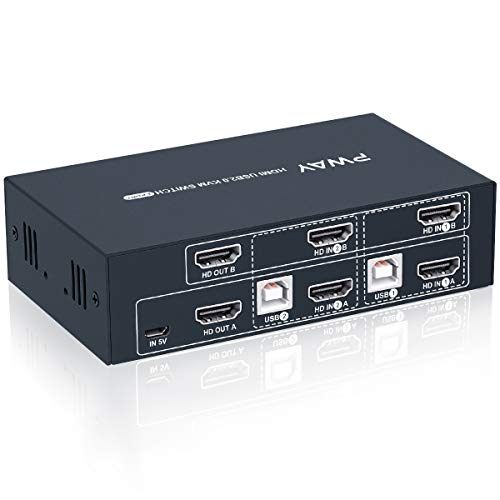
Triple Monitors KVM Switch 2 Displayport + HDMI USB 3.0 KVM Switch 8K@60Hz,4K@144Hz 3 Monitors 2 Computers KVM with 4 USB 3.0 Ports Included KVM Cables,HDMI 8K@60Hz/4K@120Hz,DP 8K@30Hz/4K@144Hz



Key features
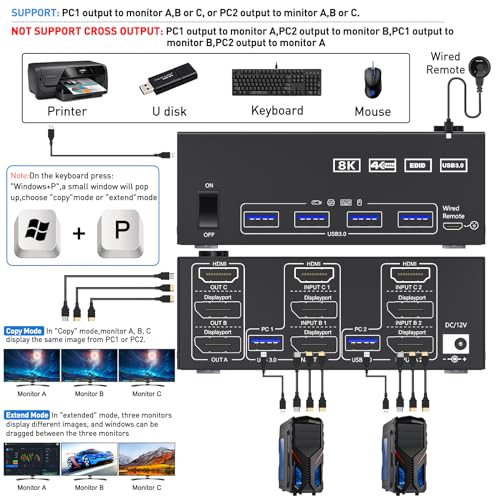
- •【Triple Monitor KVM Switch】2 Displayport1.4+HDMI2.1 USB3.0 KVM Switch allows 2 desktop computers/laptops to share 3 monitors and 4 USB3.0 ports(keyboard,mouse and other USB devices).It can make your work space tidy and efficient, also a premium choice for working from home.▲▲▲NOTE:Only when your computer supports 3 display or multi display, you can use this KVM to achieve 2 PC to share 3 monitors.
- •【UHD8K@60Hz/4K@144Hz】The resolution and fresh rate of triple monitor KVM switch supports up to 8K@60Hz/4K@144Hz, ☛☛☛BUT PLEASE NOTE THAT :①HDMI part supports 8K@60Hz,4K@60Hz,and backward compatible.②Displayport part support 8K@30Hz ,4K@144Hz and backward compatible.✔✔✔Warming: Please use HDMI2.1 and DP1.4 cables, if the set distance allows,the length of cabels more short more better.
- •【3 Monitors KVM Switches with 4 USB 3.0 Ports】Triple monitor HDMI+2 Displayport KVM switch with 4 USB 3.0 ports which can recognize keyboard,mouse,printer,scaner and other USB devices. USB 3.0 offers data transfer speeds of up to 5Gbps, while USB 2.0 offers data transfer speeds of only 480Mbps.
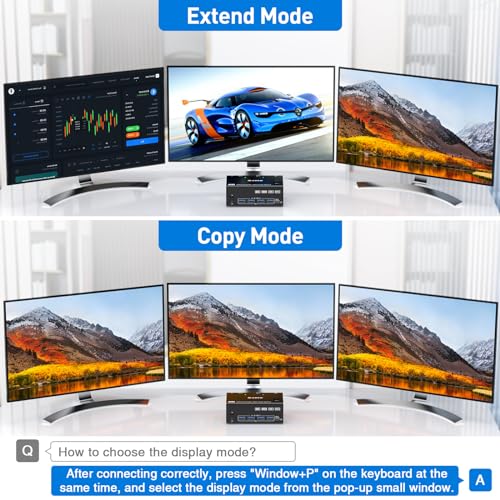
- •【Extended Mode&Copy Mode】Triple display KVM switches require 2 DP+HDMI connections per computer, and for computers with discrete and integrated graphics cards require both 2 DP+HDMI ports must belong discrete graphics card. However, most computers, especially laptops, do not have dual DP+HDMI ports and therefore require a reliable adapter or docking station. ★★★NOTE:✔MAC M1/M2 only supports one external screen, no multi-screen output.
- •【Compatibility & 2 Switching Methdos】AOOCOO triple monitors KVM switch driver-free and plug and play. you can press the button on the panel or use the wired remote controller(included in the package) to switch the computers.Two color lights indicate the active computer.
- •【Note 】2 DP+HDMI cables and USB cable need to be connected to get triple screen display properly. ☛Note:If the input USB3.0 ports are not connected or connected incorrectly, the output USB device will not be recognized. For desktop or laptop without 2 DP+HDMI port, you need to use it with a reliable adapter or docking station. Please make sure each of your PC has the ability to support multi display before purchasing.
Triple Monitors KVM Switch 2 Displayport + HDMI USB 3.0 KVM Switch 8K@60Hz,4K@144Hz 3 Monitors 2 Computers KVM with 4 USB 3.0 Ports Included KVM Cables,HDMI 8K@60Hz/4K@120Hz,DP 8K@30Hz/4K@144Hz
List Price: $203.69$183.32DEALYou Save: $20.37 (10%)
Free shippingFree Returns – 30 daysFree Order CancellationSecure Payment2–3 Days DeliveryGet It October 27, 2026In Stock (1)No marketing spamNo account requiredFulfilment by FedEx / Amazon / UPS / ShipwirePayPal / Card Buyer Protection
Customer Reviews
Reviews sourced from verified Amazon purchasers4.4
out of 5
Based on 10 reviews
5★
50%
4★
50%
3★
0%
2★
0%
1★
0%
Compact, functional, easy to assemble and use - remote a great feature
DeepBlue✓ Verified Purchase•October 1, 2023
I have used several KVM switches over the years and found many unreliable or idiosyncratic, leading to such things as flashing or blank screens or no connection at all. Not so with this unit (though I did need to reboot my laptop initially to get things working correctly). The unit is compact, functional, and easy to assemble and use. The fact that it requires a power source connected by a mini USB (included) is a plus, ensuring a constant power source to maintain a robust connection. The remote control is a welcome feature as I position the KVM switch behind my monitor, which is a bit of a stretch. Since I switch back and forth regularly, I can position the remote conveniently, making it much easier to switch between computers. Overall, it is a well-functioning unit and of great value. (I deducted one star only because my first unit was apparently defective and required an exchange.)
Work great
Brioso✓ Verified Purchase•September 4, 2023
Work fine
Works great
Peter P. Sadlon✓ Verified Purchase•August 28, 2023
Handles all my consoles & my Raspberry Pi on my TV perfectly. My only complaint is Ch 2 on the remote IR signal coincidentally triggers the Options feature on my Roku TVs (Onn & TCL just in case). Not a big deal just takes a sec or so for it to resolve itself when it happens.
It just worked. No setup, no futzing.
Matthew E.✓ Verified Purchase•August 7, 2023
I have two computer setups in my house. At my work desk, I use my office laptop, and I have a ROG Ally with dock. The monitor on the desk is the secondary monitor for both systems, letting me use one keyboard and mouse with a shared large monitor. I plugged everything in, using the included USB A-A cables to get USB 3.0 functionality, and everything just worked. HDMI and USB from a Type C adapter off my laptop, same from my ROG Ally desk, and that's about it.
I am very surprised at how well this setup is working for me. The wires are just shoved back into the space under my desk's monitor shelf, and not gently. The HDMI cables are wrapped back and forth and around each other. It is a real mess, at least until I can get some right-sized cables, and everything still works. I get the occasional 1-2 second video dropout with my laptop, so I think that HDMI cable is the worst of the lot. Nothing to do with the switch.
I really like the wired remote, which comes with adhesive to stick the button somewhere. Makes it easier to shove everything back away and pull out the one wire.
Now, I just need to get around to setting up the 4x1 switch for my main gaming rig, but that's for another review.
I am very surprised at how well this setup is working for me. The wires are just shoved back into the space under my desk's monitor shelf, and not gently. The HDMI cables are wrapped back and forth and around each other. It is a real mess, at least until I can get some right-sized cables, and everything still works. I get the occasional 1-2 second video dropout with my laptop, so I think that HDMI cable is the worst of the lot. Nothing to do with the switch.
I really like the wired remote, which comes with adhesive to stick the button somewhere. Makes it easier to shove everything back away and pull out the one wire.
Now, I just need to get around to setting up the 4x1 switch for my main gaming rig, but that's for another review.
Works ok, needs instructions
Robert Jackson✓ Verified Purchase•August 6, 2023
This came with a piece of paper stating the specs and features, but nothing explaining how it should work. The product listing contains more info than the paper it comes with. But installing and using it is pretty simple and most people should be able to figure it out pretty easily. This comes with all the wires needed to string two computers to it. There is a button on the unit to change from one computer to another. It also comes with a wired remote button, which is convenient so you can place it next to the keyboard and switch back and forth pretty easily. There are 4 usb jacks in the front, the computers attach to the back and there is a mystery usb-c jack on the side. I don't know if you are supposed to power it or what? It works without it so far. It even comes with a usb-c to usb cable? Once again it lacks instructions so you have no idea what it is for. It switches between computers easily. I am running Windows 10 on one and Linux Mint 21 on the other and it is working perfectly.
I took a star off for lack of any instructions plus I was using it and plugged in a USB card read and the screen went blank. I unplugged all wires to try to reset it and that didn't work. I had to restart both computers to get it working again. Very annoying. For the price you get what you pay for though.
I took a star off for lack of any instructions plus I was using it and plugged in a USB card read and the screen went blank. I unplugged all wires to try to reset it and that didn't work. I had to restart both computers to get it working again. Very annoying. For the price you get what you pay for though.
Page 1 of 2