XREAL Air 2 Pro AR Glasses|46° FOV, 130" 120Hz HD Display, True Colors, Cinematic Sound, All-Day Comfort. Compatible with iPhone 16/15, Steam Deck, ROG, Mac, PC, Android & iOS




Key features
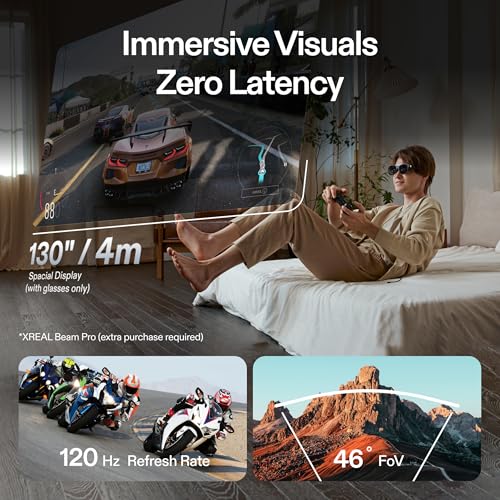
- •【Incredible Visuals】Featuring custom SONY Micro-OLED panels, 46° FOV, and an enormous 120Hz ultra-sharp display, each Air 2 Pro is meticulously calibrated for color accuracy - the first to receive TÜV Rheinland color accuracy certification.
- •【Immersion On Demand】Instantly switch between 3 Electrochromic Dimming levels with a simple touch and block out the right amount of light, ideal for using the glasses in any lighting conditions, both indoors and outdoors.
- •【Expansive Compatibility】Effortlessly connect to any device with USB-C video output, including iPhone 15, iPad, many Android phones , Steam Deck, ROG Ally, MacBook, Windows, and more. Note: XREAL Adapter or XREAL Beam are required for connecting with iPhones earlier than iPhone 15 and for PlayStation, Xbox and Switch gaming consoles. Please check the compatibility of android phones in details below.
- •【Unparalleled Comfort】Enjoy all-day wearing comfort with only 75g of weight, zero-pressure nose pads, and ultra-soft temples. Air 2 Pro has an industry-first three-level temple adjustment and 1:1 weight distribution ensuring maximum comfort.
- •【Unlock Spatial Display】Immerse yourself in our revolutionary Spatial Display (3DoF), allowing you to pin the screen in the air, resize, and adjust the screen distance to your preference. Smooth Follow mode minimizes display movements when you get jostled around, like when in a car.
- •【Cinematic Sound】Our upgraded sound system delivers rich and immersive audio. Directional Audio technology reduces sound dispersion, offering better privacy and minimal disturbances to others.
XREAL Air 2 Pro AR Glasses|46° FOV, 130" 120Hz HD Display, True Colors, Cinematic Sound, All-Day Comfort. Compatible with iPhone 16/15, Steam Deck, ROG, Mac, PC, Android & iOS
List Price: $580.55$522.50DEALYou Save: $58.05 (10%)
Free shippingFree Returns – 30 daysFree Order CancellationSecure Payment2–3 Days DeliveryGet It October 27, 2026In Stock (1)No marketing spamNo account requiredFulfilment by FedEx / Amazon / UPS / ShipwirePayPal / Card Buyer Protection
Customer Reviews
Reviews sourced from verified Amazon purchasers3.7
out of 5
Based on 10 reviews
5★
40%
4★
60%
3★
0%
2★
0%
1★
0%
Air 2 Pro vs. Air 1
John A C Kelso✓ Verified Purchase•March 8, 2024
I bought these glasses after having the original Xreal Air glasses, and while I liked the V1 glasses, I found them to be extremely uncomfortable after about half an hour. For the size and shape of my head, the earpieces were too short, so the ends of them pressed against my head too tightly and would get very sore red spots behind my ears on at the nose pads. Otherwise I liked the functionality of the V1 glasses very much.
My only use for these glasses is my Steam Deck. They are not compatible with my phone (Pixel 7 Pro), and neither my laptop nor my desktop PC has a USB-C DP port. I think I might be able to use the Xreal Beam to use the glasses with other hardware, but I'm mainly here for the Steam Deck use, and didn't want to spend the extra money on the Beam. The glasses plug and play with the Steam Deck to give you a huge display (the display is centered in the glasses and stays centered wherever you turn your head). The functionality of the glasses with a Steam Deck can be expanded by installing the user-made "XR Gaming" driver through Decky. It's easy to do, free, and adds a ton of functions that normally require the Xreal Beam.
The Air 2 Pros are a big improvement over the Air 1 glasses in a few important ways. First and foremost, the V2s are MUCH more comfortable than the V1 glasses. The earpieces are longer and the nose pads are softer. I could wear these for hours without discomfort. The audio is also much better. The elctrochromic dimming is great. It's SO much more convenient to darken the lenses by clicking a button on the earpiece than snapping on the opaque plastic cover that the V1 glasses require. (The V2 Pros do come with a plastic cover for the lenses that has a small lip that touches your cheeks if you need a total blackout experience.) I also felt like the image was better on the V2 glasses in a way that I couldn't quite define. It could have been my imagination though.
Unfortunately there were two very big problems that ultimately led to my returning the glasses. First was that no matter how I adjusted the fit and the position of the glasses on my face, I always had blurring and streaking at the far corners of the screen. This is really problematic because that's where games put important information (health bar, ammo count, mini map, etc). I think the problem might be my eyes being more deep set than the glasses are designed for, but even with the glasses tight up against my forehead I couldn't totally get rid of the blur. The other issue I had (which isn't a problem with the glasses really, but my specific use case) was that when I tried using a mode that uses gyro information from the glasses (like "virtual display", which puts a virtual screen that hangs in the same spot in the room as you move your head, or "VR lite", which converts your head movements into mouse or joystick movement in game) I would get terrible drift. This is a problem with the XR Driver, and is being worked on, but since using the glasses with my Steam Deck is my primary use for them, and there is no official app or software from Xreal for Steam Deck, the XR Gaming driver is my only choice. (BTW, there isn't even a working Windows app for the glasses. There's a beta that Xreal has put out only on their subreddit for testing, but I didn't have good luck with it.)
So ultimately I returned them. I liked a lot of things about them quite a lot, but my issues were just too great. The issues were kind of specific to me though, so I think these could probably be really great glasses for most people.
My only use for these glasses is my Steam Deck. They are not compatible with my phone (Pixel 7 Pro), and neither my laptop nor my desktop PC has a USB-C DP port. I think I might be able to use the Xreal Beam to use the glasses with other hardware, but I'm mainly here for the Steam Deck use, and didn't want to spend the extra money on the Beam. The glasses plug and play with the Steam Deck to give you a huge display (the display is centered in the glasses and stays centered wherever you turn your head). The functionality of the glasses with a Steam Deck can be expanded by installing the user-made "XR Gaming" driver through Decky. It's easy to do, free, and adds a ton of functions that normally require the Xreal Beam.
The Air 2 Pros are a big improvement over the Air 1 glasses in a few important ways. First and foremost, the V2s are MUCH more comfortable than the V1 glasses. The earpieces are longer and the nose pads are softer. I could wear these for hours without discomfort. The audio is also much better. The elctrochromic dimming is great. It's SO much more convenient to darken the lenses by clicking a button on the earpiece than snapping on the opaque plastic cover that the V1 glasses require. (The V2 Pros do come with a plastic cover for the lenses that has a small lip that touches your cheeks if you need a total blackout experience.) I also felt like the image was better on the V2 glasses in a way that I couldn't quite define. It could have been my imagination though.
Unfortunately there were two very big problems that ultimately led to my returning the glasses. First was that no matter how I adjusted the fit and the position of the glasses on my face, I always had blurring and streaking at the far corners of the screen. This is really problematic because that's where games put important information (health bar, ammo count, mini map, etc). I think the problem might be my eyes being more deep set than the glasses are designed for, but even with the glasses tight up against my forehead I couldn't totally get rid of the blur. The other issue I had (which isn't a problem with the glasses really, but my specific use case) was that when I tried using a mode that uses gyro information from the glasses (like "virtual display", which puts a virtual screen that hangs in the same spot in the room as you move your head, or "VR lite", which converts your head movements into mouse or joystick movement in game) I would get terrible drift. This is a problem with the XR Driver, and is being worked on, but since using the glasses with my Steam Deck is my primary use for them, and there is no official app or software from Xreal for Steam Deck, the XR Gaming driver is my only choice. (BTW, there isn't even a working Windows app for the glasses. There's a beta that Xreal has put out only on their subreddit for testing, but I didn't have good luck with it.)
So ultimately I returned them. I liked a lot of things about them quite a lot, but my issues were just too great. The issues were kind of specific to me though, so I think these could probably be really great glasses for most people.
Lightweight, versatile AR glasses that can help to make your digital experiences more immersive
Haley✓ Verified Purchase•March 6, 2024
The XREAL Air 2 Pro are lightweight AR glasses that provide a more immersive experience for watching videos/film, scrolling through social media, doing work, and playing video games.
In order to use the glasses, you have to plug them into an applicable device via the USB-C cord. I connected the glasses to my Macbook Pro and Iphone 15 pro (on two seperate ocassions). As I am writing this review, i actually have the glasses connected to my computer :)
The glasses have been a very positive and fun experience for me. Once they are connected to a device, they are extremely easy to use. The glasses themselves have several functions that help you to customize your experience. Via a button on the side of the glasses, you can adjust the brightness of the display screen. You can also press a different button that will allow you to see both the digital display screen and your actual surroundings.
To create the most immersive experience possible, I connected the glasses both to my computer and my iphone (on seperate ocassions) and watched various youtube videos while connected. You have the option to hear the sound either through the glasses (there are speakers on the glasses), via the device that the glasses are connected to, and or through bluetooth earphones.
If you are looking to have a more immersive movie/film/video/video game experience and are looking for a device that is easy to use/extremely portable, I would recommend the XREAL Air 2 Pro
In order to use the glasses, you have to plug them into an applicable device via the USB-C cord. I connected the glasses to my Macbook Pro and Iphone 15 pro (on two seperate ocassions). As I am writing this review, i actually have the glasses connected to my computer :)
The glasses have been a very positive and fun experience for me. Once they are connected to a device, they are extremely easy to use. The glasses themselves have several functions that help you to customize your experience. Via a button on the side of the glasses, you can adjust the brightness of the display screen. You can also press a different button that will allow you to see both the digital display screen and your actual surroundings.
To create the most immersive experience possible, I connected the glasses both to my computer and my iphone (on seperate ocassions) and watched various youtube videos while connected. You have the option to hear the sound either through the glasses (there are speakers on the glasses), via the device that the glasses are connected to, and or through bluetooth earphones.
If you are looking to have a more immersive movie/film/video/video game experience and are looking for a device that is easy to use/extremely portable, I would recommend the XREAL Air 2 Pro
It's okay but for the Price there's Full VR headsets in this range with much more to offer
HighFidelity✓ Verified Purchase•February 5, 2024
If you are buying this for Productivity Good Luck, if you are buying this for watching Movies or Content on a headset then Good Deal.
I got my kid the Quest 2 & 3 but wanted something to take on the road for virtual desktops on my Macbook, was hoping this was the answer of not spending $3500+ on the vision pro, but sadly this is not the answer. It's a good headset for content, it's going to be great for flights, I've also used it while charging and it's made the 1 hour charge time fly by (Also while killing 40% of my battery on my phone) it takes a lot of getting used to, both physically and with software. The little beam is pretty much needed for this device to work as they intended, and then it still is buggy. You are basically a beta tester if you are buying this, it's not fully worked out and in 2 - 3 years this will probably be outdated. Honestly this should only be purchased if you have disposable income and want to watch netflix on flights and good luck pairing BlueTooth headphones only my Bose OTE pair (For the life of me my airpods pro won't pair). I am likely going to keep these and not return them only because for charging and I travel a lot for work this time of year.
I got my kid the Quest 2 & 3 but wanted something to take on the road for virtual desktops on my Macbook, was hoping this was the answer of not spending $3500+ on the vision pro, but sadly this is not the answer. It's a good headset for content, it's going to be great for flights, I've also used it while charging and it's made the 1 hour charge time fly by (Also while killing 40% of my battery on my phone) it takes a lot of getting used to, both physically and with software. The little beam is pretty much needed for this device to work as they intended, and then it still is buggy. You are basically a beta tester if you are buying this, it's not fully worked out and in 2 - 3 years this will probably be outdated. Honestly this should only be purchased if you have disposable income and want to watch netflix on flights and good luck pairing BlueTooth headphones only my Bose OTE pair (For the life of me my airpods pro won't pair). I am likely going to keep these and not return them only because for charging and I travel a lot for work this time of year.
Edge Blurring is the only issue
GB.IZ.✓ Verified Purchase•February 4, 2024
Honestly, I love this product. As someone who used to game all the time and has had to reduce that to when I am lying in bed at night. This product gives me the ability to enjoy my games from my steam deck like I was playing them at my desktop on my massive monitor. The design and finish on the product are great, the weight doesn't bother me even after wearing them for several hours. I truly enjoy these glasses, unfortunately the edge blurring on the other hand is rough. I have tried the three different nose pieces placed them as close and as far from my face as possible but edge blurring especially around text really is the downfall of this device. If you don't have that issues than this device is amazing the colors are great and there is amazing clarity. For watching movies this device is great, for playing action games this device is great, but if like me you play text heavy games it can give you headaches and makes me nauseous. For this reason, I am going to return this device, I hope that a revision of this product that addresses this issue is released or that this is fixed in the air 2 ultras. I look forward to giving these another try at a later time.
Not bad I like it
Ben A Taylor✓ Verified Purchase•January 25, 2024
To tell you the truth my expectations were pretty low but I figured for the price why not? However, I've enjoyed them. If I had to do it all over again I certainly would. The Xbeam is nifty too.
I have two purposes. First, I use the glasses directly hooked up to my Xbeam Where I watch Amazon movies. In honesty browsing through Amazon prime is a bit cumbersome but I've learned to pick out a movie on my iPhone or TV and add it to my watchlist. Then time permitting I use my Xbeam With the glasses. This minimizes the amount of navigation that I have to do within the Amazon app.
My second use case what's to try to connect the glasses to my PC. I soon discovered that I needed to download the nebula app. I also had to go into graphics settings and set my Nvidia card to serve up graphics for the nebula app. Once that was done I connected Glasses and chose a three panel display and curved the edges 180°. Now for the nebula app you will need to search for it in a search engine Bing Because I could not find it on the Xair web site.
The app provided fairly decent results considering I have a crappy laptop and the software is version eight beta. This software for the PC has not been out long at all but has been updated twice in the last 30 days. So, you can tell that the company is really trying to make an effort. My final note is do not waste your time on the lightning to HDMI adapter, or should I say HDMI adapter to USB display. I simply could not get that to work.
I have two purposes. First, I use the glasses directly hooked up to my Xbeam Where I watch Amazon movies. In honesty browsing through Amazon prime is a bit cumbersome but I've learned to pick out a movie on my iPhone or TV and add it to my watchlist. Then time permitting I use my Xbeam With the glasses. This minimizes the amount of navigation that I have to do within the Amazon app.
My second use case what's to try to connect the glasses to my PC. I soon discovered that I needed to download the nebula app. I also had to go into graphics settings and set my Nvidia card to serve up graphics for the nebula app. Once that was done I connected Glasses and chose a three panel display and curved the edges 180°. Now for the nebula app you will need to search for it in a search engine Bing Because I could not find it on the Xair web site.
The app provided fairly decent results considering I have a crappy laptop and the software is version eight beta. This software for the PC has not been out long at all but has been updated twice in the last 30 days. So, you can tell that the company is really trying to make an effort. My final note is do not waste your time on the lightning to HDMI adapter, or should I say HDMI adapter to USB display. I simply could not get that to work.
Page 1 of 2


