LUBA 2 AWD 5000 Robot Lawn Mower, Perimeter Wire Free Robotic Lawnmower for 1.25 Acres Lawn 80% Slope, Cut Height 1.0\"-2.7\", APP Control, Compatible with Alexa, All-Wheel Drive, Multi-Zone Management



Key features
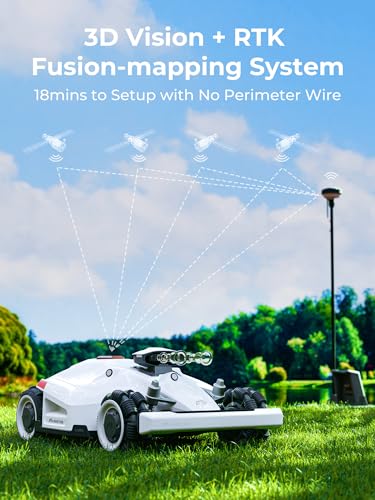
- •RTK+Vision Integration, A trust Choice for Complex and Terrain: With enhanced RTK signal coverage and 3D vision positioning technology, places with weak signals or hefty trees coverage is no more a problem. LUBA 2 AWD 5000 All-Wheel Drive automatic robot lawn mower can navigate narrow passages, objects and slopes, handling slopes of up to 80%/ 38-degrees, cuts at a max height of 2.75 inches, and covers up to 5,381 square feet per hour, perfect for lawns that up to 1.25 acres.
- •No Perimeter Wires, No More Pains: Still in the pain of burying/installing a boundary wire? Why not pick Mammotion robot mower- No perimeter wire is needed to setup or repair anymore. With the App, you can set the virtual boundaries in cm-level accuracy positioning and map your lawn, thanks to the advanced RTK-GNSS and Multi-Sensor Navigation System. You deserve a dynamic and flexible lawn and LUBA saves your time.
- •APP& Voice Control, Mowing is Breeze: Customize different cutting heights, mowing modes and frequencies for multi-zone or check the mowing progress and location from anywhere via your smartphone with the Mammotion app or integrate the automatic mower into your smart home setup with Amazon Alexa or Google Home.
- •100% Solar Powered RTK, Take a Step Towards Sustainability: Using gas-powered lawn equipment for an hour causes the same level of pollution as driving between Los Angeles and Las Vegas. Focusing on innovations like robotic mowers and autonomous, battery-powered equipment, Mammotion designed to navigate and maintain lawns efficiently. LUBA 2 upgraded RTK can be charged using solar power, making it environmentally friendly with zero emissions.
- •GPS Theft Protection, Never Worry About Your LUBA Lost: Equipped with anti-theft system and a built-in alarm system, if someone took your Mammotion LUBA 2 AWD 5000 lawn robot, you can instantly secure and track its location through the Mammotion App. The individual activating the device initially becomes its rightful owner. Ownership Authentication supports the "lost" feature, unauthorized users cannot operate the machine.
LUBA 2 AWD 5000 Robot Lawn Mower, Perimeter Wire Free Robotic Lawnmower for 1.25 Acres Lawn 80% Slope, Cut Height 1.0\"-2.7\", APP Control, Compatible with Alexa, All-Wheel Drive, Multi-Zone Management
List Price: $4218.05$3796.25DEALYou Save: $421.80 (10%)
Free shippingFree Returns – 30 daysFree Order CancellationSecure Payment2–3 Days DeliveryGet It October 26, 2026In Stock (2)No marketing spamNo account requiredFulfilment by FedEx / Amazon / UPS / ShipwirePayPal / Card Buyer Protection
Customer Reviews
Reviews sourced from verified Amazon purchasers5.0
out of 5
Based on 2 reviews
5★
100%
4★
0%
3★
0%
2★
0%
1★
0%
Solid design
Aaron Osborne✓ Verified Purchase•January 3, 2024
I just got my Luba 2 (5000) with the 1 to 2.7 (25 to 70mm) cutting range. I've had it a few days now. The first thing I would say is that I was aware of the high and standard cutting ranges and chose the lower one because I measured the height my current mower cuts and thought this model would more closely match. What I will say is that their version of 2 inches (50 mm) and 2 inches on my gas mower are completely different. If I had known this, I would have opted for the H version.
If you really look at the specifications on these Luba mowers, there isn't much difference between the 5000, 3000 and 1000. The battery size, charge time, cutting width, height, length and weight are exactly the same. Now they even have a 10000 version but again, the specs are the same as all the others. Luba told me there are different "chips" on the larger versions. I think this relates to the memory and if you look, that seems to be the only difference between all these mowers. This somehow relates to the mowing zone information that can be stored in the unit. If you look at the max multi-zone management areas for the Luba, these are really the only differences between the 10000, 5000, 3000 and 1000 versions.
Battery life is less than advertised. I would say it's about half from a working time perspective. I can mow for about 90 minutes on a full charge and it takes about two hours to recharge fully. Keep in mind, the Luba wants to return to the base once the battery reaches 15%. It will charge from 15% to 80% in about an hour. Like most lithium battery systems, that last 20% takes half the time. This is also the point (80%) where the Luba will return to an incomplete task so the recharge time while working is really about an hour.
I initially used custom specs with the least amount of overlap (35 cm cutting width) but I had to lower that to 30 cm. The mower tended to show misses at 35 cm. I also set the speed at the highest level of 0.6 m/s. The standard 0.3 m/s is painfully slow. This would impact the ability to run the full advertised 180-minute mow time but not enough to make up the other 90 minutes. Returning at 15% probably helps keep the recharge time around two hours instead of the advertised two and a half hours and the 80% charge level to return to task also significantly reduces overall task times. I used the chess board pattern, which essentially means Luba is mowing each zone twice to achieve the crosscut pattern. Using the zig-zag pattern would cut the mowing time in half. Luba also says you can mow 500 sq meters (~5400 sq ft) on a single charge. I would guess that this may be close if the area was flat and everything was optimized for minimal turns and you ran the battery down to zero. Also, my grass isn't very thick yet so I don't know how the thick grass may affect things during robust growth season.
I initially set up four zones. The Luba mapped out about 10,000 sq ft of area to mow in these four zones (combined). The actual mow time was around six hours. Since it took one hour to recharge to 80% each time, it essentially takes 9 hours to completely mow the 10,000 sq ft area, including three recharges and four, 90-minute, mowing activities. I don't see how the new 10K unit would be able to mow 2.5 acres in a week unless it worked all day and night.
I have a walk-out basement in the back and my yard drops some 8 feet in rather short order from front to back. Luba handled these slopes without any issue. In fact, I had delayed purchasing one of these robotic mowers, primarily because of the slope associated with my yard and I don't believe any other mower would handle the slope like Luba AWD does. It has the lowest, most stable looking profile on the market and with electric motors in each wheel, it will really climb. I give five stars on the design, slope handling capability and look of the Luba. It even handled the slope running side to side in the chess board mode without sliding or drifting down the hill.
I decided to go with the Luba 2, which has the 3D vision system. I'm not 100% sold on this feature. It does seem to slow the Luba down just prior to hitting an object but the bumper still makes contact. When this happens, the Luba backs up about a foot and shuts down with a warning alarm. It will resume a few seconds later and navigate around the object. This may be related to the mode I have the Luba in. Currently, obstacle detection mode is level 1 and I haven't messed with this function yet. The vision doesn't work during low light conditions so I get warning notices every evening as the sun goes down, even when he mower is parked on the charger. I'm not sure why they couldn't solve this with a headlight for night mowing? The one thing I will say is that the vision system does allow for a really cool and addictive, "critter-eye" view of the mowing process. This is dependent on a good wifi signal and the view won't work once you get out of home wifi range.
The RTK positioning system is pretty darn impressive, from an accuracy standpoint and the range is really, unbelievable. I drove the Luba out into a field behind my house and was able to map and mow several hundred yards away from my house without issue. There are a few glitchy things that can occur. For instance, I had a spot on the edge of one of my first zones where the mower seemed to be lost and moving in all directions before finally getting its bearings and continuing on. The map didn't show any anomalies so I don't know what was going on. I eventually deleted that zone and remapped it without issue. I also noticed a couple of RTK disconnect warnings that occurred on the opposite side of the house. I have the RTK mounted above the roof line on the side of the two-story house but it still lost signal momentarily, when the mower was on the opposite side. The loss of signal didn't cause the mower to stop or get outside of the virtual boundary. The only negative that I can see is a really jerky and confused action around boundaries. The mower goes really slow and seems to consume a lot of energy and time making small adjustments when cutting the boundary. It also has a tendency to drift into walls or objects, especially if the boundary is drawn really close to those objects.
The green and red lights on Luba and the RTK station are really bright at night. I wish there was a day-night mode. I know some customers were complaining about not being able to see the first version of the RTK power light in the day but I would rather have that than the full moon that is visible on my roof every night. I turned off the red lights on the side with the app. When I first got the mower, I got software updates daily, for the first three days so obviously they are working and updating the software at a pretty significant pace. I'm hopeful that some of these issues can be smoothed out.
The Luba is super quiet, almost silent. If you are more than 25 feet away from it, you almost can't hear it over the birds.
Tech support is pretty much useless. It is easy to reach someone on the app but getting an answer is the issue. I guess the people who are monitoring the chat just understand English and need to ask someone else for every answer, or at least that has been my experience. The good news is that the aside from a few glitchy things, it appears to be a pretty robust product. I initially had an issue with where the mower thought the charger was located and it had to sit overnight before it finally locked in. I have also read several others who had similar issues and once things sat for a while, they resolved themselves.
All in all, I'm very pleased at this early stage with the mower.
If you really look at the specifications on these Luba mowers, there isn't much difference between the 5000, 3000 and 1000. The battery size, charge time, cutting width, height, length and weight are exactly the same. Now they even have a 10000 version but again, the specs are the same as all the others. Luba told me there are different "chips" on the larger versions. I think this relates to the memory and if you look, that seems to be the only difference between all these mowers. This somehow relates to the mowing zone information that can be stored in the unit. If you look at the max multi-zone management areas for the Luba, these are really the only differences between the 10000, 5000, 3000 and 1000 versions.
Battery life is less than advertised. I would say it's about half from a working time perspective. I can mow for about 90 minutes on a full charge and it takes about two hours to recharge fully. Keep in mind, the Luba wants to return to the base once the battery reaches 15%. It will charge from 15% to 80% in about an hour. Like most lithium battery systems, that last 20% takes half the time. This is also the point (80%) where the Luba will return to an incomplete task so the recharge time while working is really about an hour.
I initially used custom specs with the least amount of overlap (35 cm cutting width) but I had to lower that to 30 cm. The mower tended to show misses at 35 cm. I also set the speed at the highest level of 0.6 m/s. The standard 0.3 m/s is painfully slow. This would impact the ability to run the full advertised 180-minute mow time but not enough to make up the other 90 minutes. Returning at 15% probably helps keep the recharge time around two hours instead of the advertised two and a half hours and the 80% charge level to return to task also significantly reduces overall task times. I used the chess board pattern, which essentially means Luba is mowing each zone twice to achieve the crosscut pattern. Using the zig-zag pattern would cut the mowing time in half. Luba also says you can mow 500 sq meters (~5400 sq ft) on a single charge. I would guess that this may be close if the area was flat and everything was optimized for minimal turns and you ran the battery down to zero. Also, my grass isn't very thick yet so I don't know how the thick grass may affect things during robust growth season.
I initially set up four zones. The Luba mapped out about 10,000 sq ft of area to mow in these four zones (combined). The actual mow time was around six hours. Since it took one hour to recharge to 80% each time, it essentially takes 9 hours to completely mow the 10,000 sq ft area, including three recharges and four, 90-minute, mowing activities. I don't see how the new 10K unit would be able to mow 2.5 acres in a week unless it worked all day and night.
I have a walk-out basement in the back and my yard drops some 8 feet in rather short order from front to back. Luba handled these slopes without any issue. In fact, I had delayed purchasing one of these robotic mowers, primarily because of the slope associated with my yard and I don't believe any other mower would handle the slope like Luba AWD does. It has the lowest, most stable looking profile on the market and with electric motors in each wheel, it will really climb. I give five stars on the design, slope handling capability and look of the Luba. It even handled the slope running side to side in the chess board mode without sliding or drifting down the hill.
I decided to go with the Luba 2, which has the 3D vision system. I'm not 100% sold on this feature. It does seem to slow the Luba down just prior to hitting an object but the bumper still makes contact. When this happens, the Luba backs up about a foot and shuts down with a warning alarm. It will resume a few seconds later and navigate around the object. This may be related to the mode I have the Luba in. Currently, obstacle detection mode is level 1 and I haven't messed with this function yet. The vision doesn't work during low light conditions so I get warning notices every evening as the sun goes down, even when he mower is parked on the charger. I'm not sure why they couldn't solve this with a headlight for night mowing? The one thing I will say is that the vision system does allow for a really cool and addictive, "critter-eye" view of the mowing process. This is dependent on a good wifi signal and the view won't work once you get out of home wifi range.
The RTK positioning system is pretty darn impressive, from an accuracy standpoint and the range is really, unbelievable. I drove the Luba out into a field behind my house and was able to map and mow several hundred yards away from my house without issue. There are a few glitchy things that can occur. For instance, I had a spot on the edge of one of my first zones where the mower seemed to be lost and moving in all directions before finally getting its bearings and continuing on. The map didn't show any anomalies so I don't know what was going on. I eventually deleted that zone and remapped it without issue. I also noticed a couple of RTK disconnect warnings that occurred on the opposite side of the house. I have the RTK mounted above the roof line on the side of the two-story house but it still lost signal momentarily, when the mower was on the opposite side. The loss of signal didn't cause the mower to stop or get outside of the virtual boundary. The only negative that I can see is a really jerky and confused action around boundaries. The mower goes really slow and seems to consume a lot of energy and time making small adjustments when cutting the boundary. It also has a tendency to drift into walls or objects, especially if the boundary is drawn really close to those objects.
The green and red lights on Luba and the RTK station are really bright at night. I wish there was a day-night mode. I know some customers were complaining about not being able to see the first version of the RTK power light in the day but I would rather have that than the full moon that is visible on my roof every night. I turned off the red lights on the side with the app. When I first got the mower, I got software updates daily, for the first three days so obviously they are working and updating the software at a pretty significant pace. I'm hopeful that some of these issues can be smoothed out.
The Luba is super quiet, almost silent. If you are more than 25 feet away from it, you almost can't hear it over the birds.
Tech support is pretty much useless. It is easy to reach someone on the app but getting an answer is the issue. I guess the people who are monitoring the chat just understand English and need to ask someone else for every answer, or at least that has been my experience. The good news is that the aside from a few glitchy things, it appears to be a pretty robust product. I initially had an issue with where the mower thought the charger was located and it had to sit overnight before it finally locked in. I have also read several others who had similar issues and once things sat for a while, they resolved themselves.
All in all, I'm very pleased at this early stage with the mower.
Great mower but takes some trial and error.
Amazon Customer✓ Verified Purchase•October 21, 2023
Arrived much faster than expected so I didn't have to wait to play with my new toy. I've been testing it out for a week and I'm very impressed. It easily tackles mud and ruts in my uneven yard. The quality of cut is better than my riding mower so no complaints there.
I put the base station and charger about 100 feet from my house. I've got a camper connection out there so I could power it. It has no issues with rtk connection. I setup my first zone to test it's limits. It's 500 feet away on the other side of my house next to a welded wire fence. Signal strength from the base station was fine. Seems like a big improvement over version 1.
Setting up zones was easy enough. Just steer it around with my phone while walking beside it. Maps perfectly to where it went so you can get very close to fences and ditches (note on this later). No go zones are done in the same way. If zones don't overlap you need to add paths to connect them. Just drive it inside one zone near it's border, select make a path the drive into the next zone. If you're going through a gate try to make it centered. It drives to the path then tank turns into it. My path was close to the edge and it would bump into the fence causing it to get stuck.
So it does have some... I don't want to call them issues, uh, unexpected behavior. If you map it too close to a wall it can get a little off angle and bump into the wall. It will then back up and swing out wide then try to come back into it's cut line. It will then drive right into the wall, bump again, rinse and repeat, slowly moving down the wall. I realized the GPS is over the rear wheels and the bump sensor is in the front. It's trying to line up the rear wheels with the path so when it's angles into a wall it will bump into it. To fix this I modified the areas to stay a little further from walls. It will require a little more string trimming but not the end of the world.
Some other things of note.
If you add a new zone over an existing path it will not be happy. Delete the path and make a new one if it's still needed.
If two zones overlap it will have trouble moving from one zone to another. It can get stuck in the shared space.
They are releasing software updates which make it better and fix bugs. It was almost unusable on day 1. A software update was pushed on my second day of ownership that fixed many things and activated the camera navigation.
I put the base station and charger about 100 feet from my house. I've got a camper connection out there so I could power it. It has no issues with rtk connection. I setup my first zone to test it's limits. It's 500 feet away on the other side of my house next to a welded wire fence. Signal strength from the base station was fine. Seems like a big improvement over version 1.
Setting up zones was easy enough. Just steer it around with my phone while walking beside it. Maps perfectly to where it went so you can get very close to fences and ditches (note on this later). No go zones are done in the same way. If zones don't overlap you need to add paths to connect them. Just drive it inside one zone near it's border, select make a path the drive into the next zone. If you're going through a gate try to make it centered. It drives to the path then tank turns into it. My path was close to the edge and it would bump into the fence causing it to get stuck.
So it does have some... I don't want to call them issues, uh, unexpected behavior. If you map it too close to a wall it can get a little off angle and bump into the wall. It will then back up and swing out wide then try to come back into it's cut line. It will then drive right into the wall, bump again, rinse and repeat, slowly moving down the wall. I realized the GPS is over the rear wheels and the bump sensor is in the front. It's trying to line up the rear wheels with the path so when it's angles into a wall it will bump into it. To fix this I modified the areas to stay a little further from walls. It will require a little more string trimming but not the end of the world.
Some other things of note.
If you add a new zone over an existing path it will not be happy. Delete the path and make a new one if it's still needed.
If two zones overlap it will have trouble moving from one zone to another. It can get stuck in the shared space.
They are releasing software updates which make it better and fix bugs. It was almost unusable on day 1. A software update was pushed on my second day of ownership that fixed many things and activated the camera navigation.