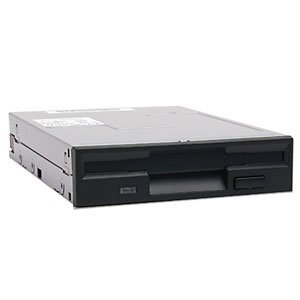
YEY External USB 3.5-inch USB Floppy Disk Reader 1.44 MB FDD Portable Floppy Disk for PC Laptops Windows/XP/7/8/10/11 Plug and Play, Also for iMac and MacBook Pro (Black)

Key features
- •USB Floppy Disk Drive: Easily read and transfer data from your 3.5" floppy disks with this convenient USB floppy disk reader. Bring your nostalgic files back to life!
- •Plug and Play: No extra drivers or installations necessary! Simply plug the floppy disk drive into your USB port and start accessing your files immediately. Hassle-free and user-friendly!
- •ULTRA SLIM PORTABLE USB FLOPPIE DRIVE: Allows you to easily carry and use this compact USB floppy disk reader to retrieve wedding photos, childhood photos, favorite poems, college thesis, novel manuscripts, and favorite songs on floppy disks anytime, anywhere. For those who have saved a lot of good memories on floppy disks, this is a good choice for you!
- •COMPATIBLE: This USB floppy disk reader is compatible with Windows 11/ 10/ 8.1/ 7/ Vista/ XP/2000/Mac/Linux operating systems. Please note that it does not support tablets, TVs, cell phones and cars, only computers with PC laptopApple All-in-One operating system.
- •HASSLE-FREE SHOPPING-2 YEAR WARRANTY: We are a manufacturer specializing in the production of storage drives, and each product undergoes a rigorous production and testing process to ensure that it is in good working condition before shipping. If you don't know how to use it or you receive a device that was damaged in transit, simply contact us for help or an exchange without worrying about the time limitations of the return window.
YEY External USB 3.5-inch USB Floppy Disk Reader 1.44 MB FDD Portable Floppy Disk for PC Laptops Windows/XP/7/8/10/11 Plug and Play, Also for iMac and MacBook Pro (Black)
List Price: $34.90$31.41DEALYou Save: $3.49 (10%)
Free shippingFree Returns – 30 daysFree Order CancellationSecure Payment2–3 Days DeliveryGet It October 26, 2026In Stock (1)No marketing spamNo account requiredFulfilment by FedEx / Amazon / UPS / ShipwirePayPal / Card Buyer Protection
Customer Reviews
Reviews sourced from verified Amazon purchasers4.4
out of 5
Based on 10 reviews
5★
50%
4★
50%
3★
0%
2★
0%
1★
0%
Versatile Connectivity
Nick✓ Verified Purchase•February 15, 2024
The 3.5-inch USB floppy disk reader is a versatile tool for accessing data from old floppy disks. With both USB-C and USB Type-A connectors, it offers compatibility with a wide range of devices, including modern laptops, desktops, and even some smartphones and tablets. The reader is easy to use; simply plug it in and insert your floppy disk to access your files. Its compact size makes it convenient for travel or home use. Whether you're transferring old files to a modern system or preserving data from vintage disks, this USB floppy disk reader is a reliable choice. Highly recommended for anyone dealing with legacy floppy disks and different USB ports.
Not sure
Christopher M.✓ Verified Purchase•February 5, 2024
Well I happened to find an old floppy the other day, and I naturally turned to Amazon to obtain some device that could read it. This drive was recognized by my Mac. It was very noisy. I'm not sure I remember 3.5in drives being so loud. After popping in the disc I could eventually see what files were on it. Unfortunately I couldn't open any of the files nor copy them to my internal drive. I just got done spinning beach balls of death, which I had honestly forgotten about till this adventure. It is entirely possible that the fault lies with the 20+ year old media that has been ignored in storage all these years. I shall have to dig up more to experiment further. Hopefully someone else will have better luck.
bit wonky but it works.
shane✓ Verified Purchase•January 31, 2024
never used a floppy disk reader before and i don't know if they all have this problem but for some reason if you want to change floppy disks, you need to take it out, disconnect the device, reconnect the device and then put in the next floppy disk.
for some reason it will keep reading the first floppy inserted into it, even if it's no longer inserted.
the floppy drive might not appear near your other drives, at least on windows 10 i could open "devices and printers" and then find the floppy in there and right click it to open the "drive".
windows 11 was much harder, it wasn't where all the drives are and i have no idea how to get to devices and printers on W11 lol. i still managed to do it, just took a bit longer.
the important thing is, is that it works! just need to learn how to use it, that's all.
for some reason it will keep reading the first floppy inserted into it, even if it's no longer inserted.
the floppy drive might not appear near your other drives, at least on windows 10 i could open "devices and printers" and then find the floppy in there and right click it to open the "drive".
windows 11 was much harder, it wasn't where all the drives are and i have no idea how to get to devices and printers on W11 lol. i still managed to do it, just took a bit longer.
the important thing is, is that it works! just need to learn how to use it, that's all.
Rescue Data On Your Old (Ancient?) Floppy Disk Drives
Robert Hare✓ Verified Purchase•January 2, 2024
If you have to ask, "What is a floppy disk?" You do not need this product. If, on the other hand, you still possess floppy disks with old, but potententially valuable data on them, this might be a very interesting device to add to your computer equipment. Your current computing equipment almost certainly does not have a floppy disk drive installed. You are lucky if you still have a CD/DVD drive installed. This small, easy to use device can allow you to review and possibly harvest valuable documents and images from those dusty old floppie.s No installation or driver is required to use this device. Plug it in, slide in a 1.44mH floppy disk and go to your file management software to see your disk's contents. If you see anything valuable, copy it to modern storage media and file the copied floppy in file 13.
Inexpensive, easy to use and it may allow you to recover valuable work and memories. If you have that need, you want this FD drive.
Inexpensive, easy to use and it may allow you to recover valuable work and memories. If you have that need, you want this FD drive.
Works fine on MacbookPro Monterey 12.7
Gdubz✓ Verified Purchase•December 23, 2023
I had my doubts about this working on m Mac, but I took the $20 gamble and as it turns out it worked perfectly! Plug & Play! Recommend.
Page 1 of 2