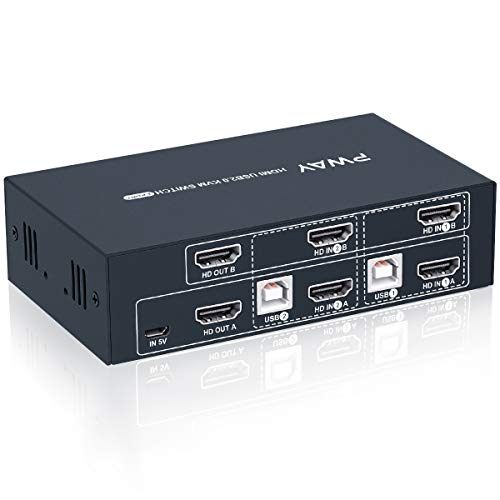
HDMI Displayport KVM Switch 2 Monitors 2 Computers 4K@60Hz DP KVM Switcher Dual Monitor for 2 Computers Share 2 Screens and 4 USB 3.0 Ports Support Extended/Copy Mode with Desktop Controller




Key features
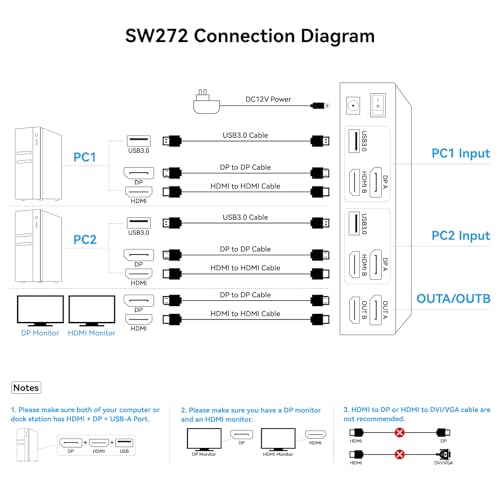
- •【Important Note】This KVM switch has only one DP port and one HDMI port, so it is impossible to connect and use dual HDMI or dual DP monitors simultaneously. Its port setup allows for just one DP interface device and one HDMI interface device. Given that the switch needs to connect multiple devices, the connection process is indeed a bit complex. But don't worry. We'll offer you detailed connection instructions and technical support. This ensures you can install and use it smoothly
- •【Read Before Buying】1. Each computer needs to be connected to the KVM switch via a DP cable and an HDMI cable. 2. HDMI to DP/VGA or DP to HDMI conversion cables or adapters are not supported throughout the setup process. 3. Both computers need to have one DP output and one HDMI output, and each monitor needs to have DP + HDMI inputs. Only when these three conditions are met can the switch work properly. Note: For compatibility reasons, it is not recommended to use the KVM switch on Mac devices
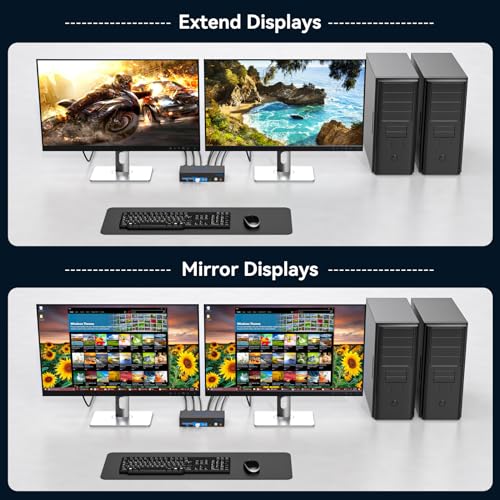
- •【KVM Switch 2 Monitors】The KVM switch 2 monitors 2 computers for DP and HDMI ports device to share keyboard mouse and monitor. KVM switches support Extended&Copy Mode. Note: Please make sure your computers/laptops/docking stations have DP+HDMI port, and KVM does not support the signal conversion function (HDMI input can only be output to a monitor with HDMI, DP input can only be output to a monitor with DP). The DP A and HDMI B ports on the product must be connected to the same computer
- •【Ultra HD Visual Effects】This HDMI + DP KVM switch support resolution up to 3840*2160@60Hz(4K@60hz). Brings you realistic visual enjoyment. Note: Please make sure your signal source and monitor as well as cables support 4K60Hz. It is recommended to use a high quality DP 1.2 and HDMI 2.0 standard cable with a length of no more than 3.3 feet for more stable operation and to avoid black screen flicker
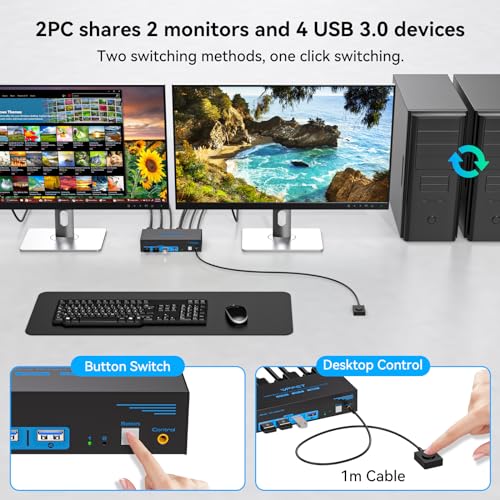
- •【Support 4 USB Peripherals】This KVM switches 2 in 2 out has 4 USB 3.0 ports for sharing mouse, keyboard, USB printers, scanners, etc,. And is backwards compatible with USB 2.0 and USB 1.1 devices. Note:If the input USB3.0 ports are not connected or connected incorrectly, the USB device will not be recognized (Please note: Use with any adapter is not supported.)
- •【2 Ways to Switch】The dual monitor KVM switch supports 2 switching mode: 1. Press the selection button on the switcher to switch the signal source; 2. Use the desktop controller button to switch the signal source (included in the package). The LED light shows the active device, solving the problem of frequent plugging and unplugging. It supports various systems such as Windows/Vista/XP and Mac OS, Linux and Unix. NOTE: Keyboard shortcuts (hotkeys) toggles are not supported
HDMI Displayport KVM Switch 2 Monitors 2 Computers 4K@60Hz DP KVM Switcher Dual Monitor for 2 Computers Share 2 Screens and 4 USB 3.0 Ports Support Extended/Copy Mode with Desktop Controller
List Price: $114.99$103.49DEALYou Save: $11.50 (10%)
Free shippingFree Returns – 30 daysFree Order CancellationSecure Payment2–3 Days DeliveryGet It October 26, 2026In Stock (2)No marketing spamNo account requiredFulfilment by FedEx / Amazon / UPS / ShipwirePayPal / Card Buyer Protection