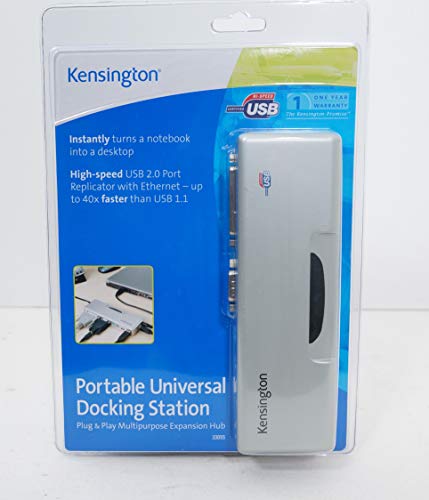
Kensington 33055 Portable Universal Docking Station (PC)
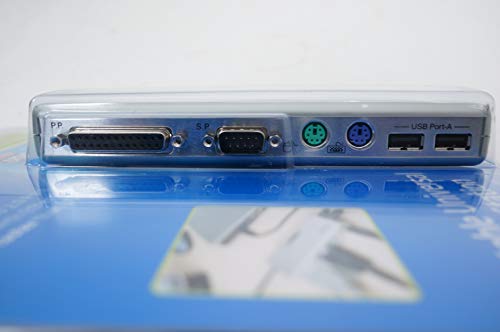


Key features
- •Transform your notebook into a desktop workstation
- •Plugs into your USB port; get instant access to external keyboard, mouse, Ethernet, printer, network, etc.
- •Includes 2 USB, 1 Ethernet, 1 parallel, 1 serial, 2 PS/2 ports
- •High-speed USB 2.0 for 40 times faster transfers than USB 1.1
- •Minimum requirements: PC with Pentium processor/equivalent, USB 2.0 port (will function also at USB 1.0 speeds), Windows XP Service Pack 1
Kensington 33055 Portable Universal Docking Station (PC)
List Price: $91.77$82.59DEALYou Save: $9.18 (10%)
Free shippingFree Returns – 30 daysFree Order CancellationSecure Payment2–3 Days DeliveryGet It October 25, 2026In Stock (1)No marketing spamNo account requiredFulfilment by FedEx / Amazon / UPS / ShipwirePayPal / Card Buyer Protection
Customer Reviews
Reviews sourced from verified Amazon purchasers2.0
out of 5
Based on 5 reviews
5★
0%
4★
40%
3★
0%
2★
20%
1★
40%
One Star
Sue M M•January 10, 2017
Ports were out of date and would not work with my new laptop.
One Star
William Hahn•May 28, 2015
wasn't clear in the ad that this device would not work with windows 8
Kensington Docking Station
Arthur B. Eslinger•December 24, 2007
I purchased one a while ago, loved it, but couldn't find it locally. Works just like I expected it to. If you use it for networking, make sure to install the driver. XP will try to auto configured one, but it didn't work on the first docking station I bought. Forget trying to install it later, it's impossible to find it in the USB devices because they all say generic or hub.
There is a driver update, it corrects blue screen due to the networking port. Once I installed, problem went away.
There is a driver update, it corrects blue screen due to the networking port. Once I installed, problem went away.
Good enough for me
G. Long•August 24, 2006
I bought the docking station because I had an old laser printer (HP 2100tn laser jet) that I could not get to work over my network. I didn't want to buy a new printer and the only other way to connect this printer was through a serial or a parallel port both of which my new laptop lacked. The problem was that if I bought the Lenovo dock, I would spend as much as I would on a printer. The Kensington product has worked well and I am happy with the performace. My only complaint is that I cannot hook up an external monitor through the docking station and I think that is something that would make it more complete...but it is good enough for me.
Basic functions OK, put caution on PS/2 ports
M. Lang•May 23, 2006
I acquired this unit about a week ago to serve as a docking station for a new laptop computer that does not have any of the traditional ports on it. You must install the software that comes with it to use the serial or parallel ports, and I had to reboot my computer to get the parallel port working. (Note that the serial port appears on a non-standard setting, mine is COM4, so any software must be directed to that location.) I have not tried the serial port, but the USB and parallel ports appear to work fine. However, beware that the PS/2 ports on the unit do not work the same way as built-in PS/2 ports. A keyboard and mouse plugged into them will perform their basic functions. But, if you have an advanced mouse or keyboard with extra keys or other options, they will not function through the docking station. It appears that the PS/2 ports on the docking station are wired to always appear to the operating system as some form of generic Human Interface Device mouse and keyboard, rather than recognizing whatever form of keyboard is plugged in -- as happens with built-in PS/2 ports. Because of that, I could not find a way to get the computer to match the special mouse and keyboard drivers required for the advanced functions to those devices when connected to the docking station. Kensington support ignored my first two requests for help on this issue, and then suggested I contact the keyboard and mouse vendors -- which does not make any sense because the devices work fine any time except when they are connected through the PS/2 ports on the docking station. I had to find another way to bridge my keyboard and mouse into a USB port to get them to work. For that reason, I probably would not have purchased this unit if I had known about this issue. However, if you only need a parallel and serial port, as well as two USB ports, this unit will work fine.