Pinnacle Systems 210100316 Dazzle DVC 80 USB Video Capture Device
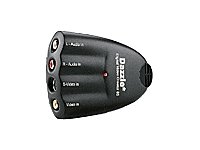
Key features
- •With included Studio SE version 8 software you can easily edit your video to make it look however you want
- •Share your video with video email or streaming webcast
- •You can even take digital snapshots from your videos!
- •The USB 2.0 - 1.1 interface makes connecting the DVC-80 a breeze
- •Includes - audio extension cable, installation CD-ROM, & Quick Start guide
BrandPinnacle Systems
Pinnacle Systems 210100316 Dazzle DVC 80 USB Video Capture Device
List Price: $96.53$86.88DEALYou Save: $9.65 (10%)
Free shippingFree Returns – 30 daysFree Order CancellationSecure Payment2–3 Days DeliveryGet It October 25, 2026In Stock (1)No marketing spamNo account requiredFulfilment by FedEx / Amazon / UPS / ShipwirePayPal / Card Buyer Protection
Customer Reviews
Reviews sourced from verified Amazon purchasers3.5
out of 5
Based on 10 reviews
5★
10%
4★
10%
3★
0%
2★
0%
1★
80%
Five Stars
E. Steve Spurr•September 3, 2017
works great
Problem is the device is only backed up or usable ...
Sandra K. Huikko•April 3, 2015
Problem is the device is only backed up or usable on old operating systems, thus it does not work on our systems.
Pinnacle Systems
Olga Vilenskaya•February 18, 2014
I did not like t.his product because it is not compatible with most of the windows systems. Buy latter versions of the product
obsolete and utterly useless
RustyMike•January 5, 2014
If you have an operating system newer than Windows Vista, this simply will not work for you. If you still use Vista, this *might* work for you if you go through a very specific set of installation instructions in order to trick your system into using it. Even still, there's a high chance you will experience many random blue-screens, often while working on something that uses the device. However, if you are still running Windows XP (not compatibility mode! Native XP) then you can easily install and use this device, as well as the software that goes with it. However, you will likely still be plagued by random blue-screens anyway.
IF you are fortunate enough to get this thing to be recognized and installed correctly on your system... good luck finding software that will recognize it besides the bundled software that comes with it, which is also obsolete, and will also not work on newer systems.
Why this is still being sold at all, and why in the world it still costs $50 is beyond my comprehension. Once upon a time I bought one, and even then it was fickle about working with certain configurations of hardware/software, not to mention the audio delay made it frustratingly pointless to use for playing video game consoles through my PC monitor (to record gameplay), and even more pointless for transferring old VHS tapes to digital... Which is what it is designed for!!!
Stay away from this atrocity. It was sub-par in 2003, and it's now worthless in 2014.
IF you are fortunate enough to get this thing to be recognized and installed correctly on your system... good luck finding software that will recognize it besides the bundled software that comes with it, which is also obsolete, and will also not work on newer systems.
Why this is still being sold at all, and why in the world it still costs $50 is beyond my comprehension. Once upon a time I bought one, and even then it was fickle about working with certain configurations of hardware/software, not to mention the audio delay made it frustratingly pointless to use for playing video game consoles through my PC monitor (to record gameplay), and even more pointless for transferring old VHS tapes to digital... Which is what it is designed for!!!
Stay away from this atrocity. It was sub-par in 2003, and it's now worthless in 2014.
Great Item, If Used With Other Software *Please Read*
Rusty Spoons•August 8, 2010
I have had this Dazzle USB device for many years now, and I still love the thing to death.
As a hobby I do a lot of video editing, most of which is high-definition stuff, but there's still times when I NEED to import from an analog source.
Most commonly this is in the form of infrared footage, for which we still use our Sony Hi8 camera.
The transfer from our Hi8 to digital via the Dazzle is almost lost-less, thanks mostly to it's S-Video input port.
I have to say that my Dazzle has been nothing but 100% reliable from day one, which has to be something like 5 years ago now.
Sadly, the Dazzle's fatal flaw with most people is it's atrocious software and thus cumbersome use.
I find it sad to see such great hardware suffer from such extremely poor software, BUT there is a very simple work-around.
If you have all the updates for Windows Movie Maker, you can easily have it capture your footage using the Dazzle as the input device.
It's as simple as going to Movie Maker, selecting "Import" and then selecting the Dazzle device from the list it pops up.
When the footage is imported via Movie Maker, I have noticed it is of notably better quality than when I tried to use the included Dazzle software.
Additionally you can then save the footage in whatever format you wish (that Movie Maker supports), as opposed to the limited selection featured on the included software.
I see this thing is currently going for $200 new, when I purchased mine many years ago (from Circuit City) I paid $80.
It is a very wonderful device once you understand how to use it, but it is certainly not worth $200...
Shop around or buy it used.
~Rusty
As a hobby I do a lot of video editing, most of which is high-definition stuff, but there's still times when I NEED to import from an analog source.
Most commonly this is in the form of infrared footage, for which we still use our Sony Hi8 camera.
The transfer from our Hi8 to digital via the Dazzle is almost lost-less, thanks mostly to it's S-Video input port.
I have to say that my Dazzle has been nothing but 100% reliable from day one, which has to be something like 5 years ago now.
Sadly, the Dazzle's fatal flaw with most people is it's atrocious software and thus cumbersome use.
I find it sad to see such great hardware suffer from such extremely poor software, BUT there is a very simple work-around.
If you have all the updates for Windows Movie Maker, you can easily have it capture your footage using the Dazzle as the input device.
It's as simple as going to Movie Maker, selecting "Import" and then selecting the Dazzle device from the list it pops up.
When the footage is imported via Movie Maker, I have noticed it is of notably better quality than when I tried to use the included Dazzle software.
Additionally you can then save the footage in whatever format you wish (that Movie Maker supports), as opposed to the limited selection featured on the included software.
I see this thing is currently going for $200 new, when I purchased mine many years ago (from Circuit City) I paid $80.
It is a very wonderful device once you understand how to use it, but it is certainly not worth $200...
Shop around or buy it used.
~Rusty
Page 1 of 2