Avery Printable Heat Transfer Paper for Light Fabrics, 8.5" x 11", Inkjet Printer Compatible, 18 Sheets of Iron On Transfer Paper, Great for Custom Shirts, Uniforms, Gifts, and More (8938)





Key features
- •Quality results for a professional, fashionable look
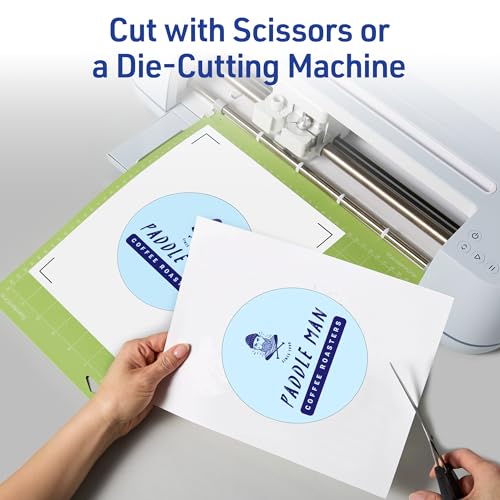
- •Use to personalize your T-shirts, hats, aprons and even bags
- •Designed for use on light-colored 100% cotton/poly cotton blend fabrics
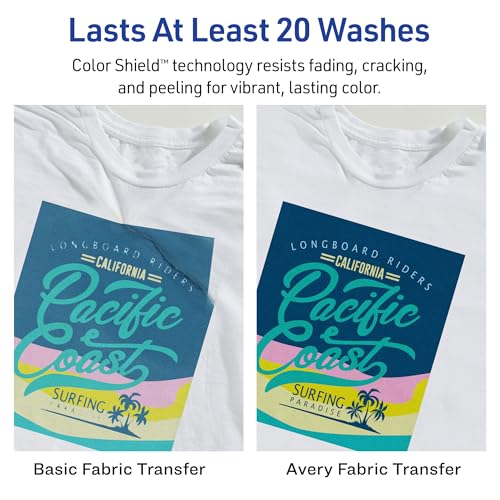
- •Color Shieldformula means colors stay bright, even after being washed
- •For more information go to avery.com/transfers
Avery Printable Heat Transfer Paper for Light Fabrics, 8.5" x 11", Inkjet Printer Compatible, 18 Sheets of Iron On Transfer Paper, Great for Custom Shirts, Uniforms, Gifts, and More (8938)
List Price: $43.02$38.72DEALYou Save: $4.30 (10%)
Free shippingFree Returns – 30 daysFree Order CancellationSecure Payment2–3 Days DeliveryGet It October 28, 2026In Stock (30)No marketing spamNo account requiredFulfilment by FedEx / Amazon / UPS / ShipwirePayPal / Card Buyer Protection
Customer Reviews
Reviews sourced from verified Amazon purchasers3.9
out of 5
Based on 10 reviews
5★
80%
4★
20%
3★
0%
2★
0%
1★
0%
Good price, transfer nicely but poor directions
Raquel M.•January 25, 2018
I was looking to make reusable goodie bags for my son's Pokémon themed party and figured personalized iron on bags would be a hit. The price per sheet was cheaper then buying a smaller quantity so I felt the price was good for a product name I know. I knocked off a star for the lack of directions. I've used these before years ago and it was always hit and miss but now I realize it was the directions, not me. With some experimentation and couple sacrificed canvas bags I figured out the trick... Cut your print down to rounded edges and iron on for a good 1-2 minutes moving continuously. Let cool 2 minutes and then iron again this time paying special attention to the edges. Let cool again and then peel slowly from bottom to top (replace and reiron for any trouble spots). Once I figured out the process my bags came out great! Unfortunately you can tell my first attempts from my last. But they work well enough for me. Happy with the transfer quality just wish they would have gave some more guidance. As far as holding up in the wash, I have yet to see how that will go.
Works well, but clean shirt of any lint first!
KellBell•December 10, 2017
Worked well to transfer an image I made in Photoshop onto a t shirt. If you don't know how or don't have capability to flip an image horizontally, then you can use Avery's online design site which does it for you. Many printers these days has the "transfer sheet" option when printing that will flip the image for you. TIP: Before ironing on the transfer, make sure that you use a lint roller first to clean it thoroughly!! Otherwise all the clear spots will show up all the different lint that was once not visible to the naked eye. It will show up like a sore thumb when smashed under the transfer sheet! See my pic for what it looks like if you don't clean your shirt of lint first - yikes.
Not for professionals, best for at home DIY projects.
DejaLiyah•July 16, 2017
Ok so they transfer really well. I tried them on little cotton muslin bags. However, i don't like that there is a shine on the paper and when it hits the light, you can see the entire shape of the cutout of the design. After doing research, I found out there are better papers out there, primarily you can order your design online to be printed and then you heat press it with a heatpress machine. So if you are looking for a professional looking job, do not get this paper. I will not be using it because I don't like the clear flim that is left after I iron the design on, I only want the black ink to transfer. I ended up ordering my bulk order online from an actual factory they will print it for me on the bags, it was way cheaper that way as well.
Great for Tote Bags
Robin•May 24, 2016
I used these to customize totes for our wedding Welcome Bags. They were used on a natural cotton material, a little stiff, not stretchy at all and they worked GREAT. I was really nervous as I bought exactly the number I needed, and I was afraid I was going to mess up. Reading some of the not so great reviews made me apprehensive, but it could not have been easier and they came out looking better than I had expected! Of 36 bags, we literally had zero rejects!
I printed graphics and words with a lot of blank space, and there is some "halo effect" but I honestly think it would look weirder if I had cut it out. I think it looks just fine, it does not bother me at all. I can see how if you were doing a shirt or something with ONE graphic in the center and a lot of blank space, it might look odd, but I think for a lot of applications, you don't need to worry about that.
I printed graphics and words with a lot of blank space, and there is some "halo effect" but I honestly think it would look weirder if I had cut it out. I think it looks just fine, it does not bother me at all. I can see how if you were doing a shirt or something with ONE graphic in the center and a lot of blank space, it might look odd, but I think for a lot of applications, you don't need to worry about that.
DIY'er!
Kristina M Perez•April 21, 2016
This is my first time using heat iron transfers! I wasn't sure what to expect so I read the directions carefully. I'm making tote favor bags for my daughter's Frozen Fever themed party and I think they came out great! I will definitely be using the transfers for lots of other projects!! I ironed these onto tote bags I also bought on Amazon. They are Kangaroo canvas tote bags, 18 pack size 12x12 inches.
Page 1 of 2


![Nero 11 Platinum [Old Version]](https://m.media-amazon.com/images/I/51FN826rLTL._SL500_.jpg)