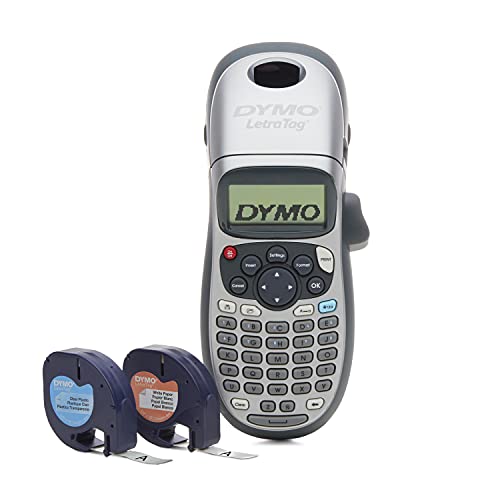
DYMO LetraTag 100H Plus Handheld Label Maker for Office or Home


Key features
- •Choose from 5 font sizes, 7 Print styles and 8 box styles
- •See font effects on screen before you Print with a graphical display
- •Take advantage of 9 label memory and 2 line printing
- •Save power with auto off functionality
- •13 Character LCD screen
DYMO LetraTag 100H Plus Handheld Label Maker for Office or Home
List Price: $52.35$47.12DEALYou Save: $5.23 (10%)
Free shippingFree Returns – 30 daysFree Order CancellationSecure Payment2–3 Days DeliveryGet It October 25, 2026In Stock (15)No marketing spamNo account requiredFulfilment by FedEx / Amazon / UPS / ShipwirePayPal / Card Buyer Protection
Customer Reviews
Reviews sourced from verified Amazon purchasers4.2
out of 5
Based on 10 reviews
5★
30%
4★
30%
3★
0%
2★
30%
1★
10%
Good for the money, but a few drawbacks
L. Smith✓ Verified Purchase•March 16, 2018
This label maker is a big improvement over the P touch model I'd been using. The P touch tape kept jamming and I wasted a lot of money replacing the cassettes prematurely. The Dymo label maker uses a more reliable tape and is easy to use.
However, there seem to be some small deficiencies. First, it always defaults to a large size of font. It won't stay on the one I last used. It's hard to tell what the printed label will look like before you print it since the LCD display only has some icons to show the font size and style. Finally, I couldn't find some common symbols, like a dash, on the keyboard. Perhaps there are some things I don't understand about it that would remedy these problems, but right now I don't have an answer for them.
As a basic label maker this is a very good device that is straightforward, uses a reliable cassette, and is inexpensive. But a bigger selection of symbols, a way to keep the last format settings used, and a better preview display would be useful improvements.
However, there seem to be some small deficiencies. First, it always defaults to a large size of font. It won't stay on the one I last used. It's hard to tell what the printed label will look like before you print it since the LCD display only has some icons to show the font size and style. Finally, I couldn't find some common symbols, like a dash, on the keyboard. Perhaps there are some things I don't understand about it that would remedy these problems, but right now I don't have an answer for them.
As a basic label maker this is a very good device that is straightforward, uses a reliable cassette, and is inexpensive. But a bigger selection of symbols, a way to keep the last format settings used, and a better preview display would be useful improvements.
Labels peal off--not worth the money, buy a PTouch
Cassandra✓ Verified Purchase•January 23, 2018
Prints nicely, has a lot of decent features but labels don't stick well. Just trying to tidy up an office and make things organized, but the ENDS of the labels begin to peal off after a short time which defeats the purpose--had to peal off several labels entirely and affix new ones because it just looked like crap plus I didn't want the label pealing entirely off eventually. I've used Brother P Touch's for years and it looks like I'll be going back to that brand.
Letters print unevenly, labels look sloppy
Makobleiu✓ Verified Purchase•October 4, 2017
It works okay and is easy to use, but the printing of letters that hang lower (p, g, q) is off. The font of those letters is smaller in order to cram them into the same lateral area as the non-hanging letters (see photo). The result is that the labels look sloppy and uneven, not clean and organized. The font is also blurry/pixelated and there are not different font options like I had thought. Overall, poorly designed product and I wish I had gone with a different one.
College Student Wanting To Be Organized.
Andrew Barrett✓ Verified Purchase•July 21, 2017
I am a college student that genuinely wanted to become more organized.
I chose this because it seemed of high quality and the reviews backed it up as being worth looking at.
PROS
- Prints quickly
- Has many different options that allow for big, small, italized, bold, or two columned
- very reliable
CONS
- The paper didn't last long.
- I wish it had a copy paste function
- sometimes the print would come out lopsided if the paper wasn't loaded right.
Overall, definitely worth the purchase. I don't find myself using it nowadays because I everything is already organized and labeled!
But it did the job. And no regrets
I chose this because it seemed of high quality and the reviews backed it up as being worth looking at.
PROS
- Prints quickly
- Has many different options that allow for big, small, italized, bold, or two columned
- very reliable
CONS
- The paper didn't last long.
- I wish it had a copy paste function
- sometimes the print would come out lopsided if the paper wasn't loaded right.
Overall, definitely worth the purchase. I don't find myself using it nowadays because I everything is already organized and labeled!
But it did the job. And no regrets
It worked great the first few times and now it keeps saying ...
Jessica Green✓ Verified Purchase•May 10, 2017
I have to try to return which an big inconvince for me and who know if I will have the time these days. It worked great the first few times and now it keeps saying tape jam, so I looked online to see if maybe I could find an easy fix and I found many, however nothing has worked so far. I even put new tape in and guess what nothing. I was in the middle of a project so I was super excited to have this machine but now I am not. It really is a hit or miss if you decide to buy this product. Good Luck and I hope you get a better on than I did.
Page 1 of 2


![Nero 11 Platinum [Old Version]](https://m.media-amazon.com/images/I/51FN826rLTL._SL500_.jpg)