Diamond Multimedia VC500 One Touch VHS to Digital File, DVD Converter with Easy to use Software, Convert, Edit and Save For Win7,8,10,11


Key features
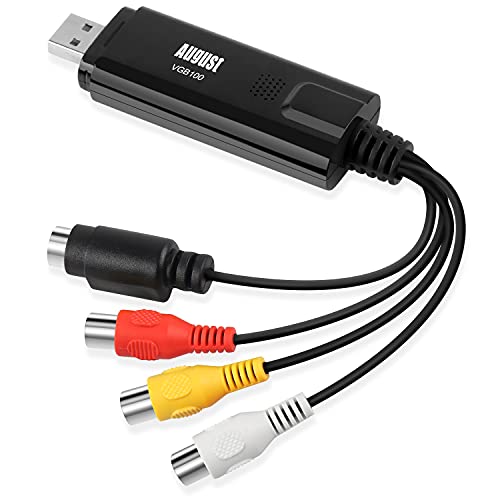
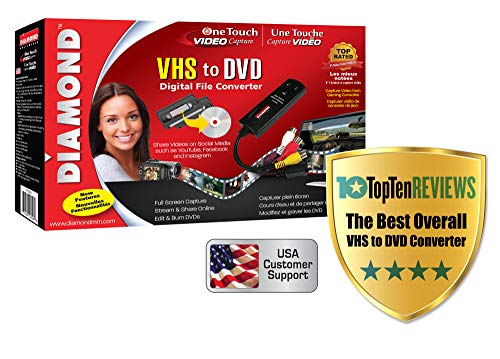
- •With ONE TOUCH, Convert your VHS Tapes Hi8, and V8 cameras to Digital format and burn to DVD. Capture Video from Almost Any Video Source supporting Composite RCA or S Video outputs
- •USB Self Powered Video Capture Device - For 3 step easy installation, just plug it into the PC, Connect the video cables to your source, Install the drivers and Cyberlink Power Director Capture program, easy as 1 2 3!
- •Support Windows 10, Windows 8.1, 8 and 7
- •Preserve and protect your treasured home video memories by transferring them to DVD and other digital formats AVI, MPEG2, MPEG4 and MP3(Audio only) to preserve your vinyl records in digital format
- •Arcsoft Show Biz Video Capture, Editor, and DVD Creator included. Capture your un replaceable precious moments for generations to come. You can also edit, add titles, music and chapters menus before burning to DVD. No need to use expensive VHS to DVD transfer services, with the VC500 you can do it all yourself
- •Share on Social Media - The VC500 saves your home VHS videos and movies in many digital formats options to choose from and allows you to share with all your friends and family on Facebook, YouTube, Twitter, Snapchat and many other Social Media networking services to share your precious memories with friends and family members
Diamond Multimedia VC500 One Touch VHS to Digital File, DVD Converter with Easy to use Software, Convert, Edit and Save For Win7,8,10,11
List Price: $69.60$62.64DEALYou Save: $6.96 (10%)
Free shippingFree Returns – 30 daysFree Order CancellationSecure Payment2–3 Days DeliveryGet It October 25, 2026In Stock (5)No marketing spamNo account requiredFulfilment by FedEx / Amazon / UPS / ShipwirePayPal / Card Buyer Protection
Customer Reviews
Reviews sourced from verified Amazon purchasers3.4
out of 5
Based on 10 reviews
5★
50%
4★
30%
3★
10%
2★
0%
1★
10%
Not plug 'n play but easy to adjust software and results are great
Gail✓ Verified Purchase•October 2, 2017
To my surprise this was not plug in and use. The factory settings are off and have to first be adjusted. Instructions don't walk you through this so be prepared to focus on the sound feature and the video capture feather. Software has to be reminded to use its own software to capture the video. Once you figure these two features out, it is extremely easy to use. Saves as an mp4 file which apparently is no longer up to date and to upload to youtube or elsewhere, or for that matter to save to a thumb drive, takes as long or longer than it did to originally convert the video. Be Patient. You will be rewarded with digital videos of your old, out of date VHS-S tapes at a tiny cost.
Had it for a month with no success.
Sergio✓ Verified Purchase•September 17, 2017
So, I've been focused on transfering old VHS tapes to a digital format for almost a month with this thing and had pathetic results. Files are always out of sync using the EZ Grabber software. The other bundled software either wouldn't install (because Diamond didn't include an install code) or just wouldn't work. The drivers are all over the place. The directions are worthless. The website has been no help. And, frankly, nothing about this product seems to work as advertised (its got one big button for "recording" that does nothing when pressed).
I am reeeeeal close to giving up and returning the whole mess.
I am reeeeeal close to giving up and returning the whole mess.
Met My Expectations
IBLong✓ Verified Purchase•September 12, 2017
It worked fine with my MacBook Pro 15 and iMac 27. I had no issues setting it up. Communicated once with Diamond with quick first call response. I tried a couple of others including Roxio and Vidbox. Diamond gives more control over Codecs and file quality than the other two. I am not looking to move VHS to DVD. I want good quality digital files. There is a lot more to it than just the digitizer, but this one met my expectations. Only thing I have found is that QuickTime does not see it as a digitizer nor does Premier Pro, so I have been using the Empia software that comes with it. That may be a stumbling block for some potential users.
Family history preserved.
SavvyConsumer✓ Verified Purchase•September 11, 2017
Download the software from the Diamond site. The included software CD did not read on our Win7 laptop. We transferred more than 40 old family VHS tapes to USB (we used an external 2 terabyte hard drive.) Glitches in the old family videos sometimes made the software throw a "copyright protected" message that then stopped the recording. It was easy to either start over, or save the recording up to that glitch and pick up recording a few seconds later into the VHS recording. It made multiple saves for some videos, but it was a small inconvenience for saving priceless family history. This device saved us $1000s over sending the family videos to a professional company for conversion.
Good, but disable your screen saver
Josh✓ Verified Purchase•June 11, 2017
This USB video capture device works as advertised and the video that is digitized is of the quality that is expected from VHS. The driver and software installation went smoothly. I did download the latest drivers and software from Diamond's website.
The only issue I had was that when I was capturing longer videos my computer's screen saver would kick in. For whatever reason the capture device would start over when the screen saver kicked back off. By chance I put two and two together that the video was only of the part that I watched once the screen saver went away. So I disabled the screen saver and the monitor turning off and everything has been working perfectly since.
I'm not sure how this device compares to the cheaper capture devices, but I don't have skipping of audio or video glitches so I'm happy with my purchase. The video editing software that comes with it isn't bad either.
The only issue I had was that when I was capturing longer videos my computer's screen saver would kick in. For whatever reason the capture device would start over when the screen saver kicked back off. By chance I put two and two together that the video was only of the part that I watched once the screen saver went away. So I disabled the screen saver and the monitor turning off and everything has been working perfectly since.
I'm not sure how this device compares to the cheaper capture devices, but I don't have skipping of audio or video glitches so I'm happy with my purchase. The video editing software that comes with it isn't bad either.
Page 1 of 2