Hauppauge 1212 HD-PVR High Definition Personal Video Recorder
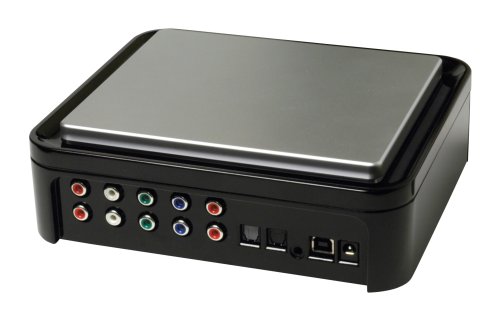


Key features
- •High-definition personal video recorder records directly from cable TV and satellite set top boxes at up to 1080i
- •Records in AVCHD format for burning Blu-ray DVD discs
- •Includes Hauppage's WinTV scheduler to schedule TV recordings, and built-in IR blaster to automatically change TV channels
- •Standard definition composite and S-Video inputs lets you digitize your old home video tapes directly from VCR
- •Record: Xbox, Xbox 360, PS3 and Game Play,1-Year Limited Warranty
Hauppauge 1212 HD-PVR High Definition Personal Video Recorder
List Price: $472.28$425.05DEALYou Save: $47.23 (10%)
Free shippingFree Returns – 30 daysFree Order CancellationSecure Payment2–3 Days DeliveryGet It October 25, 2026In Stock (2)No marketing spamNo account requiredFulfilment by FedEx / Amazon / UPS / ShipwirePayPal / Card Buyer Protection
Customer Reviews
Reviews sourced from verified Amazon purchasers3.7
out of 5
Based on 10 reviews
5★
60%
4★
10%
3★
10%
2★
10%
1★
10%
Small Unit but it does a GREAT BIG JOB - and does it WELL
DJI Joe•November 28, 2016
Really helps me not worry about the Purchases I have made via my Xfinity Cable Box if I ever God-forbid cant afford it anymore, or move again and maybe they cant transfer it (like how Amazon will close peoples accounts without any chance to talk to the owner of the account to maybe work TOGEHTER to find out why, but they then still leave your SELLER ACCOUNT open and thus the orders that come in daily cannot be fulfilled, and worse yet, the buyer cant even get a message from the Amazon Seller because the completely random shutdown of the Amazon Customer Account). But with this thing, I can record all of my OWNED and PURCHASED moves or TV Series or whatever it may be and I can watch it back on BluRay with full 1080p HD and 5.1 Surround Sound. Its GREAT for not using any HDMI wires. The ones that are newer that DO use HDMI's may be slightly different, but I don't know how much "better" the quality of the outcome could be because this one captures video in perfectly clear HD and Perfectly crisp 5.1 surround sound audio - so my advice is to NOT WASTE YOUR MONEY ON THE NEWER MODELS unless you're a big time gamer and wanna record all of your gaming... But this is 1/2 the price and you get the same quality as anything. I have a 65" SUHD TV and if there were any distortions or any loss of clarity or anything, it would be noticeable on my screen's display.
Just Barely Works
BillAdams•October 11, 2016
I wanted to record news and MLB to watch later. Online (YouTube, etc.) does not have recorded current news and sports unless you pay up for specific channels, which I'm already paying Comcast for. There are software PVRs out there similar to Windows Media Center that have TV tuners and will record shows to your PC from live broadcast. But I wanted to record from basic cable without paying Comcast a single additional dime. The Hauppauge 1212 intercepts the signal after it leaves the cable box already decoded, just before it reaches the TV, and it re-encodes the signal into .mp4 or other common video format and sends it to a file on your PC where you can play it later. It also loops the original signal around back to the TV so you can watch it live. The box is not a recorder. It's just a file encoder and a switch. Hauppauge software on your PC does the actual recording. I copy the recording onto a cheap Seagate external drive which I can then carry to my other devices for viewing later, because the PC connected to the Hauppauge stays wired in place.
This system does work, kinda, sorta, but has serious flaws. First, it's a science project to get it working and keep it working. Lots o' wires. I have to use RGB Component connections in standard definition. Second, there's only one tuner so you can't watch one show while recording another, so it's only good for recording while you're not home. Third, it uses a flimsy infrared (IR) connector to tell the cable box what channel you want to capture, and that IR connection is unreliable. It is poorly constructed hardware that doesn't always come on, or comes on and stays on, or works intermittently. It's a connector issue, not software. The Hauppauge software is clunky but works fine. Without depending on the IR, you have to pre-set the cable box for the channel you want to capture. So all in all, the system is not worth the trouble. Seems like a great business opportunity here for somebody to come in with a cloud-based competing product. If I were younger it would be me. As it is right now, you're better off paying the robber barons at Comcast the damn $20 a month for their filthy DVR box.
This system does work, kinda, sorta, but has serious flaws. First, it's a science project to get it working and keep it working. Lots o' wires. I have to use RGB Component connections in standard definition. Second, there's only one tuner so you can't watch one show while recording another, so it's only good for recording while you're not home. Third, it uses a flimsy infrared (IR) connector to tell the cable box what channel you want to capture, and that IR connection is unreliable. It is poorly constructed hardware that doesn't always come on, or comes on and stays on, or works intermittently. It's a connector issue, not software. The Hauppauge software is clunky but works fine. Without depending on the IR, you have to pre-set the cable box for the channel you want to capture. So all in all, the system is not worth the trouble. Seems like a great business opportunity here for somebody to come in with a cloud-based competing product. If I were younger it would be me. As it is right now, you're better off paying the robber barons at Comcast the damn $20 a month for their filthy DVR box.
Exceeded expectations!
jj1946•April 25, 2016
The Hauppauge 1212 HDPVR works great for what we wanted to use it for. We record TV movies & shows, etc. to our Macbook Pro's external portable hardrive to take with us in our motorhome for when there is no internet or wifi available. Using Apple TV 4, we can airplay to the motorhomes TV. The HDPVRCapture software for the Mac works great with the Hauppage 1212. You don't have to be an expert at recording to use this equipment. I also downloaded VLC software on the Macbook Pro to view while recording & edit recordings if needed, however I just leave the recorded files as .m2ts & they play fine on QuickTime version 10.4 on the Macbook Pro. The Hauppage 1212 HDPVR is a perfect solution for our needs.
For a Geek like Me, It's Just Sexy
Aaron B.•March 11, 2015
This is the one of the few converters I've found that can take a regular composite (RCA) input. I use it to take screen videos of old video game consoles, and it works like a charm.
But honestly, they've updated their Hauppauge Capture software, and that's just full of bugs. I would actually recommend the Elgato capture hardware over Hauppauge. Elgato Video Capture, Capture analog video for your Mac or PC, iPad and iPhone, white
But honestly, they've updated their Hauppauge Capture software, and that's just full of bugs. I would actually recommend the Elgato capture hardware over Hauppauge. Elgato Video Capture, Capture analog video for your Mac or PC, iPad and iPhone, white
The heart of our home entertainment system
Thomas Junk•December 14, 2014
At the heart of our home entertainment system. I got it to work just fine on Linux, too, even though that part is not for the faint-of-heart.
Under Windows it's easy, though: Saw a lot of complaints about the software it ships with, I think it's not bad. Setting up a recording session under Windows is fast and straight-forward. Wrote a small utility that automatically monitors for new recordings and automatically runs them though comskip to generate .edl files, willing to share if somebody wants a copy. Then I use nextPVR (free!) to watch commercial-free full 1080. HD-PVR obviously is not stand-alone, you need a computer to go with it (even a fairly basic one will do), a graphics card with some type of output you can plug into your TV (I use HDMI) and a large hard drive. An alternative would be to use the TV itself as monitor for the computer to set up recording sessions. None of this is very expensive these days, especially since you can also use this setup to stream TV and audio, replace your DVD and CD players as well and save the monthly Tivo bill. If any of this sounds complicated, keep in mind it's a one-time setup, operating the system is a breeze.
As far as HD-PVR under Linux is concerned, I wish Hauppauge had made sure their follow-up model is also Linux compatible, I heard it's not, that's why I'm sticking with the 1212 for now.
Under Windows it's easy, though: Saw a lot of complaints about the software it ships with, I think it's not bad. Setting up a recording session under Windows is fast and straight-forward. Wrote a small utility that automatically monitors for new recordings and automatically runs them though comskip to generate .edl files, willing to share if somebody wants a copy. Then I use nextPVR (free!) to watch commercial-free full 1080. HD-PVR obviously is not stand-alone, you need a computer to go with it (even a fairly basic one will do), a graphics card with some type of output you can plug into your TV (I use HDMI) and a large hard drive. An alternative would be to use the TV itself as monitor for the computer to set up recording sessions. None of this is very expensive these days, especially since you can also use this setup to stream TV and audio, replace your DVD and CD players as well and save the monthly Tivo bill. If any of this sounds complicated, keep in mind it's a one-time setup, operating the system is a breeze.
As far as HD-PVR under Linux is concerned, I wish Hauppauge had made sure their follow-up model is also Linux compatible, I heard it's not, that's why I'm sticking with the 1212 for now.
Page 1 of 2