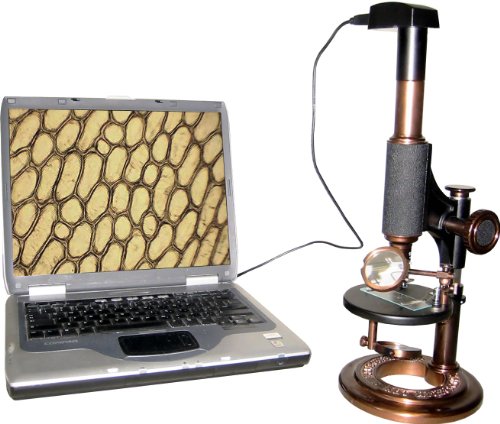
kenable Veho Discovery VMS-001 USB Microscope with 200x Magnification 1.3Mp

Key features
- •With a base zoom level of 20x, the VMS-001 can be further zoomed in manually up to a factor of 200x
- •The1.3-megapixel CMOS lens can be adjusted to point in any direction using the movable arm mounted on the microscope stand
- •8 adjustable LED for on/off Illumination of object under scrutiny and supplied with alloy stand
- •Snapshot, Video and measurement function with supplied software that supports Win2k/XP/Vista/Win7/Mac
- •Fine slider adjustment for brightness, hue, saturation and sharpness, plus a black and white display mode
- •CMOS
kenable Veho Discovery VMS-001 USB Microscope with 200x Magnification 1.3Mp
List Price: $37.83$34.05DEALYou Save: $3.78 (10%)
Free shippingFree Returns – 30 daysFree Order CancellationSecure Payment2–3 Days DeliveryGet It October 25, 2026In Stock (2)No marketing spamNo account requiredFulfilment by FedEx / Amazon / UPS / ShipwirePayPal / Card Buyer Protection
Customer Reviews
Reviews sourced from verified Amazon purchasers3.2
out of 5
Based on 10 reviews
5★
20%
4★
40%
3★
20%
2★
0%
1★
20%
When manufacturers stop supporting operating systems they would be better served by pulling the unsupported hardware off the market ...
Nomdeguerre✓ Verified Purchase•January 13, 2018
Product worked until Windows 10. No Windows 10 drivers now and software that allows you to capture photos or video no longer can find the microscope. Have been out to Veho website and the latest drivers off their support download did not rectify the situation.
Given this, I'm surprised and dismayed to see this model still being sold when functionality is severely limited.
When manufacturers stop supporting operating systems they would be better served by pulling the unsupported hardware off the market or making the limitations known.
Personally don't think they should be allowed to be sold on Amazon given they are non functional on Windows 10 without such clarification.
Product was good prior to this change.
Given this, I'm surprised and dismayed to see this model still being sold when functionality is severely limited.
When manufacturers stop supporting operating systems they would be better served by pulling the unsupported hardware off the market or making the limitations known.
Personally don't think they should be allowed to be sold on Amazon given they are non functional on Windows 10 without such clarification.
Product was good prior to this change.
Not bad for what it is - but can be very handy
Mike✓ Verified Purchase•June 16, 2017
For the price, and because it plugs right into a USB port and shows up on my monitor, it's pretty good.
The stand it comes with I found to be annoying, so I tossed it and attached it to a goose neck with a heavy base. While that works better, it's still difficult to focus because it shakes and the focus knob takes a little bit of pressure to turn, which effects the focusing. For example, when you take your hand away from the knob, you may lose the focus because the scope moves, and even just a little movement effects the image.
On line I've seen stands for this thing where you put the scope into it and you move the stand, but I haven't personally tried it.
If I can figure out a way to move the subject matter closer to the scope, instead of the scope closer to the subject, it would be easier a lot easier to focus on the image. Maybe I could attach it to something really heavy so it has zero shake.
On the other hand, you can move it around which comes in handy. For instance, I can use it to look into my cats ears as long she's still. I can look into my own ears, too, though it's limited. It's not like at the doctors. So, if you add a USB extension cord to this, if it;s long enough, you can walk around the whole house looking at stuff. It doesn't need to stay on a desk.
Also - keep in mind that this scope only has two focal points: 20x and 400x. Not everything in between.
The stand it comes with I found to be annoying, so I tossed it and attached it to a goose neck with a heavy base. While that works better, it's still difficult to focus because it shakes and the focus knob takes a little bit of pressure to turn, which effects the focusing. For example, when you take your hand away from the knob, you may lose the focus because the scope moves, and even just a little movement effects the image.
On line I've seen stands for this thing where you put the scope into it and you move the stand, but I haven't personally tried it.
If I can figure out a way to move the subject matter closer to the scope, instead of the scope closer to the subject, it would be easier a lot easier to focus on the image. Maybe I could attach it to something really heavy so it has zero shake.
On the other hand, you can move it around which comes in handy. For instance, I can use it to look into my cats ears as long she's still. I can look into my own ears, too, though it's limited. It's not like at the doctors. So, if you add a USB extension cord to this, if it;s long enough, you can walk around the whole house looking at stuff. It doesn't need to stay on a desk.
Also - keep in mind that this scope only has two focal points: 20x and 400x. Not everything in between.
good little scope!
Allan Boyd✓ Verified Purchase•March 15, 2014
I picked this up for inspection of metal edges. I hone shaving razors and this is perfect to use to inspect my edges. A friend recommended it and for the price it's a great little unit. I really like the fact you can take quick snap shots of your work. I use it for my customers for "before and after" photos of their razors. It takes the guess work out when working on tiny things. There isn't much of a range and you have to have the adjustment all the way to the furthest adjustment for full strength, I'm pretty sure it falls short of it's x200 magnification it's probably closer to x50 but it does everything I need.
Bad software
Alex•October 29, 2012
The microscope really isn't bad itself. Craftsmanship is okay, kind of cheap. The LED is dimmable, the foot is pretty sturdy, no defects. One issue is that trying to get hundreds of times of magnification for me was impossible. At a really reasonable distance of about 1/2" from the specimen, I got 17x magnification... still looked neat but I was looking for more than 17x magnification.
The ruler tool is useless. You can use the tool but you can't save the image with the ruler lines. You have to use the ruler tool, then take a screenshot or use the windows snipping tool. Also the ruler tool is lacking- you can't adjust marks you've made. If you try to you wind up making another ruler. And shortcuts like CTR-Z for undo don't work.
The mini-CD is hidden deep in the bottom of the cyllindrical plastic tube packaging. If you don't dig you won't find it, and you can't go to their website and download it. I can see where some of the other reviewers went wrong.
Overall the product has good mechanical and electrical design, and awful software design.
The ruler tool is useless. You can use the tool but you can't save the image with the ruler lines. You have to use the ruler tool, then take a screenshot or use the windows snipping tool. Also the ruler tool is lacking- you can't adjust marks you've made. If you try to you wind up making another ruler. And shortcuts like CTR-Z for undo don't work.
The mini-CD is hidden deep in the bottom of the cyllindrical plastic tube packaging. If you don't dig you won't find it, and you can't go to their website and download it. I can see where some of the other reviewers went wrong.
Overall the product has good mechanical and electrical design, and awful software design.
After two days of using someone elses, I ordered my own
Richard Widman•June 1, 2012
I have been looking at several of these and reading reviews. This week a consultant was here and we used one of these that he brought with him to analyze diesel fuel and particles in it. After a couple of dozen analysis, snapping pictures of the results while we showed them to the group on screen, I placed an order for my own.
We actually did not use the stand. It worked well sitting directly on top of the membrane with the particles in them (covered with a plastic film).
Wherever we went, we just plugged it in and slid it around the membrane to show the particles, mostly in the 1 to 40 micron range.
Here are a couple of pics of samples just with the macro on a normal digital camera, plus additional pictures taken through the microscope. [...]
Mine came and it is great. I can see why people comment on the stand, but I don't use it. People are amazed at how dirty their fuel is.
The mini disc with the software doesn't fit in my computer, but instead of downloading the software I just put it on the network and dragged the Mac folder to my applications folder. After clicking to take pictures, I can drag them into iPhoto, name them, etc.
Videos are AVI, so they are huge, but of course can be compressed.
We actually did not use the stand. It worked well sitting directly on top of the membrane with the particles in them (covered with a plastic film).
Wherever we went, we just plugged it in and slid it around the membrane to show the particles, mostly in the 1 to 40 micron range.
Here are a couple of pics of samples just with the macro on a normal digital camera, plus additional pictures taken through the microscope. [...]
Mine came and it is great. I can see why people comment on the stand, but I don't use it. People are amazed at how dirty their fuel is.
The mini disc with the software doesn't fit in my computer, but instead of downloading the software I just put it on the network and dragged the Mac folder to my applications folder. After clicking to take pictures, I can drag them into iPhoto, name them, etc.
Videos are AVI, so they are huge, but of course can be compressed.
Page 1 of 2